
Product Overview
The RAM MOUNTS Quick-Grip Pro is a vibration-damping phone mount designed for secure attachment to motorcycles and ATVs. It features a spring-loaded holder with adjustable side supports and an integrated vibration damper to protect your electronic devices. The mount includes a U-bolt base for handlebars and a double socket arm for flexible positioning.
- Vibration Damping: Integrated damper protects electronic devices from a wide range of vibration frequencies.
- One-Handed Operation: Spring-loaded top arm allows for easy insertion and removal of your phone.
- Adjustable Fit: Side supports and bottom support are adjustable to accommodate various phone widths and align with wireless chargers.
- U-Bolt Base: Securely attaches to rails from 0.5 inches to 1.25 inches in diameter.
- MagSafe Compatibility: Center cavity is compatible with Apple MagSafe pucks (15W & 25W), with a non-slip cover and adhesive included.
- Device Tether: Includes an optional device tether for added security in open cockpit environments.
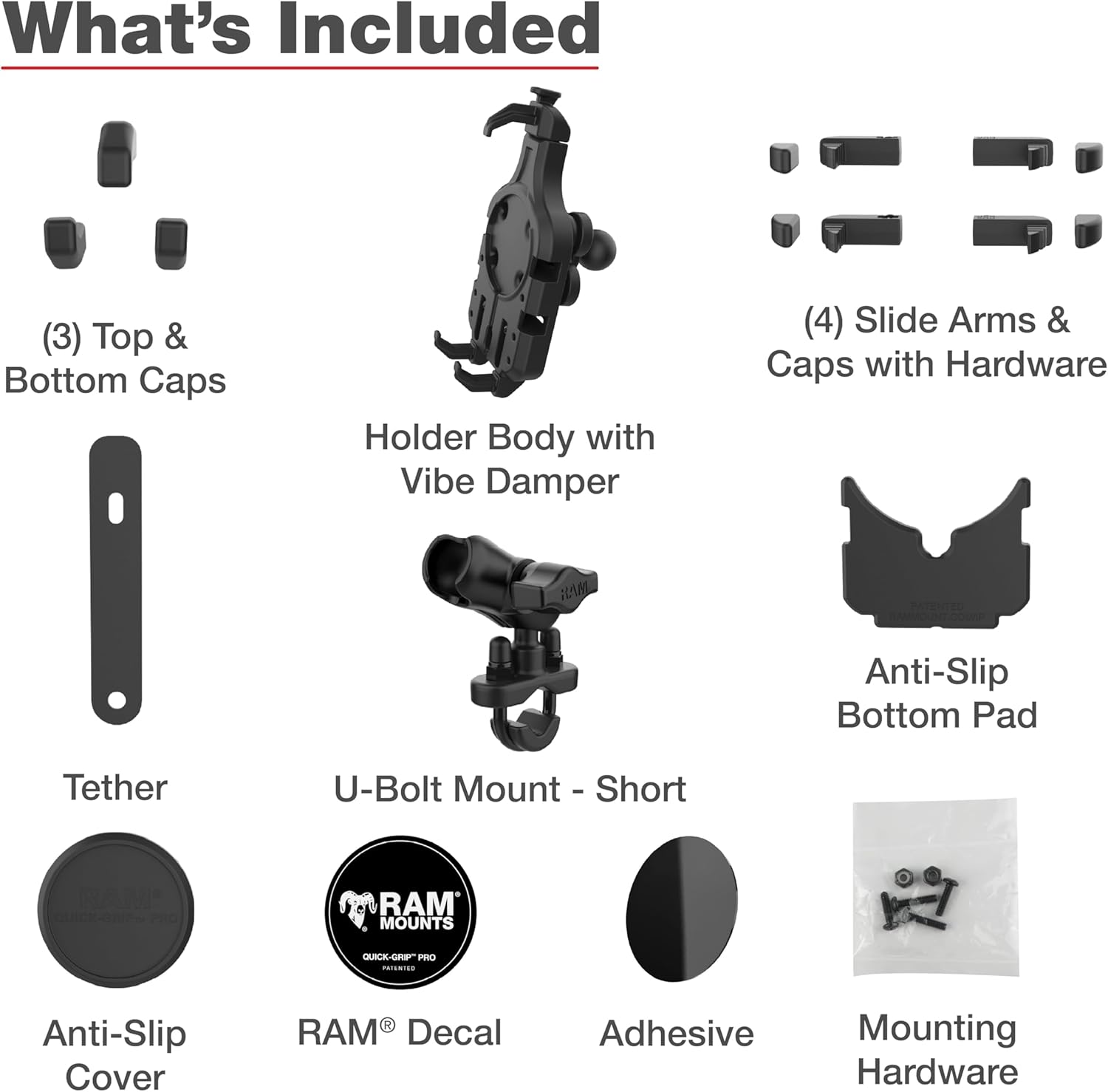
What's Included
Verify that all components are present before beginning installation:
- RAM Quick Grip Pro Phone Holder with Ball and Vibration Damper
- RAM Handlebar U-Bolt Base for Rails 0.5" to 1.25" in Diameter
- RAM B-Size (1") Double Socket Arm
- (3) Top & Bottom Caps for U-bolt
- (4) Slide Arms & Caps with Hardware
- Device Tether
- Anti-Slip Bottom Pad
- Anti-Slip Cover for MagSafe cavity
- RAM® Decal
- Adhesive for MagSafe cover
- Mounting Hardware (nuts, washers)
Setup and Installation
Follow these steps to properly install your RAM Quick-Grip Pro mount:
- Install U-Bolt Base:
- Select a suitable location on your motorcycle or ATV handlebar/rail that is between 0.5 and 1.25 inches in diameter.
- Place the U-bolt around the rail and insert the ends through the holes in the U-bolt base.
- Secure the base with the provided nuts and washers. Tighten firmly but do not overtighten.

Image: The RAM Quick-Grip Pro mount showing the U-bolt base attached to a handlebar. - Attach Double Socket Arm:
- Loosen the knob on the double socket arm.
- Place one end of the arm onto the ball of the U-bolt base.
- Place the other end of the arm onto the ball of the Quick-Grip Pro holder.
- Adjust the arm to your desired viewing angle and tighten the knob securely.
- Customize Holder for Phone:
- The holder features adjustable side arms. Slide these arms to match the width of your phone.
- The bottom support can be adjusted vertically to ensure proper alignment with your phone's charging port or to accommodate a wireless charger.

Image: The RAM Quick-Grip Pro holder illustrating the adjustable spring-loaded top arm, side arms, and bottom support for various phone sizes. - MagSafe Puck Installation (Optional):
- If using an Apple MagSafe puck, insert it into the center cavity of the holder.
- Apply the provided adhesive to the non-slip cover and place it over the MagSafe puck for a secure fit.
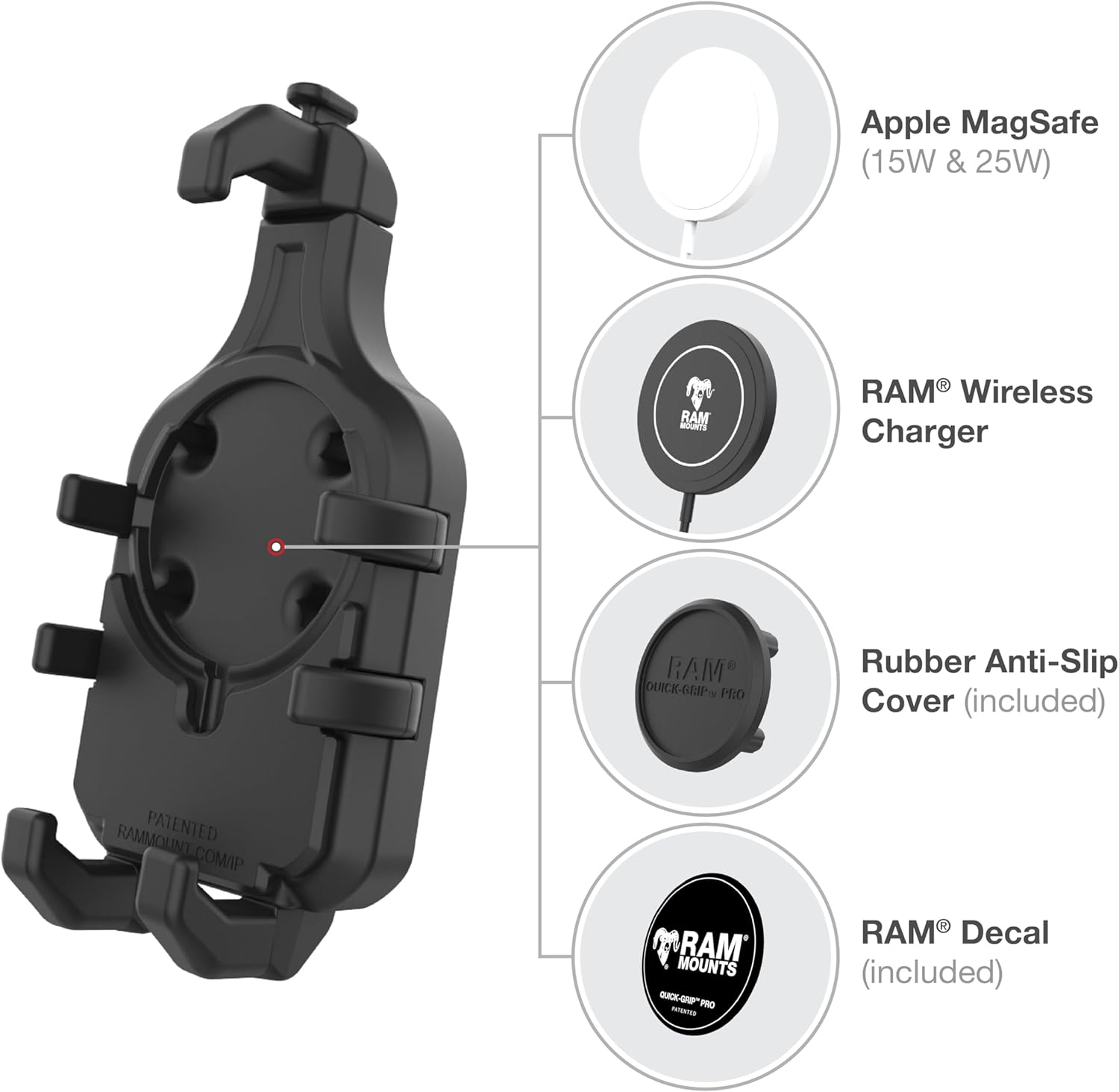
Image: Diagram showing the RAM Quick-Grip Pro holder's compatibility with Apple MagSafe and RAM Wireless Chargers, along with the included anti-slip cover and decal. - Attach Device Tether (Optional):
- For additional security, especially in open cockpit environments, attach the device tether to your phone and the mount.
Operating Instructions
Using your Quick-Grip Pro mount is straightforward:
- Inserting Your Phone:
- With one hand, push the spring-loaded top arm upwards.
- Place your phone into the holder, ensuring it rests on the bottom supports and is centered between the side arms.
- Release the top arm, allowing it to securely grip your phone.

Image: A user inserting a smartphone into the RAM Quick-Grip Pro mount, demonstrating the one-handed operation. - Removing Your Phone:
- With one hand, push the spring-loaded top arm upwards to release the grip on your phone.
- Carefully remove your phone from the holder.

Image: A user removing a smartphone from the RAM Quick-Grip Pro mount, showing the ease of release. - Adjusting Viewing Angle:
- Loosen the knob on the double socket arm to adjust the angle and orientation of your phone.
- Once the desired position is achieved, tighten the knob firmly to secure the mount.
Maintenance
To ensure the longevity and optimal performance of your RAM Quick-Grip Pro mount:
- Cleaning: Wipe down the mount periodically with a damp cloth to remove dirt and grime. Avoid harsh chemicals that may damage the composite or rubber components.
- Inspection: Regularly check all nuts, bolts, and the double socket arm knob to ensure they are securely tightened. Over time, vibrations can cause fasteners to loosen.
- Rubber Components: Inspect the soft rubber overmolds on the side supports and the vibration damper for any signs of wear or damage. Replace if necessary to maintain optimal grip and damping.
- Storage: If not in use for extended periods, store the mount in a clean, dry place away from direct sunlight.
Troubleshooting
If you encounter issues with your RAM Quick-Grip Pro mount, refer to the following:
| Problem | Possible Cause | Solution |
|---|---|---|
| Phone feels loose in holder | Side arms or bottom support not adjusted correctly; spring mechanism worn. | Ensure side arms are snug against the phone. Adjust bottom support. If spring is weak, contact support. |
| Mount rotates or shifts on handlebar | U-bolt nuts are loose; incorrect U-bolt size for rail. | Tighten U-bolt nuts. Verify rail diameter is within 0.5" to 1.25" range. |
| Viewing angle changes during ride | Double socket arm knob is loose. | Tighten the knob on the double socket arm firmly. |
| Excessive vibration reaching phone | Vibration damper damaged or not functioning optimally. | Inspect the vibration damper for visible damage. Ensure phone is seated correctly. |
Specifications
- Model Name: RAM Quick-Grip Pro Vibration Damping Phone Mount with U-Bolt Base
- Model Number: RAM-B-149Z-A-PD5VU
- UPC: 793442026621
- Brand: RAM MOUNTS
- Mounting Type: U-Bolt
- Compatible Rail Diameter: 0.5" to 1.25"
- Arm Length: 2.4 Inches (B-Size Double Socket Arm)
- Compatible Devices: Smartphones
- Compatible Phone Models: Apple iPhone 17, 16, 15, 14, 13, 12 Series (including Air, Plus, Pro, Pro Max, mini, 16e), iPhone 11 Pro Max, XS Max, 8 Plus, 7 Plus, 6s Plus; Samsung Galaxy S26, S25, S24, S23, S22, S21 Series (including Plus, Ultra, 5G), S10 5G, S8 Active, Note 20 Ultra, Note 10 Plus, Note 5, A90 5G, A80, A70, J7 (V/Max), On7, Grand Neo Plus, E7, C9 Pro, C7 Pro, C7; Google Pixel 7 Pro, 3a XL, 3 XL, 2 XL; Motorola Moto Z3, Z2, G4, E4 Plus; Garmin DriveTrack 71, DriveSmart 61 LMT-S, DriveSmart 51 LMT-S, Drive 61 LM, Drive 52, Drive 51 LM, Drive 50; and more devices with similar sizes.
- Additional Features: Adjustable, MagSafe Compatible, Non-Slip, One-Hand Operation, Vibration Damping
- Weight Capacity Maximum: 2 Pounds
- Water Resistance Level: Water Resistant
- Compatible Vehicle Types: ATV, Bicycle, Motorcycle, Snowmobile, UTV
- Item Weight: 1.2 Pounds
- Enclosure Material: High Strength Composite, Marine Grade Aluminum
- Color: Black
Warranty Information
This RAM MOUNTS product is backed by a Manufacturer Lifetime Warranty. This warranty covers defects in materials and workmanship under normal use. For specific details regarding warranty claims and coverage, please refer to the official RAM MOUNTS website or contact their customer support.
Support
For further assistance, technical support, or to inquire about replacement parts, please contact RAM MOUNTS directly:
- Website: Visit the official RAM MOUNTS website for FAQs, product registration, and contact information.
- Customer Service: Refer to the contact details provided on the RAM MOUNTS packaging or website for phone and email support.