
JETBeam E26
JETBeam E26 EDC Flashlight User Manual
Model: E26
1. Product Overview
The JETBeam E26 is a high-performance, compact Everyday Carry (EDC) flashlight featuring a dual light source with a powerful white LED and a precise green beam. Designed for versatility and durability, it is suitable for various applications from daily tasks to outdoor adventures.
- Dual Light Source: Combines a 3000-lumen white light with a <5mW green beam, which can be used simultaneously or independently.
- Compact EDC Design: Slim profile (0.62” thin, 4 oz with battery) with a sturdy two-way clip for easy pocket, hat, or backpack carry.
- Multiple Modes: Features 5 brightness levels for white light (Ultra Low, Low, Medium, High, Highest) plus a strobe mode.
- Rechargeable Battery: Equipped with a built-in 1700mAh Li-ion battery, offering up to 39 hours of runtime.
- Durable Construction: IPX8 waterproof rating (submersible up to 2 meters) and 1.5-meter drop resistance, made from anodized aviation aluminum.
- Memory Function: Remembers the last used brightness level for convenience.
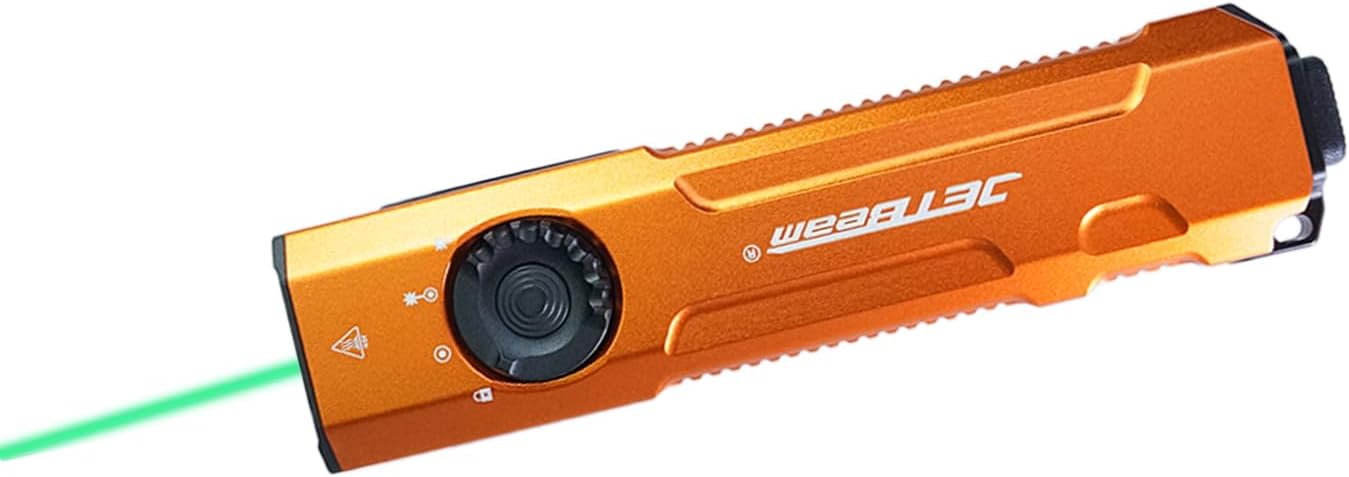
Image: The JETBeam E26 EDC Flashlight in orange, showcasing its slim design and the green beam in action.
2. What's in the Box
Upon opening your JETBeam E26 package, you should find the following items:
- E26 Flashlight (Battery Included) x 1
- User Manual x 1
- USB Charging Cable x 1
- Lanyard x 1
3. Specifications
| Feature | Description |
|---|---|
| Model | E26 |
| Light Source | LED (White Light & Green Beam) |
| White Brightness | 3000 Lumens (Max) |
| Green Beam Output | <5mW (520nm) |
| Beam Distance | 885 Feet (approx. 270 meters) |
| Battery | Built-in 1700mAh Lithium Ion |
| Max Runtime | 39 hours |
| Water Resistance | IPX8 (Underwater 2 meters) |
| Impact Resistance | 1.5 meters |
| Material | Anodized Aviation Aluminum |
| Dimensions (D x W x H) | 0.6" x 1.25" x 5" |
| Weight | 4 ounces (with battery) |
| Color Temperature | 18300 Kelvin |
4. Setup
4.1 Charging the Battery
The JETBeam E26 comes with a built-in rechargeable battery. Before first use, or when the power indicator shows low battery, charge the device using the provided USB charging cable.
- Locate the USB-C charging port on the side of the flashlight.
- Connect the USB charging cable to the flashlight and to a compatible USB power source (e.g., computer, wall adapter).
- The power indicator light will show charging status.

Image: Close-up of the JETBeam E26 showing the USB-C charging port and the power indicator light. The indicator shows battery levels: 35%-100% (green), 15%-35% (orange), Less than 15% (red, requires charging).
The power indicator will automatically work when the flashlight turns on and will shut down after 5 minutes.
4.2 Initial Use - Moonlight Mode Access
To access the ultra-low moonlight mode from the off state:
- Press and hold the side switch for several seconds.
- Release the switch to turn on the moonlight mode.
- If you continue to press and hold, the brightness will adjust normally through the other modes.
5. Operating Instructions
5.1 Power On/Off and Mode Switching (Side Switch)
The E26 features a side switch for primary control of the white light and green beam modes.
- Power On/Off: Single press the side switch to turn the flashlight on or off.
- Brightness Adjustment: When the white light is on, single press the side switch to cycle through the 5 lighting modes: Ultra Low (20 lm), Low (300 lm), Medium (700 lm), High (1300 lm), Highest (3000 lm).
- Memory Function: The flashlight will remember the last used brightness level when turned off and on again.

Image: Diagram illustrating the side switch and the 5 lighting modes (Ultra Low, Low, Medium, High, Highest) with their respective lumen outputs.
5.2 Tactical Tail Button Operation
The tactical tail button provides quick access to high output and strobe modes.
- High Light Mode: A heavy press of the tactical tail button will instantly activate the high light mode (3000 lumens). Release to turn off.
- Strobe Mode: Slightly press the tactical tail button twice to activate the strobe mode.

Image: Visual guide demonstrating the tactical tail button for instant high light output and strobe mode activation.
5.3 Green Beam and Dual Light Source Operation
The E26 features a dedicated green beam and the ability to combine it with white light.
- Green Beam Only: From the off state, press and hold the side switch to activate the green beam.
- White Light + Green Beam: When the white light is on, activate the green beam by pressing and holding the side switch. Both lights can be on simultaneously. You can adjust the brightness of the white light while both are active.

Image: Illustration showing the different light combinations: white light only (3000lm), white light + green beam (3000lm + ≤5mW), and green beam only (≤5mW).

Image: Demonstrates the accurate green beam (520nm, <5mW) for presentations or pet interaction.
5.4 Locking Function
The E26 features a locking mechanism to prevent accidental activation.
- To Lock: From the off state, press and hold the side switch until the light flashes twice, indicating it is locked. All functions will be ineffective.
- To Unlock: When the flashlight is locked, press and hold the side switch until the light flashes once, indicating it is unlocked. The flashlight will restore ultra-low brightness.
6. Maintenance
Proper maintenance ensures the longevity and optimal performance of your JETBeam E26 flashlight.
- Cleaning: Clean the flashlight body with a soft, damp cloth. For the lens, use a lens cleaning cloth. Avoid harsh chemicals or abrasives.
- Water Resistance: The E26 is IPX8 waterproof. Ensure the USB-C port cover is securely closed before exposing it to water.
- Battery Care: Recharge the battery regularly, especially if not used for extended periods, to maintain battery health. Avoid fully depleting the battery.
- Storage: Store the flashlight in a cool, dry place away from direct sunlight and extreme temperatures.

Image: The JETBeam E26 demonstrating its IPX8 waterproof capability (submerged in water) and 1.5-meter drop resistance (impact on ground), highlighting its robust and durable design.
7. Troubleshooting
If you encounter issues with your JETBeam E26 flashlight, refer to the following common problems and solutions:
| Problem | Possible Cause / Solution |
|---|---|
| Flashlight does not turn on. |
|
| Light output is dim or flickers. |
|
| Green beam not working. |
|
| Flashlight gets warm during use. | This is normal, especially on higher brightness settings, due to the high lumen output. The E26 has a built-in temperature control module (ATR) to prevent overheating. |
8. Product Demonstration
Watch the official product video for a visual guide on the JETBeam E26's features and operation.
Video: Official demonstration of the JETBeam E26 flashlight, showcasing its UV light (though not listed in product features), green beam, mode switching, tactical tail switch, waterproof capabilities, and impact resistance. This video is provided by Huida Lighting, the seller.
9. Warranty and Support
For warranty information, technical support, or any inquiries regarding your JETBeam E26 flashlight, please contact the manufacturer or the seller directly.
Seller: Huida Lighting
Please retain your purchase receipt for warranty claims.
Related documentsE26


Ask a question about this manual
Ask about setup, troubleshooting, compatibility, parts, safety, or missing instructions. Manuals+ will review the question and use this page’s manual context to help answer it.