
Introduction
The SONICAKE Pocket Master is a portable multi-effects processor designed for guitar, bass, and acoustic instruments. It integrates over 100 built-in effects, amp modeling, IR cabinet simulations, and a stereo OTG USB audio interface. Its compact design and rechargeable battery make it ideal for musicians on the go. This manual provides essential information for setting up, operating, and maintaining your device.

Image: The SONICAKE Pocket Master multi-effects pedal, showcasing its compact design and display.
Key Features
- Advanced Digital Modeling: Utilizes White-Box Digital Modeling Technology for authentic tones and supports 3rd party IRs with 5 user slots for custom sound creation.
- Extensive Effects Library: Over 100 built-in effects for guitar, bass, and acoustic instruments, including 20 legendary amp models.
- Integrated Tools: Features 24-bit 44.1kHz signal processing, 99 built-in drum rhythms, a looper, and 100 presets.
- Flexible Signal Chain: Adjustable signal chain with a maximum of 9 simultaneous effect blocks.
- USB Audio Interface: Stereo audio streaming with OTG function for direct connection to iOS/Android mobile devices.
- Bluetooth Connectivity: BT audio connection for playback and control.
- User-Friendly Display: Clear LCD color screen for easy navigation of effects and settings.
- Portability: Compact, pocket-sized design with a built-in rechargeable battery for on-the-go use.
- Software Support: Free Mac/Windows/iOS/Android software for sound editing and preset management.

Image: The SONICAKE Pocket Master held in a hand, demonstrating its ultra-portable design.
Setup
1. Device Overview
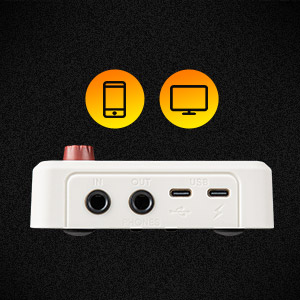
Image: Front and rear view of the Pocket Master with key components numbered for reference.
- Display: LCD screen for navigation and settings.
- VALUE/VOL Knob: Adjusts parameters and overall volume.
- Navigation Buttons: Used for scrolling and selecting options, includes Tuner function.
- IN Jack: 1/4-inch input for instrument connection.
- OUT/PHONES Jack: 1/4-inch output for amplifier/mixer or headphones.
- USB (Data) Port: USB-C port for data transfer and audio interface functions.
- USB (Power) Port: USB-C port for charging and DC power.
2. Charging the Device
Before first use, fully charge the Pocket Master by connecting a standard USB-C cable to the USB (Power) Port (7) and a compatible power adapter (not included). The device features a built-in rechargeable battery providing up to four hours of operation.

Image: The Pocket Master displaying its battery life and dimensions, indicating its internal battery.
3. Connecting Your Instrument and Headphones/Amplifier
- Connect your guitar, bass, or acoustic instrument to the IN Jack (4) using a standard 1/4-inch instrument cable.
- For silent practice, connect headphones to the OUT/PHONES Jack (5).
- To connect to an amplifier or mixing console, use the OUT/PHONES Jack (5).
4. USB Audio Interface Connection
Connect the Pocket Master to your computer or mobile device (iOS/Android) via the USB (Data) Port (6) for stereo audio streaming, recording, or using the dedicated software for sound editing.
5. Bluetooth Pairing
To use Bluetooth audio features, enable Bluetooth on your mobile device and pair it with the Pocket Master. Refer to the device's Display (1) for pairing status and instructions.
Operating Instructions
1. Power On/Off and Volume Control
- Press and hold the VALUE/VOL knob (2) to turn the device on or off.
- Rotate the VALUE/VOL knob (2) to adjust the overall output volume.
2. Navigating Presets and Effects
- Use the Navigation Buttons (3) to scroll through the 100 built-in presets.
- The Display (1) shows the current preset number and active effects.
- To edit effects, select a preset and use the VALUE/VOL knob (2) and Navigation Buttons (3) to adjust parameters for individual effect blocks (e.g., NR, FX1, DRV, AMP, IR, EQ, FX2, DLY, RVB).

Image: The Pocket Master's display illustrating the versatile effects matrix with various effect blocks.
3. Using Built-in Tuner, Drum Rhythms, and Looper
- Tuner: Activate the tuner function by pressing the dedicated tuner button (part of the Navigation Buttons (3)).
- Drum Rhythms: Access and select from 99 built-in drum rhythms for practice.
- Looper: Utilize the looper function to record and playback short phrases.

Image: The Pocket Master's display showing the interface for tuner, drum machine, and looper functions.
4. Software for Sound Editing
Download and install the free SONICAKE software for Mac, Windows, iOS, or Android to gain advanced control over sound editing, preset management, and firmware updates. Connect the device via USB (Data) Port (6) or Bluetooth to use the software.
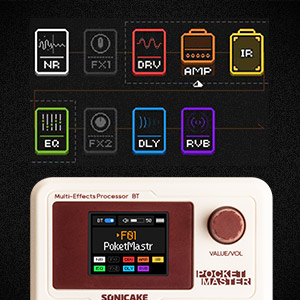
Image: The Pocket Master connected to a mobile device, illustrating the use of the companion app for sound editing.
Maintenance
- Cleaning: Use a soft, dry cloth to clean the device. Avoid abrasive cleaners or solvents.
- Battery Care: To prolong battery life, avoid fully discharging the device frequently. Charge it regularly, even if not in use for extended periods.
- Firmware Updates: Periodically check the official SONICAKE website for firmware updates to ensure optimal performance and access to new features. Use the provided software to perform updates.
- Storage: Store the device in a cool, dry place away from direct sunlight and extreme temperatures.
Troubleshooting
- No Sound Output:
- Check all cable connections (instrument, headphones/amp).
- Ensure the volume knob (2) is turned up.
- Verify the device is powered on and has sufficient battery charge.
- Check if any effect blocks are muting the signal.
- Device Not Powering On:
- Connect to a power source using the USB-C cable to the USB (Power) Port (7) and allow it to charge for at least 30 minutes.
- Ensure the power button (integrated with the VALUE/VOL knob (2)) is pressed and held correctly.
- Bluetooth Connection Issues:
- Ensure Bluetooth is enabled on both the Pocket Master and your mobile device.
- Unpair and re-pair the devices.
- Move devices closer to each other to reduce interference.
- Software Not Recognizing Device:
- Ensure the USB cable is securely connected to the USB (Data) Port (6).
- Restart both the Pocket Master and your computer/mobile device.
- Check for the latest software and drivers on the SONICAKE website.
Specifications
| Model Number | QME-10WH |
| Item Weight | 7.3 ounces (208 Grams) |
| Product Dimensions | 2.44 x 4.13 x 2.44 inches |
| Batteries | 1 Nonstandard Battery (required, built-in) |
| Hardware Interface | USB |
| Signal Format | Digital |
| Power Source | Battery Powered, DC Powered |
| Voltage | 5 Volts |
| Brand | SONICAKE |
| Style | Multi-effects, Acoustic, Bass |
| Color | White |
Warranty and Support
For warranty information, technical support, or service inquiries, please refer to the official SONICAKE website or contact their customer service directly. Keep your purchase receipt as proof of purchase.
Official Website: www.sonicake.com


