
Introduction
This manual provides instructions for the ZWP Replacement Remote Control, designed for use with various smart projectors. Please read this manual carefully before using the remote control to ensure proper operation and longevity.
Compatible Projector Models: WiMiUS K9, VOPLLS P1E M10, DBPOWER G01, YABER V12, TOPTRO X9, MECOOL KP2, Xiaomi, Wanbo TT, Blitzwolf BW-V6, Yaber U12, FUDONI S1 Smart Projector.
Setup
1. Battery Installation
The remote control requires two AAA batteries (not included). Follow these steps to install them:
- Locate the battery compartment cover on the back of the remote control.
- Slide the cover downwards or press the latch to open it.
- Insert two AAA batteries, ensuring the positive (+) and negative (-) terminals align correctly with the markings inside the compartment.
- Close the battery compartment cover securely.

Figure 1: Battery installation diagram. Ensure correct polarity when inserting AAA batteries.
2. Pairing the Remote Control
To establish a connection between the remote control and your projector, follow the pairing procedure:
- Ensure your projector is powered on and within range.
- Simultaneously press and hold the [OK] button and the [Volume Down (-)] button on the remote control.
- Hold both buttons until the pairing indicator (if available on your specific remote model) flashes or your projector displays a confirmation message.
- Release the buttons once pairing is complete. The remote control should now be ready for use.

Figure 2: Overview of the remote control's design and key features, emphasizing its build quality.
Operating the Remote Control
This remote control features an ergonomic design for comfortable use and provides quick response times. It supports multi-angle induction for stable transmission.
Key Functions:
- Power Button: Turns the projector on or off.
- Navigation Pad (OK button and directional arrows): Used to navigate menus and select options.
- Volume Buttons (+/-): Adjusts the audio volume of the projector.
- Quick Access Buttons (Netflix, YouTube, Prime Video, Open): Provides direct access to popular streaming applications.
- Number Pad: For direct input or channel selection, if supported by the projector.
- Return/Back Button: Returns to the previous screen or menu.
- Menu Button: Accesses the projector's main menu or settings.

Figure 3: Remote control responsiveness and signal strength indicators.
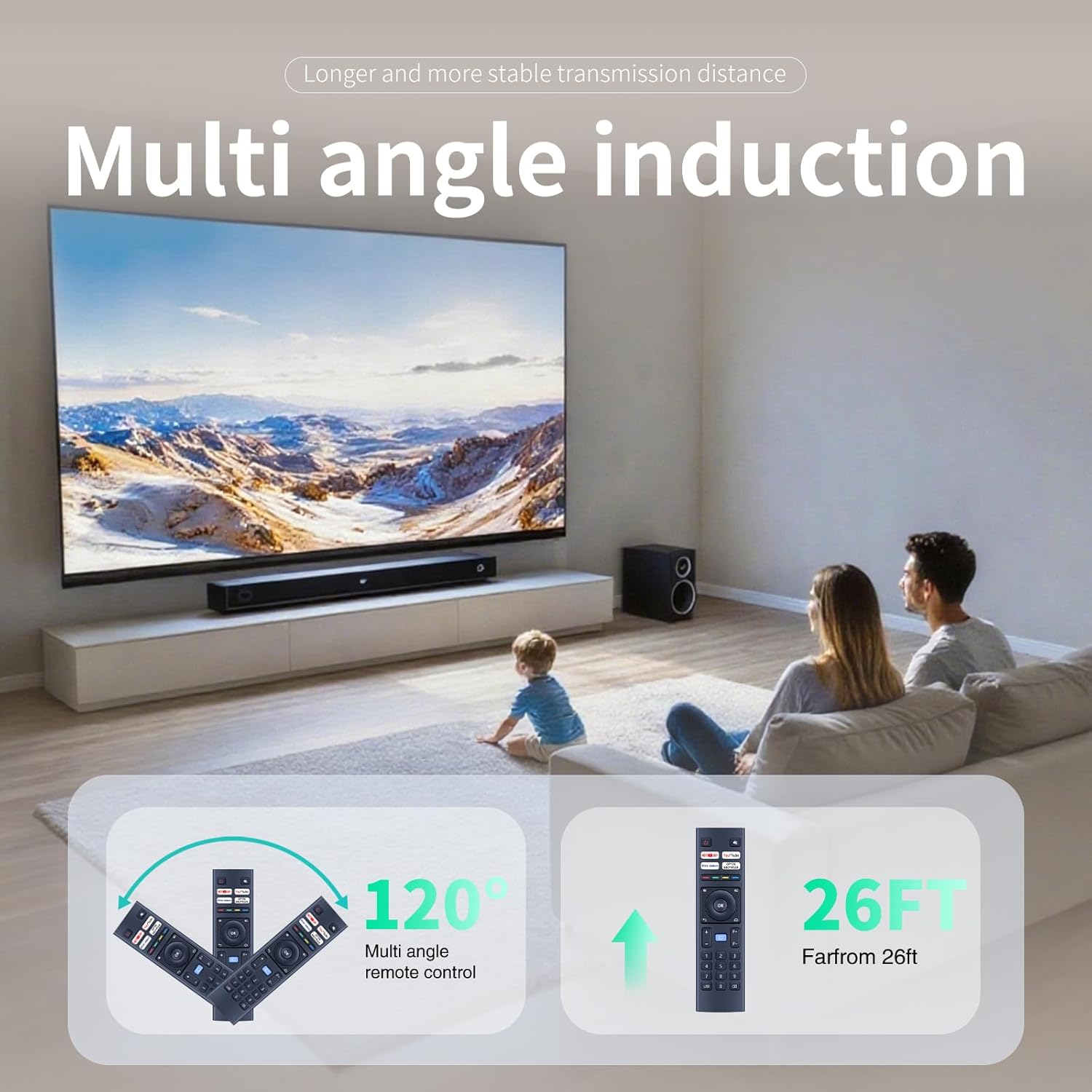
Figure 4: Multi-angle induction and effective operating range of the remote control.
Maintenance
Cleaning
To maintain the remote control's appearance and functionality:
- Wipe the surface with a soft, dry cloth.
- Do not use abrasive cleaners, solvents, or alcohol, as these can damage the finish.
- Avoid getting liquids inside the remote control.
Battery Replacement
Replace batteries when the remote control becomes unresponsive or its range decreases significantly. Refer to the "Battery Installation" section for instructions.
Storage
If the remote control will not be used for an extended period, remove the batteries to prevent leakage and potential damage.
Troubleshooting
- Remote Control Not Responding:
- Check if the batteries are correctly installed and have sufficient charge. Replace them if necessary.
- Ensure there are no obstructions between the remote control and the projector.
- Re-pair the remote control with the projector as described in the "Pairing the Remote Control" section.
- Short Operating Range:
- Replace the batteries with new ones.
- Ensure you are within the effective operating range (approximately 26 feet).
- Minimize interference from other electronic devices.
- Specific Buttons Not Working:
- Clean the remote control surface, especially around the unresponsive buttons, to remove any dirt or debris.
- If only specific quick access buttons (e.g., Netflix) are not working, ensure your projector's software is up to date and supports these functions.
Specifications
| Feature | Detail |
|---|---|
| Model Number | B0F4KCQ2SD |
| Brand | ZWP |
| Compatible Devices | Projectors (WiMiUS K9, VOPLLS P1E M10, DBPOWER G01, YABER V12, TOPTRO X9, MECOOL KP2, Xiaomi, Wanbo TT, Blitzwolf BW-V6, Yaber U12, FUDONI S1) |
| Power Source | 2 x AAA Batteries (not included) |
| Special Feature | Ergonomic Design |
| Color | Black |
| Item Weight | 2.08 ounces (approximately 59 grams) |
| Package Dimensions | 6.8 x 2.3 x 1 inches (approximately 17.3 x 5.8 x 2.5 cm) |
| Max Number of Supported Devices | 1 |
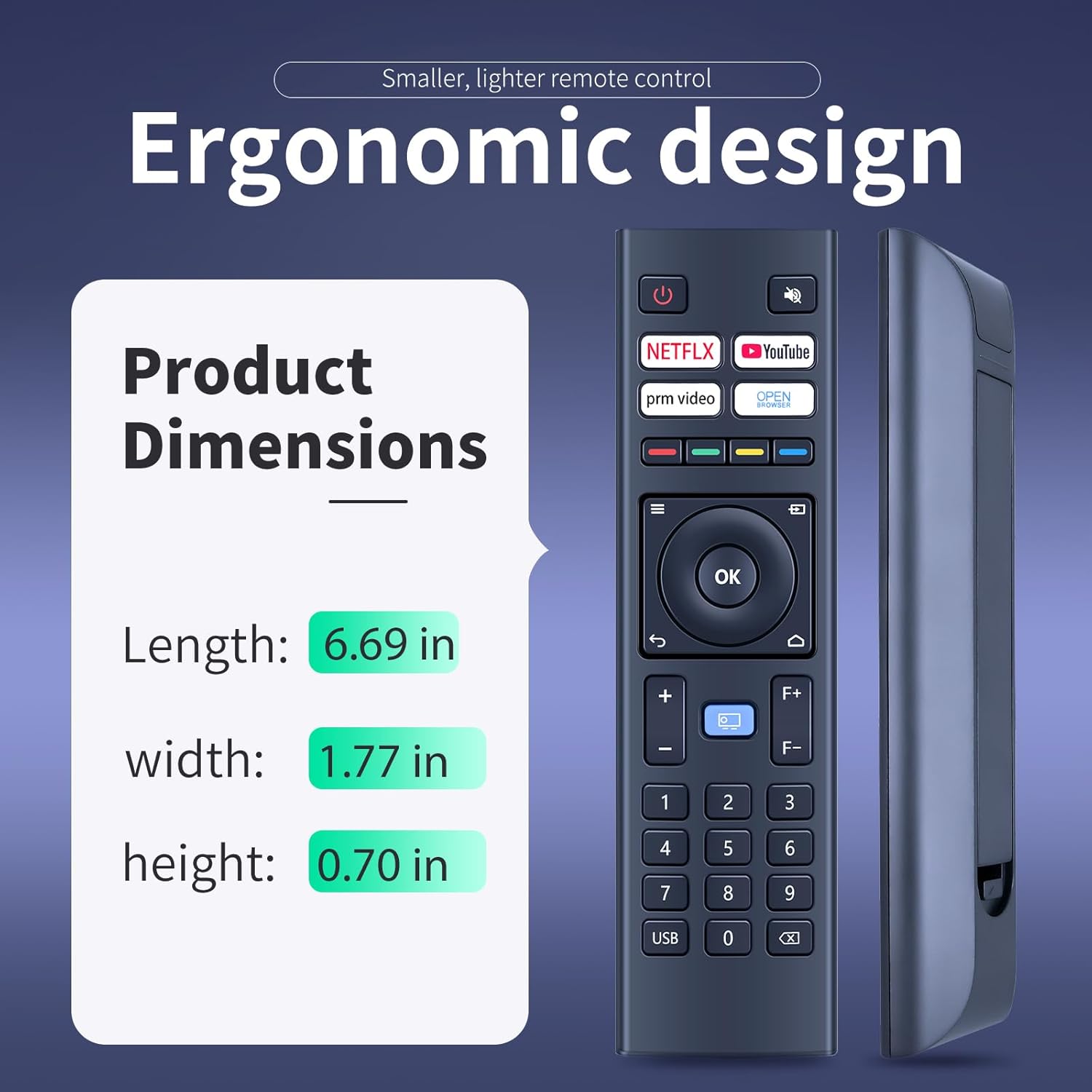
Figure 5: Ergonomic design and physical dimensions of the remote control.
Warranty and Support
This product is designed for durability and reliable performance. While specific warranty details are not provided in this manual, ZWP is committed to customer satisfaction.
For any questions, concerns, or assistance with your ZWP Replacement Remote Control, please do not hesitate to contact us. We are dedicated to helping you resolve any issues you may encounter.
You can typically find contact information for ZWP through the retailer where you purchased the product or by visiting the ZWP brand store online.