
Introduction
Thank you for choosing the SEYVUM 20V Cordless Leaf Blower, Model 8189. This manual provides essential information for the safe operation, assembly, maintenance, and troubleshooting of your leaf blower. Please read it thoroughly before use and retain it for future reference.
This leaf blower is designed for clearing leaves, dust, and small debris from various surfaces such as patios, gardens, driveways, and workshops. Its cordless design offers portability and ease of use.
Safety Information
Always observe basic safety precautions to reduce the risk of fire, electric shock, and personal injury when operating power tools.
- Read all instructions: Familiarize yourself with the controls and proper use of the appliance.
- Wear appropriate personal protective equipment (PPE): Always wear safety glasses or goggles, long pants, and sturdy footwear. Hearing protection is recommended during extended use.
- Keep bystanders away: Do not allow children or untrained individuals to operate the blower. Keep children and pets at a safe distance from the work area.
- Inspect the work area: Before starting, clear the area of objects that could be thrown or become entangled in the blower.
- Do not operate in wet conditions: Avoid using the blower in rain or on wet surfaces to prevent electric shock.
- Maintain a firm grip: Hold the blower firmly with both hands during operation.
- Battery safety: Use only the specified battery pack and charger. Do not charge batteries in damp or wet locations. Allow batteries to cool before charging.
- Avoid accidental starting: Ensure the switch is in the off position before inserting the battery pack.
- Store properly: When not in use, store the blower and batteries in a dry, secure place out of reach of children.
Package Contents
Carefully unpack the box and ensure all items are present and undamaged. If any items are missing or damaged, contact customer support.
- SEYVUM 20V Cordless Leaf Blower Unit
- 2 x 2.0Ah Lithium-ion Batteries
- Fast Charger
- Concentrator Nozzle
- Extension Nozzle (2 sections of tube)
- User Manual (this document)

Image: All components included in the SEYVUM 20V Cordless Leaf Blower package.
Setup
1. Battery Charging
Before first use, fully charge both 2.0Ah lithium-ion batteries. Ensure the battery is cool before placing it on the charger.
- Connect the fast charger to a standard power outlet.
- Slide the battery pack onto the charger. The indicator light on the charger will show the charging status.
- Allow approximately 2 hours for a full charge. Disconnect the battery once fully charged.
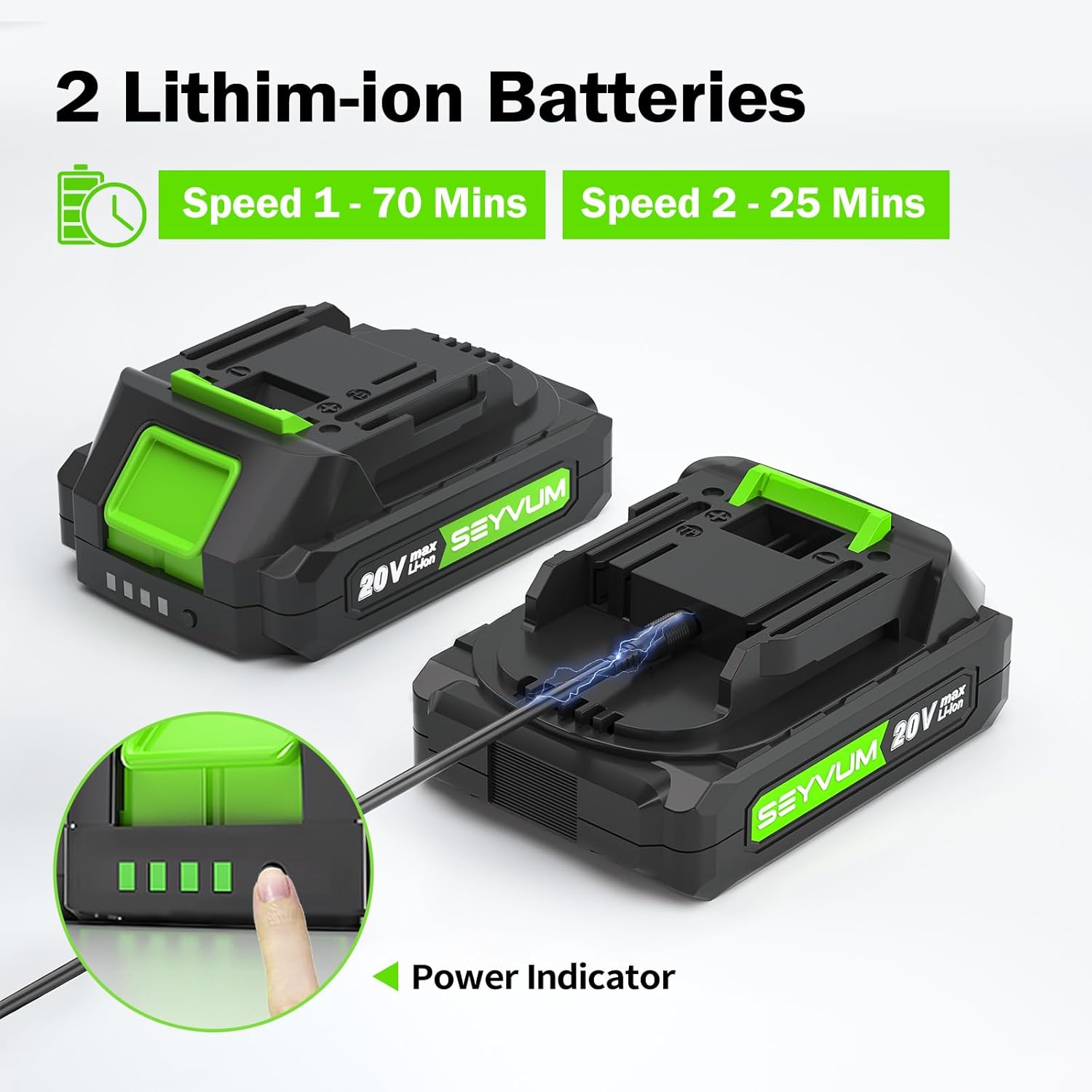
Image: SEYVUM 20V batteries and charging process, highlighting the power indicator.
2. Blower Assembly
The leaf blower features a two-section tube design for versatile use and compact storage.
- Align the first section of the blower tube with the outlet on the main blower unit. Push firmly until it clicks into place.
- If using the extension, align the second section (extension nozzle) with the first section of the tube. Push firmly until it clicks into place.
- To remove, press the release button (if present) and pull the sections apart.

Image: Assembly of the two-section blower tube for different usage scenarios.
3. Battery Installation
Once charged, slide a battery pack into the battery slot on the blower unit until it locks securely into place.
Operating Instructions
1. Starting and Stopping
To start the blower, ensure a charged battery is installed, then press the power switch. To stop, release the power switch.
2. Variable Speed Control
The SEYVUM Leaf Blower features two variable speed settings to adapt to different tasks.
- Speed 1 (Low Speed): Provides up to 70 MPH airflow, suitable for lighter debris and longer runtime (up to 70 minutes with a 2.0Ah battery).
- Speed 2 (High Speed): Provides up to 150 MPH airflow, ideal for heavier debris and more demanding tasks (up to 25 minutes with a 2.0Ah battery).
Adjust the speed by sliding the speed control switch located on the handle. Select the appropriate speed for the task at hand.

Image: Detail of the 2-speed control switch on the blower handle.
3. General Usage Tips
- Hold the blower at an angle to sweep debris rather than blowing directly down.
- Work in sections, moving debris into piles for easier collection.
- The blower is suitable for various cleaning tasks in gardens, patios, cars, job sites, and workshops.
Video: Demonstration of the SEYVUM 20V Leaf Blower in use, showcasing assembly, speed control, and various cleaning applications.
Maintenance
Regular maintenance ensures optimal performance and extends the life of your SEYVUM Leaf Blower.
- Cleaning: After each use, wipe down the exterior of the blower with a clean, damp cloth. Do not use harsh chemicals or abrasive cleaners. Ensure air vents are clear of debris.
- Battery Care: Store batteries in a cool, dry place away from direct sunlight and extreme temperatures. Do not store fully discharged batteries for extended periods. Charge them periodically if not in use.
- Storage: Detach the blower tubes and battery for compact storage. Store the unit in a dry, secure location.
Troubleshooting
If you encounter issues with your leaf blower, refer to the following common problems and solutions:
| Problem | Possible Cause | Solution |
|---|---|---|
| Blower does not start | Battery not charged or improperly installed. | Ensure battery is fully charged and securely inserted. |
| Low blowing power | Battery charge is low; Air intake/outlet blocked. | Recharge battery; Clear any obstructions from air vents and nozzle. |
| Short runtime | Battery not fully charged; Operating on high speed continuously. | Ensure battery is fully charged before use. Use low speed for longer tasks. |
If the problem persists after attempting these solutions, please contact SEYVUM customer support.
Specifications
| Feature | Detail |
|---|---|
| Brand | SEYVUM |
| Model Name | 8189 |
| Power Source | Battery Powered |
| Voltage | 20 Volts |
| Battery Capacity | 2 x 2.0Ah Lithium-ion |
| Maximum Speed | 150 Miles per Hour (MPH) |
| Air Volume | Up to 320 CFM |
| Form Factor | Handheld |
| Weight (with battery) | Approximately 2.9 lbs |
| Material | Plastic |
| Special Features | Adjustable Speed, Adjustable Tube Length, Battery Charge Indicator, Lightweight, Portable |
Warranty Information
SEYVUM products are manufactured to high-quality standards. This product is covered by a limited warranty against defects in materials and workmanship. Please refer to the warranty card included in your package or contact SEYVUM customer support for specific warranty terms and conditions.
Support
For technical assistance, replacement parts, or any questions regarding your SEYVUM 20V Cordless Leaf Blower, please contact our customer support team. Contact information can typically be found on the product packaging, the SEYVUM official website, or the warranty card.
When contacting support, please have your product model number (8189) and purchase date available to expedite service.
