
Angry miao AM Infinity Gaming Wireless Mouse
Angry Miao AM Infinity Gaming Wireless Mouse User Manual
Model: AM Infinity Gaming Wireless Mouse
1. Introduction
This manual provides detailed instructions for the setup, operation, maintenance, and troubleshooting of your Angry Miao AM Infinity Gaming Wireless Mouse. Please read this manual thoroughly to ensure proper use and optimal performance of your device.

Image 1.1: Top view of the AM Infinity Gaming Wireless Mouse.
2. Package Contents
Verify that all items are present in the package:
- AM Infinity Gaming Wireless Mouse
- 2.4G 8K Receiver HUB
- Hot-Swappable Batteries (2 included)
- USB-C Cable
- Additional bottom pads
- Grippy foam stickers for sides and mouse buttons
- User Manual (this document)

Image 2.1: Hot-swappable batteries for the AM Infinity Gaming Wireless Mouse.
3. Setup
3.1 Initial Charging
Before first use, ensure the batteries are fully charged. Insert one of the hot-swappable batteries into the 2.4G 8K Receiver HUB. Connect the USB-C cable to the receiver and then to a power source (e.g., computer USB port or USB wall adapter).

Image 3.1: The 2.4G 8K Receiver HUB with USB-C cable for charging.
3.2 Connecting the Mouse
The AM Infinity Mouse supports three connection modes: 2.4G Wireless, Bluetooth Wireless, and Wired.
- 2.4G Wireless Mode:
- Insert a charged battery into the mouse.
- Connect the 2.4G 8K Receiver HUB to an available USB port on your computer.
- Ensure the mouse is powered on and set to 2.4G mode (refer to the switch on the mouse bottom). The mouse will automatically connect to the receiver.
- Bluetooth Wireless Mode:
- Insert a charged battery into the mouse.
- Ensure the mouse is powered on and set to Bluetooth mode.
- On your computer or device, navigate to Bluetooth settings and search for "AM Infinity Mouse". Select it to pair.
- Wired Mode:
- Connect the USB-C cable directly from the mouse to an available USB port on your computer.
- The mouse will function immediately in wired mode and charge the installed battery.
3.3 Software Installation (Optional)
For advanced customization, download the Angry Miao control software from the official website. This software allows you to fine-tune DPI, polling rate, button assignments, RGB effects, and more. No drivers are required for basic plug-and-play functionality.
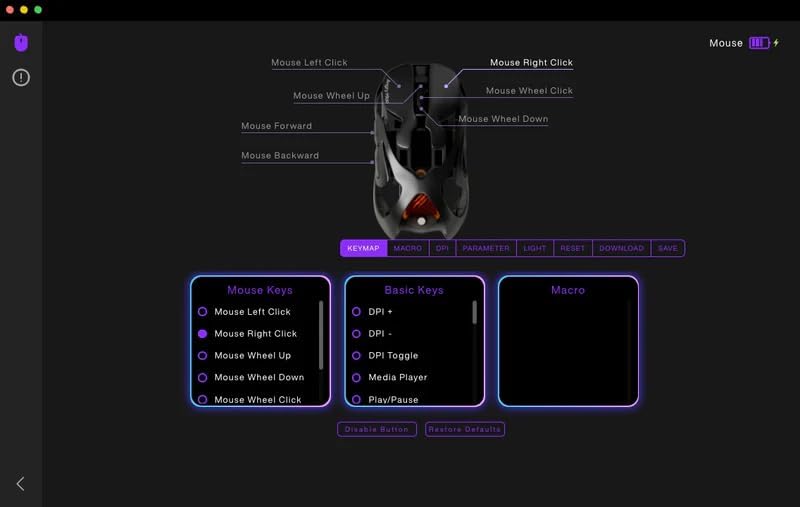
Image 3.2: Example of the Angry Miao mouse customization software interface.
4. Operating Instructions
4.1 Basic Functions
The AM Infinity Mouse features 7 programmable buttons and a scroll wheel. Default functions are standard for a computer mouse.
- Left Click: Primary action.
- Right Click: Secondary action/context menu.
- Scroll Wheel: Scroll up/down, Middle click.
- Side Buttons: Typically assigned as Forward/Backward.
4.2 DPI Adjustment
The mouse features a 30,000 DPI PAW3950 sensor. DPI can be adjusted on-the-fly using dedicated buttons (if configured) or through the Angry Miao control software. Refer to the software section for detailed customization.
4.3 Hot-Swappable Battery System
The mouse includes two hot-swappable batteries, allowing for continuous wireless operation. To swap a battery:
- Locate the battery compartment on the underside of the mouse.
- Gently remove the depleted battery.
- Insert a fully charged battery. The magnetic connection will secure it in place.
The 2.4G 8K Receiver HUB also functions as a magnetic fast charger for the spare battery.

Image 4.1: The AM Infinity mouse alongside its charging hub and a spare battery.
4.4 RGB Lighting Customization
The mouse features customizable RGB lighting. Adjust lighting effects, colors, and brightness using the Angry Miao control software to match your gaming setup.
5. Maintenance
5.1 Cleaning
To maintain optimal performance and appearance:
- Use a soft, dry cloth to wipe the mouse surface.
- For stubborn dirt, slightly dampen the cloth with water. Avoid harsh chemicals or abrasive materials.
- Periodically clean the optical sensor on the underside of the mouse with a cotton swab to prevent tracking issues.
5.2 Battery Care
To prolong battery life:
- Avoid fully discharging the batteries frequently.
- Store spare batteries in a cool, dry place.
- If the mouse will not be used for an extended period, remove the battery.
6. Troubleshooting
| Problem | Possible Cause | Solution |
|---|---|---|
| Mouse not responding (Wireless) | Low battery; Receiver not connected; Incorrect mode selected; Interference. |
|
| Mouse not responding (Wired) | Cable not connected properly; Faulty USB port. |
|
| Inconsistent tracking | Dirty sensor; Unsuitable surface. |
|
| Software not detecting mouse | Mouse not connected; Software outdated. |
|
7. Specifications
| Feature | Detail |
|---|---|
| Model | AM Infinity Gaming Wireless Mouse |
| Brand | Angry Miao |
| Connectivity | 2.4G Wireless, Bluetooth Wireless, Wired (USB-C) |
| Sensor | PAW3950 Optical Sensor |
| DPI Range | Up to 30,000 DPI |
| Polling Rate | Dual 8K Polling Rate (8000 Hz) |
| Switches | TTC Optical Micro Switches (rated for 100 million clicks) |
| Buttons | 7 programmable buttons |
| Weight | Approximately 49g (wireless), 39g (wired) |
| Material | Magnesium-aluminum alloy exoskeleton |
| Battery Type | Hot-swappable Nonstandard Battery (2 included) |
| Dimensions | 11.62 x 8.47 x 3.98 inches (Package Dimensions) |
| Item Weight (Package) | 2.09 pounds |

Image 7.1: The AM Infinity Gaming Wireless Mouse demonstrating its ultralight weight on a scale.
8. Warranty and Support
8.1 Warranty Information
For warranty details, please refer to the warranty card included in your product packaging or visit the official Angry Miao website. Keep your proof of purchase for warranty claims.
8.2 Customer Support
If you encounter any issues not covered in this manual or require further assistance, please contact Angry Miao customer support through their official website or the contact information provided with your product.
Official Brand Store: Angry Miao Store on Amazon
Related documentsAM Infinity Gaming Wireless Mouse


Ask a question about this manual
Ask about setup, troubleshooting, compatibility, parts, safety, or missing instructions. Manuals+ will review the question and use this page’s manual context to help answer it.