Introduction
This manual provides essential information for the safe and efficient use of your Lenovo IdeaPad Slim 3 15.3-inch laptop. Please read this manual thoroughly before using your device and keep it for future reference.
Product Overview
The Lenovo IdeaPad Slim 3 is a 15.3-inch notebook PC designed for everyday tasks, featuring a 13th Gen Intel Core i5 processor, 16GB of RAM, and a 512GB SSD for responsive performance.
Key Features
- Operating System: Windows 11 Home 64-bit (Japanese Edition)
- Processor: Intel Core i5-13420H Processor
- Memory: 16GB DDR5-4800 SDRAM SODIMM
- Storage: 512GB PCIe NVMe/M.2 SSD
- Display: 15.3-inch WUXGA IPS LCD (1920x1200, 16:10 aspect ratio, anti-glare)
- Graphics: Integrated Intel UHD Graphics
- Connectivity: Wi-Fi 7 (IEEE802.11be/ax/ac/a/b/g/n), Bluetooth v5.4
- Ports: 1x USB 3.2 Gen1 Type-C (Power Delivery, DisplayPort output), 2x USB 3.2 Gen1 Type-A, 1x HDMI, 1x Microphone/Headphone Combo Jack
- Camera: HD 720p front camera with privacy shutter
- Card Reader: 4-in-1 Media Card Reader (SD, SDHC, SDXC, MMC)
- Battery: Fixed 3-cell Lithium Polymer battery (50Whr)
- Pre-installed Software: Microsoft 365 Basic (1-year free), Office Home & Business 2024

Figure 1: Lenovo IdeaPad Slim 3 highlighting its core specifications.

Figure 2: Slim design with a large 15.3-inch WUXGA display.

Figure 3: Long battery life (50Whr) and Wi-Fi 7 support for high-speed communication.
Setup
Initial Power-On and Configuration
- Connect Power: Connect the AC adapter to the laptop's power connector and then to a power outlet.
- Power On: Open the laptop lid and press the power button. The power button is located on the right side of the laptop.
- Initial Windows Setup: Follow the on-screen instructions to complete the Windows 11 Home setup. This includes selecting your region, language, connecting to a Wi-Fi network, and creating a user account.
- Microsoft Office Activation: If your model includes Microsoft Office 2024, follow the instructions provided with your product to activate it. Note that Microsoft 365 Basic (1-year free) requires activation within 180 days of Windows setup.

Figure 4: Laptop ready for initial setup.
Operating Instructions
Basic Operation
- Power On/Off: Press the power button to turn on the laptop. To shut down, click the Start button, then Power, and select "Shut down."
- Using the Touchpad: The multi-touch touchpad supports various gestures for navigation. Refer to Windows settings for customization.
- Connecting Peripherals: Use the available USB ports (Type-C and Type-A) to connect external devices such as mice, keyboards, or external storage.
- External Display: Connect an external monitor using the HDMI port or the USB Type-C port (which supports DisplayPort output).
- Audio: Use the microphone/headphone combo jack for headsets or external microphones. The laptop features stereo speakers with Dolby Audio support.
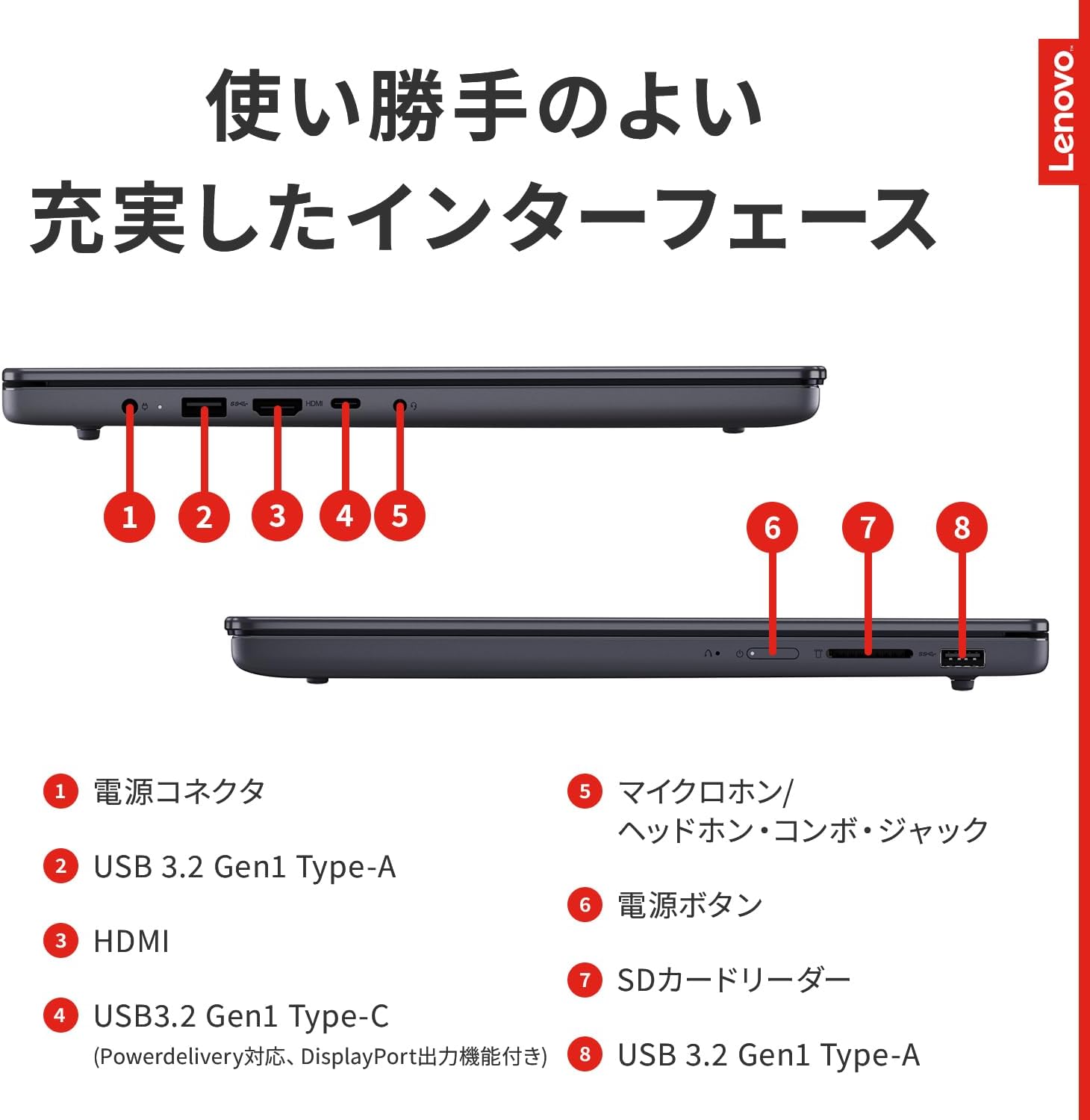
Figure 5: Overview of laptop ports and connectors.
Maintenance
General Care
- Cleaning: Use a soft, lint-free cloth to clean the screen and exterior. Avoid harsh chemicals.
- Battery Care: To prolong battery life, avoid extreme temperatures and fully discharging the battery frequently.
- Software Updates: Regularly update your Windows operating system and drivers to ensure optimal performance and security.
- Storage Management: Periodically clean up unnecessary files to maintain sufficient storage space and system speed.
Troubleshooting
Common Issues and Solutions
| Problem | Possible Cause / Solution |
|---|---|
| Laptop does not power on. | Ensure the AC adapter is securely connected and the power outlet is functional. Check battery charge level. |
| Screen is blank or black. | Check display brightness settings. Ensure no external monitor is set as the primary display. Try connecting to an external monitor to verify display output. |
| Wi-Fi connection issues. | Verify Wi-Fi is enabled in Windows settings. Restart your router and laptop. Check for updated Wi-Fi drivers. |
| Slow performance. | Close unnecessary applications. Check for sufficient free storage space. Run a system scan for malware. Ensure Windows and drivers are up to date. |
Specifications
| Feature | Detail |
|---|---|
| Product Series | Lenovo IdeaPad Slim 3i Gen 10 |
| Model Number | 83K100G4JP |
| Operating System | Windows 11 Home 64bit (Japanese Edition) |
| Processor | Intel® Core™ i5-13420H Processor (2.10GHz, up to 4.60GHz with Turbo Boost, 8 Cores) |
| Chipset | Integrated with APU |
| Fingerprint Sensor | None |
| Main Memory (Standard) | 16GB DDR5-4800 SDRAM SODIMM |
| Main Memory (Max) | 16GB |
| Memory Slots | 1 |
| Storage | 512GB (PCIe NVMe/M.2) SSD |
| Optical Drive | None |
| Display Size | 15.3-inch WUXGA IPS LCD (1920x1200, approx. 16.77 million colors, 16:10), Anti-glare |
| Video Chip | Intel® UHD Graphics |
| Video RAM | Shared with main memory |
| USB Ports | 1x Type-C USB 3.2 Gen1 (Power Delivery, DisplayPort output), 2x Type-A USB 3.2 Gen1 |
| Display Ports | 1x HDMI |
| Audio Ports | 1x Microphone/Headphone Combo Jack |
| Ethernet | None |
| Wireless | Wi-Fi 7 (IEEE802.11be/ax/ac/a/b/g/n) |
| Bluetooth | Bluetooth v5.4 |
| Audio Function | Intel® High Definition Audio (Dolby Audio™ compatible) |
| Speakers | Stereo Speakers (2.0Wx2) |
| Microphone | Digital Array Microphone |
| Built-in Camera | HD 720p front camera with privacy shutter |
| Memory Card Slot | 4-in-1 Media Card Reader (SD, SDHC, SDXC, MMC) |
| Keyboard | 84-key JIS layout (including Fn key + Windows key + Copilot key), Multi-touch touchpad, Power button, Numeric keypad |
| Body Color | Luna Grey |
| Dimensions (WxDxH) | Approx. 343.4 x 239.5 x 17.9 mm |
| Weight | Approx. 1.59 kg |
| Battery Type | Fixed 3-cell Lithium Polymer battery |
| Battery Life (JEITA2.0) | Approx. 9.9 hours (video playback), Approx. 16.9 hours (idle) |
| Charging Time (Power Off) | Approx. 3.5 hours |
| AC Adapter Input | AC 100-240V (50/60Hz) |
| AC Adapter Weight | Main unit: Approx. 209.57g, Cord: Approx. 100g |
| Max Power Consumption | 65W |
| Energy Efficiency (2022 Standard) | 12-division 21.6kWh/year (AA) |
| Microsoft Office | Microsoft 365 Basic (1-year free) + Office Home & Business 2024 |
| Included Accessories | AC Adapter, Power Cord |
Note: Specifications are subject to change without notice. Battery life and charging times may vary based on usage conditions.
Warranty and Support
Warranty Information
- Warranty Period: 1 year.
- Domestic Repair: Pick-up repair service.
- International Repair: Not supported.
- Battery Warranty: The battery pack itself has a 1-year warranty, regardless of the main unit's warranty period.
- Proof of Purchase: Please retain your purchase receipt or proof of purchase as it may be required for warranty service.
Support Services
Lenovo offers comprehensive support services to assist you with your product. These services include:
- High-quality phone support.
- Speedy repair support.
- Pick-up and delivery system for repairs.
- Extensive repair expertise.

Figure 6: Overview of Lenovo's support services.
For more details on support, please visit the official Lenovo support website.


