
1. Introduction
Thank you for choosing the DEKOPRO 800W 125mm Corded Electric Angle Grinder. This professional-grade tool is designed for a variety of tasks including grinding, cutting, and polishing. It features an 800W motor, a high speed of 12,000 RPM, and a robust design for efficient and reliable performance.
This manual provides essential information for the safe and effective operation, maintenance, and troubleshooting of your angle grinder. Please read it thoroughly before first use and keep it for future reference.
2. General Safety Instructions
WARNING: Read all safety warnings, instructions, illustrations, and specifications provided with this power tool. Failure to follow all instructions listed below may result in electric shock, fire, and/or serious injury.
- Work Area Safety: Keep your work area clean and well-lit. Cluttered or dark areas invite accidents. Do not operate power tools in explosive atmospheres, such as in the presence of flammable liquids, gases, or dust.
- Electrical Safety: Power tool plugs must match the outlet. Never modify the plug in any way. Do not abuse the cord. Never use the cord for carrying, pulling, or unplugging the power tool. Keep cord away from heat, oil, sharp edges, or moving parts.
- Personal Safety: Always wear appropriate personal protective equipment (PPE) including safety glasses, hearing protection, dust mask, and heavy-duty gloves. Dress properly; avoid loose clothing or jewelry. Ensure stable footing and maintain balance at all times.
- Tool Use and Care: Do not force the power tool. Use the correct power tool for your application. Disconnect the plug from the power source before making any adjustments, changing accessories, or storing power tools.
- Guards: Always ensure the wheel guard is properly installed and adjusted before operation. The tool-free removable guard helps prevent sparks and metal debris from flying during operation, protecting against injuries.
- Power-Off Protection: This tool features a power-off protection function. If the power plug is accidentally disconnected during operation, the machine will not restart automatically when power is restored, enhancing user safety. You must manually switch it off and then on again to resume operation.
- Ventilation: Ensure the ventilation openings are clear during operation to prevent overheating.
3. Package Contents
Upon unpacking, please verify that all items listed below are present and undamaged:
- 1 x DEKOPRO Angle Grinder
- 1 x Wheel Guard
- 1 x Grinding Disc
- 1 x Cutting Guard
- 1 x Auxiliary Handle
- 1 x Wrench
- 1 x User Manual

Image: Contents of the DEKOPRO Angle Grinder package, showing the main unit, two types of guards, a grinding wheel, an auxiliary handle, and a wrench.
4. Product Overview
Familiarize yourself with the main components of your DEKOPRO Angle Grinder:
- Main Unit: The core of the tool, housing the 800W motor.
- Spindle Lock: For quick and easy changing of grinding or cutting discs.
- Auxiliary Handle: Can be attached in three positions (left, right, top) for improved control and comfort. The rubberized grip helps reduce vibrations.
- Wheel Guard / Cutting Guard: Tool-free removable guards for protection during operation.
- Speed Adjustment Dial: Allows selection of 6 different speed settings for various applications.
- ON/OFF Switch: Equipped with power-off protection for safety.
- Ventilation Openings: Designed for efficient heat dissipation and air circulation.

Image: The angle grinder demonstrating the three possible positions for attaching the auxiliary handle, enhancing user control and ergonomics.
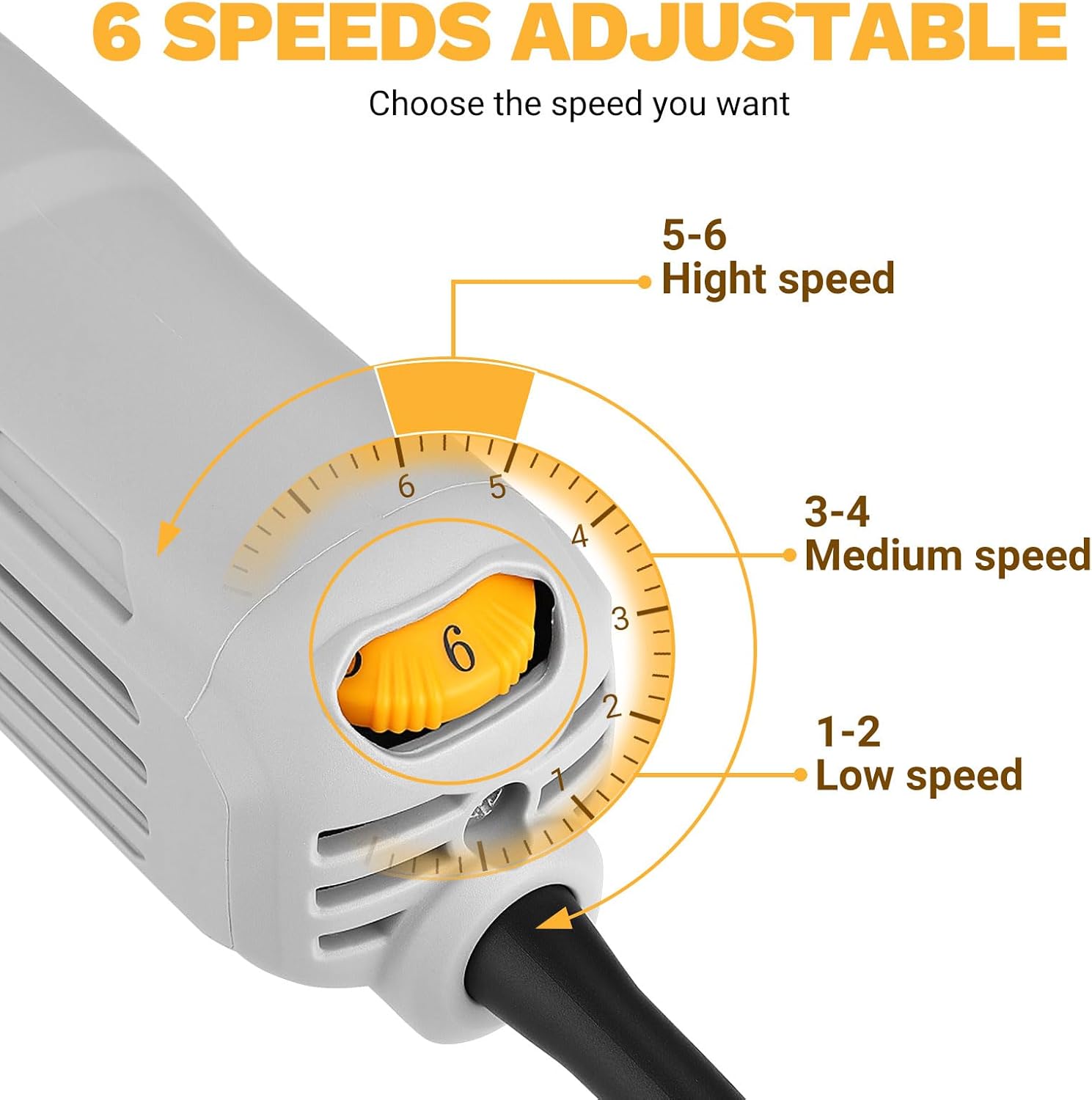
Image: Detail of the 6-speed adjustable dial on the angle grinder, indicating low, medium, and high-speed ranges.

Image: The angle grinder illustrating the power-off protection mechanism, ensuring the tool does not restart automatically after an accidental power disconnection.

Image: The angle grinder highlighting its ventilation openings, designed for efficient heat dissipation during operation.
5. Setup
5.1 Attaching the Auxiliary Handle
The auxiliary handle can be screwed into one of the three threaded holes on the grinder's head. Choose the position that provides the best control and comfort for your specific task.
5.2 Installing the Guard
Select either the wheel guard (for grinding) or the cutting guard (for cutting). The guard is tool-free and can be easily attached and adjusted to direct sparks and debris away from you. Ensure it is securely fastened before use.

Image: Illustration demonstrating the correct installation of cutting protection discs and guards on the angle grinder. Note: Cutting disc is not included with the guards.
5.3 Installing/Changing Discs
- Ensure the tool is unplugged from the power source.
- Press and hold the spindle lock button.
- Use the provided wrench to loosen the flange nut counter-clockwise.
- Remove the old disc (if any) and clean the flanges.
- Place the new grinding or cutting disc onto the spindle, ensuring it is correctly seated.
- Tighten the flange nut clockwise with the wrench while holding the spindle lock button. Do not overtighten.
- Release the spindle lock.
6. Operating Instructions
6.1 Powering On/Off
To turn the grinder ON, slide the ON/OFF switch forward. To turn it OFF, slide the switch backward. Always ensure a firm grip on the tool before starting.
6.2 Adjusting Speed
The angle grinder features a 6-speed adjustment dial. Rotate the dial to select the desired speed setting:
- Settings 1-2: Low speed, suitable for delicate tasks or initial passes.
- Settings 3-4: Medium speed, for general grinding and polishing.
- Settings 5-6: High speed, for heavy-duty cutting and rapid material removal.
Always select a speed appropriate for the material and the accessory being used.
6.3 Applications
The DEKOPRO Angle Grinder is versatile and can be used for:
- Grinding: Removing excess material, smoothing welds, or sharpening tools.
- Cutting: Cutting metal, stone, or other materials with appropriate cutting discs.
- Polishing: Achieving a smooth finish on various surfaces using polishing pads.

Image: Examples of the angle grinder in use for steel cutting, metal cutting, grinding, and polishing, demonstrating its multi-purpose capabilities.
7. Maintenance
Regular maintenance ensures the longevity and safe operation of your angle grinder.
- Cleaning: Regularly clean the tool, especially the ventilation openings, to prevent dust and debris buildup. Use a soft brush or compressed air. Ensure the tool is unplugged before cleaning.
- Disc Inspection: Before each use, inspect grinding and cutting discs for cracks, chips, or wear. Replace damaged or worn discs immediately.
- Cord Inspection: Check the power cord for any damage, cuts, or fraying. Do not use the tool if the cord is damaged.
- Storage: Store the angle grinder in a dry, secure place out of reach of children and away from direct sunlight or extreme temperatures.
8. Troubleshooting
| Problem | Possible Cause | Solution |
|---|---|---|
| Tool does not start |
|
|
| Excessive vibration |
|
|
| Overheating |
|
|
9. Specifications
| Brand | DEKOPRO |
| Model Number | DKPGAGA080C1 |
| Power | 800 Watts |
| Voltage | 220 Volts |
| Max Rotation Speed | 12000 RPM |
| Disc Diameter | 125 mm |
| Material | Metal |
| Power Source | Corded Electric |
| Package Dimensions | 32.2 x 12.7 x 11.4 cm |
| Weight | 2.3 kg |
| Country of Origin | China |
10. Warranty and Support
For warranty information, please refer to the documentation provided with your purchase or contact your retailer. For technical support or service inquiries, please reach out to DEKOPRO customer service through their official website or the contact information provided in your purchase documentation.
Always keep your proof of purchase for warranty claims.