
1. Introduction
Thank you for choosing the Alpicool EC15 Portable Refrigerator Car Freezer. This manual provides essential information for the safe and efficient operation of your new appliance. Please read it thoroughly before use and retain it for future reference.
The Alpicool EC15 is a versatile 15-liter portable refrigerator and freezer designed for use in vehicles, homes, or during outdoor activities. It operates on 12/24V DC and 100-240V AC power, offering a wide temperature range from -20°C to 20°C.
2. Safety Instructions
- Ensure the power supply matches the voltage specified on the appliance.
- Do not operate the appliance if the power cord is damaged.
- Keep the appliance away from heat sources and direct sunlight.
- Ensure adequate ventilation around the appliance to prevent overheating.
- Do not immerse the appliance in water or other liquids.
- This appliance can operate at an incline of up to 45° for short periods.
- Unplug the appliance before cleaning or maintenance.
3. Package Contents
Verify that all items are present in the package:
- 1 x Alpicool EC15 Portable Refrigerator Car Freezer
- 1 x 2.5m DC Power Cable (for 12/24V vehicle use)
- 1 x AC Power Cable with Adapter (for 100-240V home use)
- 1 x User Manual (this document)
4. Product Features
The Alpicool EC15 is equipped with several features to enhance your cooling experience:
- Deep Cooling Performance: Capable of freezing without ice, reaching temperatures as low as -20°C.
- Robust Design: Impact-resistant and durable construction, designed to withstand challenging environments.
- Efficient Insulation: Features reliable sealing and thick, high-density foam insulation to maintain cooling performance.
- Dual Operating Modes: Includes MAX mode for fast cooling and ECO mode for energy-saving operation.
- Digital Temperature Control: Easy-to-use digital display for precise temperature adjustments.
- Multiple Power Options: Supports DC 12/24V for vehicles and AC 100-240V for home use. Compatible with solar panels and power stations (accessories sold separately).
- Detachable Battery Compartment: Designed to accommodate a detachable battery (not included) for extended portable use.
- USB Charging Port: Convenient USB port for charging small electronic devices.
- Removable Door: For easier cleaning and access.
- Door Latch: Securely keeps the lid closed during transport.

Image: Touchable Control Panel and Key Features. This image illustrates the detachable battery compartment, door latch, DC 12/24V input, USB port, LED digital display, and removable door.

Image: Powering the Alpicool EC15. The refrigerator can be powered by DC (car), AC (home), or a combination of solar panel and power station.
5. Setup
5.1 Initial Placement
Place the refrigerator on a flat, stable surface. Ensure there is sufficient space (at least 10 cm) around the unit for proper ventilation. Avoid placing it in direct sunlight or near heat sources.
5.2 Connecting Power
The Alpicool EC15 supports both DC and AC power inputs:
- DC Power (12/24V): Connect the 2.5m DC power cable to the DC input port on the refrigerator and then to your vehicle's 12V or 24V power outlet (cigarette lighter socket).
- AC Power (100-240V): Connect the AC power cable to the adapter, then plug the adapter into the AC input port on the refrigerator. Finally, plug the AC power cable into a standard wall outlet.
If using a detachable battery (not included), ensure it is properly inserted into the designated battery compartment.
6. Operating Instructions
6.1 Powering On/Off
Press and hold the power button on the control panel to turn the unit on or off. The digital display will illuminate when the unit is powered on.
6.2 Setting Temperature
Use the '+' and '-' buttons on the control panel to adjust the desired temperature. The display will show the set temperature, then revert to the current internal temperature.
6.3 MAX and ECO Modes
The refrigerator features two operating modes:
- MAX Mode: Provides faster cooling performance (approx. 45W power consumption). Ideal for quickly reaching the desired temperature.
- ECO Mode: Offers energy-saving operation (approx. 33W power consumption). Suitable for maintaining temperature once the desired level is reached.
Switch between modes using the dedicated button on the control panel.

Image: Dual Mode Operation. This graphic illustrates the ECO (33W) and MAX (45W) power consumption modes for efficient and fast cooling.
6.4 Fast Cooling Performance
The Alpicool EC15 is designed for rapid cooling. Based on an ambient temperature of 25°C (77°F) and an empty box, the unit can reach -20°C (-4°F) in approximately 60 minutes.

Image: Fast Cooling Performance. This graph shows the temperature drop from 25°C to -20°C over 60 minutes.
6.5 Recommended Temperatures for Food
For optimal preservation, consider the following temperature guidelines:

Image: Recommended Temperatures for Common Food Items. This graphic provides temperature suggestions for drinks, fruits, vegetables, milk, ice cream, and seafood.
- Drinks: 5°C (41°F)
- Fruits: 5-8°C (41-46°F)
- Vegetables: 3-10°C (37-50°F)
- Milk: 10°C (50°F)
- Ice Cream: -10°C (14°F)
- Seafood: -18°C (0°F)
7. Maintenance
7.1 Cleaning
Always unplug the unit before cleaning. Use a soft cloth dampened with mild detergent to wipe down the interior and exterior surfaces. Do not use abrasive cleaners or harsh chemicals. Ensure the unit is completely dry before reconnecting power.
7.2 Defrosting
The Alpicool EC15 features a manual defrost system. If ice accumulates inside the unit, turn off the refrigerator and unplug it. Allow the ice to melt naturally, then wipe away any excess water with a clean cloth. Do not use sharp objects to remove ice.
7.3 Storage
When storing the refrigerator for an extended period, ensure it is clean, dry, and unplugged. Store it in a cool, dry place with the lid slightly ajar to prevent odors and mildew.
8. Troubleshooting
If you encounter issues with your Alpicool EC15, refer to the following common troubleshooting steps:
- Unit not powering on: Check power connections (DC or AC). Ensure the power outlet is functional. Verify the power cable is not damaged.
- Unit not cooling: Ensure the temperature setting is correct. Check for proper ventilation around the unit. Make sure the lid is securely closed.
- Unusual noise: A slight gurgling sound is normal due to the refrigerant circulation. Excessive or unusual noises may indicate an issue; contact support if persistent.
- Error codes on display: Refer to the specific error code in the full user manual (if provided) or contact customer support.
9. Specifications
Detailed technical specifications for the Alpicool EC15:
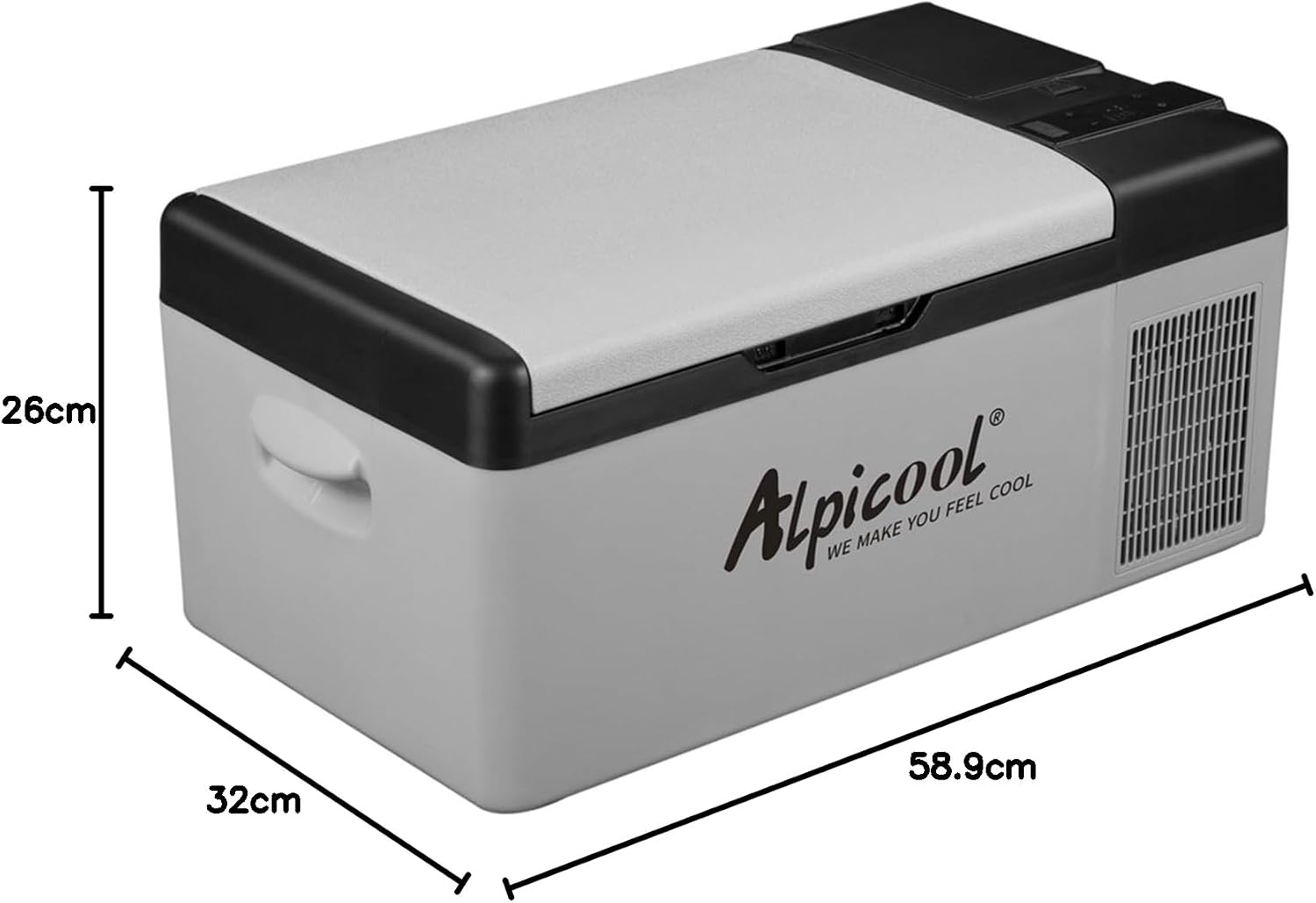
Image: Alpicool EC15 External Dimensions. The unit measures 58.9 cm (length) x 32 cm (width) x 26 cm (height).
| Specification | Value |
|---|---|
| Model | EC15 |
| Capacity | 15 Liters |
| Product Dimensions (D x W x H) | 32D x 58.9W x 26H cm |
| Item Weight | 8.4 Kilograms |
| Voltage (DC) | 12V / 24V |
| Voltage (AC) | 100-240V |
| Rated Input Power | 60W |
| Temperature Range | -20°C to 20°C |
| Noise Level | <45dB |
| Cooling Method | Compressor |
| Refrigerant | R-600A |
| Defrost System | Manual |
| Energy Consumption | 35 kWh/annum |
| Power Connector | Type E / F – 2 pin (EU-hybrid) |
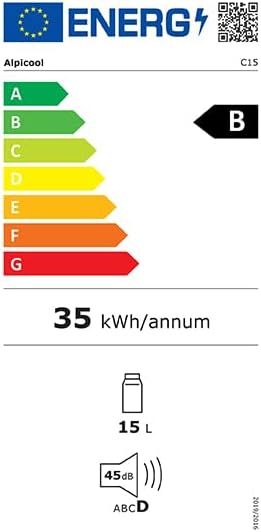
Image: Alpicool EC15 Energy Label. This label indicates an energy consumption of 35 kWh/annum and a noise level of 45dB.

Image: Product Information Sheet. This sheet provides detailed regulatory and technical information for the Alpicool EC15.
10. Warranty and Support
10.1 Warranty Information
The Alpicool EC15 comes with a manufacturer's warranty. The duration of the guarantee provided by the manufacturer is 3 months.
10.2 Customer Support
For technical assistance, warranty claims, or any product-related inquiries, please contact Alpicool customer support:
- Email: bill@alpicool.com
- Phone: +49 170 8075723
- Manufacturer: Alpicool, c/o ZHU Consulting GmbH, Am Seestern 8, 40547 Düsseldorf #Germany
Additional product information can be found on the EPREL database: https://eprel.ec.europa.eu/qr/2362362


