
1. Introduction
Thank you for choosing the Patriot Commercial Gas Hot Plate, Model PT-HP12-M. This robust 2-burner unit is engineered for demanding commercial kitchen environments, delivering 50,000 BTU of cooking power. It features separate gas valves for each burner, allowing precise temperature control for various cooking tasks. The stainless steel construction ensures durability and ease of cleaning. This manual provides essential information for the safe and efficient operation, installation, and maintenance of your hot plate.
Key features include:
- Dual burner design with 50,000 BTU output.
- Versatile fuel options: compatible with both LP and natural gas (LP conversion kit included).
- Precise control with individual gas valves and dedicated pilot lights for each burner.
- Easy maintenance with a removable stainless steel drip tray.
- Compact dimensions: 12"W x 29-1/3"D x 13-1/2"H.
2. Safety Information
WARNING: Improper installation, adjustment, alteration, service, or maintenance can cause property damage, injury, or death. Read the installation, operating, and maintenance instructions thoroughly before installing or servicing this equipment.
- This appliance must be installed by a qualified professional in accordance with all local codes, or in the absence of local codes, with the National Fuel Gas Code, ANSI Z223.1/NFPA 54, or the Natural Gas and Propane Installation Code, CSA B149.1.
- The LP conversion kit requires professional installation. Do not attempt to convert the unit yourself.
- Ensure adequate ventilation in the area where the hot plate is installed.
- Keep the area around the appliance clear and free from combustible materials.
- Do not store or use gasoline or other flammable vapors and liquids in the vicinity of this or any other appliance.
- Never use the appliance for space heating.
- Always turn off the gas supply to the appliance when not in use.
- Do not obstruct the flow of combustion and ventilation air.
3. Setup and Installation
The Patriot Commercial Gas Hot Plate requires professional installation to ensure safe and proper operation. Refer to the following guidelines:
3.1 Unpacking
- Carefully remove the hot plate from its packaging.
- Inspect the unit for any shipping damage. Report any damage immediately to the carrier and your dealer.
- Remove all packing materials, including any protective plastic films or ties.
3.2 Location and Clearance
- Install the hot plate on a level, non-combustible surface.
- Ensure adequate clearance from combustible walls and materials as specified by local codes. Minimum clearances are typically 6 inches from the sides and rear to combustible construction.
- The appliance must be installed under an effective exhaust hood with adequate ventilation.
3.3 Gas Connection
The unit is equipped with a 3/4-inch rear NPT gas connection. A qualified technician must connect the appliance to the gas supply.
- Ensure the gas supply pressure matches the appliance's requirements.
- Perform a leak test on all gas connections using a soap solution after installation. Never use an open flame to check for leaks.
3.4 LP Conversion (If Applicable)
An LP conversion kit is included with the unit. If converting from natural gas to LP gas, or vice versa, this procedure must be performed by a qualified and licensed gas technician. Incorrect conversion can lead to serious safety hazards and void the warranty.

Image: Rear view of the Patriot Commercial Gas Hot Plate, highlighting the 3/4-inch NPT gas connection and regulator for gas supply.
4. Operating Instructions
4.1 Initial Startup
- Before first use, clean the hot plate surfaces to remove any manufacturing residues.
- Ensure all gas connections are secure and leak-free.
- Turn on the main gas supply to the appliance.
4.2 Lighting the Pilot Lights
Each burner has a dedicated pilot light for reliable ignition.
- Locate the pilot light access hole for the desired burner.
- Using a long match or lighter, ignite the pilot flame.
- Once lit, the pilot flame should be stable and blue.
- Repeat for all pilot lights.
4.3 Operating the Burners
- Ensure the pilot light for the desired burner is lit.
- Turn the corresponding burner control knob to the desired heat setting (LOW to HIGH).
- The main burner should ignite immediately from the pilot flame.
- Adjust the knob to achieve the required flame intensity.
- To turn off a burner, rotate the control knob to the OFF position. The main burner flame will extinguish, but the pilot light will remain lit.
4.4 Shutting Down
- For temporary shutdown, turn all burner control knobs to the OFF position. The pilot lights will remain lit.
- For complete shutdown (e.g., end of day, extended non-use), turn off all burner control knobs, then turn off the main gas supply valve to the appliance. This will extinguish the pilot lights.

Image: Front view of the Patriot Commercial Gas Hot Plate, showing the two manual gas control knobs and the heavy-duty cast iron grates.
5. Maintenance
Regular cleaning and maintenance are crucial for the longevity and efficient operation of your hot plate.
5.1 Daily Cleaning
- Ensure the appliance is cool and the gas supply is turned off before cleaning.
- Remove the cast iron grates and clean them with warm, soapy water. Rinse thoroughly and dry completely to prevent rust.
- The stainless steel drip tray is removable for easy cleaning. Empty and wash it with warm, soapy water.
- Wipe down all stainless steel surfaces with a damp cloth and a mild detergent. Avoid abrasive cleaners or scouring pads that can scratch the finish.
- Dry all surfaces thoroughly after cleaning.
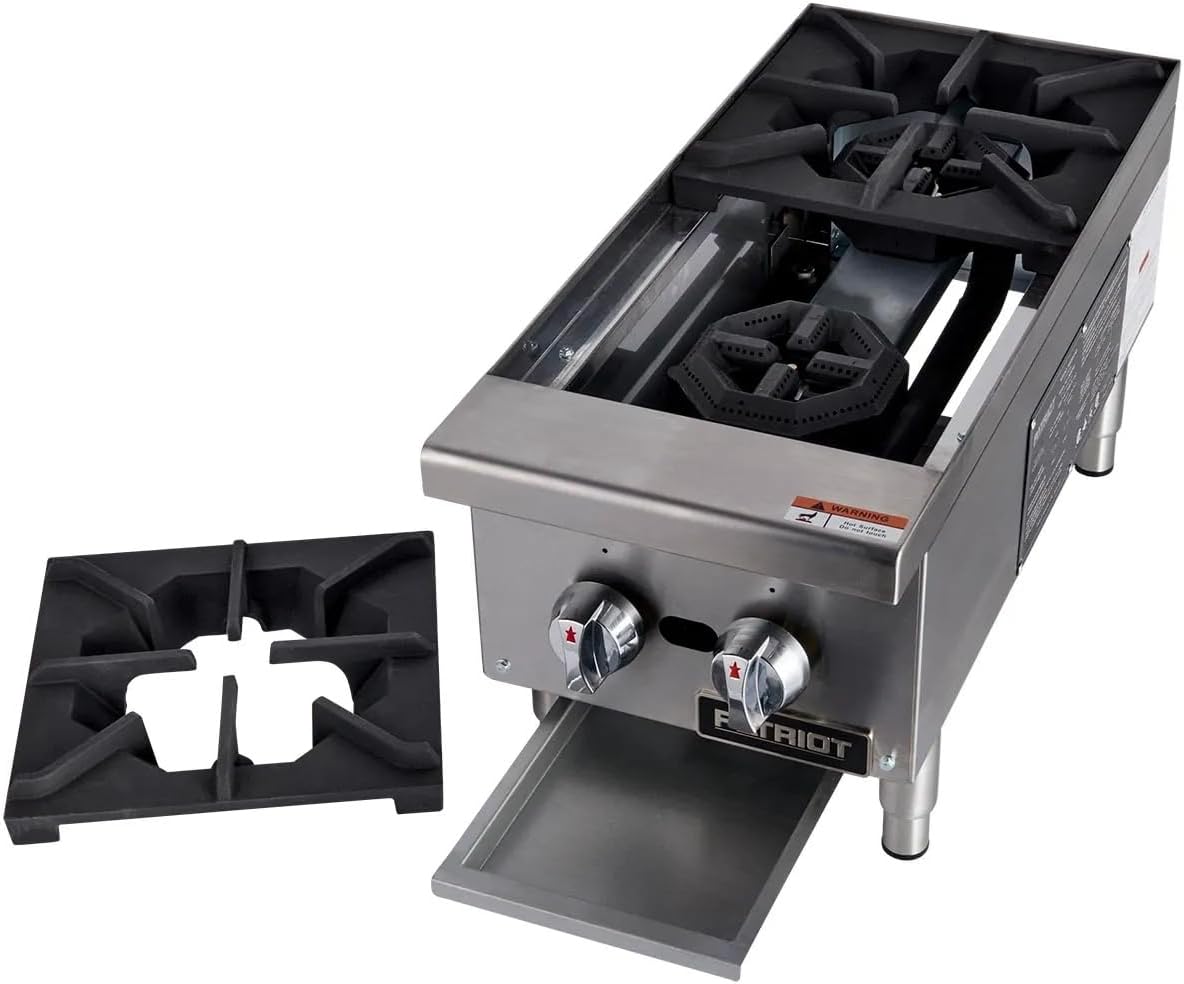
Image: The Patriot Commercial Gas Hot Plate with one burner grate removed and the stainless steel drip tray partially pulled out, demonstrating ease of cleaning.
5.2 Periodic Maintenance
- Periodically check gas connections for leaks.
- Inspect burner ports and pilot lights for blockages or debris. Clean as necessary.
- Ensure ventilation systems are clean and operating effectively.
- Any internal maintenance or repairs should be performed by a qualified service technician.
6. Troubleshooting
Before calling for service, review the following common issues and solutions:
| Problem | Possible Cause | Solution |
|---|---|---|
| Burner does not light. | No gas supply; Pilot light out; Clogged burner port. | Check main gas valve; Relight pilot; Clean burner ports. |
| Weak or yellow flame. | Improper air shutter adjustment; Low gas pressure; Clogged burner port. | Adjust air shutter (by technician); Verify gas pressure; Clean burner ports. |
| Gas odor detected. | Gas leak. | Immediately turn off gas supply. Evacuate area and call a qualified technician. Do not operate appliance. |
If troubleshooting steps do not resolve the issue, contact a qualified service technician.
7. Specifications
| Feature | Detail |
|---|---|
| Model | PT-HP12-M |
| Brand | Patriot |
| Heating Elements | 2 Burners |
| Total BTU Output | 50,000 BTU |
| Fuel Type | Natural Gas (convertible to LP with included kit) |
| Gas Connection | 3/4" Rear NPT |
| Material | Stainless Steel |
| Product Dimensions (D x W x H) | 29.33" x 12" x 13.5" |
| Item Weight | 150 Pounds |
| Special Features | Dual Burner, Removable Drip Tray, Separate Gas Valves, Pilot Lights |
8. Warranty and Support
This Patriot Commercial Gas Hot Plate is backed by a manufacturer's warranty. For specific warranty terms and conditions, please refer to the documentation provided with your purchase or contact Patriot customer support directly.
For technical assistance, parts, or service inquiries, please contact your authorized Patriot dealer or the manufacturer's customer service department. Ensure you have your model number (PT-HP12-M) and serial number available when contacting support.