
1. Introduction
The VCOROS VR1 Motorcycle Helmet Headset is engineered to provide a high-quality audio experience for single riders. It integrates seamlessly into most full-face and open-face helmets, offering clear sound for music, navigation, and phone calls. Key features include dual noise cancellation, AI voice assistant compatibility, and IPX6 waterproofing, ensuring reliable performance in various riding conditions.
2. What's in the Box
- VR1 Device (1)
- Speakers & Microphone (1)
- Clip-on Base (1)
- Velcro Package (1)
- Type-C Charging Cable (1)
- User Manual (1)
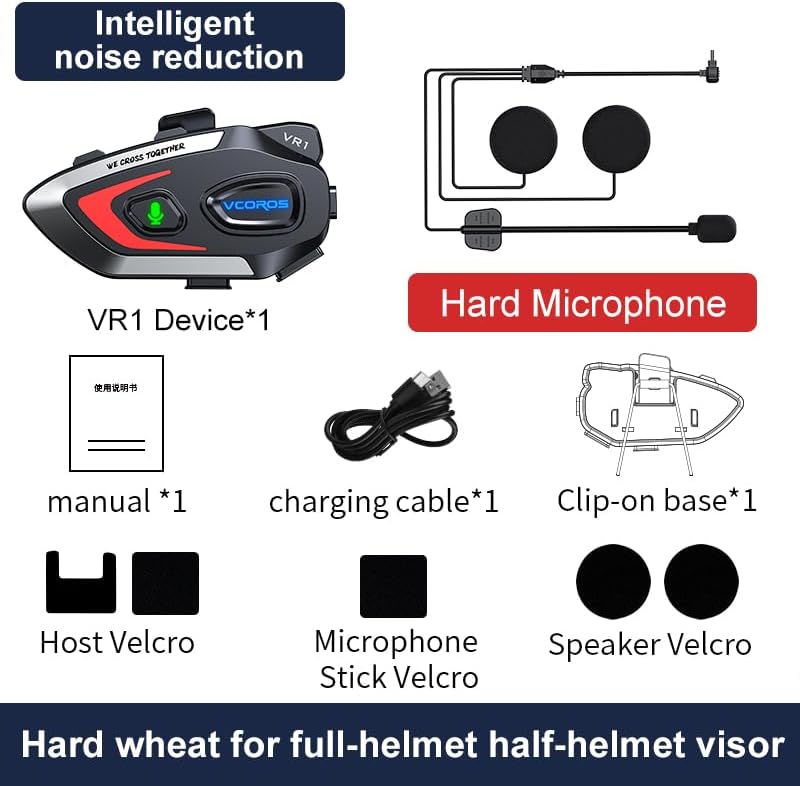
Figure 2.1: Package Contents for the VCOROS VR1 Hard Microphone model.
3. Product Overview
The VCOROS VR1 headset features an intuitive design for easy operation while riding. Familiarize yourself with the main unit and its components.

Figure 3.1: VCOROS VR1 Headset Controls and Ports.
Key Features:
- Long Battery Life: Built-in 1000mAh battery provides up to 25 hours of music playback and 20 hours of talk time.
- Dual Noise Reduction: CVC + DSP system for clear audio by reducing wind and road noise.
- AI Voice Assistant: Hands-free control for calls, music, and navigation.
- IPX6 Waterproof: Designed to withstand rain, dust, and splashes.
- Bluetooth 5.3: Stable connection, low latency, and improved sound quality.

Figure 3.2: Battery Life Overview.

Figure 3.3: Audio Components and Noise Cancellation.

Figure 3.4: Bluetooth 5.3 Wireless Chip.
4. Setup and Installation
Follow these steps to install your VCOROS VR1 headset into your motorcycle helmet. The installation process is designed for ease and a secure fit.
Installation Steps:
- Prepare the Helmet: Ensure the helmet's interior is clean and dry where the headset and speakers will be placed.
- Attach Velcro for Main Unit: Peel the backing from the large Velcro pad and firmly attach it to the side of your helmet where the main unit will be mounted.
- Attach Main Unit to Clip: Secure the VR1 main unit to the clip-on base.
- Mount Main Unit: Slide the clip-on base onto the edge of your helmet, ensuring it is securely fastened. Alternatively, use the adhesive Velcro for direct attachment to the helmet surface.
- Install Speakers: Identify the ear pockets inside your helmet. Attach the smaller circular Velcro pads to these areas. Peel the backing from the speaker Velcro and firmly press the speakers onto the helmet's interior, aligning them with your ears.
- Position Microphone: For the hard microphone, position it so that the microphone head is close to your mouth, typically along the chin bar of a full-face helmet. Use the provided Velcro to secure the microphone boom.
- Connect Components: Plug the speaker and microphone cables into the corresponding ports on the main VR1 unit.
- Route Cables: Carefully tuck all excess cables under the helmet's padding to prevent interference and ensure comfort.
Video 4.1: Detailed installation guide for the VCOROS VR1 Motorcycle Helmet Headset.
5. Operating Instructions
Power On/Off:
- Power On: Press and hold the Power button until the indicator light turns on.
- Power Off: Press and hold the Power button until the indicator light turns off.
Bluetooth Pairing:
- Ensure the headset is powered off.
- Press and hold the Power button until the indicator light flashes blue and red, indicating pairing mode.
- On your smartphone, enable Bluetooth and search for "VCOROS VR1".
- Select "VCOROS VR1" to connect. The indicator light will turn solid blue once paired.
Music Playback:
- Play/Pause: Short press the Play/Pause button.
- Next Song: Short press the Volume Up (+) button.
- Previous Song: Short press the Volume Down (-) button.
- Volume Adjustment: Long press the Volume Up (+) or Volume Down (-) button to increase or decrease volume.
Phone Calls:
- Answer Call: Short press the Play/Pause button.
- End Call: Short press the Play/Pause button during a call.
- Reject Call: Long press the Play/Pause button when an incoming call rings.
- Redial Last Number: Double-press the Play/Pause button.
- Automatic Answer: The headset supports automatic call answering after a few rings. This feature can typically be toggled on/off via your phone's Bluetooth settings or specific headset commands (refer to the included user manual for specific toggling instructions if available).
AI Voice Assistant:
The VR1 supports AI voice assistants (e.g., Siri, Google Assistant) for hands-free control.
- Activate Voice Assistant: Short press the AI Assistant button (microphone icon).

Figure 5.1: AI Voice Assistant Functionality.
6. Maintenance
- Cleaning: Wipe the headset unit with a soft, damp cloth. Do not use harsh chemicals or abrasive cleaners.
- Storage: Store the headset in a cool, dry place away from direct sunlight and extreme temperatures when not in use.
- Charging: Use only the provided Type-C charging cable. Avoid overcharging the battery.
- Water Resistance: While IPX6 waterproof, avoid submerging the device in water. Ensure the charging port cover is securely closed during wet conditions.

Figure 6.1: IPX6 Waterproof Rating.
7. Troubleshooting
| Problem | Possible Cause | Solution |
|---|---|---|
| Headset does not power on. | Low battery. | Charge the headset for at least 2.5 hours. |
| Cannot pair with smartphone. | Headset not in pairing mode; Bluetooth off on phone; too far from phone. | Ensure headset is in pairing mode (flashing blue/red). Turn on phone's Bluetooth. Keep devices within 1 meter during pairing. |
| No sound from speakers. | Speakers not connected; volume too low; incorrect audio output selected on phone. | Check speaker connection to main unit. Increase volume. Ensure phone's audio is routed to the headset. |
| Poor sound quality/noise. | Microphone/speakers improperly positioned; high wind noise; interference. | Adjust speaker and microphone position. Ensure microphone is not obstructed. Move away from sources of strong electromagnetic interference. |
| Voice assistant not responding. | Feature not enabled on phone; poor microphone connection. | Ensure voice assistant is enabled on your smartphone. Check microphone connection. |
8. Specifications
| Feature | Detail |
|---|---|
| Model Name | VR1 |
| Connectivity Technology | Wireless (Bluetooth 5.3) |
| Battery Capacity | 1000mAh |
| Music Playtime | Up to 25 hours |
| Talk Time | Up to 20 hours |
| Standby Time | 270 hours |
| Charging Time | Approx. 2.5 hours (Type-C) |
| Noise Reduction | CVC + DSP Dual Noise Cancellation |
| Waterproof Rating | IPX6 |
| Speaker Size | 93mm x 35mm x 51mm (unit dimensions) |
| Weight (bare unit) | 52g |
| Microphone Type | Hard Microphone |
9. Warranty and Support
VCOROS products are manufactured to high standards and undergo rigorous quality control. For detailed warranty information, product registration, or technical support, please refer to the warranty card included in your product packaging or visit the official VCOROS website. Keep your purchase receipt as proof of purchase for any warranty claims.
For further assistance, you may contact VCOROS customer service through the contact information provided on their official website or through the retailer where you purchased the product.
