
Introduction
This manual provides essential instructions for the safe and effective use of your Accessory USA AC Adapter Charger. This adapter is designed to provide reliable power to compatible devices, specifically the ALLPOWERS AP S300, AP-SS-005-BLA-USNEW, and FYD601504000H Power Stations. Please read this manual thoroughly before use and retain it for future reference.
Safety Information
Your Accessory USA AC Adapter Charger is designed with multiple safety features to protect both the adapter and your connected devices. Adherence to these guidelines ensures safe operation:
- Certifications: This product is CE, FCC, and RoHS certified, indicating compliance with health, safety, and environmental protection standards.
- Over Voltage Protection (OVP): Prevents damage from excessive input voltage.
- Over Current Protection (OCP): Safeguards against damage from excessive current flow.
- Short Circuit Protection (SCP): Automatically shuts down power in case of a short circuit to prevent damage.
Important Safety Precautions:
- Do not expose the adapter to water, moisture, or extreme temperatures.
- Do not disassemble or attempt to repair the adapter. Refer servicing to qualified personnel.
- Ensure the adapter is used with compatible devices only.
- Avoid placing heavy objects on the power cord.
- Unplug the adapter during lightning storms or when unused for long periods.
Product Overview
The Accessory USA AC Adapter Charger is a robust and compact power supply designed for durability and efficient charging. It features a sturdy build with high-quality materials for long-lasting performance.

Image: The main body of the Accessory USA AC Adapter Charger, showcasing its compact design and durable casing.
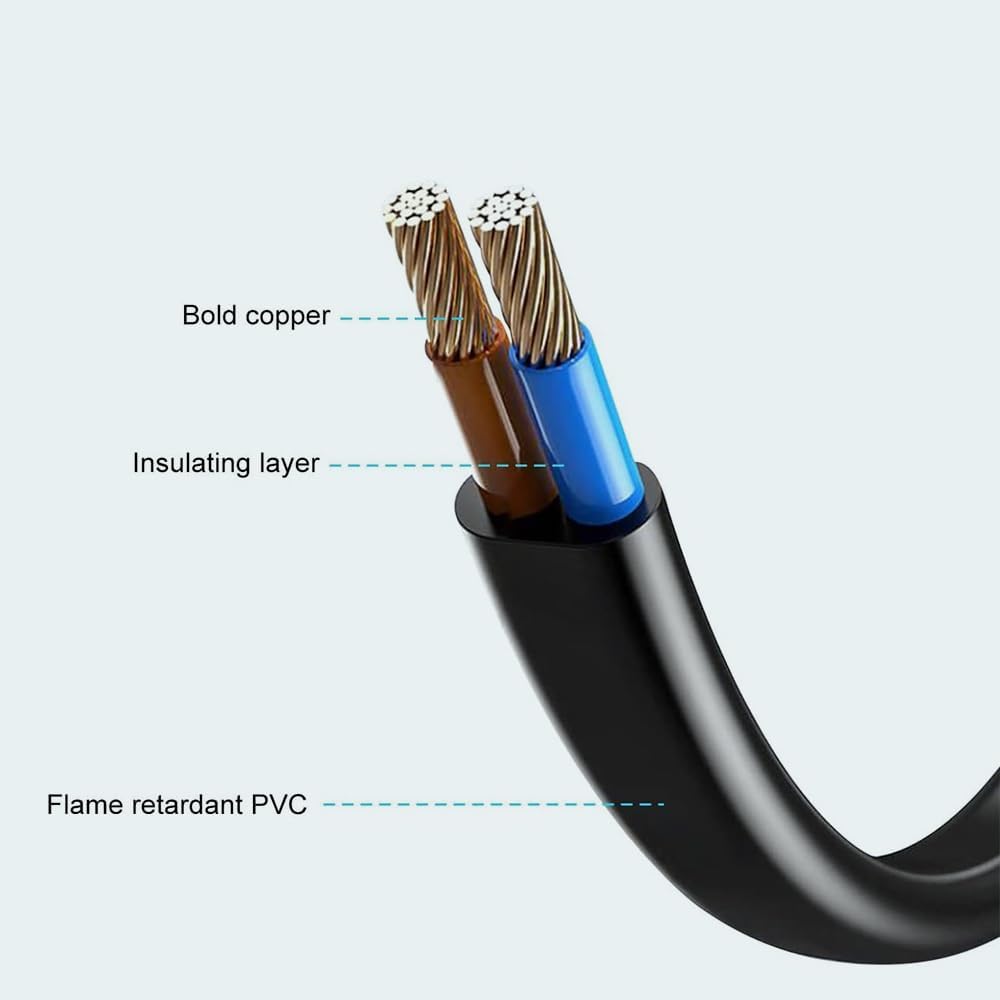
Image: Cross-section view of the power cable, illustrating its internal structure with bold copper conductors, an insulating layer, and a flame-retardant PVC outer sheath for enhanced safety and durability.

Image: Detailed view of the adapter's features, including the 2-pin plug for convenient connection, the robust copper interface ensuring stable output, and the overall construction from high-quality materials designed to support significant weight.
Setup
- Unpack: Carefully remove the AC adapter from its packaging. Inspect for any visible damage.
- Identify Ports: Locate the power input port on your ALLPOWERS AP S300 Power Station (or compatible model).
- Connect Adapter to Device: Insert the DC output connector of the AC adapter firmly into the power input port of your power station. Ensure a snug fit.
- Connect to Power Outlet: Plug the AC input cord of the adapter into a standard 120V AC wall outlet.
- Verify Connection: Confirm that the adapter is securely connected to both the power station and the wall outlet.
Operating Instructions
Once the adapter is properly set up, it will begin to supply power to your connected device.
- Charging: When connected to a compatible power station, the adapter will initiate the charging process. Refer to your power station's manual for specific charging indicators and times.
- Power Supply: The adapter can also be used to power the device directly if it supports pass-through charging or direct operation from an AC source.
- Disconnection: To disconnect, first unplug the AC adapter from the wall outlet, then disconnect the DC output connector from your power station.
Maintenance
Proper maintenance ensures the longevity and optimal performance of your AC adapter.
- Cleaning: Use a soft, dry cloth to clean the adapter. Do not use liquid cleaners or solvents.
- Storage: Store the adapter in a cool, dry place away from direct sunlight and extreme temperatures when not in use.
- Cable Care: Avoid bending or kinking the power cord sharply. Do not wrap the cord too tightly around the adapter.
- Inspection: Periodically inspect the adapter and cables for any signs of wear, cuts, or damage. Discontinue use if damage is found.
Troubleshooting
If you encounter issues with your AC adapter, refer to the following common troubleshooting steps:
- No Power/Charging:
- Ensure all connections are secure between the adapter, the power station, and the wall outlet.
- Test the wall outlet with another device to confirm it is functional.
- Check the adapter and cables for any visible damage.
- Intermittent Connection:
- Ensure the DC connector is fully inserted into the power station's port.
- Avoid moving the power station or adapter excessively while connected.
- Adapter Feels Hot:
- It is normal for the adapter to feel warm during operation. However, if it becomes excessively hot, disconnect it immediately.
- Ensure adequate ventilation around the adapter; do not cover it.
If problems persist after attempting these steps, please contact customer support.
Specifications
| Feature | Detail |
|---|---|
| Brand | Accessory USA |
| Model Name | ACC-410-192 |
| Model Number | BBB-25041011-192 |
| Compatible Devices | ALLPOWERS AP S300, AP-SS-005-BLA-USNEW, FYD601504000H Power Station |
| Input Voltage | 120 Volts (AC) |
| Power Source | Corded Electric |
| Connector Type | Standard DC Connector |
| Special Features | Short Circuit Protection, Over Voltage Protection, Over Current Protection |
| Color | Black |
| Item Weight | 3 Ounces |
| Manufacturer | Accessory USA |
Warranty and Support
For warranty information or technical support, please refer to the documentation provided with your purchase or contact Accessory USA customer service directly. Keep your purchase receipt as proof of purchase.
Contact Information: Please visit the official Accessory USA website for the most current contact details and support resources.
