
1. Product Overview
The Mirfee 65L Electronic Cigar Humidor is designed to provide an optimal environment for cigar storage, featuring intelligent temperature and humidity control. This humidor ensures your cigars are preserved under ideal conditions, maintaining their quality and flavor.
Key Features:
- Intelligent Temperature Control: Adjustable heating and cooling functions maintain a stable, precise temperature.
- Intelligent Humidity Control: High-precision sensors and an advanced humidification device ensure consistent humidity levels.
- 65L Large Capacity: Accommodates approximately 500 cigars, with cleverly arranged Spanish cedar wood drawers and shelves for optimal air circulation.
- Innovative Touch Panel: Easy control of temperature, humidity, and LED lighting.
- Silent Operation: Optimized technology ensures quiet performance.
- Secure Lockable Door: Double-layer glass door with a lock for protection.
- UV Protection Glass Door: Shields cigars from harmful UV rays.
- Built-in LED Lighting: 6500K LED light for clear visibility of your collection.
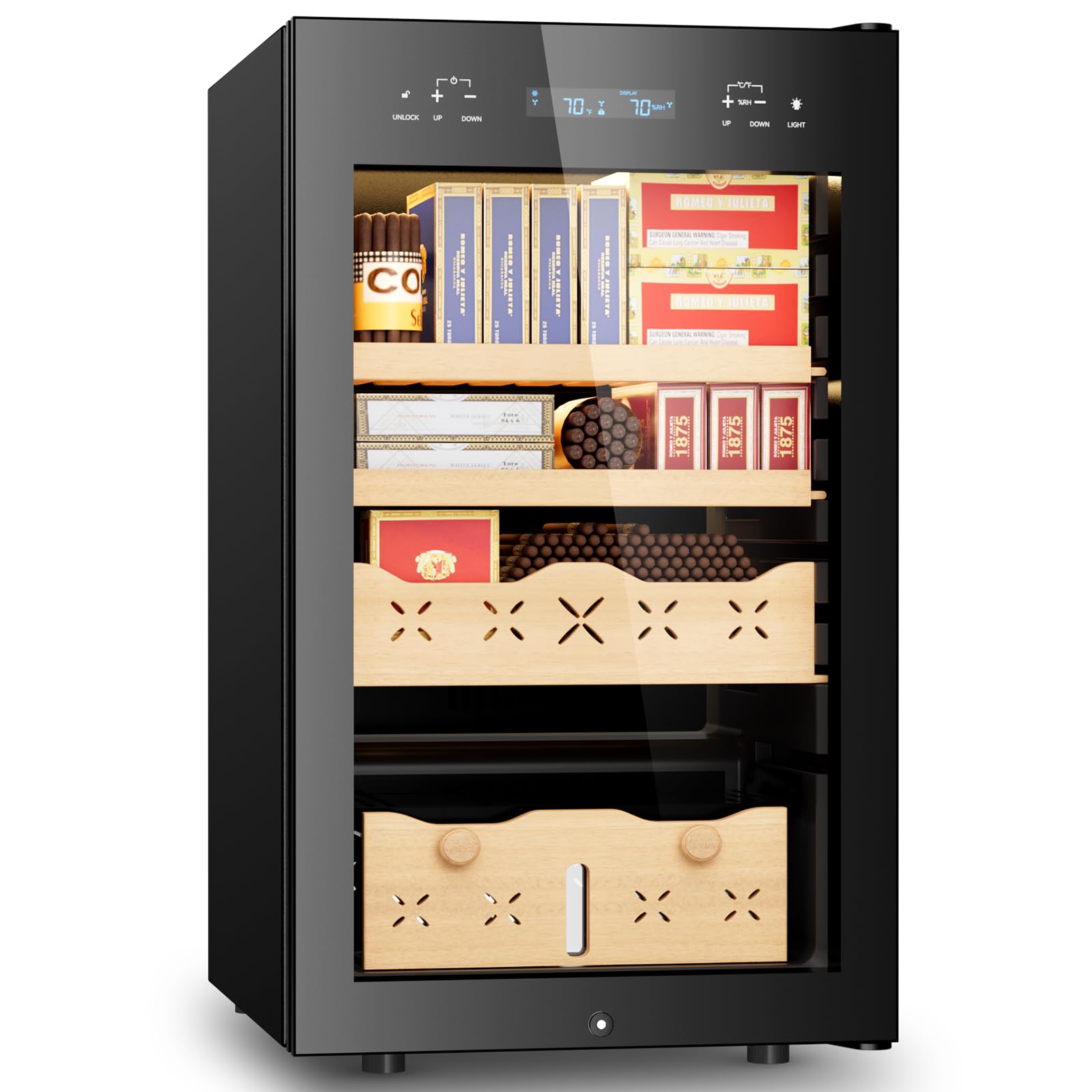
Front view of the Mirfee 65L Electronic Cigar Humidor.

The Mirfee 65L Electronic Cigar Humidor with its interior shelves and cigars.
2. Safety Instructions
Please read all safety instructions carefully before operating the humidor to prevent damage or injury.
- Ensure the humidor is placed on a stable, level surface to prevent tipping.
- Do not block ventilation openings. Allow adequate space around the unit for proper airflow.
- Keep the humidor away from direct sunlight, heat sources, and extreme temperatures.
- Use only the provided power cord and connect to a grounded electrical outlet.
- Do not immerse the appliance, cord, or plug in water or other liquids.
- Unplug the humidor before cleaning or performing any maintenance.
- Keep out of reach of children and pets.
- Do not store flammable or explosive materials inside the humidor.
3. Setup and Installation
3.1 Unpacking
- Carefully remove the humidor from its packaging.
- Inspect the unit for any shipping damage. If damaged, contact customer service immediately.
- Remove all internal packing materials, including any protective films or tapes.
3.2 Placement
- Place the humidor on a firm, level floor or counter that can support its weight when fully loaded.
- Ensure there is at least 5 inches (12.7 cm) of space at the back and sides for proper ventilation.
- Avoid placing the humidor near heat-generating appliances (e.g., oven, dishwasher) or in direct sunlight.
- The ambient room temperature should be between 50°F (10°C) and 80°F (27°C) for optimal performance.
3.3 Initial Power-On and Seasoning
- After placement, allow the humidor to stand upright for at least 2 hours before plugging it in. This allows the compressor fluids to settle.
- Plug the power cord into a grounded electrical outlet.
- The display will illuminate, and the unit will begin to cool/heat to the default settings.
- Seasoning the Cedar Wood: Before storing cigars, the Spanish cedar wood drawers and shelves must be seasoned to prevent them from absorbing moisture from your cigars.
- Wipe down the interior cedar surfaces with a clean cloth lightly dampened with distilled water. Do not saturate the wood.
- Place a small container of distilled water inside the humidor for 24-48 hours with the door closed.
- Set the desired humidity level (typically 65-75% RH) and allow the humidor to stabilize for at least 24 hours before adding cigars.
4. Operating Instructions
The humidor features an intuitive touch control panel for easy adjustment of settings.

Detailed diagram of the control panel functions.
4.1 Control Panel Functions
- UNLOCK: Press and hold for 3 seconds to unlock the control panel.
- Temperature Adjustment (UP/DOWN): Touch the '+' or '-' buttons below the temperature display to increase or decrease the temperature.
- Humidity Adjustment (UP/DOWN): Touch the '+' or '-' buttons below the humidity display to increase or decrease the humidity.
- Fahrenheit/Celsius Switch: Touch '+' and '-' buttons simultaneously (below temperature display) to switch between °F and °C.
- Light Control: Touch the light bulb icon to turn the internal LED light on or off.
- Door Open/Close Alarm: Touch '+' and '-' buttons simultaneously (below UNLOCK) to open or close the humidor (this likely refers to an alarm setting, not physically opening/closing the door).
4.2 Setting Temperature and Humidity
- Unlock the control panel by pressing and holding the UNLOCK button for 3 seconds.
- Use the temperature UP/DOWN buttons to set your desired temperature. The recommended range for cigars is typically 64-70°F (18-21°C).
- Use the humidity UP/DOWN buttons to set your desired humidity level. The recommended range for cigars is typically 65-75% RH.
- The display will flash while adjusting and then stabilize to show the current internal conditions.

The humidor's precise humidity control system, maintaining 65-75% RH.

Spanish cedar wood drawers, known for repelling bugs, controlling humidity, and enhancing cigar flavor.
5. Maintenance
5.1 Cleaning the Humidor
- Exterior: Wipe the exterior surfaces with a soft, damp cloth. Avoid abrasive cleaners or solvents.
- Interior: For the glass interior, use a mild glass cleaner on a cloth, then wipe with a clean, damp cloth. For cedar wood, only wipe with a cloth lightly dampened with distilled water. Do not use chemical cleaners on cedar.
- Ensure the humidor is unplugged before cleaning.
5.2 Water Reservoir (Humidification System)
- Regularly check the water level in the humidification device located at the bottom of the humidor.
- Refill with distilled water only. Tap water contains minerals that can lead to mineral buildup and affect performance.
- Clean the reservoir periodically to prevent mold or mildew growth.
5.3 Spanish Cedar Wood Care
- The cedar wood helps regulate humidity and imparts a desirable aroma to cigars.
- Avoid using any oils or polishes on the cedar, as this can interfere with its natural properties.
- If the cedar appears dry, lightly wipe it with a cloth dampened with distilled water during seasoning.
6. Troubleshooting
Refer to this section for common issues and their solutions.
| Problem | Possible Cause | Solution |
|---|---|---|
| Humidor not cooling/heating | Power cord unplugged; Power outage; Temperature setting too high/low; Poor ventilation. | Check power connection; Restore power; Adjust temperature setting; Ensure adequate space around the unit. |
| Humidity not stable | Water reservoir empty; Door not sealed properly; Humidor not seasoned; Ambient humidity too extreme. | Refill water reservoir with distilled water; Check door seal; Season the humidor; Relocate humidor to a more stable environment. |
| Display not working | Power issue; Control panel locked. | Check power; Unlock control panel by pressing and holding UNLOCK for 3 seconds. |
| Excessive noise | Unit not level; Obstruction near fan. | Ensure humidor is on a level surface; Check for any obstructions around the internal fan. |
7. Specifications
| Feature | Detail |
|---|---|
| Brand | Mirfee |
| Model | 65L |
| Capacity | 65 Liters (approx. 500 cigars) |
| Dimensions (D x W x H) | 19.8" x 22.2" x 32" (50.3cm x 56.4cm x 81.3cm) |
| Material | Cedar wood interior, Glass door |
| Color | Black |
| Special Features | Lockable door, Intelligent Temperature & Humidity Control, LED Lighting, UV Protection Glass |
| UPC | 623128448426 |

Dimensions and capacity details of the humidor.
8. Warranty and Support
Mirfee products are manufactured to high-quality standards. For specific warranty details, please refer to the warranty card included with your purchase or contact Mirfee customer support.
Customer Support:
- For technical assistance, troubleshooting, or warranty claims, please contact Mirfee customer service.
- Have your model number (65L) and purchase date ready when contacting support.
- You may find contact information on the Mirfee official website or within your product packaging.