
1. Introduction
Thank you for purchasing the THINKYA TH-A10 Portable CD Player. This device combines classic CD playback with modern connectivity options, including Bluetooth 5.1, USB, AUX, and optical output. Designed for high-fidelity audio, it features built-in stereo speakers, a rechargeable battery, and anti-skip protection for stable playback. Please read this manual thoroughly before use to ensure proper operation and to maximize your listening experience.

Image: The THINKYA TH-A10 Portable CD Player, highlighting its elegant wooden finish and compact form factor.
2. Product Overview
2.1 Components and Controls
The TH-A10 CD player is designed with user-friendly controls and a robust build. It features a wooden cabinet for enhanced sound quality and reduced resonance.
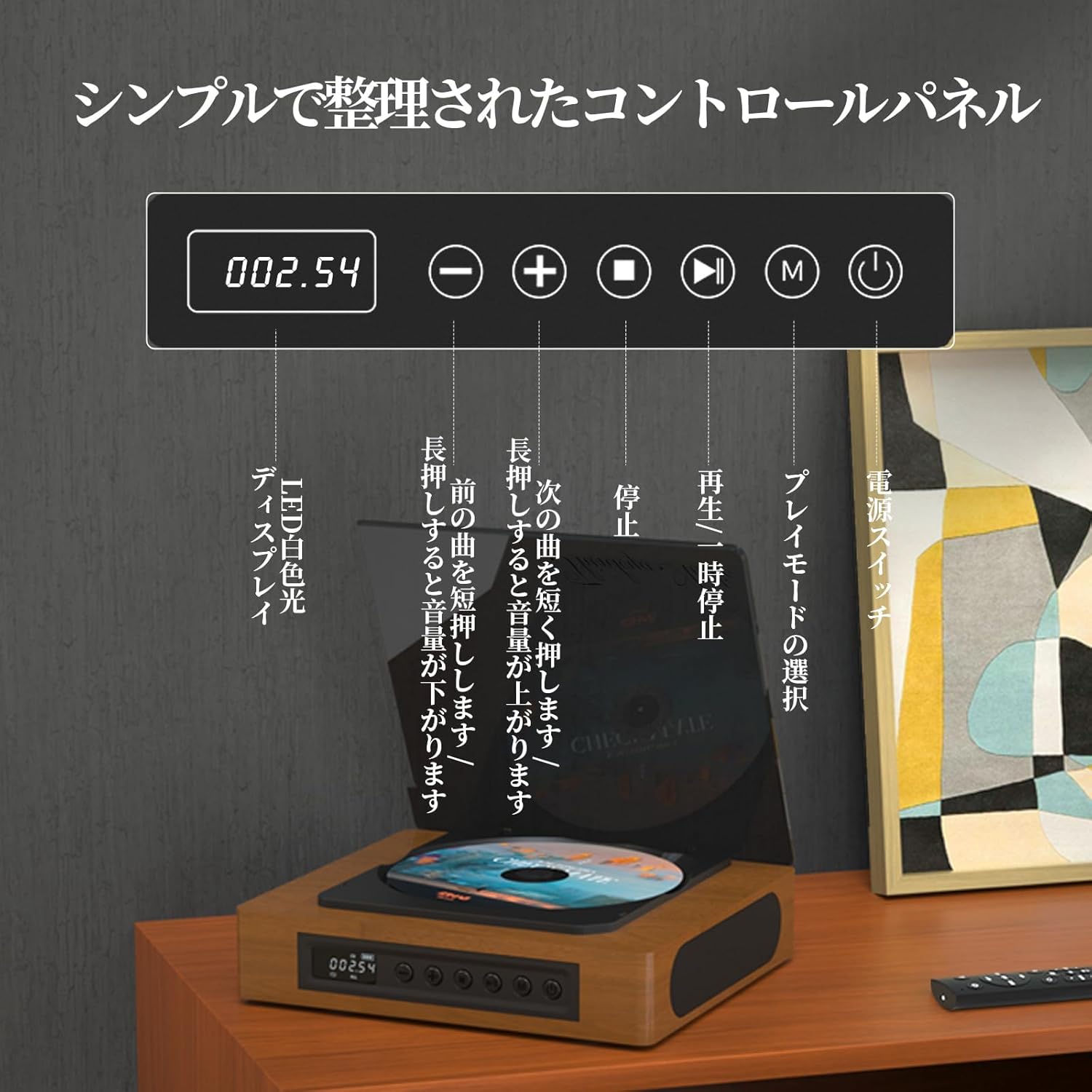
Image: The control panel and LED display of the TH-A10 CD Player. The LED display shows track number and time, while buttons control playback, volume, and mode selection.
Control Panel Functions:
- LED Display: Shows current track, time, and mode.
- Power Switch: Turns the device on/off.
- Play/Pause Button: Starts or pauses playback.
- Previous/Volume Down Button: Short press for previous track, long press to decrease volume.
- Next/Volume Up Button: Short press for next track, long press to increase volume.
- Stop Button: Stops playback.
- Mode Button (M): Selects playback mode (CD, Bluetooth, USB, AUX, Optical).

Image: Detailed view of the LED display, indicating operational status and battery level.
2.2 Rear Panel Connections
The rear panel provides various ports for external connections.

Image: The rear panel of the TH-A10, displaying the various input/output ports including USB, AUX, Type-C for charging, and Optical output.
Ports:
- DC IN (Type-C): For charging the internal battery or powering the device.
- USB Port: For playing audio files from a USB memory stick.
- AUX IN/OUT (3.5mm Jack): For connecting external audio devices or outputting audio to headphones/speakers.
- Optical Output (SPDIF): For connecting to an external amplifier or DAC for high-fidelity audio.
3. Setup
3.1 Powering On and Charging
- Connect the provided Type-C charging cable to the DC IN port on the rear of the player.
- Connect the other end of the cable to a USB power adapter (not included) or a powered USB port.
- The LED display will indicate charging status. A full charge provides approximately 6 hours of playback.
- Press the Power Switch to turn on the device.

Image: Charging options for the TH-A10, including wall adapter, car charger, and power bank, connected via the Type-C port.
3.2 Initial Placement
Place the CD player on a stable, flat surface. Ensure adequate ventilation around the unit.
4. Operating Instructions
4.1 CD Playback
- Gently open the dust cover.
- Place a CD (CD, CD-R, CD-RW) onto the spindle, label side up.
- Close the dust cover.
- Press the 'M' (Mode) button until 'CD' mode is selected.
- Press the Play/Pause button to start playback.
- Use the Previous/Next buttons to skip tracks. Long press for volume adjustment.
Note: This player does not support Blu-ray discs.

Image: Playback modes (sequential, repeat one, repeat all, random) and the ASP anti-shock function are shown, indicating versatile and stable audio experience.
4.2 Bluetooth Operation (Receive/Transmit)
The TH-A10 supports Bluetooth 5.1 for both receiving and transmitting audio.

Image: The TH-A10's Bluetooth functionality, demonstrating connections to various devices like smartphones, tablets (receiving), and Bluetooth speakers or headphones (transmitting).
4.2.1 Bluetooth Receive Mode:
- Press the 'M' (Mode) button until 'BT' mode is selected. The LED display will show 'BT' and flash, indicating pairing mode.
- On your smartphone or tablet, enable Bluetooth and search for available devices.
- Select 'TH-A10' from the list to pair. Once connected, the 'BT' indicator will stop flashing.
- You can now play audio from your device through the TH-A10's speakers.
4.2.2 Bluetooth Transmit Mode:
- Ensure your Bluetooth headphones or speaker are in pairing mode.
- Press the 'M' (Mode) button until 'BT' mode is selected.
- The TH-A10 will automatically search for nearby Bluetooth receiving devices.
- Once connected, audio from the CD player (or other selected source) will be transmitted to your Bluetooth headphones/speaker.
4.3 USB Playback
- Insert a USB memory stick containing MP3, WMA, or WAV audio files into the USB port on the rear panel.
- Press the 'M' (Mode) button until 'USB' mode is selected.
- The player will automatically begin playing audio files from the USB stick.
4.4 AUX Input/Output
4.4.1 AUX Input:
- Connect an external audio device (e.g., smartphone, MP3 player) to the AUX port using a 3.5mm audio cable.
- Press the 'M' (Mode) button until 'AUX' mode is selected.
- Play audio from your external device. The sound will be output through the TH-A10's speakers.
4.4.2 AUX Output (Headphones/External Speakers):
- Connect headphones or external speakers to the AUX port using a 3.5mm audio cable.
- Select your desired playback mode (CD, Bluetooth, USB).
- Audio will be routed to the connected headphones or external speakers.
4.5 Optical Output
For the highest audio fidelity, use the optical output.
- Connect an optical cable (not included) from the SPDIF Optical Output port on the TH-A10 to an optical input on your amplifier or DAC.
- Select the optical input on your amplifier/DAC.
- Play audio from the TH-A10 (CD, USB, or Bluetooth source).
4.6 Remote Control
The included remote control allows for convenient operation from a distance of up to 10 meters.
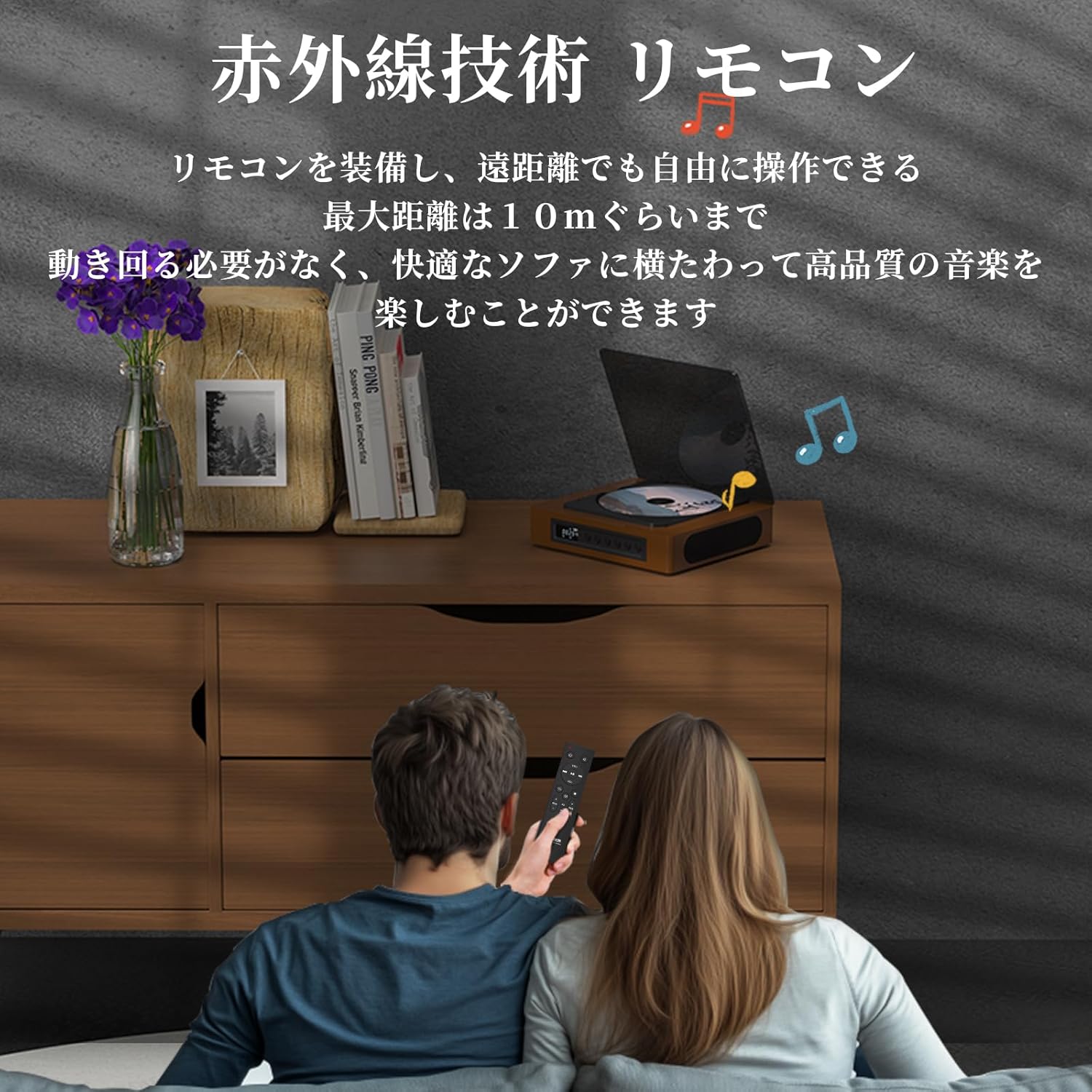
Image: A couple using the remote control for the TH-A10 CD Player, demonstrating its convenience for remote operation.
5. Maintenance
5.1 Cleaning
- Wipe the exterior of the unit with a soft, dry cloth.
- For the CD lens, use a specialized CD lens cleaner. Do not touch the lens directly.
- Keep the transparent dust cover clean to prevent dust accumulation on the CD.

Image: The transparent dust cover of the TH-A10, designed to protect the CD mechanism from dust and moisture.
5.2 Storage
When not in use for extended periods, store the player in a cool, dry place away from direct sunlight and extreme temperatures.
6. Troubleshooting
| Problem | Possible Cause | Solution |
|---|---|---|
| No power | Battery drained; Power cable not connected. | Charge the battery; Ensure power cable is securely connected. |
| CD not playing | CD inserted incorrectly; Disc is dirty or scratched; Incorrect mode selected; Blu-ray disc inserted. | Reinsert CD correctly; Clean or replace disc; Select 'CD' mode; Blu-ray discs are not supported. |
| No sound from speakers | Volume too low; Mute activated; External headphones/speakers connected to AUX out. | Increase volume; Check mute status; Disconnect external audio devices from AUX out if using internal speakers. |
| Bluetooth pairing failed | Device not in pairing mode; Out of range; Interference. | Ensure both devices are in pairing mode; Move devices closer; Restart Bluetooth on both devices. |
| Skipping during CD playback | Player is unstable; Disc is damaged; Excessive vibration. | Place player on a stable surface; Clean or replace disc; ASP anti-shock function is active for minor vibrations. |
7. Specifications
| Feature | Detail |
|---|---|
| Model Number | TH-A10 |
| Brand | THINKYA |
| Connectivity | Bluetooth 5.1 (Receive/Transmit), USB, AUX (3.5mm), Optical (SPDIF), Type-C (Power) |
| Supported Disc Formats | CD, CD-R, CD-RW (Not compatible with Blu-ray discs) |
| Supported Audio Formats | MP3, WMA, WAV, APE, FLAC (from USB) |
| Battery Capacity | 2600mAh |
| Playback Time (Battery) | Approx. 6-8 hours (depending on usage) |
| Speakers | Built-in Stereo Speakers (2x50mm Neodymium Iron Boron Magnetic Units) |
| Anti-Shock Protection (ASP) | 60 seconds for CD, 120 seconds for MP3 |
| Dimensions (L x W x H) | 17.8 x 15.8 x 4.85 cm |
| Weight | 1.12 kg |
| Accessories Included | CD Player, Audio Line, Type-C Charging Cable, Remote Control, Instruction Manual |
8. Warranty and Support
8.1 Warranty Information
This THINKYA TH-A10 CD Player comes with a 1-year warranty from the date of purchase. This warranty covers defects in materials and workmanship under normal use. If the product fails due to a manufacturing defect within this period, we will provide a free replacement. Please retain your proof of purchase for warranty claims.
Note: The warranty does not cover damage caused by misuse, accident, unauthorized modification, or normal wear and tear.
8.2 Customer Support
For any questions, technical assistance, or warranty claims, please contact THINKYA customer support through the retailer where you purchased the product. Our team is dedicated to providing prompt and helpful service.


