
GEOID BM05
GEOID BM05 Bike Computer Mount Instruction Manual
Model: BM05
Brand: GEOID
1. Introduction
The GEOID BM05 Bike Computer Mount is designed to securely attach your cycling computer, action camera, and bike light to your bicycle's handlebars. Crafted from high-strength Nylon Plastic, this mount offers excellent shock resistance and durability while maintaining a lightweight profile. It is compatible with a wide range of bike computers and accessories, enhancing your cycling experience.
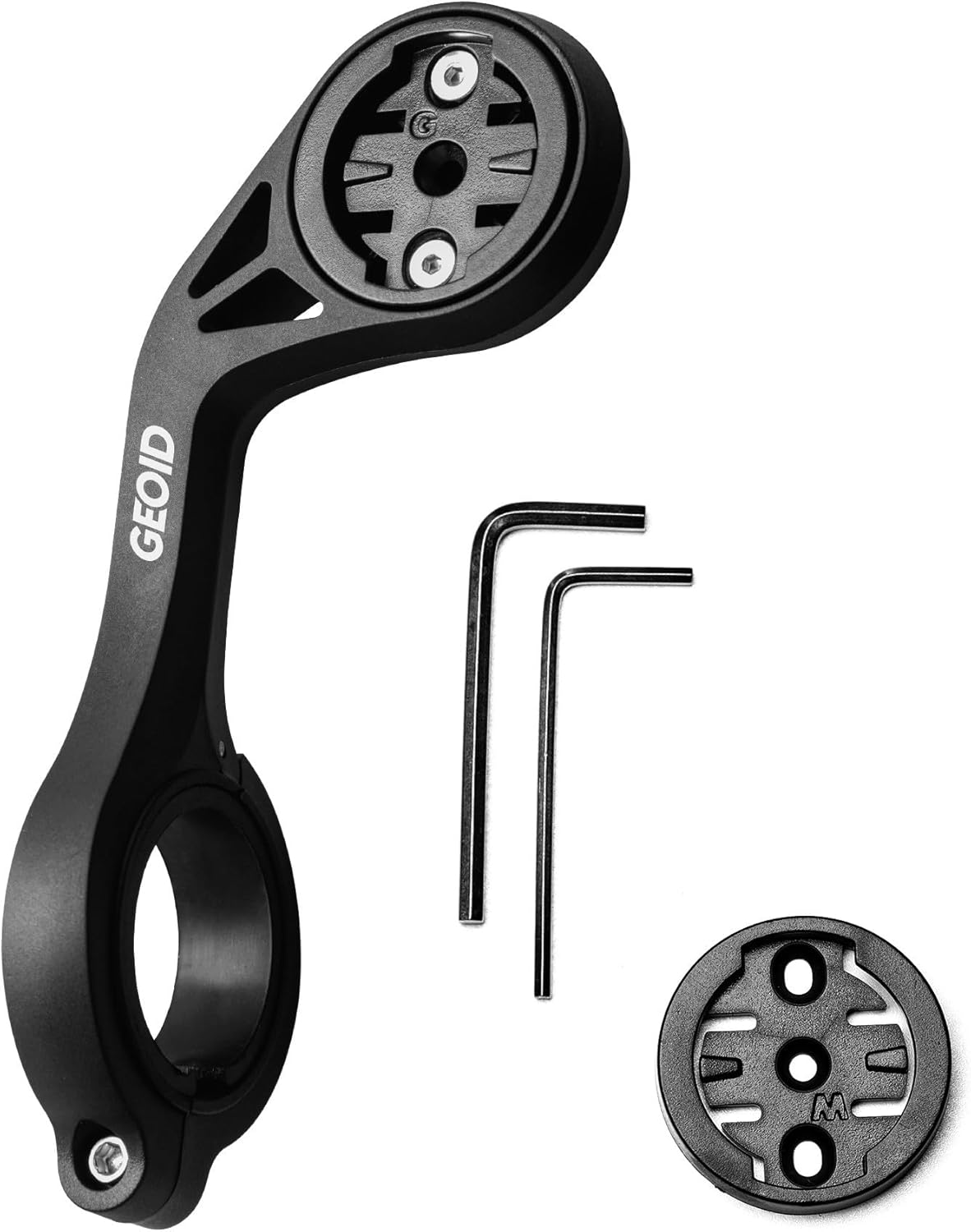
Figure 1: GEOID BM05 Bike Computer Mount and included accessories.
2. Package Contents
Please verify that all items listed below are included in your package:
- Mount body ×1
- Wahoo-compatible bike computer base ×1
- GARMIN standard code table base ×1 (pre-installed on the mount body)
- 3mm hex key ×1
- 2mm hex key ×1

Figure 2: All components included in the BM05 package.
3. Specifications
| Name | Bike Computer Mount |
| Model | BM05 |
| Dimensions | 135*56*47mm (approx. 5.3 x 2.2 x 1.85 inches) |
| Weight | ~44g (approx. 1.55 ounces) |
| Compatible Handlebar Diameter | 31.8mm |
| Material | Nylon Plastic |
| Compatibility | GEOID, Garmin, Wahoo, Bryton, Magene, Cycplus, CooSpo, XOSS bike computers; GoPro action cameras; Bike lights |
| Color | Black |
| Special Features | Lightweight, Rust Resistant, Anti-slip Design |
Note: All data are laboratory measurements; actual product may vary slightly.
4. Setup and Installation
Follow these steps to properly install the GEOID BM05 Bike Computer Mount on your bicycle's handlebars.
4.1 Attaching the Mount to the Handlebar
- Identify the optimal position on your 31.8mm diameter handlebar for the mount. Ensure it does not obstruct your view or interfere with other controls.
- Loosen the screw on the handlebar clamp of the mount using the provided 3mm hex key.
- Carefully open the clamp and position it around your handlebar.
- Close the clamp and align the mount. Ensure the thickened anti-slip rubber pads are properly seated to enhance grip and reduce vibration.
- Tighten the screw with the 3mm hex key until the mount is secure and does not rotate freely. Do not overtighten.

Figure 3: Mount securely attached to the handlebar.
4.2 Installing Bike Computer Base (if changing from Garmin to Wahoo)
The mount comes with a Garmin-compatible base pre-installed. If you use a Wahoo computer, you will need to swap the base.
- Using the 2mm hex key, unscrew the two small screws holding the pre-installed Garmin base on the top of the mount body.
- Remove the Garmin base.
- Place the Wahoo-compatible base into position, aligning the screw holes.
- Secure the Wahoo base with the two small screws using the 2mm hex key. Ensure it is firmly attached.

Figure 4: Detail of the computer base attachment.
5. Operating Instructions
Once the mount is installed, you can attach your compatible devices.
5.1 Attaching a Bike Computer
Align your bike computer with the corresponding base on the mount (Garmin, Wahoo, Bryton, Magene, Cycplus, CooSpo, XOSS). Gently push down and twist the computer clockwise until it clicks securely into place.

Figure 5: Bike computer attached to the mount.
5.2 Attaching a GoPro Action Camera or Bike Light
The mount features an integrated bracket for GoPro action cameras and compatible bike lights. Slide your GoPro or light into the bracket from the front until it locks into place. Ensure it is firmly seated before riding.

Figure 6: Mount with attached GoPro action camera and bike light.
To remove, press the release tab (if present on your accessory) and slide the device out.
6. Maintenance
Regular maintenance ensures the longevity and optimal performance of your GEOID BM05 Bike Computer Mount.
- Cleaning: Wipe the mount with a damp cloth to remove dirt and grime. Avoid using harsh chemicals or abrasive cleaners.
- Inspection: Periodically check all screws for tightness, especially the handlebar clamp screw and the computer base screws. Retighten if necessary using the appropriate hex key.
- Storage: If removing the mount for extended periods, store it in a clean, dry place away from direct sunlight and extreme temperatures.
7. Troubleshooting
If you encounter any issues with your GEOID BM05 Bike Computer Mount, refer to the following common problems and solutions:
| Problem | Solution |
|---|---|
| Mount is loose on the handlebar. | Ensure the handlebar clamp screw is tightened sufficiently with the 3mm hex key. Verify that the mount is positioned correctly on a 31.8mm handlebar. |
| Bike computer does not fit or is loose. | Confirm you are using the correct computer base (Garmin or Wahoo) for your device. Ensure the base is securely screwed onto the mount body using the 2mm hex key. |
| GoPro or bike light is not secure. | Ensure the accessory is fully slid into the integrated bracket until it locks. Check for any debris in the bracket that might prevent a secure fit. |
8. Warranty and Support
For any questions, concerns, or technical support regarding your GEOID BM05 Bike Computer Mount, please contact GEOID customer service through the retailer where you purchased the product or visit the official GEOID store on Amazon:
Please retain your proof of purchase for warranty claims, if applicable.
Ask a question about this manual
Ask about setup, troubleshooting, compatibility, parts, safety, or missing instructions. Manuals+ will review the question and use this page’s manual context to help answer it.