
radius HP-H10BT
radius HP-H10BT Wireless Ear-hug Earphones User Manual
Model: HP-H10BT
1. Introduction
This manual provides detailed instructions for the safe and effective use of your radius HP-H10BT Wireless Ear-hug Earphones. Please read this manual thoroughly before using the product and retain it for future reference. These earphones are designed for comfortable, open-ear listening, allowing you to enjoy audio while remaining aware of your surroundings.
2. Product Overview
Key Features
- Stress-free wearing comfort with an ear-cuff design.
- Open-ear listening structure for situational awareness.
- Sound that integrates seamlessly with daily life.
- Up to 25 hours of total battery life with the charging case.
- IPX4 splash-proof rating for protection against sweat and light rain.
- Compact charging case designed to fit comfortably in your palm.
- Intuitive touch controls for easy operation.
Package Contents
- radius HP-H10BT Wireless Ear-hug Earphones (Left & Right)
- Charging Case
- USB-C to USB-A Charging Cable
- User Manual (includes Warranty Information)
Product Diagram
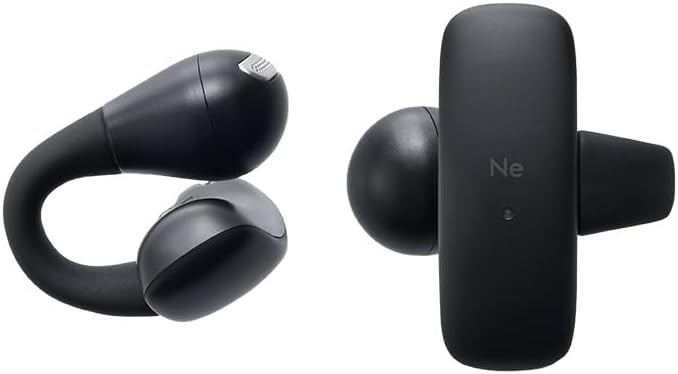
Image: The radius HP-H10BT earphones, shown both individually and stored within their compact charging case.
3. Setup
3.1 Charging the Earphones and Case
- Place both left and right earphones into their respective slots in the charging case. Ensure they are seated correctly.
- Connect the provided USB-C to USB-A charging cable to the charging port on the case and then to a USB power source (e.g., computer, USB wall adapter).
- The indicator lights on the charging case will show the charging status. Refer to the specific light patterns in the manual for full details.
- A full charge provides up to 25 hours of total playback time with the charging case.

Image: The HP-H10BT earphones and their charging case positioned beside a laptop, symbolizing their long battery life and charging convenience.
3.2 Pairing with a Bluetooth Device
- Open the charging case. The earphones will automatically enter pairing mode, indicated by a flashing LED light (refer to the manual for specific light patterns).
- On your smartphone or other Bluetooth-enabled device, go to the Bluetooth settings and ensure Bluetooth is turned on.
- Select "HP-H10BT" from the list of available devices.
- Once connected, a voice prompt or LED indicator will confirm successful pairing.
3.3 Wearing the Earphones
- Identify the Left (L) and Right (R) earphones.
- Gently hook the earphone over your ear, ensuring the flexible bridge rests comfortably and securely. The speaker should be positioned near your ear canal without blocking it, allowing for open-ear listening.
- Adjust the earphone for a comfortable and stable fit.

Image: A visual representation of the earphone's flexible bridge and its ergonomic design for a comfortable, stress-free fit on the ear.
4. Operating Instructions
4.1 Power On/Off
The earphones automatically power on when removed from the charging case and power off when returned to the case and the lid is closed.
4.2 Touch Controls
The HP-H10BT earphones feature intuitive touch controls on each earbud. The touch sensor is located on the outer surface of the earbud.

Image: A user interacting with the touch sensor on the earphone, highlighting the intuitive control feature.
| Function | Left Earbud | Right Earbud |
|---|---|---|
| Play / Pause | Double Tap | |
| Next Track | Triple Tap | |
| Previous Track | Triple Tap | |
| Answer Call | Double Tap | Double Tap |
| Reject Call | Triple Tap | Triple Tap |
| End Call | Double Tap | Double Tap |
| Activate Voice Assistant | Double Tap |
5. Maintenance
5.1 Cleaning
- Use a soft, dry cloth to clean the earphones and charging case.
- Do not use abrasive cleaners, alcohol, or harsh chemicals, as these may damage the product.
- Regularly clean the charging contacts on both the earphones and the case with a dry cotton swab to ensure proper charging.
5.2 Storage
- Always store the earphones in their charging case when not in use to protect them and keep them charged.
- Avoid storing the product in areas with extreme temperatures (hot or cold), high humidity, or direct sunlight.
5.3 Battery Care
- Charge the earphones and case regularly to maintain optimal battery health.
- Avoid completely discharging the battery for extended periods, as this can reduce its lifespan.
6. Troubleshooting
Common Issues and Solutions
- No Sound or Cannot Pair:
- Ensure both earphones and the charging case are sufficiently charged.
- Verify that Bluetooth is enabled on your device.
- On your device, forget the "HP-H10BT" from your Bluetooth device list and attempt to re-pair.
- Place both earphones back into the charging case, close the lid for a few seconds, then open it again to reset the earphones. - Charging Issues (Earphones or Case Not Charging):
- Ensure the earphones are correctly seated in their charging slots within the case.
- Check that the USB-C charging cable is securely connected to both the case and the power source.
- Try using a different USB port or power adapter.
- Clean the charging contacts on both the earphones and inside the charging case with a dry cotton swab to remove any dust or debris. - Unstable Fit:
- Adjust the position of the earphone on your ear. The flexible bridge is designed to provide a secure fit without inserting into the ear canal. Experiment with slight rotations or repositioning until comfortable and stable.
If you encounter issues not listed here or if problems persist, please refer to the official radius website for further support or contact customer service.
7. Specifications
| Feature | Specification |
|---|---|
| Model Name | HP-H10BT |
| Brand | radius |
| Connectivity Technology | Wireless (Bluetooth) |
| Ear Placement | Open-ear |
| Headphone Form Factor | True Wireless |
| Impedance | 16 Ohms |
| Noise Control | None |
| Water Resistance Level | IPX4 (Water Resistant) |
| Battery Required | Yes |
| Included Components | Charging cable (USB-C to USB-A), User Manual (with warranty) |
| Color | Black |
| Package Dimensions | 10.5 x 10 x 6 cm |
| Item Weight | 200 g |
| ASIN | B0F4D3KPHL |
| First Available Date | 2025/04/10 |
8. Warranty and Support
8.1 Warranty Information
Warranty coverage for your radius HP-H10BT earphones applies to products purchased from authorized radius dealers. These include the radius official store, Kojima, Sofmap, e☆earphone, and Yamada Denki. Products purchased from unauthorized sellers are not eligible for warranty service. Please verify the seller's authorization before making your purchase.
For detailed warranty terms and conditions, please refer to the official radius website.
8.2 Important Note on Product Quality
To ensure the highest quality, radius products undergo thorough inspection, firmware updates, and periodic recharging prior to shipment. As a result, you may find that the product packaging has been temporarily opened. Please be assured that these products are unused and their quality remains uncompromised. Your understanding of this process is greatly appreciated.
8.3 Customer Support
For further assistance, troubleshooting, or inquiries, please visit the official radius website or contact their customer support directly. Contact information can typically be found on the official website or in the included warranty documentation.
Related documentsHP-H10BT


Ask a question about this manual
Ask about setup, troubleshooting, compatibility, parts, safety, or missing instructions. Manuals+ will review the question and use this page’s manual context to help answer it.