
1. Important Safety Warnings
Please read and understand all safety warnings before operating this product. Failure to do so may result in injury or damage to the device.
- Avoid direct eye contact with stage lights. Never intentionally expose your eyes or others to direct laser radiation.
- This product can potentially cause instant eye injury or blindness if the party light directly strikes the eyes.
- It is illegal and dangerous to shine this into audience areas where the audience or other personnel could receive direct laser beams or bright reflections into their eyes.
- This unit contains high-power devices internally. Do not open the housing due to potential exposure to unsafe levels of laser radiation. The power levels accessible if the unit is opened can cause instant blindness, skin burns, and fires.
2. Product Overview and What's Included
The U`King ZQ05031 is an RGB stage lighting unit designed to produce beam animation and 3D laser patterns. It features multiple operating modes and DMX control capabilities.

Image 2.1: Two U`King ZQ05031 laser light units shown with their accompanying remote controls. Each unit is black, rectangular, and features a front laser aperture and a rear control panel.
2.1. Package Contents:
- 1 x Party Light Unit (Note: Product is sold as a 2-pack, so you will receive two units per order)
- 1 x Power Cable (one per unit)
- 1 x User Manual
- Batteries for remote control (included)
3. Specifications
| Feature | Detail |
|---|---|
| Scanner | High-speed optical scanner, big angle scanning |
| Play Modes | Sound Active, AUTO-BEAM, Auto-animation, DMX, Master/Slave |
| DMX Effect Capabilities | Unique blanking, Strobe, Arbitrary rotation, Pan, Zoom, Wave, Shine, Move, Appear, Disappear, Draw, Speed, Color |
| DMX Channels | 6CH / 34CH |
| Power Supply | Bi-voltage: 110V to 220V-250V, 50/60HZ |
| Shell Materials | Aluminum alloy |
| Net Weight | 4.09 lbs (1.85 kg) |
| Product Dimensions (L x W x H) | 9.4" x 5.9" x 9.8" (23.9 cm x 15 cm x 24.9 cm) |
| Light Source Type | Laser |
| Light Source Wattage | 20 Watts |
| Mounting Type | Floor Mount (with included bracket) |
| Bulb Features | Sound Activated, 3D Animation |
| Model Number | ZQ05031 |
4. Setup
4.1. Unpacking and Inspection
Carefully remove the laser light unit and all accessories from the packaging. Inspect for any signs of damage during transit. If any damage is found, do not operate the unit and contact customer support.
4.2. Mounting and Placement
The unit is designed for floor mounting. Use the integrated bracket to position the light securely. Ensure the unit is placed on a stable, level surface or securely mounted to a truss or stand. Maintain adequate clearance around the unit for ventilation.

Image 4.1: A U`King ZQ05031 laser light unit with its dimensions (length, width, height) indicated, along with a view of the rear control panel and fan for proper placement consideration.
4.3. Power Connection
- Ensure the power switch on the rear of the unit is in the "OFF" position.
- Connect the provided power cable to the power input socket on the rear of the unit.
- Plug the other end of the power cable into a suitable electrical outlet (110V-250V, 50/60Hz).
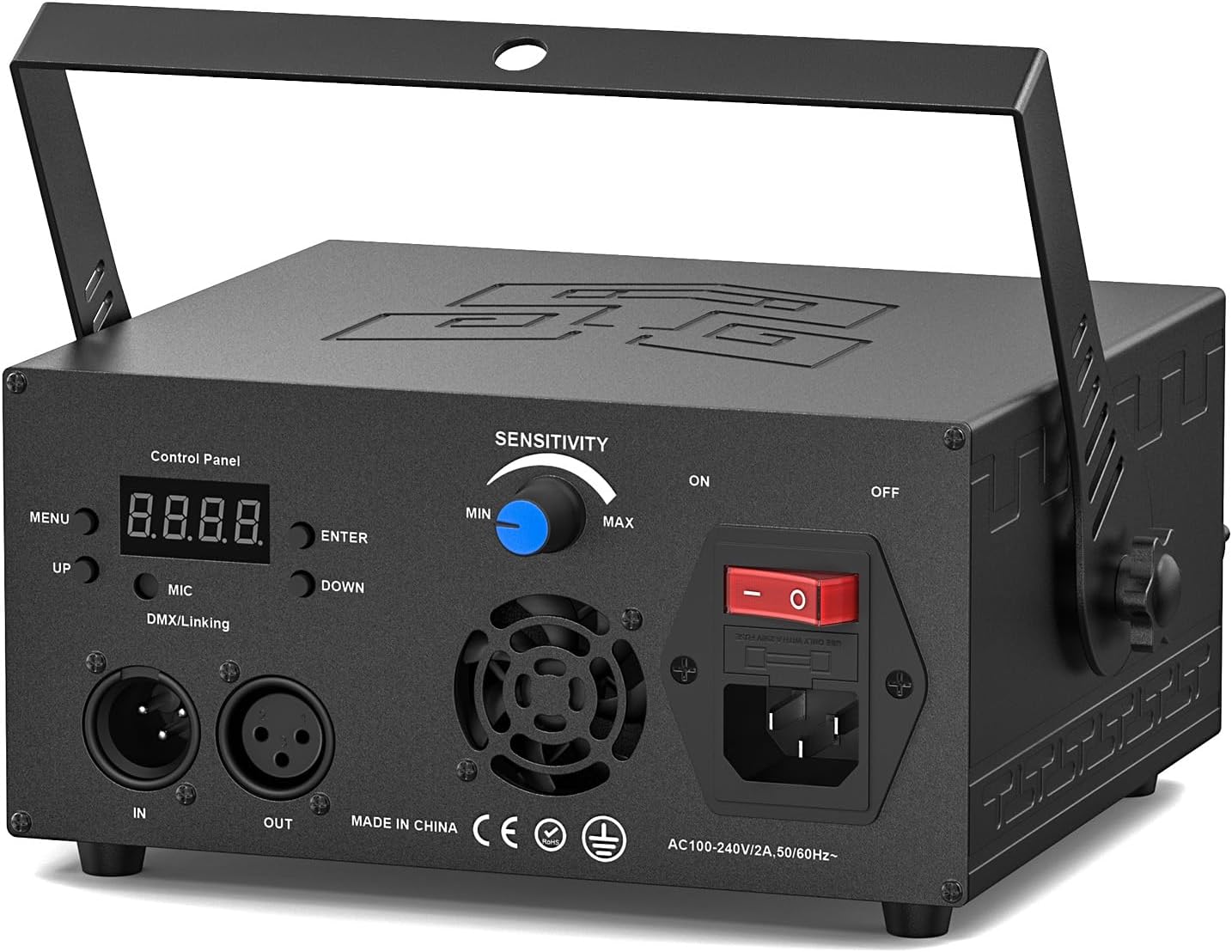
Image 4.2: Detailed view of the rear control panel, showing the power input, power switch, DMX IN/OUT ports, microphone for sound activation, and menu buttons for configuration.
4.4. DMX Connection (Optional)
For advanced control, connect the unit to a DMX controller using standard DMX cables.
- Connect a DMX cable from the DMX OUT port of your controller to the DMX IN port of the laser light unit.
- If linking multiple units, connect the DMX OUT of the first unit to the DMX IN of the next unit, and so on (daisy-chaining).
- Refer to the DMX Channel section for addressing and control details.
5. Operating Instructions
5.1. Powering On
After connecting the power, flip the power switch on the rear of the unit to the "ON" position. The unit will initialize, and the display will show the current operating mode.
5.2. Operating Modes
The U`King ZQ05031 offers several operating modes, selectable via the control panel on the rear of the unit or the included remote control.
- Sound Active Mode: The laser patterns will react to ambient sound detected by the built-in microphone. Adjust the "SENSITIVITY" knob on the rear panel to fine-tune responsiveness.
- AUTO-BEAM Mode: The unit will cycle through various beam patterns automatically.
- Auto-animation Mode: The unit will display a sequence of animated 3D patterns.
- DMX Mode: Allows external control via a DMX controller. Set the DMX address using the control panel. Refer to the DMX Channel section for detailed control parameters.
- Master/Slave Mode: Link multiple units together. Set one unit as "Master" and others as "Slave" to synchronize their operation.

Image 5.1: A selection of dynamic laser patterns, including abstract shapes, animal figures like dolphins, and human silhouettes, demonstrating the unit's animation capabilities.

Image 5.2: Another collection of laser patterns, showcasing geometric shapes such as circles, squares, and spirals, alongside more intricate designs like hearts and abstract movements.
5.3. Remote Control Operation
The included remote control provides convenient access to various functions:
- AUTO: Activates automatic pattern cycling.
- SOUND: Activates sound-controlled mode.
- DMX: Switches to DMX control mode.
- COLOR: Cycles through available laser colors (Red, Green, Blue, White, Yellow, Cyan, Purple).
- PATTERN: Changes the displayed laser pattern.
- SPEED: Adjusts the speed of pattern movement or animation.
- STROBE: Activates or deactivates the strobe effect.
5.4. DMX Channel Functions
The unit supports 6-channel and 34-channel DMX modes. Consult the DMX section of the full manual (if provided separately) for a complete DMX chart. Common DMX effects include:
- Pattern selection
- Color control (RGB mixing)
- X/Y axis movement (Pan/Tilt)
- Zoom and rotation
- Strobe speed
- Animation speed
6. Maintenance
6.1. Cleaning
To maintain optimal performance and light output, regularly clean the laser aperture and the exterior casing. Use a soft, lint-free cloth. For the laser aperture, use a specialized lens cleaning solution and cloth to avoid scratching.
Ensure the unit is powered off and unplugged before cleaning.
6.2. Cooling System
The built-in cooling fan helps maintain the brightness and longevity of the laser diodes. Ensure that the fan vents are not obstructed during operation. Regular cleaning of dust from the vents is recommended to prevent overheating.
Under normal operating conditions, the laser scanner can reach a service life of 5000 to 10000 hours.
7. Troubleshooting
7.1. General Issues
- No Power:
- Check if the power cable is securely connected to both the unit and the power outlet.
- Ensure the power switch is in the "ON" position.
- Verify the power outlet is functional.
- No Laser Output:
- Ensure the unit is powered on and not in a standby mode.
- Check if the laser aperture is clear of obstructions.
- If in DMX mode, verify the DMX signal and channel settings.
- Patterns Not Moving/Responding:
- In Sound Active mode, adjust the "SENSITIVITY" knob. Ensure there is sufficient sound input.
- In DMX mode, check DMX connections and controller settings for pattern and speed control.
- In Auto modes, ensure the unit is not stuck on a static pattern. Try cycling modes.
7.2. Optimal Visual Effects
Important Note: All optimal visual effects, including dynamic beams and scanning effects, are produced in an environment with atmospheric haze or smoke. Without smoke, only some individual laser dots will be visible, and the full range of dynamic beams and scanning effects will not be apparent. For the best experience, consider using a fog or haze machine.

Image 7.1: A collage illustrating the U`King laser light in various event settings, such as parties, weddings, and nightclubs, demonstrating the atmospheric effects achieved with the device, often enhanced by haze or smoke.
8. Warranty and Support
8.1. Warranty Information
Specific warranty details for your U`King ZQ05031 laser light are typically provided with your purchase documentation or on the manufacturer's official website. Please retain your proof of purchase for warranty claims.
8.2. Customer Support
For technical assistance, troubleshooting beyond this manual, or warranty inquiries, please contact U`King customer support through their official channels or the retailer from whom you purchased the product.
You can often find contact information on the U`King brand store page or your purchase invoice.


