
1. Introduction
1.1 Product Overview
This manual provides detailed instructions for the installation, operation, and maintenance of your KUNFINE 10.25" Android Car Stereo. This unit is designed to enhance your driving experience with advanced navigation, multimedia, and connectivity features.
1.2 Compatibility
This car stereo is specifically designed for Audi Q5 and A4 models manufactured between 2010 and 2017.
1.3 Key Features
- Built-in Wireless CarPlay and Android Auto for seamless smartphone integration.
- Octa Core CPU with 8GB RAM and 128GB ROM for smooth performance.
- Android Operating System, supporting various applications.
- 10.25-inch IPS Touchscreen Display with multi-touch support.
- Supports USB input, all audio playback formats, and USB interface cameras/DVRs.
- Internal Bluetooth for stereo music streaming and hands-free calling.
- Internal Wi-Fi with hotspot sharing capability.
- Supports car rear view camera (aftermarket RCA type).
- Steering wheel control compatibility.
- Multi-language OSD support (English, French, German, Spanish, Italian, etc.).
2. Package Contents
Please verify that all items listed below are included in your package:
- 1x Car Android Head Unit with Mask
- 1x GPS Antenna
- 1x Power Cable (Plug & Play)
- 2x USB Port Cables
- 1x RCA Expand Cable
- 1x RCA Connector for Reverse Camera
- 1x Install Kit
- 1x External Microphone
- 1x AHD 720 Reverse Camera
3. Setup and Installation
3.1 Pre-Installation Check
Before proceeding with installation, it is crucial to confirm your vehicle's audio input capabilities. Please check if your car has an AUX or AMI (Audi Music Interface) port. This will determine the necessary wiring and adapter requirements.

Image showing the importance of checking for AUX or AMI ports before installation. If AMI is present without AUX, an AMI cable may be required.
3.2 Installation Overview
The installation process involves removing the original car stereo unit and integrating the new Android head unit. Due to the complexity of automotive electronics, professional installation is highly recommended to ensure proper functionality and avoid damage to your vehicle or the product.

Visual comparison of the car's dashboard before and after the installation of the KUNFINE Android head unit. This image also highlights the selection of the correct version based on the car's MMI/GPS configuration.
3.3 Wiring Connections
Connect the provided power cable, GPS antenna, USB cables, and RCA cables according to the wiring diagram specific to your Audi Q5/A4 model. Ensure all connections are secure to prevent intermittent issues.
3.4 Initial Power On
After installation, turn on your vehicle's ignition. The head unit should power on and display the Android system interface. Follow any on-screen prompts for initial setup.
4. Operating Instructions
4.1 Android System Interface
The head unit operates on an Android system, providing access to a wide range of applications. The main screen will display various icons for navigation, media, communication, and system settings.

A visual representation of the Android system interface on the car stereo, showcasing various popular applications available for use.
4.2 Wireless CarPlay & Android Auto
This unit supports both wireless and wired connections for Apple CarPlay and Android Auto, allowing seamless integration with your smartphone for navigation, music, calls, and more.

Detailed steps for establishing wireless and wired connections for both Apple CarPlay and Android Auto. For CarPlay, connect via Bluetooth, open 'zlink5' app, and enjoy. For Android Auto, download the app, connect via Bluetooth, open 'zlink5' app, and enjoy (note: some Samsung phones may not be supported).
4.2.1 CarPlay Connection
- Establish a Bluetooth connection between your car stereo and your iPhone.
- Open the "zlink5" application on the car stereo.
- Your iPhone should now connect to Wireless Apple CarPlay.
4.2.2 Android Auto Connection
- Download the Android Auto app on your Android smartphone.
- Establish a Bluetooth connection between your car stereo and your Android phone.
- Open the "zlink5" application on the car stereo.
- Your Android phone should now connect to Wireless Android Auto. (Note: Some Samsung phone models may not be supported for wireless Android Auto.)
4.3 Navigation
The unit supports various navigation applications, allowing you to choose your preferred mapping service. The integrated GPS antenna ensures accurate positioning.

The image illustrates the car stereo's compatibility with multiple navigation applications and its ability to respond to voice commands for navigation and media playback.
4.4 Bluetooth Connectivity
Pair your mobile phone via Bluetooth to make hands-free calls and stream audio directly to the car stereo speakers.
4.5 Wi-Fi and Hotspot Sharing
Connect the head unit to a Wi-Fi network or use your phone's hotspot to access online features, download apps, and browse the internet.
4.6 Steering Wheel Control
The unit supports your vehicle's original steering wheel controls, allowing you to manage audio, calls, and other functions without taking your hands off the wheel.
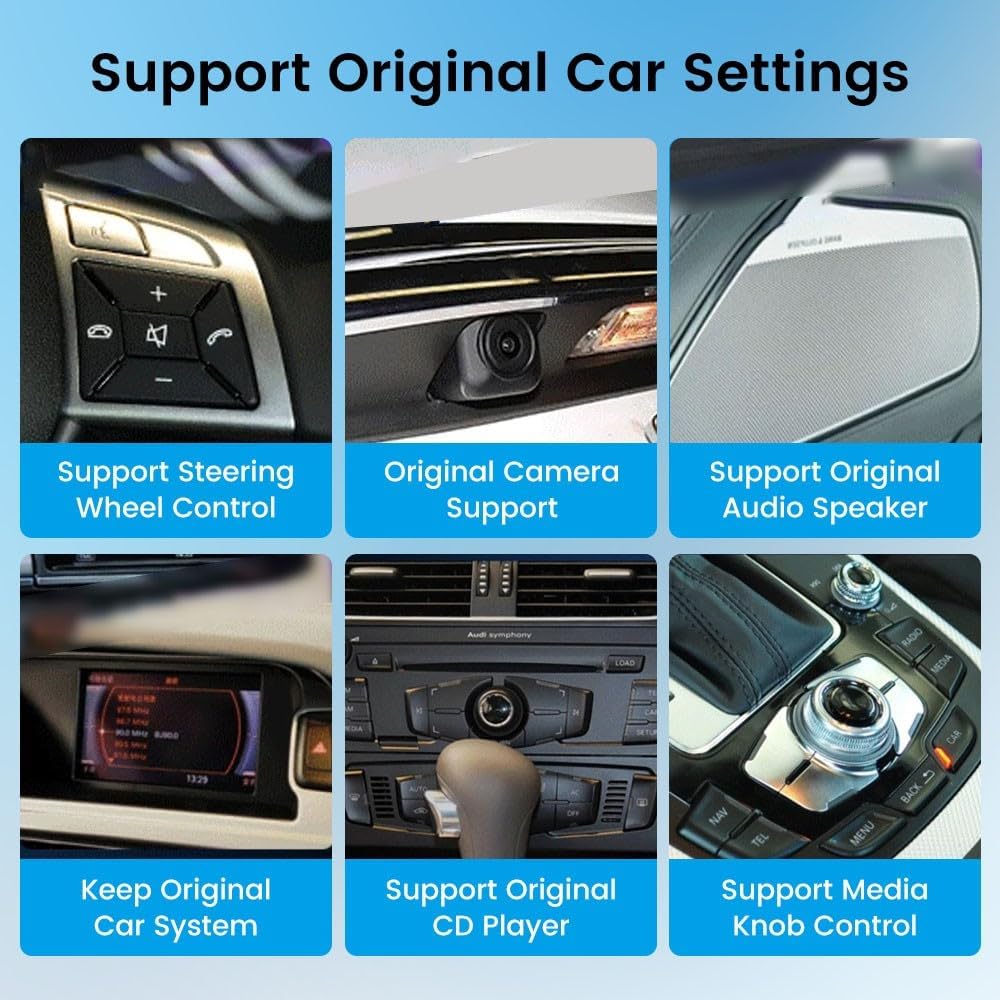
This image highlights the car stereo's ability to integrate with and support various original car features, including steering wheel controls, original camera, audio speakers, original car system, CD player, and media knob control.
4.7 Multimedia Playback
Play audio and video files from USB drives. The unit supports various formats for a comprehensive entertainment experience.
5. Maintenance
To ensure the longevity and optimal performance of your car stereo, follow these maintenance guidelines:
- Cleaning the Screen: Use a soft, lint-free cloth to gently wipe the touchscreen. Avoid abrasive cleaners or harsh chemicals.
- Software Updates: Periodically check for and install software updates to ensure the system has the latest features and security patches.
- Avoid Extreme Temperatures: Do not expose the unit to extreme heat or cold for extended periods, as this can affect its electronic components.
- Secure Connections: Ensure all cables and connections remain secure to prevent signal loss or power interruptions.
6. Troubleshooting
If you encounter any issues with your car stereo, refer to the following common troubleshooting steps:
- No Power: Check all power cable connections. Ensure the vehicle's ignition is on. Verify the fuse for the stereo is intact.
- No Sound: Check speaker connections. Ensure the volume is not muted or set to zero. Verify audio output settings.
- GPS Signal Loss: Ensure the GPS antenna is properly installed and has a clear view of the sky. Move the vehicle to an open area if signal is weak.
- Touchscreen Unresponsive: Try restarting the unit by turning off and on the vehicle's ignition. If the issue persists, a factory reset might be necessary (consult support).
- CarPlay/Android Auto Not Connecting: Re-establish Bluetooth connection. Ensure the "zlink5" app is open. Check phone settings for CarPlay/Android Auto permissions.
- Poor Radio Reception: Check the antenna connection. Ensure the antenna is not damaged.
If these steps do not resolve the issue, please contact customer support for further assistance.
7. Specifications
Detailed technical specifications for the KUNFINE 10.25" Android Car Stereo:
| Feature | Specification |
|---|---|
| Display Size | 10.25 Inches |
| Operating System | Android |
| CPU | Octa Core |
| RAM | 8 GB |
| Memory Storage Capacity (ROM) | 128 GB |
| Touch Screen Type | Capacitive |
| Human Interface Input | Touch Pad, Touchscreen |
| Control Method | Touch |
| Connectivity Technology | USB, Bluetooth, Wi-Fi |
| Map Type | North America (pre-installed, other maps via app download) |
| CarPlay/Android Auto | Built-in, Wireless & Wired |
| OSD Language | English, French, German, Spanish, Italian, etc. (over 20 languages) |
| Batteries Included | No |
7.1 Display Resolution
The unit features an ultra-high screen resolution for superior visual clarity compared to standard displays.

This image visually compares the clarity and color brightness of a 1920x720 resolution display (ours) versus a 1280x480 resolution display (others), highlighting the significant increase in pixel count and visual quality.
8. Warranty and Support
8.1 Warranty Information
This KUNFINE car stereo unit comes with a one-year warranty from the date of purchase. This warranty covers manufacturing defects and malfunctions under normal use. It does not cover damage caused by improper installation, misuse, accidents, or non-human damage.
8.2 Customer Support
For any questions, technical assistance, or warranty claims, please contact the seller or KUNFINE customer support. Your consultation is always welcomed.