
Introduction
The SONRU B110 is a versatile 2-in-1 Bluetooth 5.3 audio adapter designed to transform your audio experience. It functions as both a Bluetooth transmitter (TX mode) and a Bluetooth receiver (RX mode), allowing you to wirelessly stream audio to and from various devices. Enjoy high-fidelity sound, low latency, and extended battery life for home entertainment, travel, and on-the-go use.
Package Contents
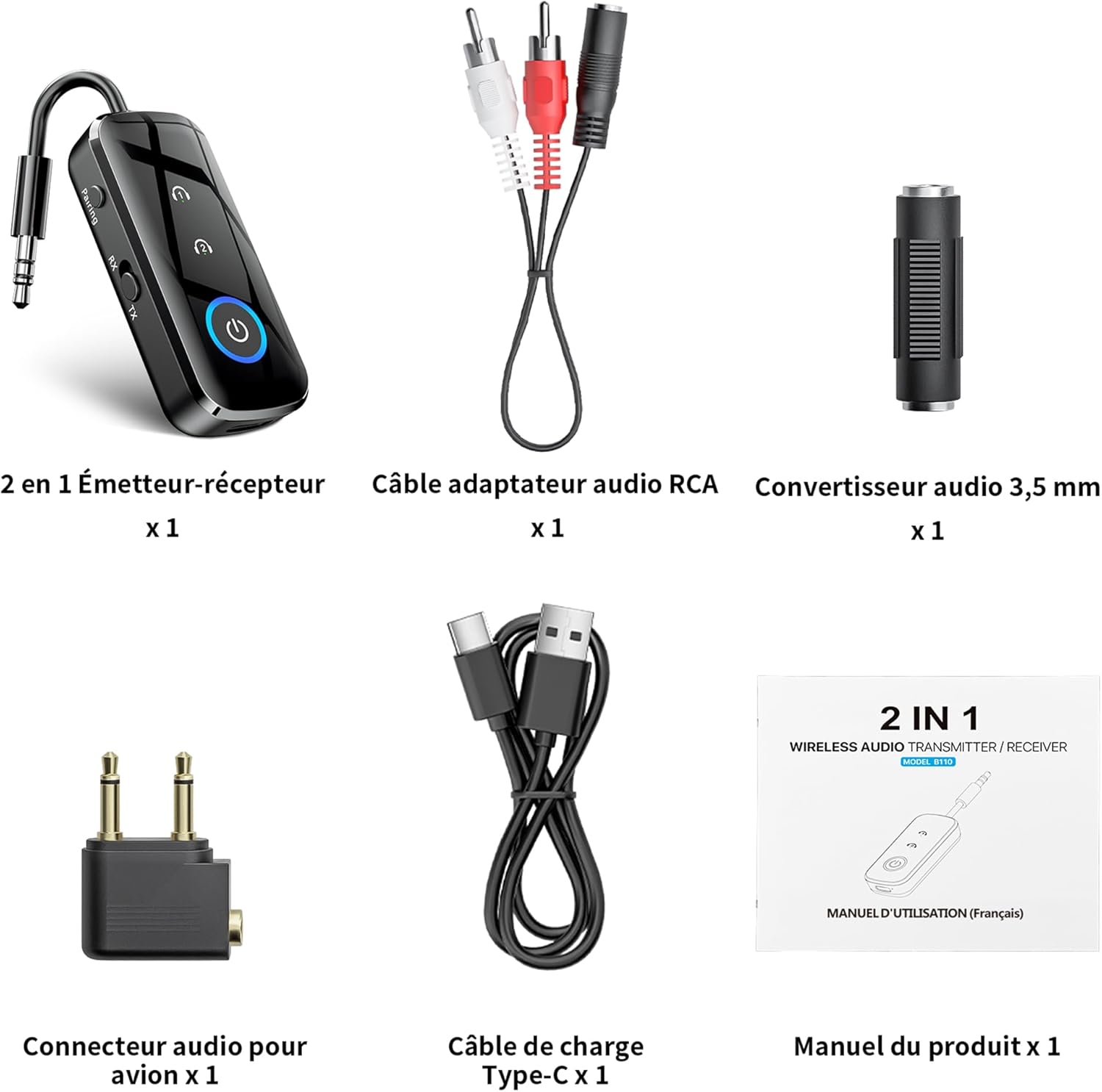
Figure 1: Package Contents
- 1 x SONRU B110 2-in-1 Bluetooth Transmitter/Receiver
- 1 x RCA Audio Adapter Cable
- 1 x 3.5mm Audio Converter
- 1 x Airplane Audio Connector
- 1 x USB Type-C Charging Cable
- 1 x User Manual
Product Overview

Figure 2: Device Features and Controls
The SONRU B110 features a compact design with essential controls for easy operation. It includes a 3.5mm audio jack, a mode switch (RX/TX), power button, and volume/track control buttons. The device also has a USB-C charging port.
Specifications
| Feature | Detail |
|---|---|
| Model | B110 |
| Bluetooth Version | 5.3 |
| Bluetooth Protocols | A2DP/AVRCP (Reception), A2DP (Emission) |
| Operating Range | >10 meters (open space) |
| Audio Interface | Universal 3.5 mm audio input/output |
| Battery Capacity | 250 mAh |
| Charging Time | Approximately 1.5 hours (USB-C) |
| Battery Life (TX Mode) | Up to 15 hours |
| Battery Life (RX Mode) | Up to 12 hours |
| Dimensions | 13.9 x 11.6 x 2 cm |
| Weight | 110 grams |
| Special Features | Automatic connection memory, Dual connection, Fast Charging, Hands-Free Calls, Low Latency |
Setup
1. Charging the Device
Before first use, fully charge your SONRU B110.
- Connect the provided USB Type-C charging cable to the charging port on the device.
- Connect the other end of the cable to a USB power adapter (not included) or a computer's USB port.
- The charging indicator light will show the charging status. A full charge takes approximately 1.5 hours.
- Once fully charged, the device offers up to 15 hours of use in Transmitter (TX) mode and 12 hours in Receiver (RX) mode.

Figure 3: Charging and Battery Life
2. Pairing in Transmitter (TX) Mode
TX mode allows you to transmit audio from non-Bluetooth devices (e.g., TV, PC, airplane entertainment system) to Bluetooth headphones or speakers.
- Switch the device to TX mode.
- Connect the SONRU B110 to your audio source (e.g., TV, PC, MP3 player) using the 3.5mm audio cable. For airplane entertainment systems, use the provided airplane audio connector.
- Turn on your Bluetooth headphones or speaker and set them to pairing mode.
- The SONRU B110 will automatically search for and connect to nearby Bluetooth devices. The indicator light will confirm a successful connection.
- Dual Connection: The device supports connecting to two Bluetooth headphones/speakers simultaneously. After connecting the first device, put the second device into pairing mode. The B110 will automatically connect to it.

Figure 4: TX Mode in an Airplane

Figure 5: Dual Connection in TX Mode
3. Pairing in Receiver (RX) Mode
RX mode allows you to receive audio from your Bluetooth-enabled smartphone, tablet, or computer and play it through non-Bluetooth devices like car stereos, wired headphones, or home speaker systems.
- Switch the device to RX mode.
- Connect the SONRU B110 to your non-Bluetooth audio device (e.g., car stereo, wired speaker) using the 3.5mm audio cable.
- Enable Bluetooth on your smartphone, tablet, or computer and search for "SONRU B110" in the list of available devices.
- Select "SONRU B110" to pair. The indicator light will confirm a successful connection.
- Automatic Reconnection: The device has an automatic connection memory function. After a successful connection, re-enabling Bluetooth on your phone will automatically connect to the B110.

Figure 6: RX Mode in a Car

Figure 7: TX and RX Mode Compatibility
Operating Instructions
Power On/Off
- Power On: Press and hold the Power button until the indicator light turns on.
- Power Off: Press and hold the Power button until the indicator light turns off.
Mode Switching
- Use the TX/RX switch on the side of the device to select the desired mode (Transmitter or Receiver).
Music Control (RX Mode)
- Play/Pause: Press the Power button once.
- Next Track: Press and hold the "+" button.
- Previous Track: Press and hold the "-" button.
- Volume Up: Short press the "+" button.
- Volume Down: Short press the "-" button.
Call Management (RX Mode)
The SONRU B110 features a built-in microphone for hands-free calls when in RX mode.
- Answer/End Call: Press the Power button once.
- Reject Call: Press and hold the Power button.
- Redial Last Number: Double-press the Power button.
Maintenance
- Keep the device dry. Avoid exposure to moisture or liquids.
- Do not attempt to disassemble or modify the device.
- Clean the device with a soft, dry cloth. Do not use harsh chemicals or abrasive cleaners.
- Store the device in a cool, dry place when not in use.
- Avoid extreme temperatures.
Troubleshooting
- Device does not power on:
- Ensure the device is fully charged. Connect it to a power source using the USB-C cable and try again.
- Cannot pair with a Bluetooth device:
- Make sure the SONRU B110 is in the correct mode (TX for transmitting, RX for receiving).
- Ensure your target Bluetooth device (headphones, speaker, phone) is in pairing mode.
- Place the devices close to each other.
- Clear previous pairing records on both devices and try pairing again.
- No sound or poor audio quality:
- Check if the 3.5mm audio cable is securely connected to both the SONRU B110 and the audio source/receiver.
- Ensure the volume on both the SONRU B110 and the connected audio device is turned up.
- Verify that the correct input/output source is selected on your audio system (e.g., AUX input on car stereo).
- Reduce the distance between the B110 and the paired Bluetooth device, and remove any obstacles.
- Ensure there is no interference from other wireless devices.
- Dual connection not working:
- Ensure both target Bluetooth devices are in pairing mode when attempting to connect the second device.
- Device not compatible with musical instruments or hearing aids:
- As stated in the product features, this device is not designed for use with musical instruments or hearing aids.
Warranty and Support
SONRU products are designed for reliability and performance. For warranty information or technical support, please refer to the contact details provided on the product packaging or visit the official SONRU website. Please retain your proof of purchase for warranty claims.

