
1. Product Overview
The 2NLF GAD1031BK1 is an advanced outdoor security camera featuring a unique 3-lens system designed to provide comprehensive surveillance. It combines two fixed lenses with one Pan-Tilt-Zoom (PTZ) lens, offering a 360-degree panoramic view without blind spots. This camera delivers 4MP HD resolution, intelligent night vision, smart alerts with auto-tracking, and robust IP66 weather resistance, making it suitable for various outdoor environments.

Figure 1.1: The 2NLF 3-Lens camera offers comprehensive coverage, potentially replacing multiple traditional cameras.
Key Features:
- 3-Lens System: Two fixed lenses and one PTZ lens for a complete 360° view. The PTZ lens rotates 90° vertically and 330° horizontally.
- 4MP HD Resolution: Captures clear and detailed images.
- Smart Night Vision: Offers infrared (black and white), full-color, and smart (automatic switching) modes for clear visibility in low light.
- Intelligent Alerts & Auto-Tracking: PIR motion detection reduces false alarms, sends notifications, tracks moving objects, and records video.
- Two-Way Audio: Enables remote communication and deterrence of intruders.
- IP66 Weatherproof: Designed for outdoor use, resistant to dust and water, operating from -30°C to 40°C.
- Flexible Connectivity: Supports 2.4G WiFi and Ethernet cable connections.
- Multiple Storage Options: Supports Micro SD card (up to 128GB, not included) and cloud storage (subscription required).
- Multi-User Sharing: Allows up to 5 simultaneous users to monitor live feeds via the IPC360 Home app.

Figure 1.2: Key features of the 2NLF outdoor camera.
2. Setup and Installation
2.1 Package Contents
Before installation, verify that all components are present:
- 1 x 2NLF 3-Lens Security Camera
- 1 x Power Cable
- 1 x Instruction Manual
- 1 x Mounting Screw Kit

Figure 2.1: Camera components and included accessories.
2.2 Mounting the Camera
The camera can be mounted using screws on a wall or a tree. Ensure the mounting location provides a clear field of view and is within range of your Wi-Fi network or an Ethernet connection point.
- Choose a suitable mounting location.
- Use the provided mounting template (if available in the manual) to mark drill holes.
- Drill the necessary holes and insert wall anchors if mounting on masonry.
- Secure the camera bracket to the surface using the provided screws.
- Attach the camera to the bracket.

Figure 2.2: Flexible installation options for the camera.
2.3 Network Connection
The camera supports both 2.4G Wi-Fi and wired Ethernet connections for stable operation.
- Wi-Fi Connection: Download the IPC360 Home app. Follow the in-app instructions to scan the QR code on the camera and configure the 2.4 GHz Wi-Fi connection.
- Ethernet Connection: Connect an Ethernet cable from your router to the camera's Ethernet port. The camera will automatically establish a wired connection.

Figure 2.3: Quick connection to your home Wi-Fi network.
3. Operating Instructions
3.1 IPC360 Home App
The IPC360 Home app is your primary interface for controlling and monitoring the camera. Download it from your device's app store.
- Live View: Access real-time video feeds from all three lenses.
- PTZ Control: Manually adjust the PTZ lens's horizontal (330°) and vertical (90°) angles.
- Playback: Review recorded footage stored on the Micro SD card or cloud.
- Settings: Configure motion detection, night vision modes, alert preferences, and storage options.
3.2 Panoramic View and PTZ Control
The camera's unique design provides a wide field of view. The two fixed lenses cover a broad area, while the PTZ lens allows you to focus on specific details or track movement.
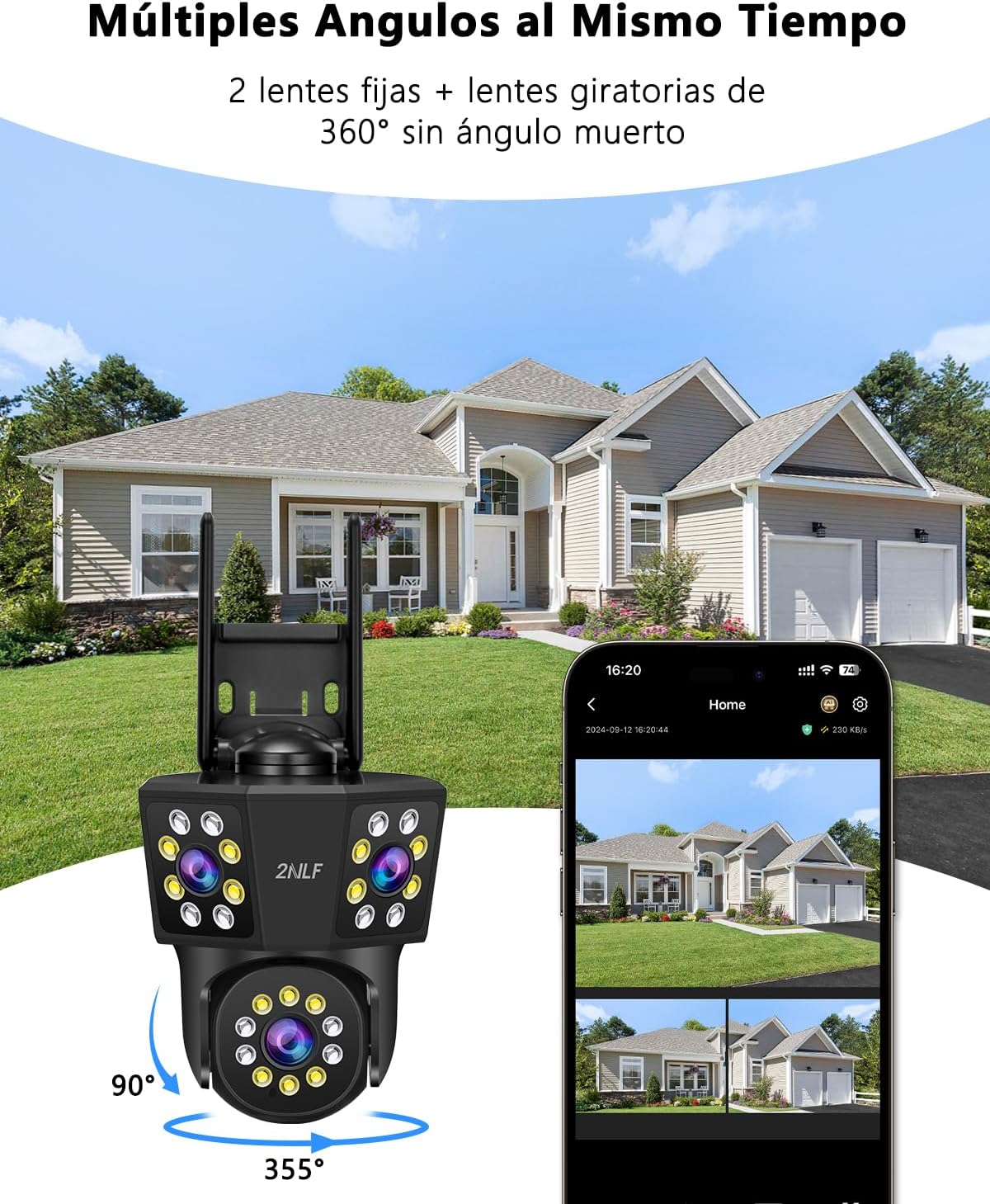
Figure 3.1: Multiple angles covered simultaneously by the 3-lens system.

Figure 3.2: 360-degree vision with 10x digital zoom for detailed monitoring.
3.3 Night Vision Modes
The camera offers three night vision modes to suit different monitoring needs:
- Infrared Mode: Provides clear black and white images in complete darkness.
- Color Night Vision: Utilizes built-in spotlights to capture full-color images at night.
- Smart Mode: Automatically switches between infrared and color night vision based on detected motion or light conditions.

Figure 3.3: Clear night image with both black and white and full-color options.

Figure 3.4: Maintaining security during the night with infrared light and spotlight.
3.4 Motion Detection and Alerts
The camera uses PIR motion detection to accurately identify movement and minimize false alarms. When motion is detected, the camera can:
- Send instant notifications to your phone.
- Activate an audible siren.
- Trigger flashing lights.
- Begin automatic tracking of the moving object.
- Record video footage of the event.

Figure 3.5: Theft alarm system with various alert options.

Figure 3.6: Humanoid detection and proactive protection features.

Figure 3.7: Humanoid tracking ensures no moment is missed.
3.5 Two-Way Audio
The built-in microphone and speaker allow for two-way communication. You can speak through the camera to visitors or deter unwanted individuals.

Figure 3.8: Two-way audio for communication.
3.6 Multi-User Sharing
Share access to your camera's live feed with up to 5 other users, such as family members or employees, through the IPC360 Home app.

Figure 3.9: Share live images with family members on up to 4 devices simultaneously.
4. Maintenance
4.1 Weather Resistance
The 2NLF GAD1031BK1 camera is rated IP66, meaning it is protected against dust ingress and powerful water jets. It is designed to withstand various outdoor weather conditions, including wind, rain, and snow, within an operating temperature range of -30°C to 40°C.

Figure 4.1: Designed for outdoor security, resistant to extreme weather conditions.
4.2 Storage Management
The camera offers two secure storage options for your video recordings:
- Micro SD Card: Supports up to 128GB Micro SD cards (not included). Ensure the card is inserted correctly into the designated slot.
- Cloud Storage: A subscription-based cloud storage service is available for continuous or event-triggered recording. This provides off-site backup for your footage.

Figure 4.2: Two secure forms of storage: Micro SD card and cloud storage.
4.3 Cleaning
Periodically clean the camera lenses and housing with a soft, damp cloth to ensure optimal image clarity. Do not use harsh chemicals or abrasive materials.
5. Troubleshooting
If you encounter issues with your 2NLF GAD1031BK1 camera, please refer to the following common problems and solutions:
| Problem | Possible Cause | Solution |
|---|---|---|
| Camera not connecting to Wi-Fi | Incorrect Wi-Fi password, weak signal, 5GHz network selected. | Ensure correct 2.4GHz Wi-Fi password. Move camera closer to router. Verify router settings for 2.4GHz band. |
| Live view is lagging or freezing | Weak network signal, network congestion. | Improve Wi-Fi signal strength or use an Ethernet cable. Reduce network traffic. Restart camera and router. |
| PTZ function not responding | Power issue, app malfunction, mechanical obstruction. | Check power supply. Restart the IPC360 Home app. Ensure no physical obstructions. Contact support if issue persists. |
| No night vision or poor night image quality | Night vision mode not selected, lens obstruction, IR lights blocked. | Check night vision settings in the app. Clean the camera lens. Ensure nothing is blocking the IR lights. |
| Micro SD card not recording | Card full, corrupted, or not inserted correctly. | Format the Micro SD card in the app. Replace with a new card if corrupted. Ensure proper insertion. |
For further assistance, please refer to the Warranty & Support section.
6. Specifications
| Feature | Detail |
|---|---|
| Model Name | 2NLF Cámaras de Seguridad Negras de 3 Lentes |
| Model Number | GAD1031BK1 |
| Brand | 2NLF |
| Connectivity Technology | Wireless (Wi-Fi 2.4G), Wired (Ethernet) |
| Special Features | Two-way audio, 3-lens camera, Motion detector, PTZ technology, Auto-tracking |
| Indoor/Outdoor Use | Outdoor |
| Mounting Type | Tree mount, Screw-in |
| Video Capture Resolution | 1440p (4MP) |
| Color | Black |
| Material | Acrylonitrile Butadiene Styrene (ABS) |
| Voltage | 12 Volts |
| Video Capture Format | H.264 |
| Night Vision Range | 10 Meters |
| Viewing Angle | 360 Degrees (combined) |
| Dimensions | 7.6 x 7.6 x 12.7 centimeters |
| Operating Temperature | -30°C to 40°C |
| Storage | Micro SD card (up to 128GB), Cloud Storage |
7. Warranty and Support
7.1 Product Warranty
The 2NLF GAD1031BK1 camera comes with a 1-year (365-day) warranty from the date of purchase, covering manufacturing defects. Additionally, a 30-day money-back guarantee is offered for your peace of mind.
7.2 Customer Support
2NLF is committed to providing excellent customer service. We offer:
- Professional All-Day Support: Assistance is available through various channels.
- Lifetime Technical Support: Dedicated technical assistance for the lifespan of your product.
- Privacy Protection: Adherence to professional privacy standards (AES128, TLS 1.2) to safeguard your data.

Figure 7.1: Reasons to choose 2NLF, highlighting support and data protection.

Figure 7.2: 24/7 Professional Customer Support.

Figure 7.3: Worry-free purchase with comprehensive guarantees.

Figure 7.4: Professional data privacy protection.