
1. Introduction
This manual provides detailed instructions for the installation and use of your XINLEI Universal Soundbar Mount SBR501. Please read these instructions carefully before installation to ensure proper setup and safe operation. This mount is designed to securely attach your soundbar to your television, offering flexible placement options and efficient cable management.
2. Safety Information
- Ensure all components are present and undamaged before installation. Do not use if any parts are missing or faulty.
- The mount is designed to support soundbars weighing up to 20 lbs (9.07 kg). Do not exceed this weight limit.
- Verify that your TV's VESA mounting pattern is compatible (Horizontal Max 600mm, Min 150mm).
- Always use appropriate tools and follow all steps precisely. If unsure, seek professional assistance.
- Keep small parts away from children.
3. Package Contents
Please check that all the following components are included in your package:
- Soundbar mounting brackets (main horizontal bar and vertical extension arms)
- Adjustable base holders with non-slip EVA pads
- Locking screws
- Various screws, washers, and spacers for TV and soundbar attachment
- Instruction manual
Note: Specific screw sizes and quantities may vary. Refer to the included hardware pack for exact details.
4. Specifications
| Feature | Detail |
|---|---|
| Brand | XINLEI |
| Model Name | SBR501 |
| Weight Capacity | Up to 20 lbs (9.07 kg) |
| TV VESA Compatibility (Horizontal) | Max 600mm, Min 150mm |
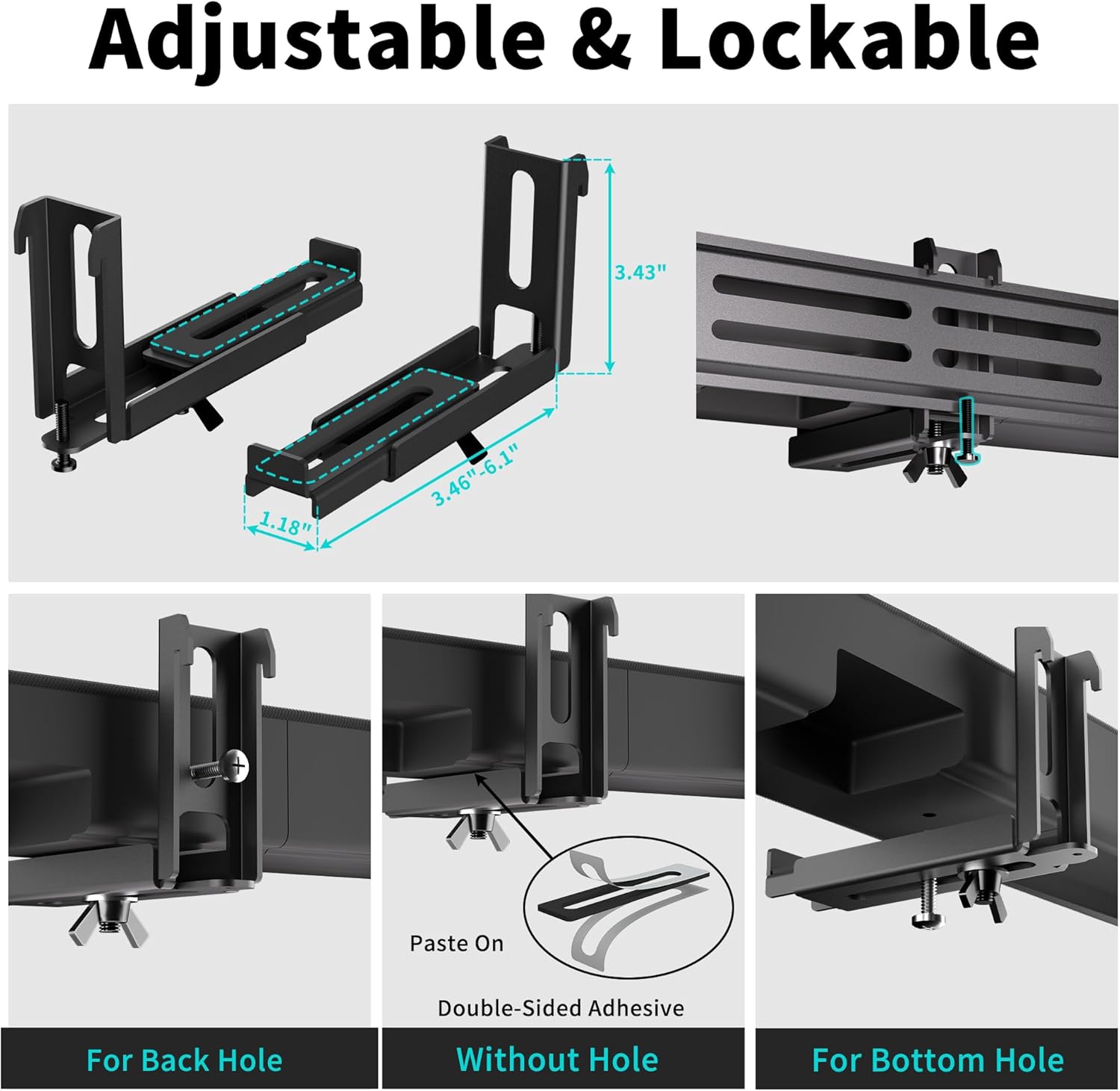
| Adjustable Soundbar Depth | 3.46" - 6.1" (88mm - 155mm) |
| Material | Premium Metal |
5. Setup and Installation
Follow these steps to install your XINLEI Universal Soundbar Mount SBR501. Ensure your TV is securely mounted to the wall or on a stable stand before proceeding.
5.1. Check Compatibility
Before beginning, confirm your TV and soundbar meet the following criteria:
- TV VESA: Horizontal VESA mounting holes must be between 150mm and 600mm.
- Soundbar Depth: The adjustable base holder extends from 3.46" to 6.1" to accommodate various soundbar depths.
- Soundbar Weight: Your soundbar must not exceed 20 lbs (9.07 kg).

5.2. Assembly Steps
- Assemble Soundbar Bracket: Attach the adjustable base holders to the main horizontal bar using the provided screws. Ensure they are securely fastened but allow for later adjustment.
- Connect Bracket to TV: Attach the vertical extension arms to the back of your TV using the appropriate VESA screws and spacers. Then, connect the assembled horizontal soundbar bracket to these vertical arms.
- Hang TV (if not already mounted): If your TV is not yet mounted, carefully hang it onto your wall mount or place it on its stand.
- Attach Soundbar to Bracket: Position your soundbar on the adjustable base holders.
- For soundbars with back holes: Use the provided screws to secure the soundbar to the back holes of the holders.
- For soundbars with bottom holes: Use the provided screws to secure the soundbar to the bottom holes of the holders.
- For soundbars without holes: Apply the non-slip EVA pads to the base holders to ensure stability. The locking screw can be used to further secure the soundbar.
- Adjust and Secure: Adjust the depth of the base holders to fit your soundbar snugly (from 3.46" to 6.1"). Tighten all locking screws to ensure the soundbar is stable and secure.

5.3. Mounting Position Options
The XINLEI SBR501 mount allows you to position your soundbar either above or below your television, depending on your preference and setup requirements.


5.4. Cable Management
The mount features openings designed to help route and organize your soundbar cables, minimizing clutter and maintaining a clean aesthetic. Thread your cables through these openings after attaching the soundbar.

5.5. Installation Video Guide
For a visual guide on the installation process, please watch the official product video below:
6. Operating
Once installed, the XINLEI Universal Soundbar Mount SBR501 requires minimal "operation." Its primary function is to securely hold your soundbar. You may occasionally need to:
- Adjust Soundbar Position: If your soundbar's depth needs minor adjustment, loosen the locking screws on the base holders, reposition the soundbar, and re-tighten securely.
- Cable Management: Periodically check that cables remain neatly routed and are not pinched or strained.
7. Maintenance
To ensure the longevity and continued secure performance of your soundbar mount:
- Cleaning: Wipe the mount with a soft, dry cloth to remove dust. Avoid abrasive cleaners or solvents.
- Periodic Checks: Every few months, inspect all screws and connections to ensure they remain tight. Re-tighten if necessary.
- Damage Inspection: If the mount appears damaged or bent, discontinue use immediately and replace it.
8. Troubleshooting
If you encounter issues during installation or use, refer to the following common problems and solutions:
| Problem | Possible Cause / Solution |
|---|---|
| Soundbar does not fit the mount. |
|
| Mount feels flimsy or unstable. |
|
| Screws do not fit my TV/soundbar. |
|
| Soundbar slides on the mount (for soundbars without holes). |
|
9. Warranty and Customer Support
XINLEI products are manufactured with quality and durability in mind. For any questions, concerns, or assistance with your XINLEI Universal Soundbar Mount SBR501, please contact our customer service. Details for contacting support can typically be found on the product packaging or the XINLEI official website.
Please retain your proof of purchase for warranty claims.
