
1. Introduction
This manual provides detailed instructions for the safe and efficient operation of your M-Amazup Portable CD Boombox, Model C-09-R. Please read this manual thoroughly before using the device and retain it for future reference.

Image 1: Front view of the M-Amazup Portable CD Boombox.
2. Package Contents
Verify that all items are present in the package:
- CD Player Boombox x1
- AC Power Cord x1
- User Manual x1
3. Setup
3.1 Power Supply
Your boombox can be powered by either AC power or batteries.
AC Power (Recommended for Home/Office Use)
- Ensure the boombox is turned off.
- Connect the supplied AC power cord to the AC IN jack on the back of the boombox.
- Plug the other end of the AC power cord into a standard wall outlet (AC 100-240V, 50/60Hz).
Battery Power (For Portable Use)
- Ensure the boombox is turned off and disconnected from AC power.
- Open the battery compartment cover on the bottom of the unit.
- Insert 6 x 'C' size batteries (not included) according to the polarity markings (+/-) inside the compartment.
- Close the battery compartment cover securely.

Image 2: Illustration of dual power supply options: AC adapter and C-size batteries.
4. Operating Instructions
4.1 Basic Controls
Familiarize yourself with the control panel:
- FUNC/MODE Button: Press to switch between CD, Bluetooth, USB, AUX, and FM Radio modes.
- VOL- / VOL+ Buttons: Adjust the volume level.
- PLAY/PAUSE (►/−) Button: Play or pause playback.
- STOP (■) Button: Stop playback.
- PREVIOUS (◀◀) / NEXT (▶▶) Buttons: Skip tracks/stations or fast forward/rewind.
- SCAN Button: In FM mode, press to auto-scan and save stations.
- SLEEP Button: Set the sleep timer.
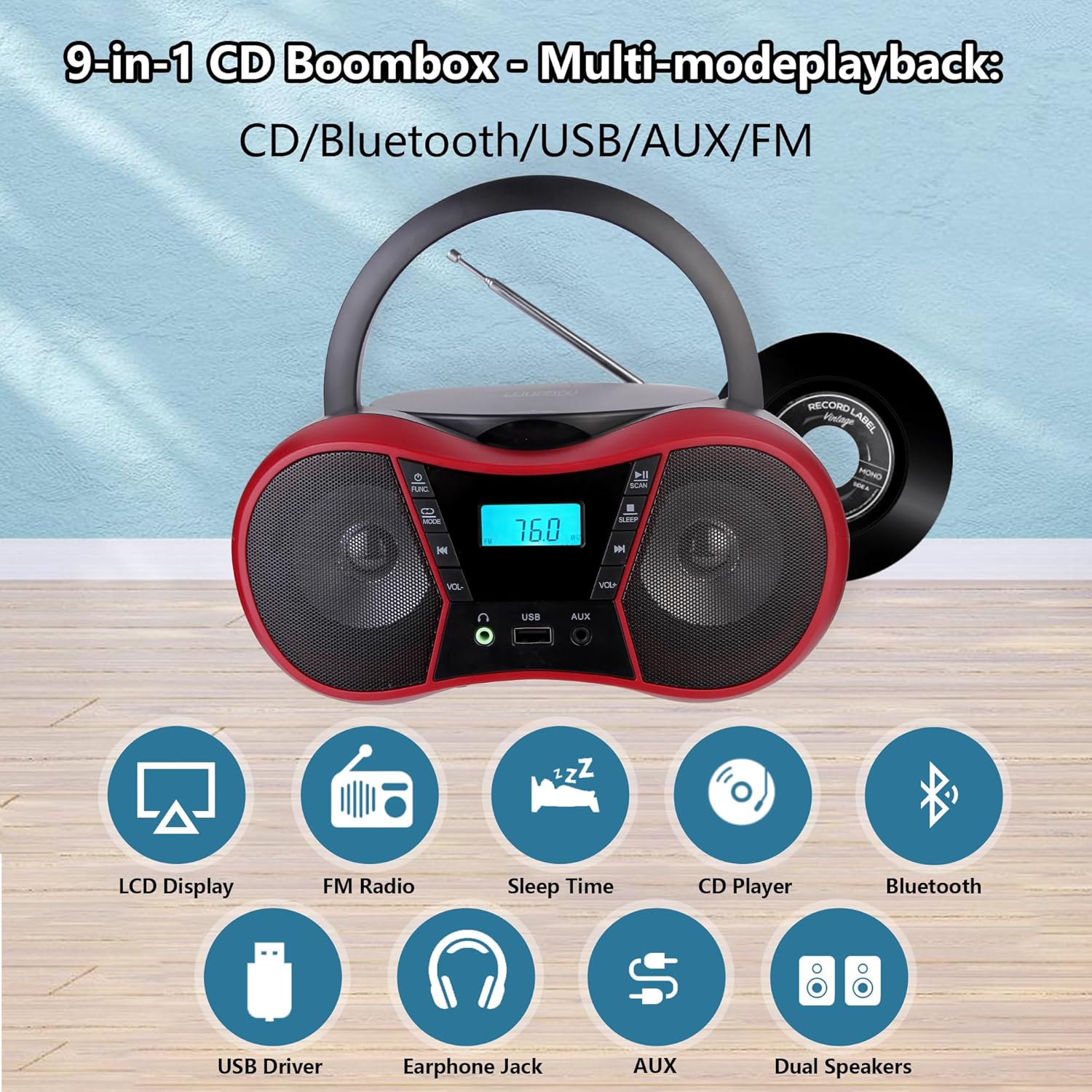
Image 3: Overview of boombox features and controls.
4.2 CD Playback
- Press the FUNC/MODE button to select CD mode. The LCD display will show "CD".
- Open the CD compartment cover.
- Place a CD (CD, CD-R, or CD-RW) onto the spindle with the label side facing up.
- Close the CD compartment cover. The CD will begin playing automatically.
- Use the PREVIOUS (◀◀) and NEXT (▶▶) buttons to navigate tracks.
- Press the PLAY/PAUSE (►/−) button to pause or resume playback.
- Press the STOP (■) button to stop playback.
- Repeat/Shuffle Functions: Repeatedly press the 'Repeat' or 'Program' button (if available, otherwise refer to specific model instructions) to cycle through single track repeat, all track repeat, or random play.

Image 4: CD/USB playback options and controls.
4.3 USB Playback
- Insert a USB flash drive containing MP3 audio files into the USB port.
- Press the FUNC/MODE button to select USB mode. The LCD display will show "USB".
- Playback will begin automatically. Use the PREVIOUS (◀◀) and NEXT (▶▶) buttons to navigate tracks.
4.4 Bluetooth Connection
Connect your smartphone, tablet, or other Bluetooth-enabled device wirelessly.
- Press the FUNC/MODE button to select Bluetooth mode. The LCD display will show "BT" and flash, indicating it's ready for pairing.
- Enable Bluetooth on your external device and search for available devices.
- Select "M-Amazup Boombox" (or similar name) from the list.
- Once paired, the "BT" indicator will stop flashing, and you can play audio from your device through the boombox.

Image 5: Bluetooth 5.1 connectivity for wireless audio streaming.
4.5 FM Radio Operation
- Extend the telescopic antenna for optimal reception.
- Press the FUNC/MODE button to select FM Radio mode. The LCD display will show the frequency.
- Press the SCAN button to automatically scan and save available FM stations (87.5-108MHz).
- Use the PREVIOUS (◀◀) and NEXT (▶▶) buttons to tune to saved stations.

Image 6: The boombox with its telescopic antenna extended for FM radio reception.
4.6 AUX Input
- Connect an external audio device (e.g., MP3 player) to the AUX IN port using a 3.5mm audio cable (not included).
- Press the FUNC/MODE button to select AUX mode. The LCD display will show "AUX".
- Control playback from your external device.
4.7 Headphone Jack
For private listening, plug 3.5mm headphones into the headphone jack. Audio will automatically switch from the speakers to the headphones.

Image 7: Close-up of the headphone jack and USB port.
4.8 Sleep Timer
The sleep timer allows the boombox to automatically power off after a set period.
- While the boombox is playing, press the SLEEP button.
- Repeatedly press the SLEEP button to cycle through available sleep times (e.g., 10, 20, 30, 60, 90 minutes, or OFF).
- The boombox will automatically turn off after the selected duration.
5. Maintenance
5.1 Cleaning
- Always unplug the boombox from the power source before cleaning.
- Use a soft, dry cloth to wipe the exterior surfaces.
- Do not use abrasive cleaners, waxes, or solvents as they may damage the finish.
- For the CD lens, use a specialized CD lens cleaner disc.
5.2 Storage
- If storing the unit for an extended period, remove all batteries to prevent leakage.
- Store the boombox in a cool, dry place away from direct sunlight and extreme temperatures.
6. Troubleshooting
If you encounter issues with your M-Amazup Portable CD Boombox, refer to the following common problems and solutions:
| Problem | Possible Cause | Solution |
|---|---|---|
| No power | AC cord not properly connected; Batteries depleted or incorrectly inserted. | Check AC cord connection; Replace batteries or ensure correct polarity. |
| No sound | Volume too low; Incorrect mode selected; Headphones connected. | Increase volume; Select correct mode (CD, BT, USB, AUX, FM); Disconnect headphones. |
| CD skipping or not playing | CD is dirty, scratched, or inserted incorrectly; Unit is vibrating. | Clean or replace CD; Ensure CD is inserted correctly; Place unit on a stable surface. |
| Bluetooth not connecting | Boombox not in Bluetooth mode; Device too far; Bluetooth not enabled on external device. | Switch boombox to Bluetooth mode; Move device closer; Enable Bluetooth on your device and re-pair. |
| Poor FM reception | Antenna not extended; Weak signal area. | Fully extend the telescopic antenna; Try repositioning the unit. |
If the problem persists after attempting these solutions, please contact customer support.
7. Specifications
| Feature | Detail |
|---|---|
| Model Number | C-09-R |
| Brand | M-Amazup |
| Product Dimensions (L x W x H) | 9.01 x 8.23 x 4.29 inches |
| Item Weight | 2.86 pounds |
| Connectivity Technology | Auxiliary, Bluetooth 5.1, USB |
| Supported Media | CD, CD-R, CD-RW, USB (MP3) |
| FM Frequency Range | 87.5-108 MHz |
| Speaker Type | Stereo |
| Power Source | AC (adapter included) or 6 x 'C' Batteries (not included) |
| Color | Red |
| Manufacturer | M-Amazup |
8. Warranty and Support
For warranty information or technical support, please refer to the contact details provided with your purchase documentation or visit the official M-Amazup website. Keep your purchase receipt as proof of purchase.