
1. Introduction
The Kratos K8 AI-Powered Selfie Stick Tripod is a versatile device designed to enhance your mobile photography and videography experience. It features advanced AI face tracking, a 360-degree auto-rotating stand, and a stable quad-leg design, making it suitable for various applications from vlogging to group photos.
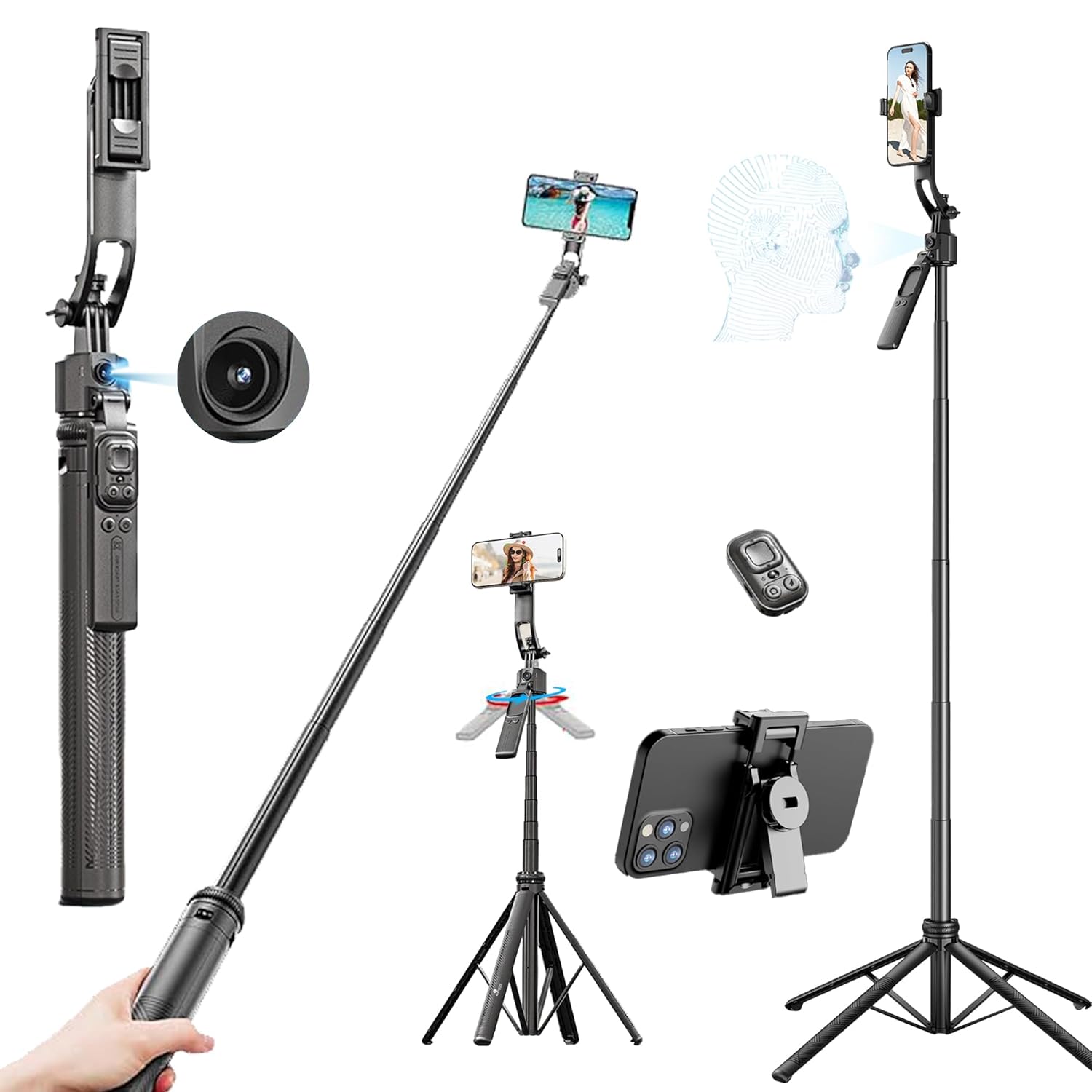
Figure 1: Kratos K8 AI-Powered Selfie Stick Tripod
2. Package Contents
Verify that all items are present in the package:
- Kratos K8 AI-Powered Selfie Stick Tripod
- Bluetooth Remote Control
- Warranty Card
3. Setup Guide
3.1 Unpacking and Initial Inspection
Carefully remove all components from the packaging. Inspect the device for any signs of damage. If any parts are missing or damaged, contact customer support immediately.
3.2 Assembling the Tripod
- Extend the Tripod Legs: Gently pull the base of the handle downwards to deploy the four tripod legs. Ensure they are fully extended and locked into position for maximum stability.
- Adjust Height: Extend the telescopic pole to your desired height. Twist the locking mechanisms (if present) to secure the pole at the chosen length. The tripod can extend up to 70 inches (178 cm).

Figure 2: Quad-Leg Tripod Base
3.3 Attaching Your Device
The Kratos K8 is compatible with smartphones, action cameras, and ring lights.
- For Smartphones: Open the phone clamp and securely place your smartphone. Ensure the phone is balanced. The phone holder is detachable and can be used as a standalone stand.
- For Action Cameras/Ring Lights: Use the standard 1/4-inch screw mount located at the top of the device. Attach your action camera or ring light by screwing it onto the mount. Ensure it is tightened securely.

Figure 3: Detachable Phone Holder

Figure 4: Wide Device Compatibility
3.4 Bluetooth Remote Pairing
- Power On Remote: Slide the power switch on the Bluetooth remote to the 'ON' position. The indicator light will begin to flash, indicating it is in pairing mode.
- Enable Bluetooth on Device: On your smartphone, go to Bluetooth settings and enable Bluetooth.
- Pair: Look for 'Kratos Remote' or a similar device name in the list of available devices and select it to pair. The indicator light on the remote will stop flashing and remain solid once paired.
4. Operating Instructions
4.1 Power On/Off
To power on the AI tracking module, press and hold the power button on the device until the indicator light illuminates. To power off, press and hold the power button again until the light turns off.
4.2 Selfie Stick Mode
When the tripod legs are folded, the device functions as an extendable selfie stick. Hold the handle firmly and extend the pole to your desired length. Use the Bluetooth remote to capture photos or start/stop video recording.
4.3 Tripod Mode
With the quad-legs fully extended and locked, the device functions as a stable tripod. Place it on a flat, stable surface. Adjust the height and angle as needed for hands-free operation.
4.4 AI Face Tracking
The Kratos K8 features AI-powered face tracking that automatically rotates the device to keep you in frame.
- Enable Tracking: Ensure the device is powered on. Show an "OK" gesture to the camera. The green indicator light will turn on, and tracking will begin.
- Stop Tracking: Show a "PALM" gesture to the camera. Tracking will pause, and the indicator light may change.

Figure 5: Gesture Recognition for AI Tracking
4.5 360° Rotation and Angle Adjustment
The device offers extensive flexibility for capturing various angles:
- Horizontal Rotation: The head can rotate 360 degrees horizontally for panoramic shots.
- Vertical Adjustment: Adjust the vertical angle up to 270 degrees to achieve desired elevation or downward shots.
- Balance Handle: The 360° rotatable balance handle allows for precise positioning.

Figure 6: Multi-Angle Adjustment
4.6 Using the Bluetooth Remote
The detachable Bluetooth remote provides convenient control from a distance of up to 10 meters.
- Power Switch: Slide left to turn ON, right to turn OFF.
- Camera Button: Click to take photos or start/stop video recording.
- Arrow Buttons: Control mouse direction (if applicable for certain apps).
- Like Button: Click to pause, double-click to 'like' (functionality may vary by application).

Figure 7: Bluetooth Remote Control Functions
5. Maintenance
Proper maintenance ensures the longevity and optimal performance of your Kratos K8 Selfie Stick Tripod.
- Cleaning: Wipe the device with a soft, dry cloth. Do not use harsh chemicals or abrasive cleaners.
- Storage: Store the tripod in a cool, dry place away from direct sunlight and extreme temperatures. Ensure it is fully collapsed before storage.
- Battery Care: If the remote control will not be used for an extended period, consider removing its battery to prevent leakage.
6. Troubleshooting
Refer to the table below for common issues and their solutions.
| Issue | Possible Cause | Solution |
|---|---|---|
| Bluetooth remote not pairing. | Remote is off, battery low, or not in pairing mode. | Ensure remote is ON and indicator light is flashing. Check/replace battery. Restart phone's Bluetooth. |
| AI Face Tracking not working. | Insufficient lighting, incorrect gesture, or module not powered on. | Ensure adequate lighting. Use clear "OK" gesture to start. Verify AI module is powered on. |
| Tripod feels unstable. | Legs not fully extended/locked, uneven surface, or excessive weight. | Ensure all four legs are fully extended and locked. Place on a flat surface. Do not exceed recommended weight capacity. |
| Device not rotating smoothly. | Obstruction or mechanism issue. | Check for any obstructions. Ensure the device is not overloaded. |
7. Specifications
| Feature | Detail |
|---|---|
| Model | K8 |
| Product Dimensions | 8.8 x 4.4 x 36 cm (folded) |
| Item Weight | 477 g |
| Max. Extended Length | 70 inches / 178 cm |
| Material | Aluminium (pole) |
| Connectivity | Bluetooth |
| Special Features | AI Face Tracking, 360° Auto Rotating Stand, Quad-Leg Stability, Detachable Bluetooth Remote |
| Compatible Devices | Smartphone, Action Camera, Ring Light |

Figure 8: Aluminium Alloy Construction
8. Warranty and Support
8.1 Warranty Information
The Kratos K8 AI-Powered Selfie Stick Tripod comes with a 1-year product warranty. Please refer to the included Warranty Card for detailed terms and conditions. Warranty registration may be available via a provided link or WhatsApp contact.
8.2 Customer Support
For technical assistance, troubleshooting, or warranty claims, please contact Kratos customer support:
- Manufacturer: Ezeekart Creation LLP
- Phone: 81482 73270
- Email: help@gokratos.com