
1. Introduction
Thank you for choosing the MOVE SPEED Z70Pro Power Bank. This device is designed to provide reliable and high-speed portable charging for a wide range of electronic devices, including smartphones, tablets, and laptops. With its massive 70,000mAh capacity, 100W Power Delivery (PD) output, and integrated 35W fast charger with a retractable Type-C cable, it offers unparalleled convenience and power for your daily needs and outdoor adventures.
Please read this manual carefully before using the product to ensure safe and optimal performance. Keep this manual for future reference.
2. Safety Information
- Do not expose the power bank to extreme temperatures (above 60°C/140°F or below -10°C/14°F), direct sunlight, or fire.
- Do not immerse the power bank in water or expose it to rain or moisture.
- Do not disassemble, repair, or modify the device yourself. Refer all servicing to qualified personnel.
- Keep the power bank away from children.
- Use only the provided or certified charging cables and adapters.
- Avoid dropping or subjecting the power bank to strong impacts.
- If the power bank swells, emits an odor, or becomes excessively hot, discontinue use immediately and contact customer support.
- Dispose of the power bank according to local regulations. Do not dispose of it with household waste.
3. Package Contents
Please check the package for the following items:
- MOVE SPEED Z70Pro Power Bank (70,000mAh)
- 35W PD Fast Charger with Retractable Type-C Cable
- USB-C to USB-C Charging Cable
- User Manual

Figure 3.1: Package Contents Overview. The image displays the MOVE SPEED Z70Pro Power Bank, a white 35W wall charger with a retractable Type-C cable, and two separate USB-C to USB-C charging cables.
4. Product Features
- 70,000mAh High Capacity: Provides extensive power, capable of fully charging an iPhone 14 approximately 16 times or a MacBook Pro 14'' multiple times. Ideal for extended travel and outdoor use.
- 100W Super Fast Charging (PD3.0 & QC3.0): Equipped with a powerful 100W Power Delivery output, allowing rapid charging of laptops and other high-power devices. Charges a MacBook Pro 14'' to 50% in just 35 minutes.
- Integrated 35W Super-Fast Charger: Features a built-in 35W wall charger with a retractable Type-C cable for convenient and fast recharging of the power bank itself or other devices. Charges an iPhone 16 Pro Max to 65% in 30 minutes.
- Multi-Device Charging: Supports simultaneous charging of multiple devices.
- Emergency LED Light: Includes an integrated LED light with four modes (High, Medium, Low, SOS) for illumination in various situations.
- Smart Display: Digital display shows remaining battery percentage and charging status.

Figure 4.1: Key Features of the Z70Pro Power Bank. The image shows the power bank with its side LED light illuminated, placed on a wooden table in an outdoor camping scene, emphasizing its large capacity and fast charging capabilities.
5. Setup
5.1 Initial Charging of the Power Bank
Before first use, it is recommended to fully charge your MOVE SPEED Z70Pro Power Bank.
- Locate the integrated 35W PD Fast Charger on the side of the power bank.
- Extend the retractable Type-C cable from the charger.
- Plug the 35W charger directly into a standard wall outlet.
- The digital display on the power bank will show the charging progress. A full charge from empty takes approximately 5 hours.
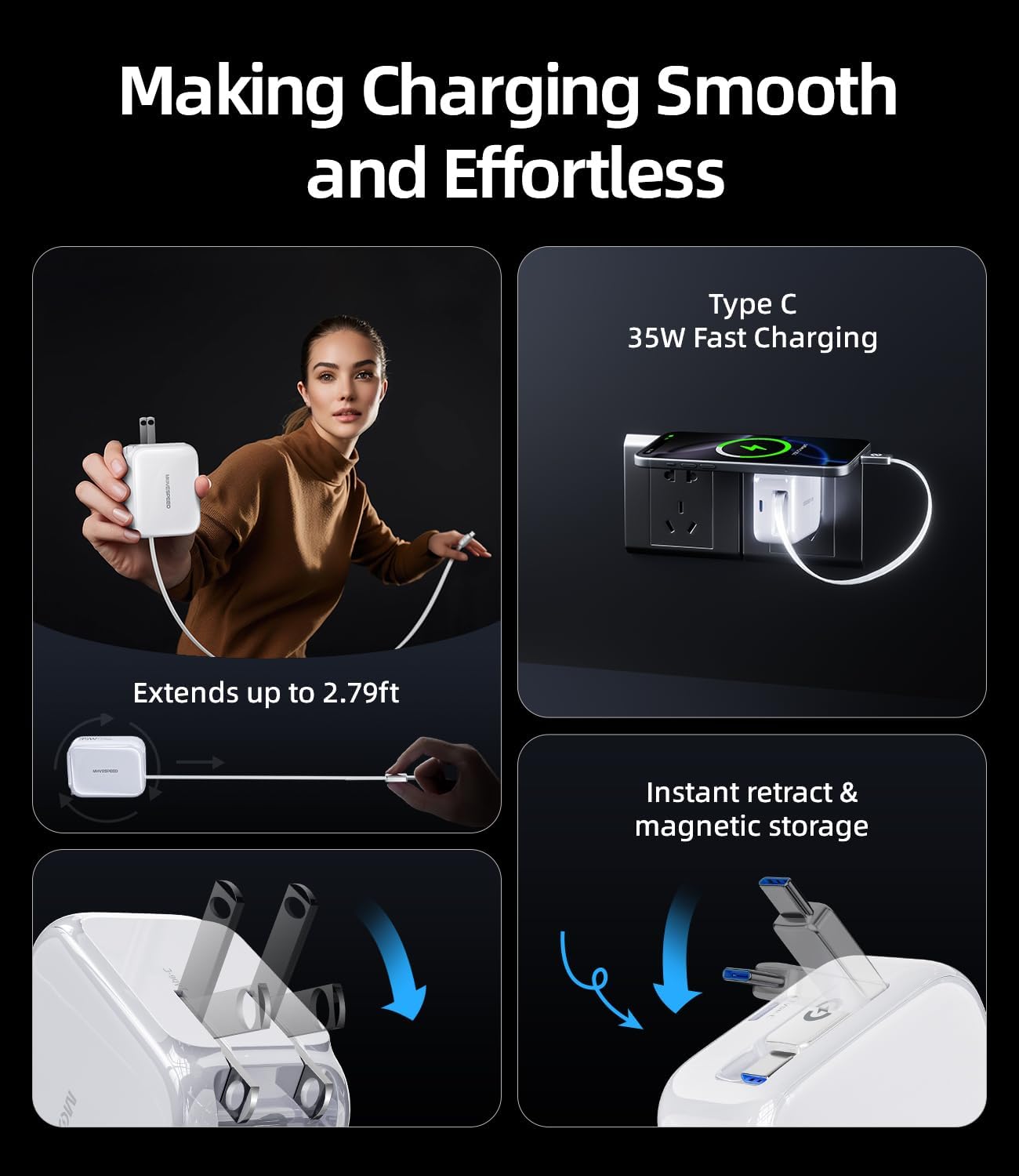
Figure 5.1: Extending the Retractable Cable. This image illustrates how the integrated Type-C cable extends from the 35W wall charger for convenient use.

Figure 5.2: 35W GaN Charger Technology. This image highlights the compact design and advanced GaN technology of the integrated 35W charger.
6. Operating Instructions
6.1 Charging Your Devices
The MOVE SPEED Z70Pro Power Bank offers multiple output ports for charging various devices simultaneously.
- Using the 100W PD Output: For laptops, tablets, and other high-power devices, use a compatible USB-C to USB-C cable (one is included) and connect it to the 100W PD output port on the power bank and your device. This port supports up to 100W fast charging.
- Using the 35W Output (Retractable Cable): For smartphones and other devices compatible with Type-C, simply extend the integrated retractable Type-C cable from the 35W charger and plug it into your device. This port supports up to 35W fast charging.
- Using Other USB Ports: The power bank also features additional USB-A and USB-C ports for charging other devices. Connect your device's charging cable to the appropriate port.
- The digital display will indicate when a device is connected and charging.
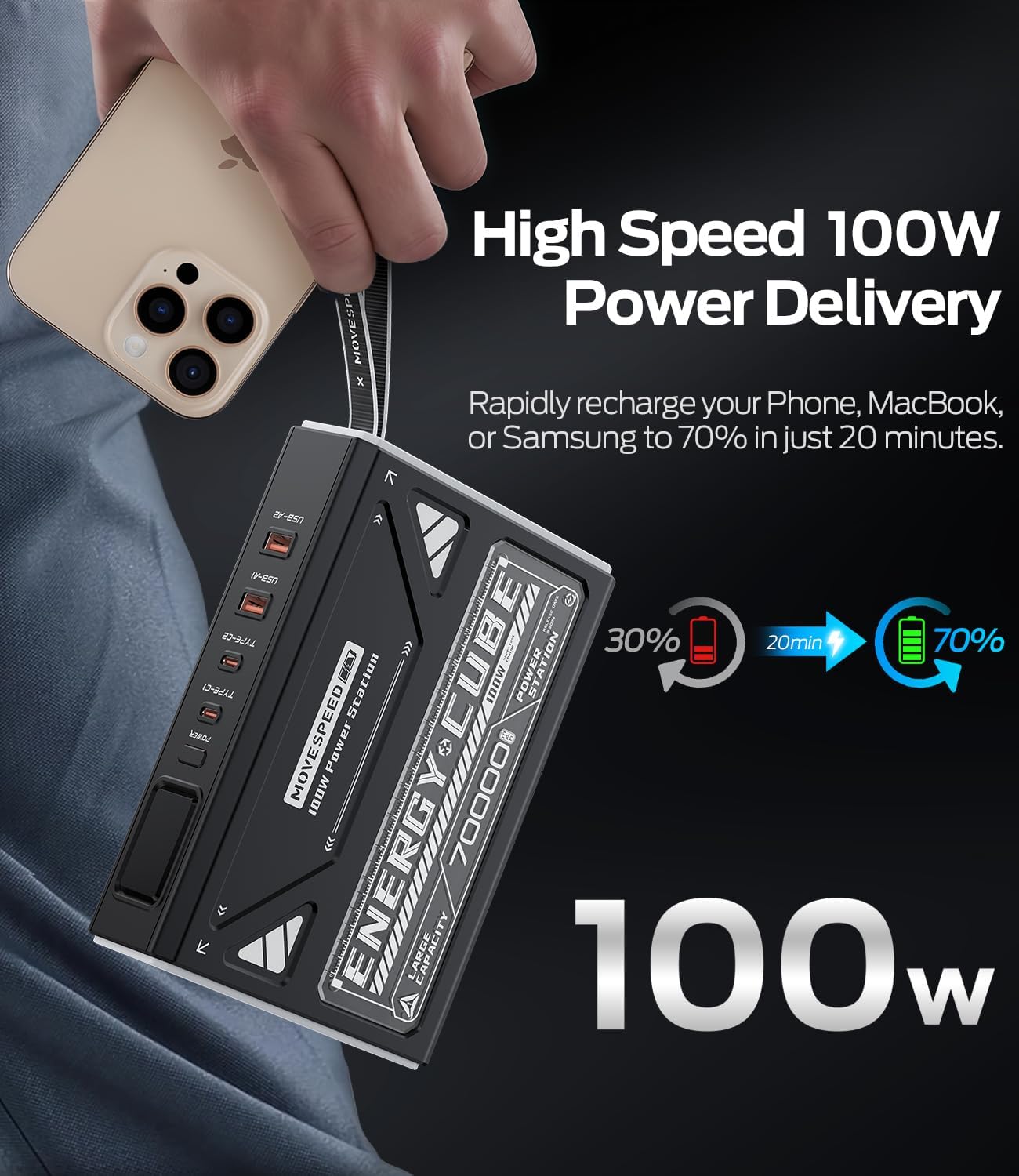
Figure 6.1: High-Speed 100W Power Delivery. This image illustrates the rapid charging capability of the 100W output, showing a phone charging from 30% to 70% in 20 minutes.

Figure 6.2: Multi-Protocol Fast Charging. This image demonstrates the versatility of the charger, capable of powering phones, tablets, and computers with various fast charging protocols.
6.2 Using the Emergency LED Light
The Z70Pro Power Bank includes a built-in LED light for emergency situations or general illumination.
- To turn on the LED light, locate the power button (or dedicated light button, if present) on the power bank and press it briefly.
- Subsequent brief presses will cycle through the light modes: High, Medium, Low, and SOS (Morse code for distress).
- To turn off the LED light, continue pressing the button until the light turns off, or press and hold the button for a few seconds.

Figure 6.3: Emergency Light with 4 Modes. This image displays the power bank's LED light functioning in an outdoor setting, illustrating its different brightness levels and SOS signal.
7. Maintenance
- Cleaning: Use a soft, dry cloth to clean the surface of the power bank. Do not use harsh chemicals or abrasive materials.
- Storage: Store the power bank in a cool, dry place away from direct sunlight and extreme temperatures. If storing for extended periods, charge the power bank to about 50-70% capacity every 3 months to prolong battery life.
- Cable Care: Ensure the retractable cable is fully retracted when not in use to prevent damage. Avoid bending or twisting cables excessively.
8. Troubleshooting
| Problem | Possible Cause | Solution |
|---|---|---|
| Power bank not charging | Charger not properly connected; faulty cable/adapter; power bank battery depleted. | Ensure charger is securely plugged into outlet and power bank. Try a different cable or adapter. Allow power bank to charge for a few minutes. |
| Device not charging from power bank | Power bank battery depleted; incompatible cable; device not properly connected; device requires more power than available. | Recharge the power bank. Ensure the cable is securely connected to both the power bank and the device. Use a compatible cable. Check if your device's power requirements exceed the power bank's output. |
| Slow charging | Using a non-fast charging port/cable; device not supporting fast charging protocol; multiple devices charging simultaneously. | Ensure you are using the 100W PD or 35W output ports with compatible cables. Verify your device supports the fast charging protocols (PD, QC). Charging multiple devices may reduce individual charging speeds. |
| LED light not working | Power bank battery low; incorrect operation. | Recharge the power bank. Refer to section 6.2 for correct operation of the LED light. |
9. Specifications
| Feature | Detail |
|---|---|
| Model | Z70Pro |
| Capacity | 70,000mAh / 259Wh |
| Input (for Power Bank Charging) | 35W (via integrated charger) |
| Output 1 (USB-C PD) | Up to 100W Power Delivery |
| Output 2 (Integrated Type-C Cable) | Up to 35W Fast Charging |
| Other Display Features | Wireless (as per product specifications, though not explicitly detailed in features) |
| ASIN | B0F48NPMKJ |
| Date First Available | April 9, 2025 |

Figure 9.1: Compact Size of the 35W Charger. This image highlights the small footprint of the integrated 35W charger, allowing it to fit easily on power strips.
10. Warranty and Support
MOVE SPEED products are designed and manufactured to the highest quality standards. For information regarding warranty coverage, technical support, or any product-related inquiries, please contact MOVE SPEED customer service through the retailer where you purchased the product or visit the official MOVE SPEED website.
Please have your product model (Z70Pro) and ASIN (B0F48NPMKJ) ready when contacting support.
For more information, you may visit the MOVE SPEED Store on Amazon.