
Introduction
Thank you for choosing the Dowinx Gaming Chair LS-6689. This manual provides essential information for the safe assembly, operation, and maintenance of your new chair. Please read these instructions thoroughly before use and retain them for future reference.
Important Safety Information
- Do not exceed the maximum weight capacity of 350 pounds.
- Follow all assembly instructions carefully to ensure stability and safety.
- Ensure all bolts and screws are tightened securely before use. Periodically check and re-tighten as necessary.
- Avoid standing on the chair or using it as a step stool.
- Keep hands and fingers clear of moving parts during adjustment.
Product Overview
The Dowinx Gaming Chair LS-6689 is designed for ergonomic support and comfort during extended periods of use, whether for gaming or office work. Key features include:
- Ergonomic Design: Adjustable lumbar support, contoured high back, and premium cold-cured foam for sustained comfort.
- Reclining Function: Smooth recline from 90° to 165° for various activities.
- Integrated Footrest: Retractable footrest for relaxation.
- Massage Lumbar Pillow: USB-powered massage function to alleviate lower back tension.
- High Capacity: Supports up to 350 LBS with a wide 20-inch seat.
- Durable Construction: Features scratch-resistant PU leather, a BIFMA-certified base, and a heavy-duty frame.

Figure 1: Dowinx Gaming Chair LS-6689 with footrest extended.
Setup and Assembly
The Dowinx Gaming Chair LS-6689 requires assembly. Clear instructions and numbered parts are provided in the packaging for easy setup. Please ensure you have all components before beginning assembly.
- Unpack all components and verify against the parts list provided in your package.
- Follow the step-by-step graphical instructions included with your chair.
- Ensure all connections are firm and secure before using the chair.

Figure 2: Assembly diagram for the Dowinx Gaming Chair.
Operating Instructions
Height Adjustment
To adjust the chair's height, locate the lever on the right side beneath the seat. Pull the lever upwards while applying or releasing weight from the seat to move it up or down. Release the lever to lock the height.
Backrest Recline
The backrest can be reclined from 90° to 165°. Pull the recline lever, typically located on the left side of the seat, and lean back to your desired angle. Release the lever to lock the backrest in position.

Figure 3: Demonstrating the recline and footrest features.
Footrest Operation
To extend the footrest, pull it out from underneath the seat. To retract, push it back until it is fully stored beneath the seat.
Massage Function
The lumbar pillow features a USB-powered massage function. Connect the USB cable from the pillow to a compatible USB power source (e.g., computer, power bank). The massage function will activate upon connection.

Figure 4: Lumbar massage pillow detail.
Armrest Functionality
The linkage armrests move in conjunction with the reclining backrest, providing continuous support. They do not feature independent height or swivel adjustments.
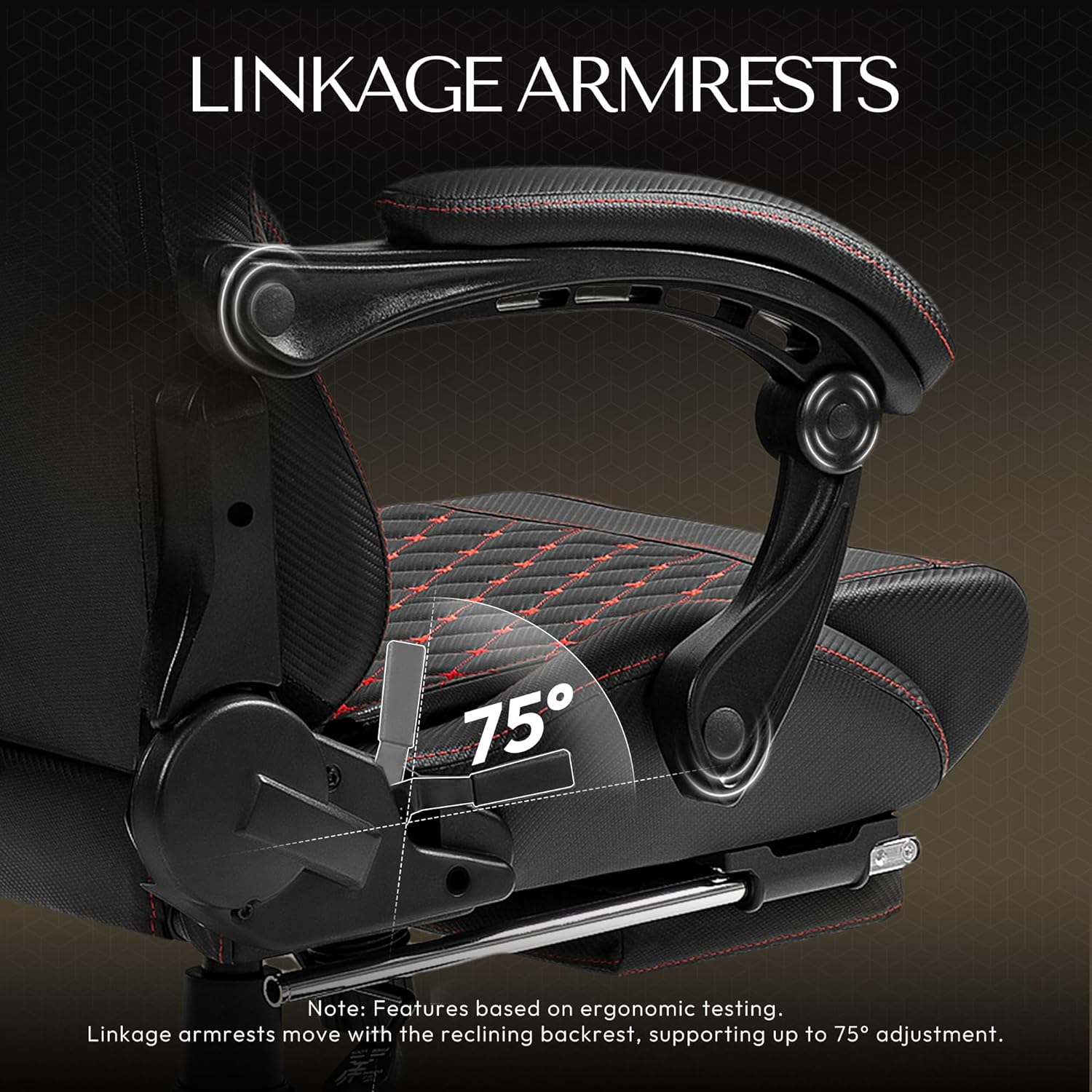
Figure 5: Linkage armrest mechanism.
Maintenance
- Cleaning: The chair's PU leather surface can be cleaned by gently wiping with a damp cloth. Avoid harsh chemicals or abrasive cleaners.
- Fasteners: Periodically check all bolts and screws to ensure they remain tight. Re-tighten as needed to maintain stability.
- Casters: Keep casters free of debris (hair, dust) to ensure smooth movement.
Troubleshooting
- Squeaking Noises: If the chair develops squeaking noises, check all bolted connections and ensure they are tightened. Applying a small amount of silicone lubricant to moving metal parts may also help.
- Difficulty Adjusting Height: Ensure the height adjustment lever is fully engaged or disengaged. Check for any obstructions around the gas lift cylinder.
- Unstable Chair: Verify that all components are correctly assembled and tightened according to the instructions. Ensure the chair is on a flat, even surface.
Specifications
| Feature | Detail |
|---|---|
| Brand | Dowinx |
| Model Number | LS-6689 |
| Color | Black |
| Product Dimensions | 33.07"D x 10.24"W x 24.8"H |
| Maximum Weight Recommendation | 350 Pounds |
| Material | Foam (Fill Material), PU Leather (Surface) |
| Special Features | Adjustable Backrest, Adjustable Height, Ergonomic, Foot Rest, Reclining, Massage Lumbar Pillow |
| Reclining Position Count | 2 (90° to 165°) |
| Item Weight | 48 pounds |
Warranty and Customer Support
Dowinx offers a 1-year free parts replacement warranty for this product. For any inquiries, assistance, or warranty claims, please contact Dowinx customer support. They provide 24/7 customer support to ensure your satisfaction.
Visit the official Dowinx Store for more information: Dowinx Store
Official Product Videos
Dowinx Gaming Chair 360 degree swivel footrest 6689A
This video demonstrates the 360-degree swivel and footrest features of the Dowinx Gaming Chair model 6689A, showcasing its flexibility and design.