
Waterdrop G5P500
Waterdrop G5P500 Reverse Osmosis Water Filter System User Manual
Model: G5P500
1. Introduction
Thank you for choosing the Waterdrop G5P500 Reverse Osmosis Water Filter System. This advanced 7-stage filtration system is designed to provide clean, safe, and great-tasting water directly from your tap. With a 500 GPD (Gallons Per Day) capacity and an efficient 2:1 pure to drain ratio, it significantly reduces various impurities, ensuring high-quality water for your household needs.
This manual provides essential information for the proper installation, operation, and maintenance of your Waterdrop G5P500 system. Please read it thoroughly before installation and keep it for future reference.
Safety Information
- Always follow local plumbing codes and regulations during installation.
- Ensure the water supply is turned off before performing any installation or maintenance.
- Do not install the system in direct sunlight or in areas where it may freeze.
- Use only genuine Waterdrop replacement filters to ensure optimal performance and system longevity.
- Keep the system away from heat sources and open flames.
2. Product Components
The Waterdrop G5P500 Reverse Osmosis Water Filter System bundle includes the main RO unit and the G5P500-CF composite filter. Ensure all components are present before beginning installation.
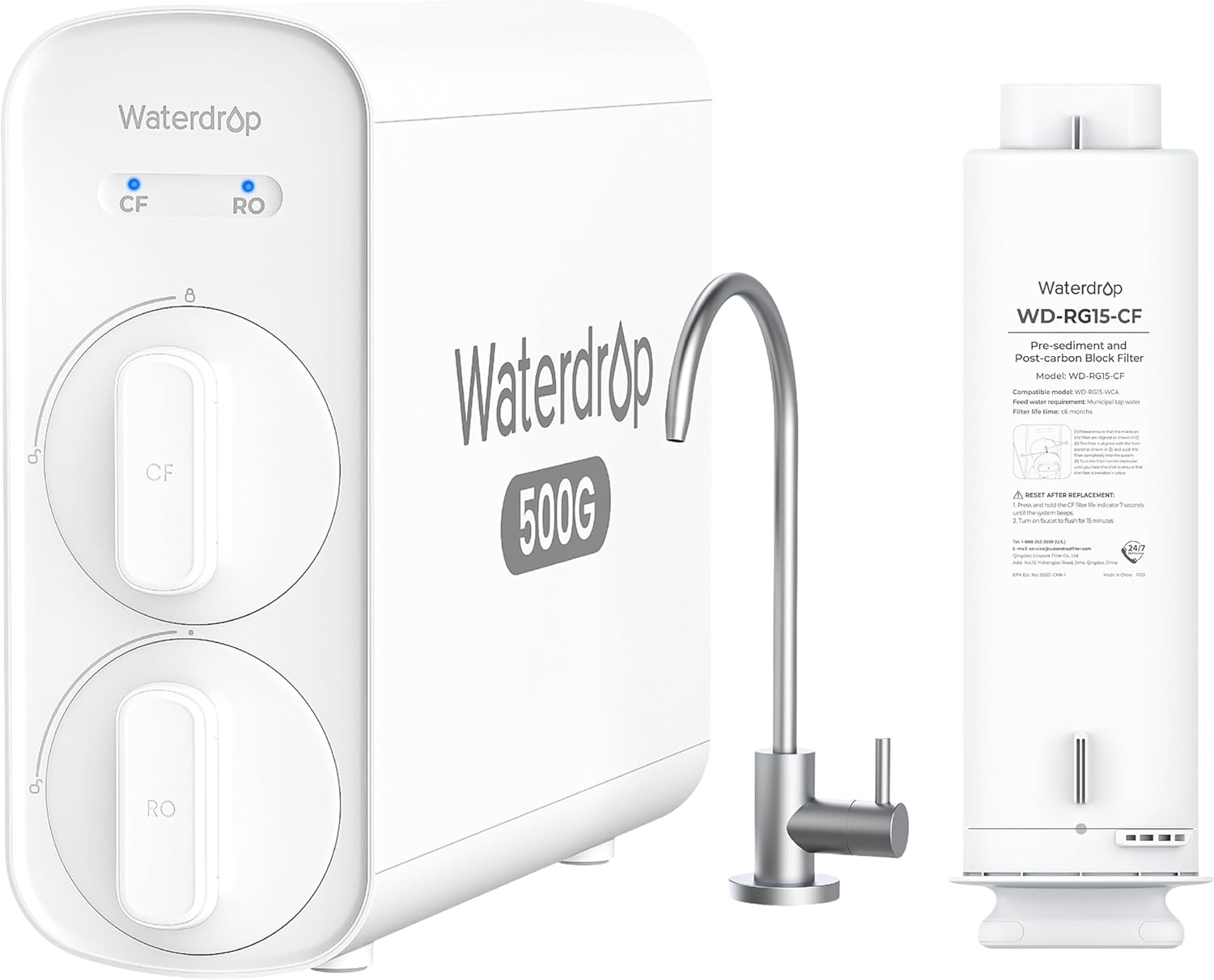
Figure 2.1: Overview of the Waterdrop G5P500 Reverse Osmosis Water Filter System, including the main unit with CF and RO filter slots, the dispensing faucet, and the G5P500-CF replacement filter.

Figure 2.2: The WD-RG15-CF pre-sediment and post-carbon block filter, designed as a replacement for the WD-G5P500 system. This image highlights the filter's compatibility and its role in the filtration process.
Filtration Stages
The G5P500 system employs a multi-stage filtration process to ensure comprehensive water purification:

Figure 2.3: Diagram illustrating the 7-stage filtration process of the Waterdrop G5P500 system. It shows how water passes through PP folded paper, carbon block, scale inhibitor, PP cotton, 0.0001µm RO membrane, and another carbon block and PP cotton layer to reduce over 1000 impurities including chlorine, lead, fluoride, sediment, PFOA, PFOS, heavy metals, and chloroform.
- Pre-Sediment Filter (PP Folded Paper): Removes larger particles like sand, rust, and sediment.
- Carbon Block Filter: Adsorbs chlorine, taste, and odor.
- Scale Inhibitor: Reduces scale buildup.
- PP Cotton: Further filters fine particles.
- RO Membrane (0.0001µm): The core of the system, effectively removes TDS, heavy metals, bacteria, viruses, and other dissolved solids.
- Post-Carbon Block Filter: Polishes the water for improved taste.
- Post-PP Cotton: Final filtration for any remaining fine particles.
3. Setup and Installation
This section provides a general overview of the installation process. For detailed instructions, please refer to the dedicated installation guide included with your product packaging.
Before You Begin:
- Gather all necessary tools (e.g., drill, wrench, screwdriver).
- Ensure sufficient space under your sink for the main unit and faucet.
- Turn off the cold water supply to your sink.
- Relieve water pressure by opening the existing faucet.
Installation Steps:
- Install the Faucet: Drill a hole (if necessary) in your countertop or sink for the new RO faucet. Secure the faucet in place.
- Connect to Cold Water Supply: Install the feed water adapter to your cold water line and connect the tubing to the RO system.
- Install Drain Saddle: Attach the drain saddle to the drain pipe under your sink to connect the drain line from the RO system.
- Mount the RO Unit: Place the main RO unit in a suitable location under the sink, ensuring easy access for filter replacement.
- Connect Tubing: Connect all color-coded tubing from the RO unit to the faucet, feed water adapter, and drain saddle as per the detailed diagram in your product manual.
- Install Filters: Insert the CF and RO filters into their respective slots. Ensure they are properly seated and twisted into place.
- Power On: Plug in the power adapter and turn on the cold water supply. Check for leaks.
- Flush the System: Allow the system to flush for at least 30 minutes before first use to remove any carbon fines and air.
4. Operating Instructions
The Waterdrop G5P500 system is designed for simple operation, providing instant access to purified water without a storage tank.
Dispensing Water:
- Simply turn the handle of the dedicated RO faucet to dispense purified water.
- The system will automatically activate and produce water as needed.

Figure 4.1: Illustration demonstrating the fast and stable water flow provided by the Waterdrop G5P500 system, highlighting its tankless design for instant water access compared to traditional RO systems with slower, slipping flow.
Pure to Drain Ratio:
The G5P500 system boasts an efficient 2:1 pure to drain ratio, meaning for every 2 gallons of purified water produced, only 1 gallon is sent to the drain. This significantly reduces water waste compared to traditional RO systems.

Figure 4.2: Visual comparison of the Waterdrop G5P500's 2:1 pure to drain ratio (67% pure water) versus a traditional RO system's 0.25:1 ratio (20% pure water), illustrating the significant water saving benefits of the G5P500 model.
Applications:
The purified water from your Waterdrop G5P500 system is suitable for various household uses:

Figure 4.3: Collage showing various applications for the purified water from the Waterdrop G5P500 system, including daily drinking, post-exercise hydration, meal preparation, and making beverages.
5. Maintenance
Regular maintenance, primarily filter replacement, is crucial for the optimal performance and longevity of your Waterdrop G5P500 system.
Filter Replacement:
The system features tool-free, quick-twist filter replacement. The CF (composite filter) and RO (reverse osmosis membrane) filters have different replacement schedules.
- CF Filter (WD-RG15-CF): Recommended replacement every 6-12 months, depending on water quality and usage.
- RO Filter: Recommended replacement every 24-36 months, depending on water quality and usage.

Figure 5.1: Step-by-step visual guide demonstrating the 3-second fast filter replacement process for the Waterdrop G5P500 system. It highlights the tool-free, easy twist-and-pull mechanism and the automatic water shutoff feature for convenient maintenance.
Steps for Filter Replacement:
- Turn off the water supply to the system.
- Twist the old filter counter-clockwise to unlock and pull it out.
- Insert the new filter, aligning it to the midpoint, and twist clockwise to lock it into place.
- Turn on the water supply and check for leaks.
- Flush the new filter for a few minutes before first use.

Figure 5.2: Visual representation of the large capacity of a single Waterdrop G5P500 filter, equivalent to approximately 4,000 1-liter bottles of water, emphasizing long-lasting healthy water supply.
Cleaning:
- Wipe the exterior of the system and faucet with a clean, damp cloth as needed.
- Do not use abrasive cleaners or solvents.
6. Troubleshooting
This section addresses common issues you might encounter with your Waterdrop G5P500 system. For problems not listed here, please contact customer support.
| Problem | Possible Cause | Solution |
|---|---|---|
| No water flow or very slow flow |
|
|
| Poor water taste or odor |
|
|
| Water leaks |
|
|
| High TDS (Total Dissolved Solids) in purified water |
|
|
7. Specifications
| Feature | Detail |
|---|---|
| Model | Waterdrop G5P500 |
| Filtration Stages | 7-Stage Reverse Osmosis |
| Daily Production Rate | 500 Gallons Per Day (GPD) |
| Pure to Drain Ratio | 2:1 |
| Certifications | NSF/ANSI 372 Certified |
| Compatible Filters | WD-G5P500-CF (Composite Filter), WD-G5P500-RO (RO Membrane) |
| Filter Lifespan (CF) | Up to 6-12 months |
| Filter Lifespan (RO) | Up to 24-36 months |
| Operating Temperature | 41-100°F (5-38°C) |
| Operating Pressure | 14.5-87 psi (0.1-0.6 MPa) |
8. Warranty and Support
Waterdrop provides a limited warranty for its products. Please refer to the warranty card included in your product packaging for specific terms and conditions. Keep your purchase receipt as proof of purchase for warranty claims.
Customer Support:
For technical assistance, troubleshooting, or to order replacement parts, please contact Waterdrop customer support:
- Website: www.waterdropfilter.com
- Email: support@waterdropfilter.com
- Phone: (Refer to your product packaging or Waterdrop website for regional contact numbers)
When contacting support, please have your product model number (G5P500) and purchase date ready.
Related documentsG5P500


Ask a question about this manual
Ask about setup, troubleshooting, compatibility, parts, safety, or missing instructions. Manuals+ will review the question and use this page’s manual context to help answer it.