
1. Introduction and Overview
The JEYI NVMe M.2 to 5-Port SATA Adapter is designed to expand the storage capabilities of your system by converting a single M.2 NVMe slot into five SATA III 6GB/s ports. This adapter is ideal for NAS, server, and desktop PC applications requiring additional SATA connectivity for SSDs and HDDs. It features a built-in JMB585 chip for reliable performance and includes a heatsink for optimal thermal management.

Figure 1.1: JEYI NVMe M.2 to 5-Port SATA Adapter with Heatsink.

Figure 1.2: Comparison of New and Old PCB Versions. The new version incorporates design improvements based on user feedback.
2. Product Features
- Adds 5 SATA III 6GB/s ports via an M.2 NVMe slot.
- Supports PCIe 3.0 x2 interface, providing an uplink speed of up to 1700 MB/s.
- Plug and play functionality; no driver installation required.
- Supports UASP (USB Attached SCSI Protocol) and TRIM commands.
- Compliant with PCI Express specification Ver.3.1a.
- Compliant with SATA specification version 3.2.
- Supports 5-drive software RAID group (requires motherboard/OS support).
- Supports command-based and FIS-based port doubling.
- Supports PCI Express Physical Layer power saving mode.
- Supports AHCI mode and IDE programming interface.
- Supports Native Command Queuing (NCQ).
- Supports SATA power saving mode (partial and hibernation).
- Integrated aluminum heatsink for enhanced thermal performance.

Figure 2.1: Key features of the JEYI NVMe M.2 to 5-Port SATA Adapter.
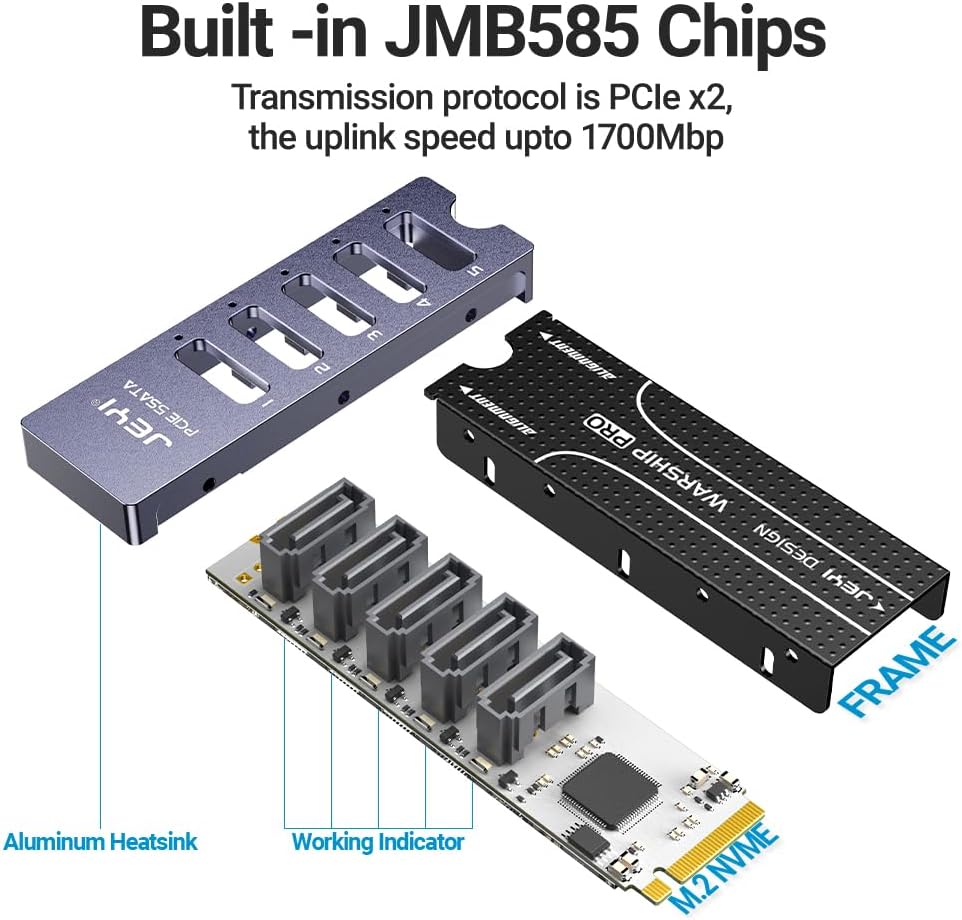
Figure 2.2: Exploded view illustrating the JMB585 chip, aluminum heatsink, and working indicators.
3. Package Contents
Please verify that all items are present and in good condition upon opening the package:
- JEYI NVMe M.2 to 5-Port SATA Adapter Card (with heatsink assembly)
- Mounting Screws
- Screwdriver (for assembly/disassembly)

Figure 3.1: Included components: Adapter PCB, heatsink components, screwdriver, and mounting screws.
4. Setup and Installation
Important: Before beginning installation, ensure your computer is powered off and disconnected from the power source. It is recommended to wear an anti-static wrist strap to prevent damage to electronic components.
4.1 System Requirements
- Available M.2 NVMe slot (M-key, PCIe 3.0 x2 or higher).
- Motherboard support for M.2 PCIe Bifurcation is highly recommended for optimal performance and recognition of all 5 SATA drives. Without bifurcation support, your system may only recognize a limited number of drives. Consult your motherboard manual for details.
- Operating System: Windows 7/8/8.1/10 (32 & 64bit), Linux.
4.2 Installation Steps
- Prepare the Adapter: If the heatsink is not pre-assembled, carefully attach the aluminum heatsink to the adapter PCB using the provided screws. Ensure proper alignment.
- Locate M.2 Slot: Open your computer case and locate an available M.2 NVMe slot on your motherboard.
- Insert the Adapter: Gently insert the JEYI NVMe M.2 to 5-Port SATA Adapter into the M.2 slot at a 30-degree angle. Push down the adapter until it is parallel with the motherboard.
- Secure the Adapter: Secure the adapter with the M.2 mounting screw provided with your motherboard or the adapter kit.
- Connect SATA Drives: Connect your SATA SSDs or HDDs to the five SATA ports on the adapter using standard SATA data cables. Ensure the cables snap securely into place.
- Provide Power: Ensure all connected SATA drives receive adequate power from your power supply unit (PSU).
- Close Case and Power On: Close your computer case, reconnect the power, and power on your system.
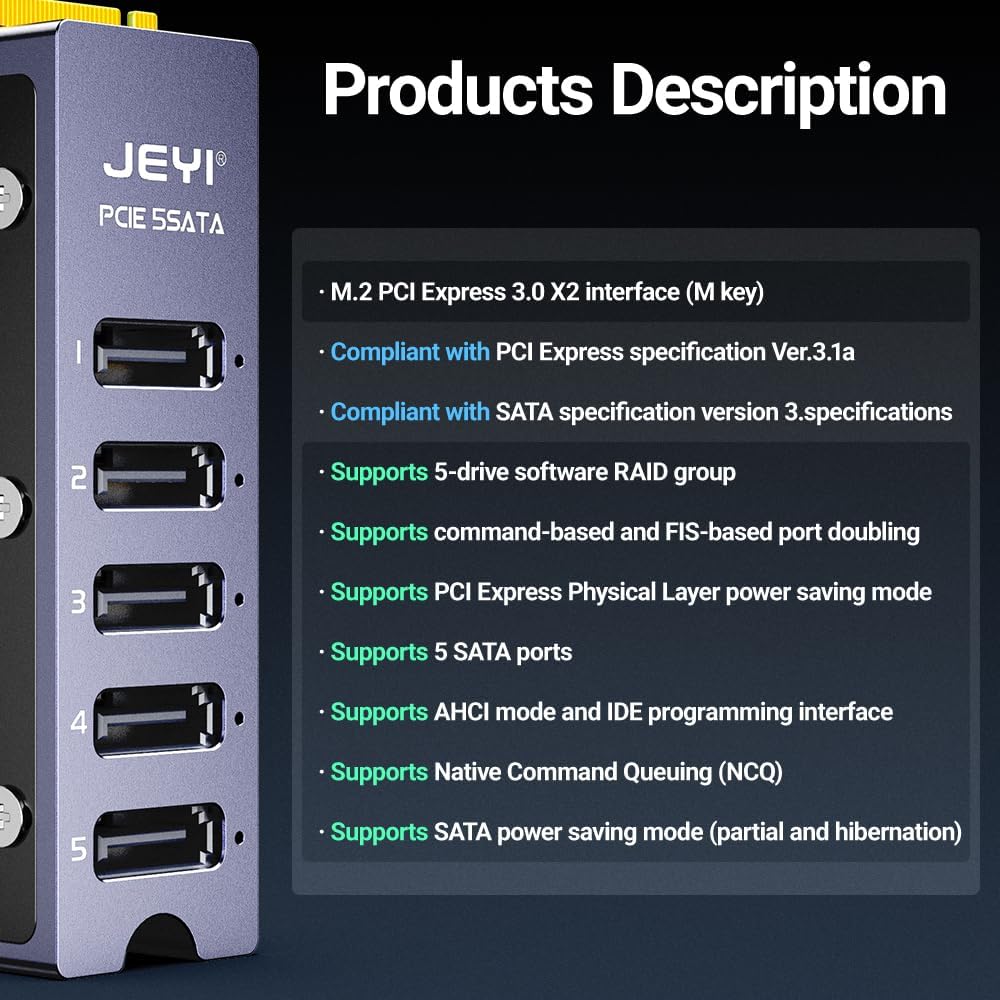
Figure 4.1: Side view of the adapter, highlighting the M.2 connector for motherboard insertion.
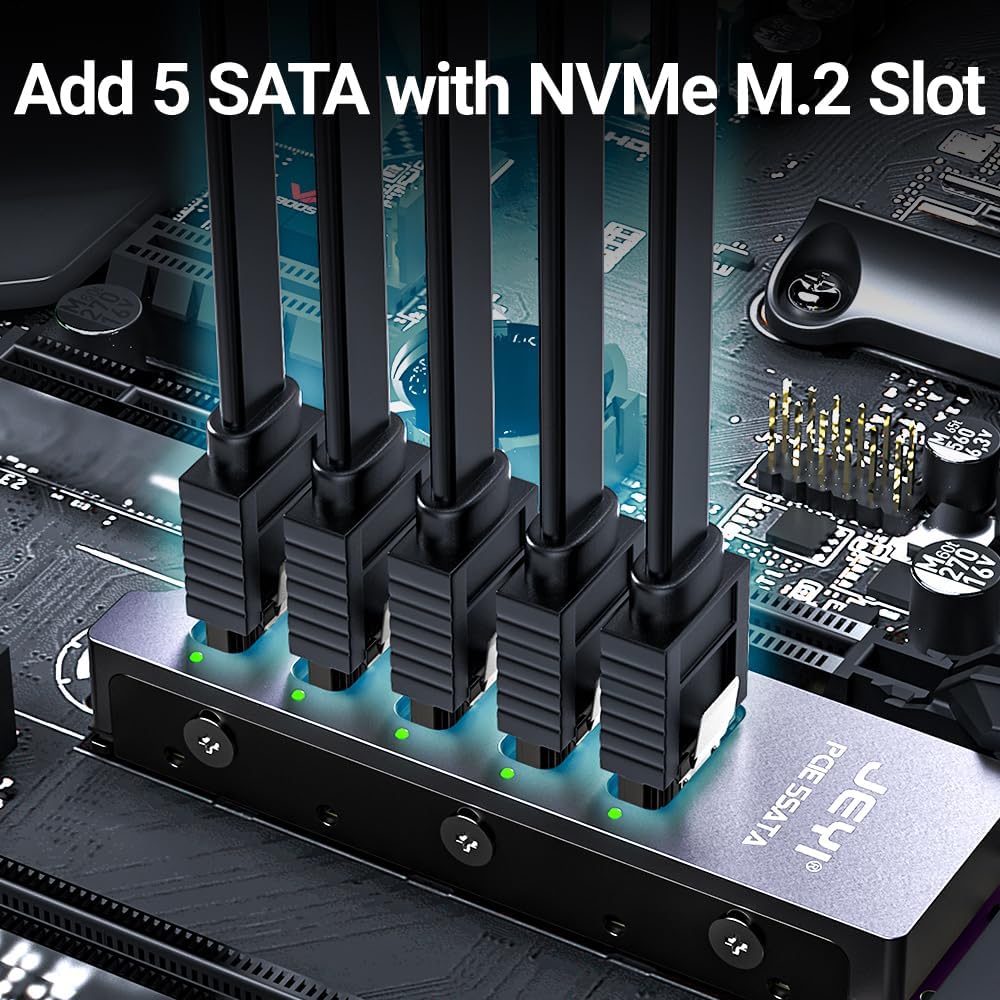
Figure 4.2: The adapter with five SATA data cables connected to the ports.
5. Operating Instructions
Once installed, the JEYI NVMe M.2 to 5-Port SATA Adapter operates as a standard SATA controller. Your operating system should automatically detect the new SATA ports and any connected drives without requiring additional drivers.
- Drive Recognition: After booting, check your operating system's Disk Management (Windows) or disk utility (Linux) to verify that all connected drives are recognized.
- Formatting Drives: New drives will need to be initialized, partitioned, and formatted before use.
- Software RAID: If you intend to use a software RAID configuration, refer to your operating system's documentation for setting up RAID groups. The adapter supports 5-drive software RAID groups, but this functionality is managed by the operating system, not the adapter itself.
- Performance: The adapter supports SATA III speeds up to 6GB/s per port, with a total uplink bandwidth of 1700 MB/s via PCIe 3.0 x2. Actual performance may vary based on your system configuration and connected drives.

Figure 5.1: Illustration of 6Gbps data transfer capability per SATA port.
6. Maintenance
The JEYI NVMe M.2 to 5-Port SATA Adapter is designed for long-term, reliable operation with minimal maintenance. Follow these guidelines:
- Keep Clean: Periodically inspect the adapter for dust accumulation, especially around the heatsink fins. Use compressed air to gently remove dust.
- Secure Connections: Ensure all SATA data and power cables remain securely connected to prevent intermittent drive issues.
- Environmental Conditions: Operate the adapter within standard computer operating temperatures and humidity levels.
7. Troubleshooting
If you encounter issues with your JEYI NVMe M.2 to 5-Port SATA Adapter, refer to the following troubleshooting steps:
- Drives Not Detected:
- Check M.2 Bifurcation: Verify that your motherboard supports M.2 PCIe Bifurcation. Without this feature, not all 5 drives may be recognized. Consult your motherboard manual or BIOS settings.
- Secure Connections: Ensure all SATA data and power cables are firmly connected to both the adapter and the drives.
- Power Supply: Confirm that your power supply unit (PSU) has sufficient wattage and available power connectors for all connected drives.
- Adapter Seating: Re-seat the M.2 adapter firmly into its slot on the motherboard.
- BIOS/UEFI Settings: Check your system's BIOS/UEFI settings to ensure the M.2 slot is enabled and configured correctly (e.g., set to PCIe mode if applicable).
- Slow Performance:
- Cable Quality: Use high-quality SATA III cables.
- Drive Health: Check the health and performance of your individual SSDs/HDDs.
- System Load: High system load or other active storage devices can impact performance.
- Intermittent Drive Disconnections:
- Cable Integrity: Inspect SATA cables for damage. Replace if necessary.
- Power Stability: Ensure stable power delivery to the drives.
- Thermal Issues: While the adapter has a heatsink, ensure adequate airflow within your PC case to prevent overheating of components.
8. Specifications
| Feature | Specification |
|---|---|
| Model Number | PCIe M.2 5xSATA |
| Interface | M.2 NVMe (M-key), PCIe 3.0 x2 |
| SATA Ports | 5 x SATA III 6Gb/s |
| Uplink Speed | Up to 1700 MB/s |
| Chipset | JMB585 |
| Operating System Support | Windows 7, 8, 8.1, 10 (32 & 64bit), Linux |
| Dimensions (LxWxH) | 8.9 x 8.15 x 1.61 inches (approx. 226 x 207 x 41 mm) |
| Item Weight | 1.58 ounces (approx. 45 grams) |
| Hardware Interface | SATA 3.0 Gb/s |
| Compatible Devices | Desktop PCs, NAS, Servers |

Figure 8.1: Physical dimensions of the JEYI NVMe M.2 to 5-Port SATA Adapter.
9. Warranty Information
JEYI products typically come with a limited warranty. Specific warranty terms, conditions, and duration may vary by region and retailer. Please refer to the warranty card included with your purchase or visit the official JEYI website for the most current warranty information. Keep your proof of purchase for warranty claims.
10. Support
For technical assistance, product inquiries, or further support, please contact JEYI customer service through the following channels:
- Official Website: Visit the JEYI official website for FAQs, driver downloads (if applicable), and contact information.
- Retailer Support: Contact the retailer from whom you purchased the product for initial support or return/exchange policies.
When contacting support, please have your product model number (PCIe M.2 5xSATA) and proof of purchase readily available.