Overview
The MAIWO M.2 SATA SSD Enclosure (Model K1688S) is designed to convert your B+M Key M.2 SATA Solid State Drive into a portable external storage device. Featuring a USB3.2 Gen1 Type-C interface, it offers high-speed data transfer and excellent heat dissipation through its aluminum alloy housing. This manual provides essential information for setup, operation, and maintenance to ensure optimal performance and longevity of your device.
What's in the Box
- 1x M.2 SATA SSD Enclosure
- 1x Type-C to Type-A 10Gbps Data Cable (45cm)
- 1x Silicone Thermal Pad
- 1x Screwdriver, Screws
- 1x User Manual
Compatibility
This M.2 SATA SSD enclosure supports B+M Key M.2 SATA SSDs in 2242mm, 2260mm, and 2280mm sizes. It is compatible with Windows, macOS, and Linux operating systems, supporting capacities up to 4TB.
Important Note: This enclosure DOES NOT SUPPORT M.2 PCIE NVME M-KEY SSDs.
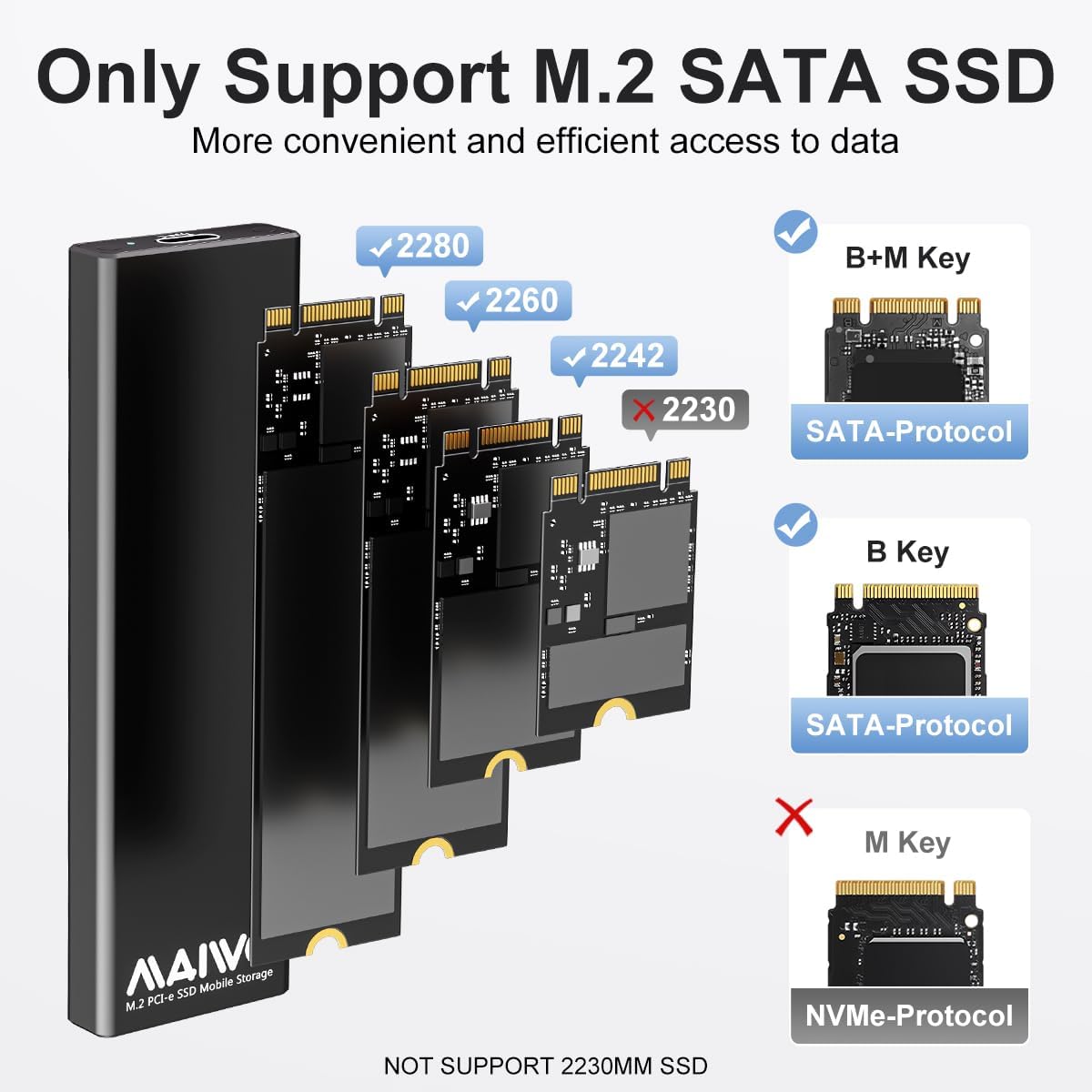
Image: The enclosure is compatible with B+M Key M.2 SATA SSDs in 2242, 2260, and 2280mm sizes. It does not support M-Key NVMe SSDs.

Image: The enclosure offers wide compatibility with various devices such as desktops, laptops, TVs, routers, phones (with OTG), tablets, and PS4. It supports Windows, macOS, Linux, iOS, and Android operating systems.
Features and Performance
- High Transfer Speed: Equipped with a 5Gbps JMS576 chipset and a USB3.2 Gen1 Type-C port, this enclosure delivers high performance. Practical transfer speeds can reach up to 6Gbps when used with Windows 8 or above systems and with UASP (USB Attached SCSI Protocol).
- Excellent Heat Dissipation: The enclosure features an all-aluminum alloy housing and includes a silicone thermal pad. This design ensures excellent heat dissipation, keeping your M.2 SATA SSD cool and extending its service life.

Image: The enclosure highlights USB3.2 Gen1 for high-speed data transfer, reaching up to 6Gbps. It features UASP & TRIM support and a Type-C to Type-A connection.
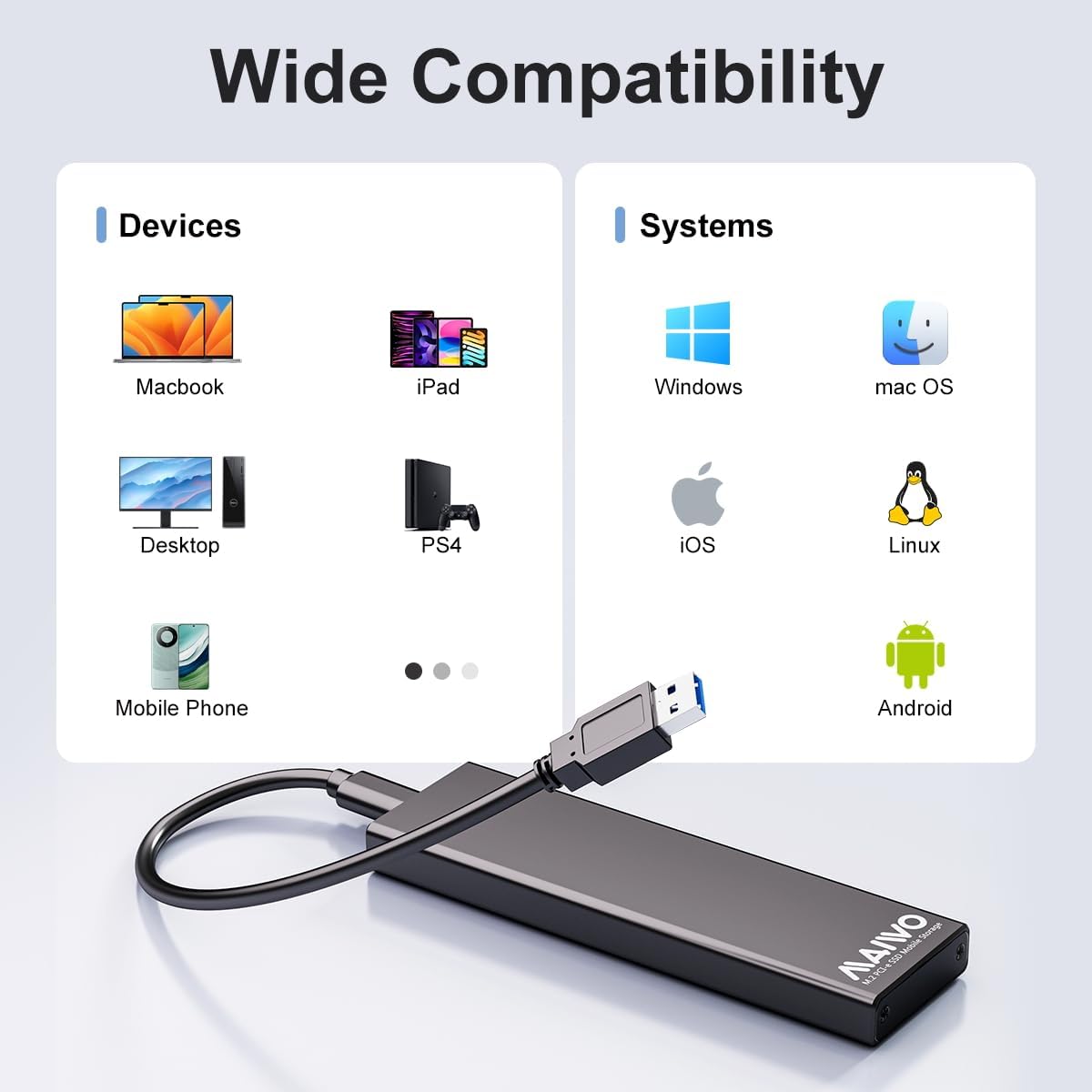
Image: Illustration of the enclosure's triple excellent heat dissipation design, featuring an all-aluminum housing and a silicone thermal pad to keep the SSD cool.
Setup and Installation
Follow these steps to install your M.2 SATA SSD into the enclosure:
- Remove the metal baffle from the enclosure using the provided screwdriver.
- Carefully insert your M.2 SATA SSD into the PCBA board connector.
- Secure the SSD to the PCBA board with the provided screw. Apply the silicone thermal pad onto the SSD's chips for optimal heat transfer.
- Slide the PCBA board with the installed SSD back into the aluminum shell. Secure the metal baffle with the screw.

Image: Step-by-step visual guide for installing the M.2 SATA SSD: 1. Remove metal baffle. 2. Insert M.2 SATA SSD. 3. Fix SSD and apply thermal pad. 4. Insert PCBA back into shell.
Video: Official MAIWO video demonstrating the installation process for the M.2 SATA SSD Enclosures.
Operating Instructions
After successful installation, connect the enclosure to your computer or compatible device using the provided USB-C to USB-A data cable. The blue LED indicator on the enclosure will light up to signify power. During data read and write operations, the LED will flash, indicating activity.
Troubleshooting
- Drive Not Recognized: Ensure the M.2 SATA SSD is correctly installed and secured. Verify that the enclosure is connected to a functional USB port on your device. Check if the SSD is properly formatted for your operating system (e.g., NTFS for Windows, APFS/HFS+ for macOS).
- Slow Transfer Speeds: Confirm that your device's USB port supports USB3.2 Gen1 speeds or higher. Using a USB2.0 port will significantly reduce transfer rates. Ensure your operating system (Windows 8 or above) supports UASP for optimal performance.
- Enclosure Gets Hot: While the aluminum housing is designed for heat dissipation, prolonged heavy usage may cause the enclosure to warm up. This is normal. Ensure the silicone thermal pad is correctly applied to aid in heat transfer.
Technical Specifications
| Feature | Detail |
|---|---|
| Brand | MAIWO |
| Model Number | K1688S |
| Material | Aluminum |
| Hardware Interface | USB 3.2 Gen 1 (Type-C) |
| Data Transfer Rate | 6 Gigabits Per Second (with UASP) |
| Memory Storage Capacity | Up to 4 TB |
| Compatible SSDs | B+M Key M.2 SATA SSD (2242/2260/2280mm) |
| Compatible Devices | Desktop, TV, Router, Laptop, Phone (Require OTG), Tablet, PS4, etc. |
| Compatible OS | Windows, macOS, Linux |
| Product Dimensions | 4.07"L x 1.22"W x 0.37"H |
| Item Weight | 1.59 ounces (45 Grams) |
Warranty and Support
This MAIWO product comes with a standard limited warranty. For warranty claims, technical support, or any inquiries regarding your M.2 SATA SSD Enclosure, please contact MAIWO Official customer service. Refer to the product packaging or the official MAIWO website for the most up-to-date contact information.


