
Moondrop Rays
Moondrop Rays Gaming Earphones User Manual
Model: Rays
Brand: Moondrop
1. Introduction
The Moondrop Rays are high-performance gaming earphones designed to provide an immersive audio experience for professional players and enthusiasts. Featuring a USB-C DSP game sound card, advanced AI noise cancellation microphone, and a customizable tuning interface, the Rays deliver precise sound positioning, clear communication, and rich audio details. These earphones are co-tuned with professional e-sports players to optimize performance across various mainstream games.

Image: Moondrop Rays Gaming Earphones, showcasing their distinctive design and braided cable.

Image: Overview of Moondrop Rays key features and design elements.
2. What's in the Box
Upon opening your Moondrop Rays package, please ensure all the following components are present:
- Moondrop Rays Earphones
- USB-C Cable
- USB-C to A Extended Cable
- Storage Bag
- Ear-tips (3 pairs of different sizes)
- User Manual
- Certificate

Image: All items included in the Moondrop Rays retail package.
3. Setup
3.1 Connecting Your Moondrop Rays
The Moondrop Rays feature a universal USB-C port for easy and direct connection to a variety of devices. No additional drivers are typically required for basic functionality.
- Identify the USB-C Port: Locate the USB-C port on your computer, mobile phone, or tablet.
- Connect the Earphones: Plug the USB-C connector of the Moondrop Rays cable directly into your device's USB-C port.
- Using the Extended Cable (Optional): If your device has a USB-A port or requires extended reach, use the provided USB-C to A extended cable. Connect the Rays' USB-C end to the adapter, and then plug the USB-A end of the adapter into your device.
- Device Recognition: Your device should automatically recognize the Moondrop Rays as an audio output and input device. You may need to select "Moondrop Rays" from your device's sound settings.

Image: Moondrop Rays USB-C connection to a laptop.
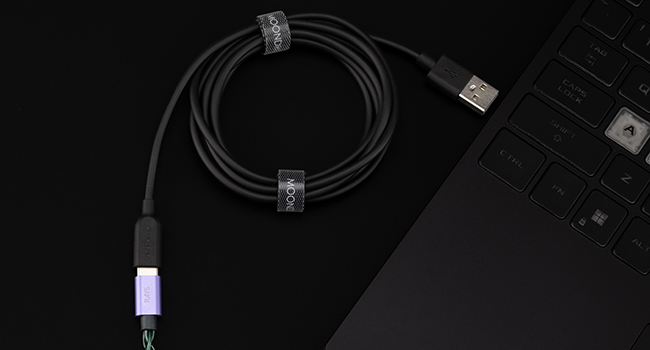
Image: The included USB-C to A extended cable for versatile connectivity.
4. Operating Instructions
4.1 Audio Tuning and Customization
The Moondrop Rays offer advanced audio tuning capabilities, allowing you to customize your sound profile for different games and media. This is facilitated by a brand-new professional tuning interface and a built-in tune sharing community.
- Professional Tuning Interface: Utilize the dedicated software (available for download from the official Moondrop website) to access the professional tuning interface. Here, you can adjust parameters such as filter type, frequency point, gain, and Q value to achieve precise audio tailoring.
- Co-Tuned with E-sports Players: The Rays come with pre-optimized tuning configurations for over 20 mainstream games, developed in partnership with professional e-sports players. These settings are designed to enhance the discernment of critical in-game sounds like footsteps and gunshots.
- Tune Sharing and Downloading Community: Access the built-in community to share your custom tuning configurations or download profiles created by other users and professional players. This allows for easy one-button switching between various optimized sound settings.
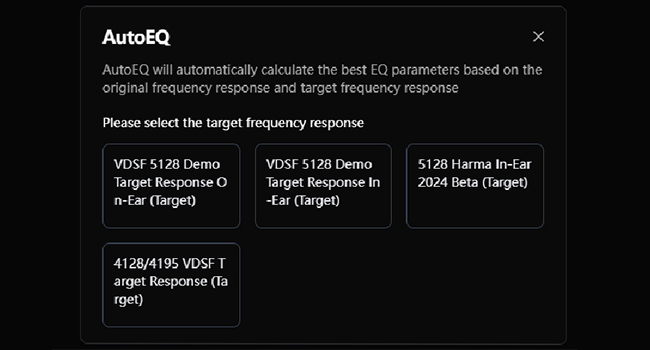
Image: AutoEQ interface for automatic EQ parameter calculation.
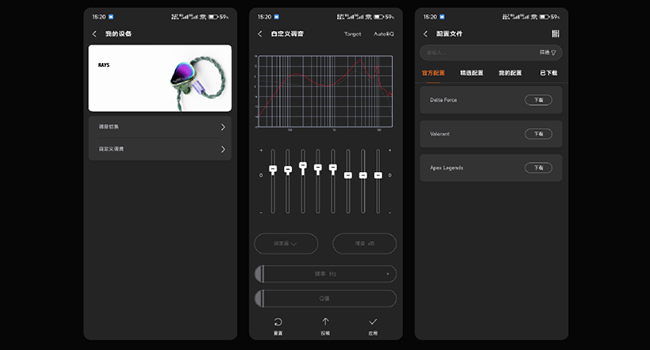
Image: Mobile application interface for tuning and managing sound profiles.
4.2 HiFi-Class Game Sound Card
The Moondrop Rays are equipped with a high-performance Hi-Fi gaming sound card, featuring a four-layer gold sinking circuit and high-precision component design. This integrated sound card can decode high-definition PCM audio up to 32-bit/384kHz, providing superior audio quality compared to traditional virtual 7.1 gaming sound cards.
- Clearer Imaging: Experience enhanced clarity in audio elements, allowing for better distinction of individual sounds.
- More Accurate Positioning: Pinpoint the direction and distance of in-game sounds with greater precision, crucial for competitive gaming.
- Richer Details and Dynamic Range: Enjoy a broader spectrum of sound details and a more impactful dynamic range, bringing games and music to life.
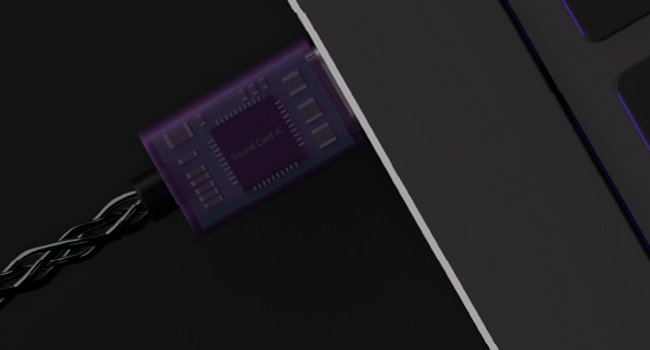
Image: Detailed view of the integrated Hi-Fi sound card IC.
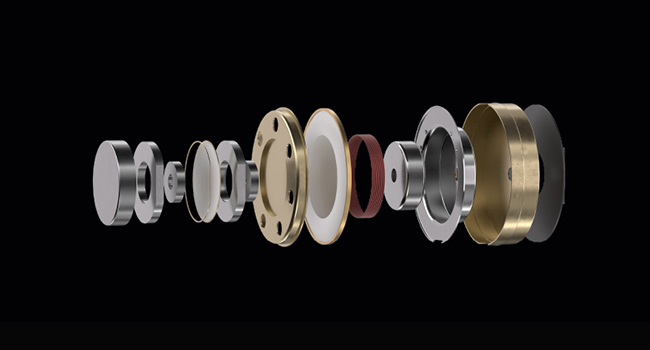
Image: Exploded view of the earphone's internal acoustic design components.
4.3 Hardware AI Noise Cancellation Microphone
The Moondrop Rays incorporate a hardware AI noise cancellation microphone, powered by an embedded NPU (Neural Processing Unit). This advanced technology significantly improves vocal clarity during calls and in-game communication by effectively suppressing environmental noise.
- Enhanced Vocal Clarity: The AI vocal enhancement algorithm ensures your voice is transmitted clearly, even in noisy environments, surpassing the performance of traditional ENC (Environmental Noise Cancellation) systems.
- Seamless Communication: Maintain clear and uninterrupted communication with teammates during intense gaming sessions or important calls.

Image: Diagram of the embedded NPU for AI noise cancellation.
4.4 Controls and Comfort
The Moondrop Rays feature inline controls for convenient audio management and are designed for comfortable wear during extended use.
- Inline Remote: Use the inline remote to adjust volume, play/pause audio, and manage calls. Refer to the quick start guide for specific button functions.
- Ergonomic Design: The earphones are ergonomically designed with a medical-grade 3D printing cavity to ensure a secure and comfortable fit for various ear shapes, reducing fatigue during long gaming sessions.

Image: Close-up of the inline control module on the Moondrop Rays cable.

Image: Moondrop Rays earphones in a typical usage scenario on a keyboard.
5. Maintenance and Care
Proper maintenance ensures the longevity and optimal performance of your Moondrop Rays earphones.
- Cleaning Ear Tips: Regularly remove the ear tips and clean them with a soft, damp cloth. Ensure they are completely dry before reattaching.
- Cleaning Earphone Body: Wipe the earphone body and cable with a dry, soft, lint-free cloth. Avoid using harsh chemicals or abrasive materials.
- Storage: When not in use, store your Moondrop Rays in the provided storage bag to protect them from dust, dirt, and physical damage. Avoid extreme temperatures.
- Avoid Moisture: Do not expose the earphones to water or excessive moisture. They are not waterproof.
- Handle with Care: Avoid pulling on the cable excessively or bending the connectors sharply, as this can damage internal wiring.
6. Troubleshooting
If you encounter any issues with your Moondrop Rays, please refer to the following common troubleshooting steps:
| Problem | Possible Cause | Solution |
|---|---|---|
| No sound or low volume | Incorrect audio output selected; device volume too low; loose connection; dirty ear tips. | Check device's sound settings and select "Moondrop Rays"; increase device volume; ensure cable is fully plugged in; clean ear tips. |
| Microphone not working | Incorrect audio input selected; microphone muted in software; physical damage. | Verify "Moondrop Rays" is selected as microphone input in device settings; check in-app or system microphone mute settings; inspect cable for damage. |
| Sound distortion or static | Poor connection; interference; damaged cable. | Reconnect the earphones; try a different USB port; avoid strong electromagnetic fields; if issue persists, cable may be damaged. |
| Earphones uncomfortable | Wrong ear tip size; improper insertion. | Try different sized ear tips for a better seal and comfort; ensure earphones are inserted correctly into the ear canal. |
7. Technical Specifications
| Feature | Specification |
|---|---|
| Brand | Moondrop |
| Model Name | Rays |
| Connectivity Technology | Wired (USB-C) |
| Noise Control | Active Noise Cancellation (Microphone) |
| Headphones Jack | 2.5 mm Jack (on cable, for earphone connection) |
| Material | Plastic |
| Specific Uses For Product | Gaming |
| Compatible Devices | PCs, Phones, Tablets |
| Item Weight | 0.34 Kilograms (12 ounces) |
| Frequency Range | 7Hz-39kHz |
| Control Method | App, Push Button |
| Audio Driver Type | Hybrid Driver |
| Earpiece Shape | In Ear |
| Color | Green |
| Ear Placement | In Ear |
| Form Factor | In Ear |
| Impedance | 30 Ohm |
8. Warranty and Support
Moondrop products are manufactured to high quality standards. For information regarding warranty coverage, technical support, or service inquiries, please refer to the warranty card included in your product packaging or visit the official Moondrop website.
You can also find more information and contact support through the official Moondrop Store:
Ask a question about this manual
Ask about setup, troubleshooting, compatibility, parts, safety, or missing instructions. Manuals+ will review the question and use this page’s manual context to help answer it.