
1. Introduction
This manual provides detailed instructions for the setup, operation, and maintenance of your THOMSON Bluetooth Sound Bar (Model B210-black). Please read this manual thoroughly before using the product to ensure proper functionality and to maximize your audio experience.
2. Product Overview
2.1. Key Features
- Immersive 3D Sound & Deep Bass: 100W sound bar with 4 full-range speakers and 2 bass diaphragms for room-filling 3D surround sound.
- Bluetooth 5.3 Connectivity: Stable wireless streaming for audio from phones, tablets, and TVs.
- Versatile Connection Methods: Supports Bluetooth, USB, AUX, Optical, and ARC inputs.
- Personalized Audio Modes: Three EQ modes (Music, Movie, Game) to optimize listening experience.
- Dual Control Options: Operate via the included remote control or the integrated touch screen on the sound bar.
2.2. Package Contents
Ensure all items are present in the package:
- THOMSON Bluetooth Sound Bar (Model B210-black)
- Remote Control
- Power Adapter
- User Manual (this document)
- Audio Cables (e.g., Optical, AUX, HDMI ARC - check packaging for specific types)
Note: Specific cable types included may vary. Please check your packaging.

Image: THOMSON Bluetooth Sound Bar with its remote control and a smartphone connected via Bluetooth.
3. Setup
3.1. Placement
Place the sound bar on a stable, flat surface in front of your TV or mount it on a wall. Ensure there are no obstructions in front of the speakers for optimal sound delivery.

Image: Proper placement of the sound bar below a television, demonstrating remote control usage.
3.2. Connecting to Power
- Connect the power adapter to the DC IN port on the back of the sound bar.
- Plug the other end of the power adapter into a wall outlet.
3.3. Audio Connections
The sound bar supports multiple audio input options. Choose the connection method that best suits your device.

Image: Rear panel connections of the sound bar, highlighting AUX, Optical, HDMI ARC, USB, and power input ports.

Image: The sound bar's compatibility with various devices such as projectors, PCs, game consoles, and smartphones.
- HDMI ARC: For optimal audio quality and control with your TV. Connect an HDMI cable from the sound bar's ARC port to your TV's HDMI ARC port. This allows you to control the sound bar volume with your TV remote.
- Optical: Connect an optical cable from the sound bar's OPTICAL port to your TV's optical output.
- AUX: Connect a 3.5mm audio cable from the sound bar's AUX port to your device's audio output.
- USB: Insert a USB drive into the USB port to play audio files directly.
- Bluetooth: For wireless connection to Bluetooth-enabled devices. (See Section 4.1 for details).
4. Operating Instructions
4.1. Bluetooth Connection
- Power on the sound bar.
- Press the "MODE" button on the remote or the touch panel until "BT" (Bluetooth) mode is selected.
- On your device (smartphone, tablet, TV), enable Bluetooth and search for available devices.
- Select "THOMSON Sound Bar" from the list.
- Once paired, the sound bar will indicate a successful connection.

Image: Demonstrating Bluetooth connectivity for streaming audio from a smartphone to the sound bar.
4.2. Selecting Input Modes
Press the "MODE" button on the remote control or the touch panel on the sound bar to cycle through available input modes: Bluetooth, USB, AUX, Optical, and ARC.
4.3. Audio Equalizer (EQ) Modes
The sound bar features three preset EQ modes to optimize your listening experience:
- Music Mode: Enhances musical clarity and bass.
- Movie Mode: Optimizes dialogue and special effects for cinematic immersion.
- Game Mode: Provides dynamic sound for gaming.
Press the "EQ" button on the remote control to switch between these modes.

Image: Visual representation of the sound bar's Music, Movie, and News (or Game) EQ modes.
4.4. Volume Control
- Use the Volume Up (+) and Volume Down (-) buttons on the remote control or the touch panel.
- In ARC mode, you may be able to control the sound bar volume using your TV's remote control.
- To mute the sound instantly, press the Mute button on the remote control.
5. Maintenance
- Cleaning: Use a soft, dry cloth to clean the surface of the sound bar. Do not use liquid cleaners or abrasive materials.
- Storage: If storing the sound bar for an extended period, disconnect it from power and store it in a cool, dry place.
- Avoid Moisture: Keep the sound bar away from water and high humidity.
6. Troubleshooting
| Problem | Possible Cause | Solution |
|---|---|---|
| No power | Power cable not connected; Power outlet not active. | Ensure power cable is securely connected. Try a different power outlet. |
| No sound | Incorrect input mode selected; Volume too low; Audio cable not connected properly. | Select the correct input mode (e.g., ARC, Optical, Bluetooth). Increase volume. Check audio cable connections. |
| Bluetooth pairing failed | Sound bar not in pairing mode; Device too far; Interference. | Ensure sound bar is in Bluetooth mode. Move device closer. Restart both devices. |
| Remote control not working | Batteries depleted; Obstruction between remote and sound bar. | Replace remote control batteries. Ensure clear line of sight to the sound bar's sensor. |
7. Specifications
| Feature | Detail |
|---|---|
| Model Name | TV Sound Bar (B210-black) |
| Brand | THOMSON |
| Speaker Type | Sound Bar with 3D audio capabilities |
| Speaker Configuration | 4 Full-Range Speakers, 2 Bass Diaphragms |
| Speaker Maximum Output Power | 100W (Total System Power) / 50 Watts (Individual Speaker Output) |
| Connectivity Technology | Bluetooth 5.3, HDMI ARC, Optical, AUX, USB |
| Product Dimensions (L x W x H) | 36.5"D x 4.7"W x 2.9"H (approx. 92.7cm x 11.8cm x 7.3cm) |
| Item Weight | 11 pounds |
| Mounting Type | Wall Mount, Tabletop |
| Included Components | Remote Control |
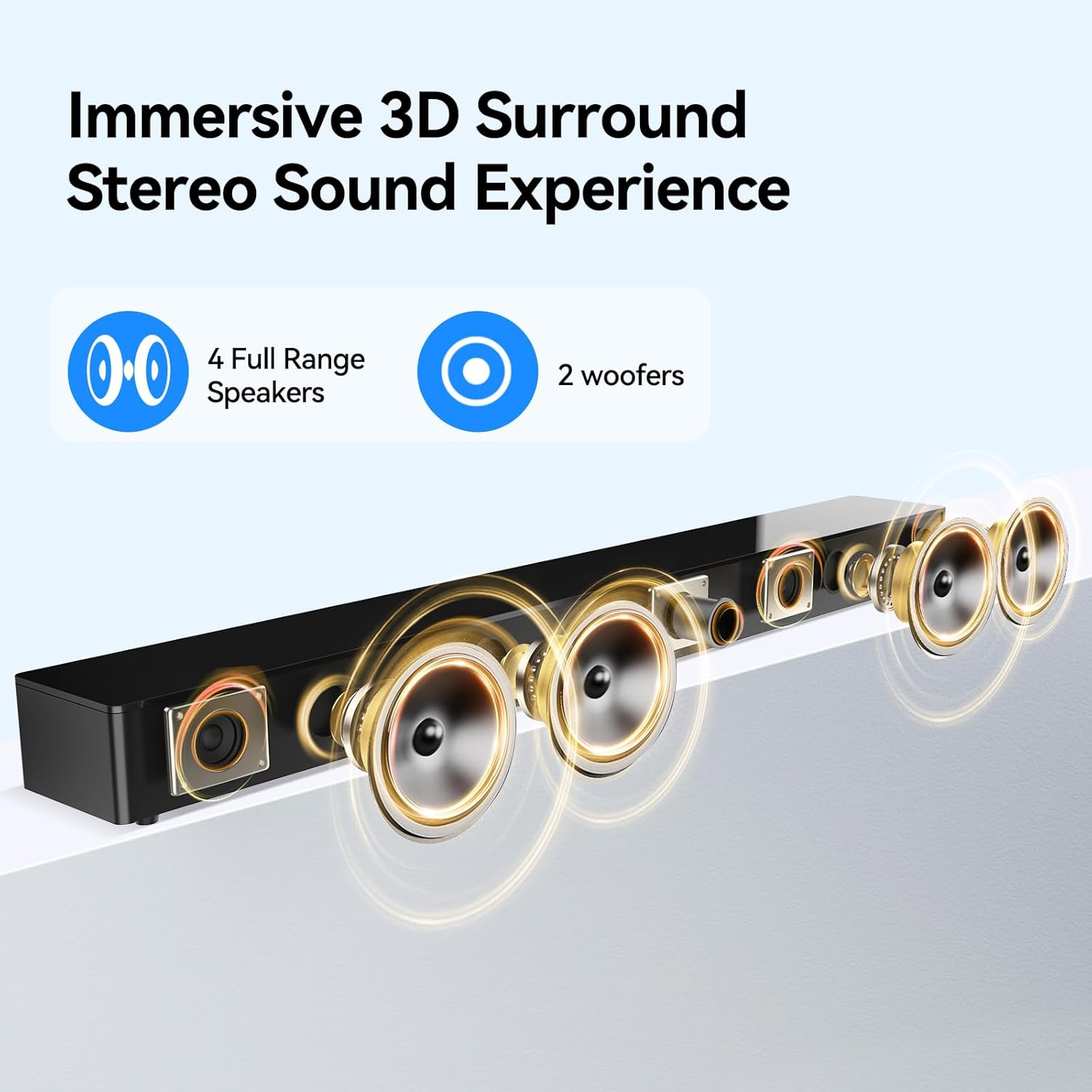
Image: Internal speaker configuration with 4 full-range speakers and 2 woofers.
8. Warranty and Support
For warranty information and technical support, please refer to the warranty card included with your product or contact THOMSON customer service. Keep your purchase receipt for warranty claims.
Manufacturer: Maxtalent Manufacturer for THOMSON