
urge medical 12A Lithium battery-500W
Electric Wheelchair User Manual
Model: 12A Lithium battery-500W | Brand: urge medical
1. Product Overview
This user manual provides essential information for the safe and effective operation, maintenance, and troubleshooting of your new urge medical Electric Wheelchair. Designed for adults, this lightweight, foldable motorized wheelchair features a powerful 500W motor and a 12A lithium battery, offering all-terrain capability and airline approval for convenient travel.
Key Features:
- Ultralight & Foldable Design: Folds in 3 seconds for easy storage and travel, suitable for car trunks, airplanes, or small spaces.
- Adjustable Control & User-Friendly: Features a 360° joystick that can be installed on either the left or right side for intuitive control.
- Long-Lasting & Detachable Battery: Provides 10+ miles of travel on a single charge, with the option to charge on or off the chair.
- Safety & Comfort Features: Built for a 300lbs capacity, includes anti-tip wheels, a cushioned seat with adjustable armrests, a back pocket, and foldable footrests.
- All-Terrain Wheels: Durable, maintenance-free wheels designed to glide smoothly over grass, gravel, or pavement.
- Powerful & Silent Motor: 500W motor delivers quiet yet strong power, capable of climbing slopes up to 8° effortlessly.
2. Setup and Assembly
Unfolding the Wheelchair:
Your electric wheelchair arrives in a folded state for compact shipping. To unfold it, place the wheelchair on a flat, stable surface. Gently pull the backrest upwards while simultaneously pushing the seat down until the frame locks into place. Ensure all locking mechanisms are securely engaged before use.

This image displays the electric wheelchair in two configurations: fully unfolded and ready for use, and compactly folded for storage or transport. The folded view highlights its portability.
Attaching the Joystick:
The 360° joystick controller can be attached to either the left or right armrest, depending on user preference. Locate the mounting bracket on the armrest and slide the joystick into position until it clicks securely. Connect the joystick cable to the corresponding port on the wheelchair frame. Ensure the connection is firm.
3. Operating Instructions
Powering On/Off:
To power on the wheelchair, press and hold the power button on the joystick controller until the indicator lights illuminate. To power off, press and hold the power button again until the lights turn off. Always ensure the wheelchair is powered off when not in use or when performing maintenance.
Driving the Wheelchair:
Use the joystick to control the direction and speed of the wheelchair. Push the joystick forward to move forward, pull back to move backward, and push left or right to turn. The speed can be adjusted using the speed control buttons on the joystick. Start at a low speed until you are comfortable with the controls.

This image points out various components and features of the wheelchair, including the high-density sponge armrest cover, phosphor strip, double-handed brake, damping spring, metal front fork, all-terrain wheels, anti-roll wheel, reversible handrail, and thickened seat cushions that can be removed and washed. The joystick is visible on the left armrest.
Charging the Battery:
The wheelchair offers two charging modes:
- Direct Charging: Plug the charger directly into the charging port on the wheelchair frame.
- Controller Charging: Detach the battery from the wheelchair and connect it to the charger via the controller.
A full charge typically takes approximately 8 hours. The indicator lights on the charger will show the charging status. Disconnect the charger once the battery is fully charged.
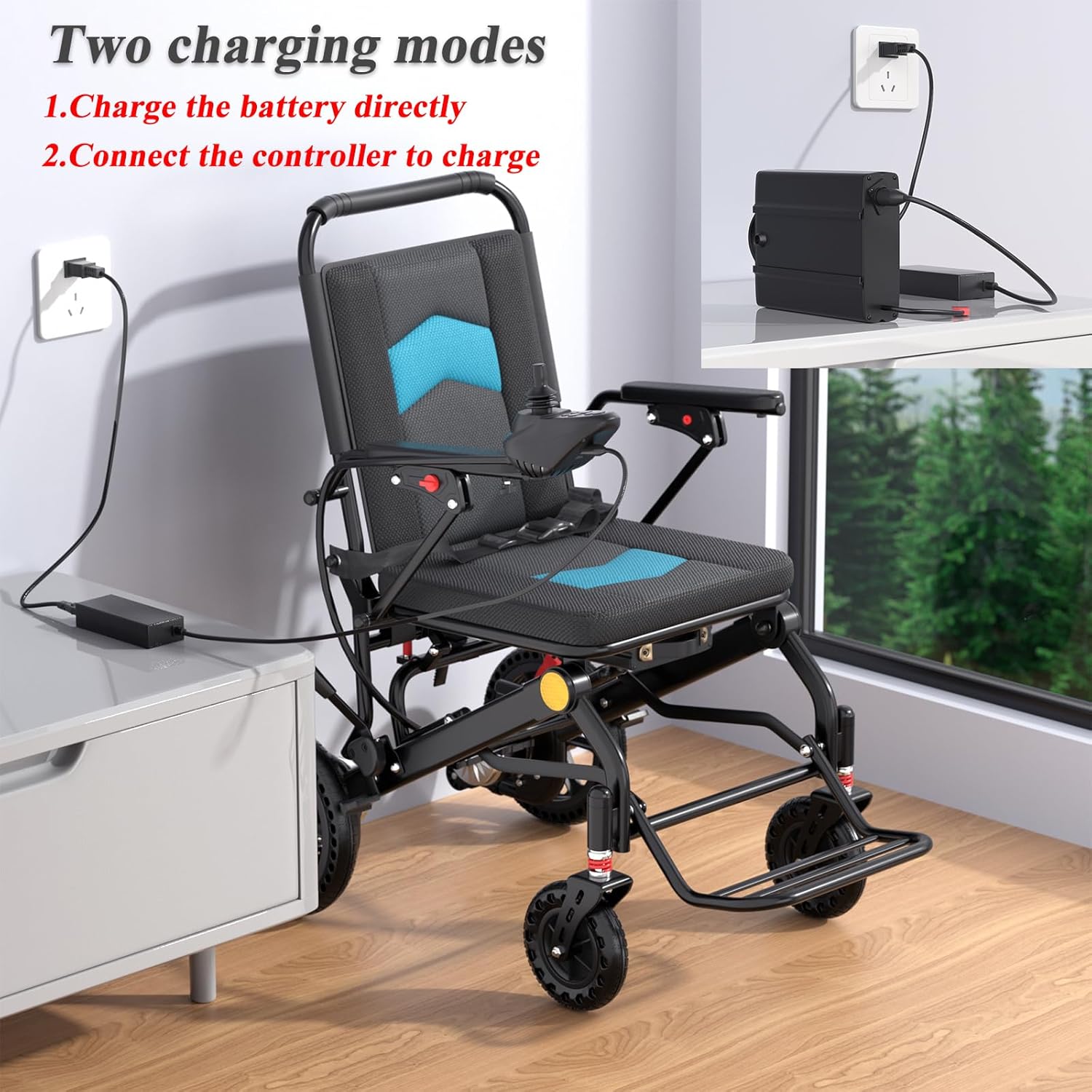
This image illustrates the two available charging methods for the wheelchair: directly charging the battery while it's installed on the chair, and connecting the controller to charge the battery separately.
Braking System:
The wheelchair is equipped with a double-handed brake system for manual control and safety. To engage the brakes, pull the brake levers located near the rear wheels. The electromagnetic brake system automatically engages when the joystick is released, providing immediate stopping power.

This image highlights key safety and convenience features: the integrated safety belt for secure seating, the flip handrail for easy access, the hand brake for manual control, and the removable battery for flexible charging and lighter transport.
4. Maintenance and Care
Cleaning:
Regularly clean the wheelchair with a damp cloth and mild detergent. Avoid using abrasive cleaners or solvents. The thickened seat cushions can be removed and washed for hygiene.
Battery Care:
To maximize battery life, fully charge the battery before first use and after each use. Avoid completely draining the battery. If storing the wheelchair for an extended period, charge the battery every 2-3 months.
Wheel and Tire Maintenance:
The all-terrain wheels are designed to be maintenance-free and do not require inflation. Periodically inspect the wheels for any debris or damage. Ensure the anti-tip wheels are securely in place before each use.

This diagram provides key measurements of the electric wheelchair, including seat width, height, overall length, and folded dimensions. It also indicates the net weight of 51 lbs (excluding battery) and a battery weight of 3 lbs, relevant for transport and storage.
5. Troubleshooting
This section addresses common issues you might encounter with your electric wheelchair.
- Problem: Wheelchair does not power on.
Solution: Check if the battery is properly connected and fully charged. Ensure the power button on the joystick is pressed and held until indicator lights appear. - Problem: Wheelchair moves slowly or inconsistently.
Solution: The battery may be low; charge it fully. Check for any obstructions around the wheels or motor. Ensure the joystick is functioning correctly. - Problem: Wheelchair makes unusual noises.
Solution: Inspect wheels for debris. Check for loose components. If the noise persists, discontinue use and consult the seller. - Problem: Difficulty folding/unfolding.
Solution: Ensure all locking mechanisms are disengaged before folding and properly aligned when unfolding. Do not force the frame.
6. Specifications
| Feature | Detail |
|---|---|
| Model | 12A Lithium battery-500W |
| Motor Power | 500W |
| Battery Type | 12A Lithium |
| Maximum Mileage | Up to 15 miles |
| Maximum Speed | 3.7 MPH |
| Charging Time | Approx. 8 hours |
| Weight Capacity | 300 lbs |
| Net Weight (excluding battery) | 51 lbs |
| Battery Weight | 3 lbs |
| Color | Black |
| Manufacturer | URGE MEDICAL |
| Country of Origin | China |

This graphic illustrates the wheelchair's maximum mileage of 15 miles and maximum speed of 3.7 MPH. It also shows estimated travel distances for various scenarios like indoor use, park, supermarket, and shopping mall, along with an 8-hour charging time.
7. Important Safety Information
Always prioritize safety when operating your electric wheelchair. Failure to follow safety guidelines may result in injury or damage to the product.
- Always wear the safety belt provided.
- Do not exceed the maximum weight capacity of 300 lbs.
- Operate the wheelchair on stable and level surfaces whenever possible.
- Be aware of your surroundings and avoid obstacles.
- Do not operate the wheelchair under the influence of alcohol or medication that may impair your judgment.
- Ensure the anti-tip wheels are always in place and functioning correctly.
- Keep hands and clothing clear of moving parts.
- Store the wheelchair in a dry, safe place away from extreme temperatures.

This collage demonstrates the versatility of the electric wheelchair in different environments: indoors in a living room and bedroom, and its compact storage in a car trunk and an airplane overhead compartment, highlighting its suitability for travel.
8. Warranty and Support
Please note: Specific warranty details and direct customer support contact information are not provided in the available product data. For warranty claims, technical assistance, or any questions regarding your urge medical Electric Wheelchair, please refer to the documentation included with your purchase or contact the seller directly through the platform where the product was acquired.
Related documents12A Lithium battery-500W


Ask a question about this manual
Ask about setup, troubleshooting, compatibility, parts, safety, or missing instructions. Manuals+ will review the question and use this page’s manual context to help answer it.