
Introduction
This document provides instructions for the Generic Replacement Remote Control designed for Kingsdown Comfort Base adjustable beds. This remote is specifically compatible with control box model JLDP.03.011.000. Please ensure your existing control box matches this model number for proper functionality.
Important Compatibility Note:
Before attempting to pair or use this remote, verify that your control box model is JLDP.03.011.000. Your current remote must also have identical buttons to this replacement remote. If you are unsure, please provide clear pictures of your control box (front and back) and your old remote control for verification.
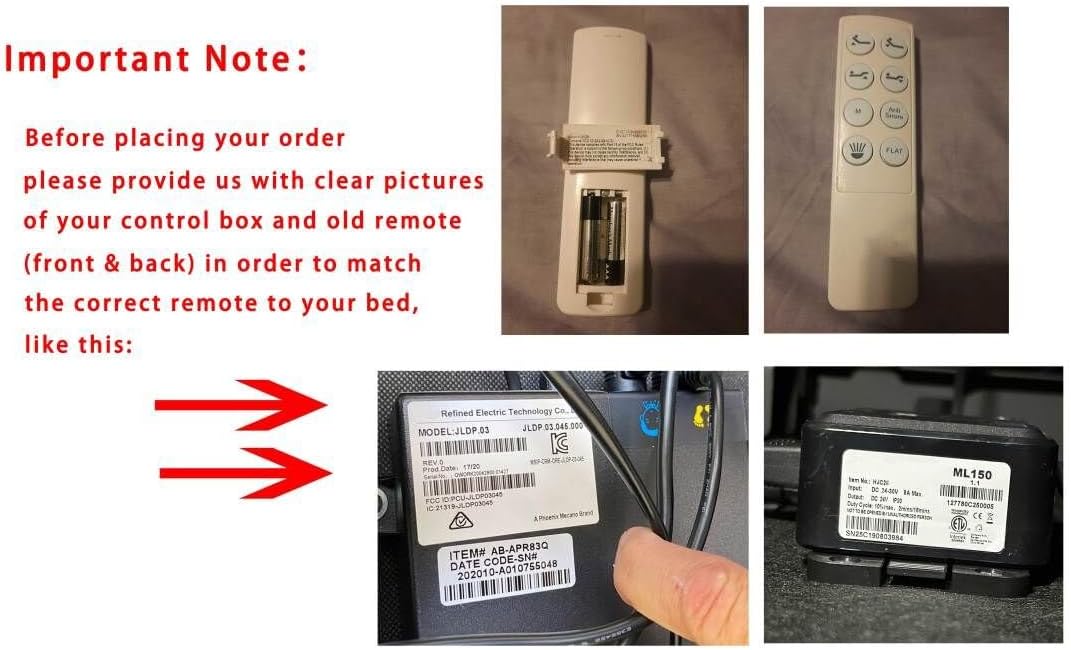
This image displays the replacement remote control, its battery compartment, and examples of compatible control boxes. The control box label clearly shows "MODEL: JLDP.03.011.000" and another label shows "ML150". These images are crucial for verifying compatibility before use.
Setup
Battery Installation
The remote control requires two AAA batteries (not included).
- Locate the battery compartment cover on the back of the remote control.
- Slide the cover downwards to open the compartment.
- Insert two AAA batteries, ensuring the correct polarity (+ and -) as indicated inside the compartment.
- Slide the battery compartment cover back into place until it clicks securely.

This image shows the rear of the remote control with the battery cover removed, illustrating the correct placement of two AAA batteries within the compartment.
Operating the Remote Control
Button Functions
The remote control features various buttons for adjusting your Kingsdown Comfort Base adjustable bed.

This image displays the front of the remote control, highlighting its various buttons for adjusting the bed's head and foot positions, as well as preset functions like Zero Gravity, Flat, and Anti Snore.
- Head Up/Down: Adjusts the head section of the bed.
- Foot Up/Down: Adjusts the foot section of the bed.
- ZG (Zero Gravity): Activates the pre-programmed zero gravity position.
- FLAT: Returns the bed to a flat position.
- ANTI SNORE: Activates the pre-programmed anti-snore position.
Note:
Specific button layouts and functions may vary slightly depending on your bed model. Refer to your bed base's original manual for detailed function descriptions.
Pairing Instructions
This remote control must be paired with your bed's control box (model JLDP.03.011.000) before use. Follow these steps carefully:
- Locate the Link button on your control box. This is typically a black round button located on the bottom of the bed base.
- Press and hold the Link button on the control box until the LED light on the control box turns on and then off.
- Release the Link button. The LED light on the control box will now blink.
- Simultaneously press and hold the Head Up and Foot Up buttons (the left button and middle button located on the top row of the remote) until the remote’s backlight starts blinking.
- Release both the Head Up and Foot Up buttons. The remote's backlight and the LED light on the control box will blink until they are successfully linked. Once linked, both lights will turn off.
- Test the bed's functions using the remote control to ensure it is working correctly. If not, repeat the pairing steps.
Important Pairing Notes:
- All pairing steps must be completed within 15 seconds. If 15 seconds pass, the pairing process will time out, and you will need to restart from step 1.
- If the pairing times out, unplug the bed's power cord, wait a few seconds, and then plug it back in before attempting to pair again. Ensure the LED light on the control box is active when you begin the pairing sequence.
Troubleshooting
Common Issues and Solutions
- Remote not responding:
Check battery installation and ensure batteries are fresh. Replace if necessary.
Ensure the remote is pointed towards the bed base and there are no obstructions.
Re-attempt the pairing process as described in the "Pairing Instructions" section.
- Bed only responds intermittently:
This could indicate low batteries in the remote. Replace them.
Ensure the control box is securely connected to power and the bed motors.
- Remote does not pair:
Verify that your control box model is exactly JLDP.03.011.000. This remote is not universal.
Ensure you complete all pairing steps within the 15-second window.
Unplug the bed's power, wait, and plug it back in before retrying the pairing process.
Confirm your old remote had the same button layout as this replacement.
If issues persist after following these steps, please contact the seller with details about your bed, control box, and old remote for further assistance.
Specifications
| Feature | Detail |
|---|---|
| Brand | Generic |
| Model Compatibility | Kingsdown Comfort Base (Control Box JLDP.03.011.000) |
| Color | White |
| Connectivity Technology | Infrared |
| Controller Type | Button Control |
| Maximum Range | 8 meters |
| Batteries Required | 2 AAA batteries (not included) |
| Warranty | 90 days |
Warranty and Support
Warranty Information
This product comes with a 90-day warranty from the date of purchase. This warranty covers manufacturing defects. It does not cover damage caused by misuse, accidents, or unauthorized modifications.
Customer Support
For technical assistance, troubleshooting, or warranty claims, please contact the seller directly through the platform where the purchase was made. Provide your order number and detailed information about the issue you are experiencing.
If you are unsure about compatibility or need further assistance, please provide clear pictures of your bed's control box and your original remote control to the seller for verification.