
ELIVED YD0074
ELIVED TV Wall Mount YD0074 User Manual
Model: YD0074
Introduction
This manual provides comprehensive instructions for the safe and proper installation, operation, and maintenance of your ELIVED TV Wall Mount YD0074. Please read this manual thoroughly before installation and retain it for future reference. Incorrect installation may result in product damage or personal injury.
Safety Information
Important Safety Instructions:
- Ensure the mounting surface can safely support the combined weight of the mount and the television.
- Do not exceed the maximum weight capacity of 88 lbs (40 kg).
- Verify VESA compatibility with your television before installation.
- Always use a stud finder to locate wood studs for secure mounting.
- For concrete or brick walls, use appropriate anchors (not included) and consult a professional if unsure.
- Do not mount on drywall alone.
- Keep children and pets away during installation.
- Wear appropriate safety gear, including eye protection.
- If you have any doubts about the installation process, seek assistance from a qualified professional.
Package Contents
Please check that all components are present and undamaged before proceeding with installation.

Image: Overview of the ELIVED TV Wall Mount YD0074 components. This image displays the main parts of the wall mount, including the wall plate, the articulating arm, the VESA mounting plate, and a small spirit level for installation. Also visible are three small anti-slip pads.
The package typically includes:
- Wall Plate Assembly
- TV VESA Plate
- Articulating Arm
- Mounting Hardware (various screws, washers, spacers for TV and wall)
- Spirit Level
- Cable Ties (not explicitly shown but common)
- Instruction Manual (this document)
Specifications
| Feature | Specification |
|---|---|
| Model | YD0074 |
| Compatible TV Sizes | 26-60 inches |
| Weight Capacity | 88 lbs (40 kg) |
| VESA Compatibility | 100x100mm to 400x400mm (4x4" to 16x16") |
| Material | Alloy Steel |
| Movement Type | Articulating (Full Motion) |
| Swivel Range | Up to ±90° (depending on TV size) |
| Tilt Range | -10° to +5° |
| Level Adjustment | ±5° after installation |
| Extension from Wall | Up to 16 inches |
| Retraction to Wall | As close as 2.1 inches |

Image: Compatibility specifications for the ELIVED TV Wall Mount. This diagram illustrates the supported TV screen sizes (26-60 inches), the maximum weight capacity (77 lbs / 35 kg), and the VESA mounting pattern range (75x75mm to 400x400mm).

Image: Available VESA patterns supported by the mount. This image lists and visually represents the various VESA mounting hole configurations that the ELIVED TV Wall Mount can accommodate, from 75x75mm up to 400x400mm.
Setup and Installation
1. Pre-Installation Checks
- TV Compatibility: Confirm your TV's weight and VESA pattern are within the mount's specifications (26-60 inches, max 88 lbs/40 kg, VESA 100x100mm to 400x400mm).
- Wall Type: Identify your wall type. This mount is suitable for wood stud walls and concrete/brick walls. Do not mount on drywall alone.

Image: Diverse Wall Compatibility. This image demonstrates that the mount can be installed on wood stud walls and concrete/brick walls. It explicitly warns against mounting on drywall without additional support.
2. Attaching TV Brackets to TV
- Carefully place your TV face down on a soft, clean surface.
- Identify the correct screws, washers, and spacers for your TV's VESA mounting holes.
- Attach the vertical TV brackets to the back of your TV using the selected hardware. Ensure they are securely fastened but do not overtighten.
3. Mounting the Wall Plate
- Determine the desired height and position for your TV.
- Use a stud finder to locate the center of a wood stud. Mark the drilling points. For concrete/brick walls, mark drilling points and use a masonry drill bit and appropriate anchors.
- Drill pilot holes at the marked locations.
- Attach the wall plate assembly to the wall using the provided lag bolts and washers. Use the spirit level to ensure the wall plate is perfectly horizontal before tightening all bolts.
4. Hanging the TV
- With assistance, carefully lift the TV and hook the TV brackets onto the wall plate.
- Secure the TV to the wall plate using the safety screws or locking mechanisms provided. Refer to the detailed diagram in the full manual for specific locking procedures.
Operating Instructions
Adjusting the TV Position
The ELIVED TV Wall Mount YD0074 offers full motion capabilities for optimal viewing.
- Extension and Retraction: Gently pull the TV away from the wall to extend the arm up to 16 inches, or push it back towards the wall to retract it to a minimum of 2.1 inches.
- Swivel: The TV can be swiveled up to ±90° left or right, depending on the TV size and distance from the wall.
- Tilt: Adjust the vertical viewing angle by tilting the TV from -10° (downward) to +5° (upward). Loosen the tilt knobs, adjust to the desired angle, and then retighten.
- Level Adjustment: After installation, if the TV is not perfectly level, you can adjust it by ±5° without removing it from the wall. Consult the detailed manual for the specific mechanism to perform this adjustment.

Image: Extend and Retract Functionality. This image illustrates the mount's ability to extend the TV up to 16 inches from the wall and retract it to a distance of 2.1 inches, offering flexible viewing positions.
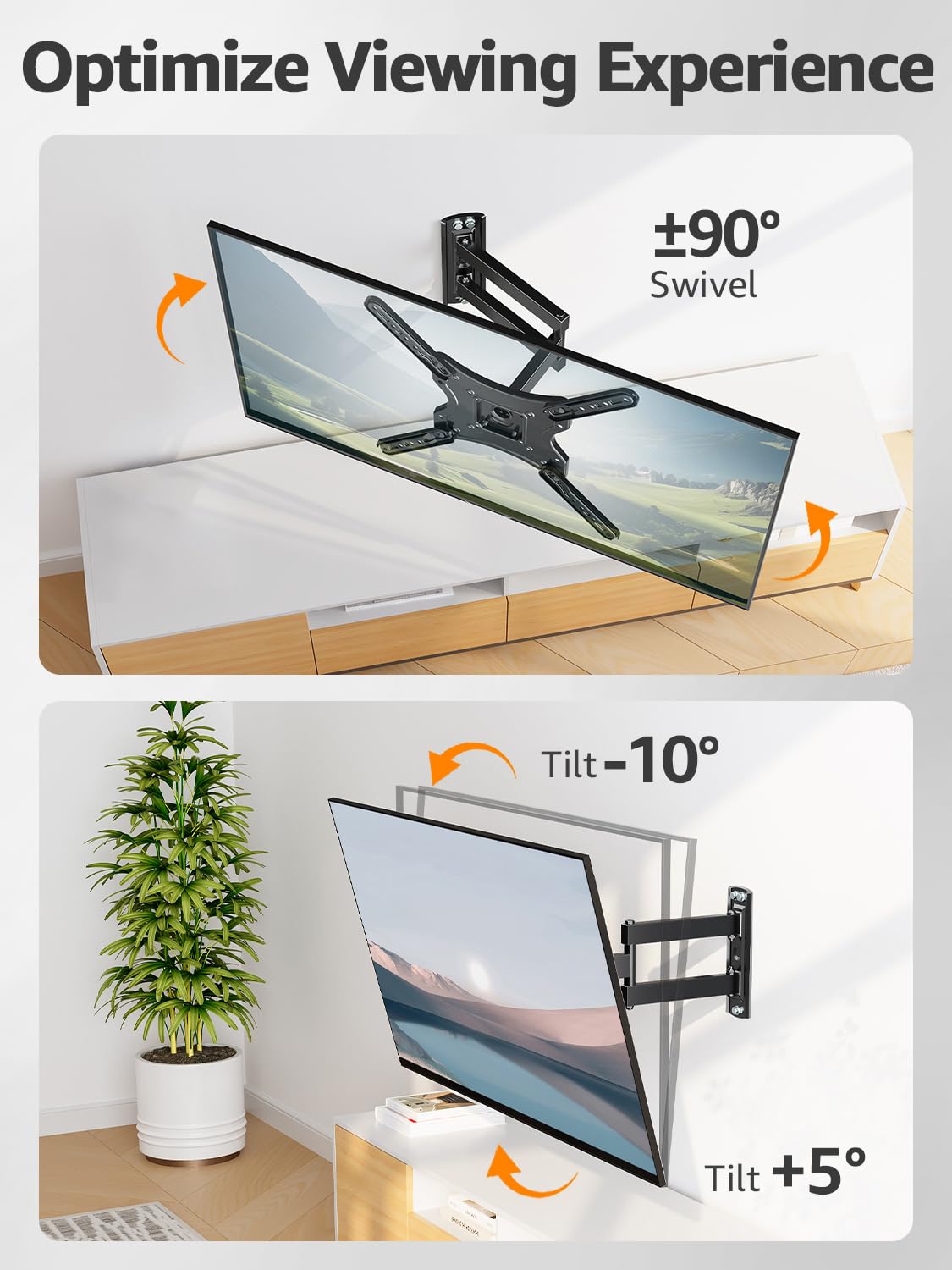
Image: Optimize Viewing Experience with Swivel and Tilt. This image demonstrates the mount's flexibility, allowing for a ±90° swivel and a tilt range of -10° to +5° to achieve the best viewing angle.

Image: Easy Level Adjustment After Installation. This image highlights the feature that allows for a ±5° level adjustment of the TV even after it has been mounted, ensuring a perfectly straight display.
Maintenance
- Periodically check all screws and bolts to ensure they remain tight and secure.
- Clean the mount with a soft, dry cloth. Avoid abrasive cleaners or solvents.
- Do not apply lubricants to the moving parts unless specifically instructed by the manufacturer.
- Inspect the mount for any signs of wear or damage. If any issues are found, discontinue use and contact customer support.
Troubleshooting
If you encounter any issues during or after installation, refer to the following common solutions:
- TV not level: Use the post-installation level adjustment feature (±5°). Ensure the wall plate was installed level initially.
- Mount feels unstable: Recheck all wall mounting bolts and TV attachment screws for tightness. Ensure the wall type is appropriate and anchors (if used) are correctly installed. Verify TV weight is within limits.
- Difficulty moving the arm: Check for any obstructions. Ensure no cables are snagged. The mount is designed for smooth movement; excessive force should not be required.
- Missing parts: Review the package contents list. Contact customer support if any essential parts are missing.
Warranty and Support
ELIVED products are designed for durability and performance. For specific warranty details, please refer to the warranty card included with your product or visit the official ELIVED website. If you require technical assistance, have questions about installation, or need to report a missing/damaged part, please contact ELIVED customer support through the contact information provided on the product packaging or their official website.
Manufacturer: ELIVED
Country of Origin: USA
Related documentsYD0074


Ask a question about this manual
Ask about setup, troubleshooting, compatibility, parts, safety, or missing instructions. Manuals+ will review the question and use this page’s manual context to help answer it.