
1. Setup
Before first use, please ensure the MigiMouse is fully charged. The toy features a rechargeable battery for convenience.
1.1 Charging the MigiMouse
- Locate the detachable cover at the base of the mouse. Gently twist and pull to remove it, revealing the charging port.
- Connect the provided USB Type-C cable to the charging port on the toy and to a compatible USB power source (e.g., computer, USB wall adapter).
- A full charge typically takes approximately 1.5 hours. The toy is designed to provide 5-7 days of fun based on 30 minutes of play per day.
- Once charging is complete, carefully reattach the detachable cover by aligning and twisting it back into place.

Figure 1.1: Detachable cover and charging port location.
1.2 Inserting Catnip (Optional)
The MigiMouse includes a removable catnip pouch to enhance your cat's engagement. The pouch is located inside the plush mouse cover.
- Gently separate the plush mouse cover from the core unit.
- Locate the small pouch inside the plush cover. This is where the organic catnip can be inserted or replaced.
- After inserting the catnip, reattach the plush cover to the core unit.
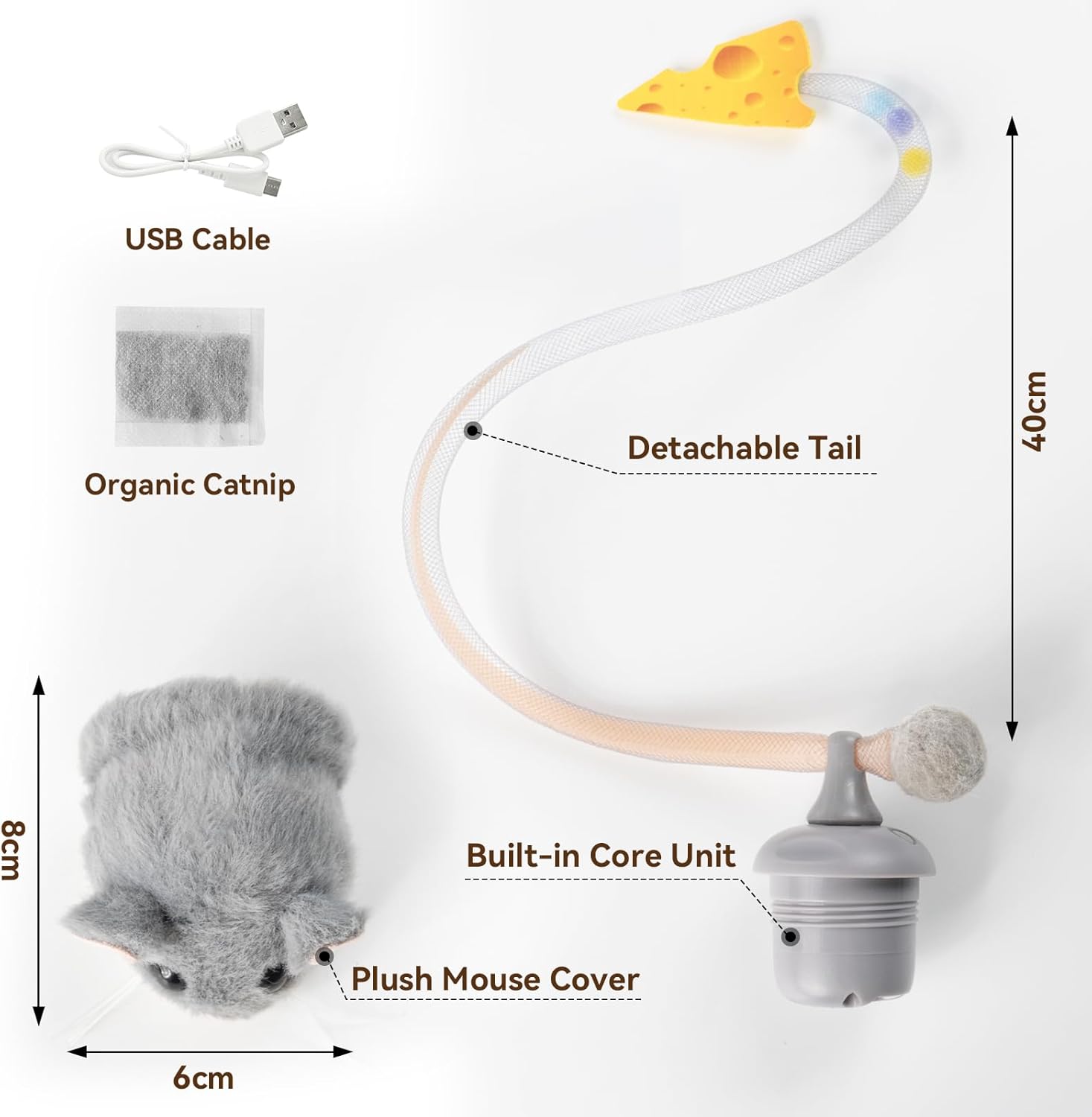
Figure 1.2: MigiMouse components including the catnip pouch.
2. Operating Instructions
The MigiMouse is designed to provide interactive play for your cat, mimicking the unpredictable movements of real prey.
2.1 Powering On/Off
- To turn the MigiMouse ON, press and hold the power button (located on the core unit, accessible by removing the plush cover) for 2 seconds.
- To turn the MigiMouse OFF, press and hold the power button for 2 seconds again.
2.2 Play Modes and Features
- Motion Sensor Activation: The toy features built-in motion sensors that automatically reactivate with every tap or paw, ensuring continuous play without interruption.
- Realistic Movement: The MigiMouse performs 360° rolling and spinning motions, including breakdance-style flips, to mimic the stop-and-go behavior of real mice. This unpredictable movement stimulates your cat's natural hunting instincts.
- Wiggling Tail: A long, elastic tail with a cheese-shaped end flicks and dances with every movement—just like an alive mouse.
- Realistic Squeaker: The toy includes a realistic squeaker with an on/off switch. You can choose to activate or deactivate the squeaking sound based on your preference and your cat's reaction.

Figure 2.1: MigiMouse demonstrating rolling and tail movements.

Figure 2.2: Squeaker feature and battery life indication.
2.3 Official Product Videos
Video 2.1: Migipaws Migimouse: The Bored Cat with Irresistible Charm. This video demonstrates the toy's general movement and how it captures a cat's attention.
Video 2.2: Migipaws Migimouse: Cats Agility Pursuit Exercise. This video showcases the toy's dynamic movements and how it encourages cats to engage in agile play.
3. Maintenance
Proper maintenance ensures the longevity and optimal performance of your MigiMouse.
3.1 Cleaning
- The plush exterior can be gently spot cleaned with a damp cloth. Avoid submerging the toy in water.
- Regularly check the tail for any debris or tangles and gently clear them to ensure smooth operation.
3.2 Battery Care
- To maximize battery life, fully charge the toy before its first use and whenever the battery is low.
- Store the toy in a cool, dry place when not in use.
3.3 Catnip Replacement
- The organic catnip pouch can be replaced as needed to maintain your cat's interest. Follow the instructions in Section 1.2 for accessing the catnip pouch.

Figure 3.1: Durable construction of the MigiMouse.
4. Troubleshooting
If you encounter any issues with your MigiMouse, please refer to the following common solutions:
| Problem | Possible Cause | Solution |
|---|---|---|
| Toy does not turn on or move. | Low battery or not powered on correctly. | Ensure the toy is fully charged. Press and hold the power button for 2 seconds to turn it on. |
| Charging port is difficult to access. | The detachable cover may be tightly secured. | Gently twist and pull the detachable cover at the base of the mouse. It may require firm but careful force. |
| Tail gets tangled or toy stops moving. | Debris in the tail mechanism or operating on unsuitable surfaces. | Clear any debris from the tail. The toy performs best on smooth surfaces like wood floors. Thick carpets may hinder movement. |
| Squeaker sound is not working. | Squeaker switch is off. | Ensure the squeaker on/off switch (located near the charging port) is in the 'on' position. |
5. Specifications
- Brand: Migipaws
- Model Name: Migi-Mouse
- Item Model Number: Migi-Mouse
- ASIN: B0F47RKRFX
- Manufacturer: Nanjing Dimeng Technology Co.,LTD.
- Material: Polyester
- Color: Grey
- Style: Pebble-Speed
- Item Weight: 3.2 ounces (0.09 Kilograms)
- Product Dimensions: 4.7 x 2.76 x 2.4 inches
- Batteries: 1 C battery required (included, rechargeable)
- Target Audience: House-cats
- Age Range Description: All Ages
- Number of Items: 1

Figure 5.1: Migipaws Interactive MigiMouse Cat Toy.
6. Warranty & Support
The Migipaws Interactive MigiMouse Cat Toy comes with a 2-month warranty from the date of purchase.
For any product inquiries, technical support, or warranty claims, please contact Migipaws customer service through the retailer's platform or the official Migipaws website.
Visit the Migipaws Store for more information.


