
1. Introduction
Thank you for choosing the LOOP GEAR SK05 Pro Flat Flashlight and SK03 EDC Flashlight. This manual provides detailed instructions for the safe and efficient use, maintenance, and troubleshooting of both devices. Please read this manual thoroughly before operation and retain it for future reference.
The SK05 Pro is a powerful flat flashlight featuring an integrated 8000mAh power bank, offering up to 4360 lumens and combining floodlight and spotlight functions. The SK03 is a compact, rechargeable EDC (Everyday Carry) flashlight with a side light, 4 color filters, and 10 lighting modes, delivering up to 1000 lumens.

Image 1.1: The LOOP GEAR SK05 Pro (left) and SK03 (right) flashlights. The SK05 Pro is a larger, flat device, while the SK03 is a smaller, cylindrical EDC light.
2. Setup
2.1 SK05 Pro Flat Flashlight
The SK05 Pro comes equipped with dual internal batteries. Before first use, it is recommended to fully charge the device.
- Charging the SK05 Pro: Connect the flashlight to a compatible 20W power adapter using a USB-C cable (not included). The charging indicator will show the charging status. A full charge ensures optimal performance and power bank functionality.
- Initial Inspection: Verify that the flashlight is free from any visible damage.

Image 2.1: The SK05 Pro flashlight connected via USB-C cable to charge a smartphone, demonstrating its 20W power bank capability.
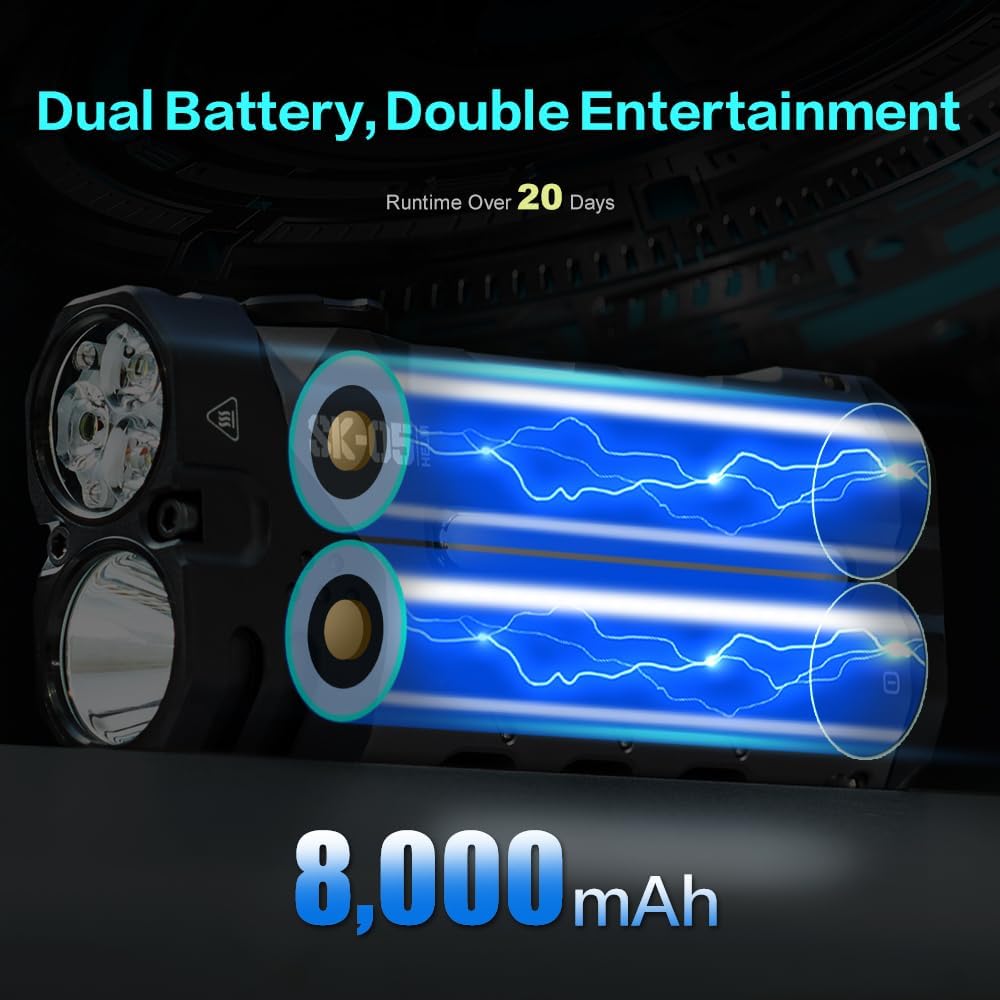
Image 2.2: An internal view of the SK05 Pro flashlight, highlighting its dual battery configuration, which provides an 8000mAh capacity.
2.2 SK03 EDC Flashlight
The SK03 flashlight uses a rechargeable AA battery. Ensure the battery is correctly inserted and charged before use.
- Battery Installation: Unscrew the tail cap of the SK03 flashlight. Insert the rechargeable AA battery with the positive (+) terminal facing towards the head of the flashlight. Screw the tail cap back on securely.
- Charging the SK03: Connect the SK03 to a USB power source using the provided charging cable. The indicator light will show charging status.

Image 2.3: The compact SK03 EDC flashlight, featuring a side clip and textured grip.
3. Operating Instructions
3.1 SK05 Pro Flat Flashlight
The SK05 Pro features a single button for controlling all lighting modes and power functions.
- Power On/Off: Press and hold the main button for approximately 1 second to turn the flashlight on or off.
- Mode Cycling: With the flashlight on, short press the main button to cycle through different brightness levels and lighting modes (e.g., low, medium, high, floodlight, spotlight, combined beam).
- Power Bank Function: To use the SK05 Pro as a power bank, connect your external device to the USB-C port on the flashlight using a compatible cable. The flashlight will automatically begin charging the device.

Image 3.1: Top-down view of the SK05 Pro, illustrating the main control button and mode indicator.

Image 3.2: The SK05 Pro flashlight illuminating a path in an outdoor environment, demonstrating its powerful beam.
3.2 SK03 EDC Flashlight
The SK03 features a single button for controlling its 10 lighting modes, including the side light and color filters.
- Power On/Off: Press the main button to turn the flashlight on. Press again to turn it off.
- Mode Cycling: With the flashlight on, short press the button to cycle through the 10 available lighting modes, including various brightness levels for the main beam and side light functions.
- Side Light and Color Filters: The SK03 includes a side light feature. To activate and change color filters, attach the desired color filter (red, blue, yellow, white) over the side light area. The side light can be accessed through the mode cycling sequence.

Image 3.3: The SK03 flashlight shown with its four interchangeable color filters (yellow, red, white, blue) for the side light, enhancing versatility.

Image 3.4: The SK03 flashlight in use, providing illumination on a dark path, demonstrating its 1000-lumen output.
4. Maintenance
Proper maintenance ensures the longevity and optimal performance of your LOOP GEAR flashlights.
- Cleaning: Wipe the flashlight body with a clean, soft cloth. For stubborn dirt, a slightly damp cloth can be used. Do not use abrasive cleaners or solvents.
- Battery Care: For both models, avoid fully discharging the batteries frequently. Recharge them regularly, especially if the flashlight will not be used for an extended period. Store in a cool, dry place.
- Storage: Store the flashlights in a temperature range of -40°C to 80°C (-40°F to 176°F). Avoid extreme temperatures and direct sunlight.
- Water Resistance: Both flashlights have an IP68 waterproof rating, meaning they are protected against continuous immersion in water. Ensure all caps and covers are securely closed before exposing to water. After exposure to saltwater, rinse with fresh water and dry thoroughly.
- Drop Resistance: Both models are designed to withstand a 1-meter drop. However, avoid unnecessary drops to prevent potential damage.
5. Troubleshooting
If you encounter issues with your flashlight, refer to the following common problems and solutions:
| Problem | Possible Cause | Solution |
|---|---|---|
| Flashlight does not turn on. | Low battery; incorrect battery insertion (SK03); loose connections. | Charge the battery fully. For SK03, ensure battery is inserted correctly. Check for secure connections. |
| Low brightness or flickering light. | Low battery; dirty contacts. | Recharge the battery. Clean battery contacts with a clean cloth. |
| SK05 Pro not charging other devices. | SK05 Pro battery is low; incompatible cable; device not properly connected. | Ensure SK05 Pro is sufficiently charged. Use a functional USB-C cable. Reconnect the device. |
| SK03 side light or color filters not working. | Incorrect mode selection; filter not properly attached. | Cycle through modes to find the side light. Ensure color filter is securely placed over the side light. |
If the problem persists after attempting these solutions, please contact customer support.
6. Specifications
6.1 SK05 Pro Flat Flashlight
- Light Source: LED
- Maximum Output: 4360 Lumens
- Beam Distance: Up to 405 meters
- Battery: Dual Lithium Ion, 8000mAh total capacity
- Runtime: Up to 20 days (depending on mode)
- Charging/Discharging: 20W (USB-C)
- Water Resistance: IP68
- Drop Resistance: 1 meter
- Features: Floodlight, Spotlight, Power Bank Function
6.2 SK03 EDC Flashlight
- Light Source: LED
- Maximum Output: 1000 Lumens
- Illumination Distance: Up to 393 feet
- Battery: Rechargeable AA
- Lighting Modes: 10 modes
- Features: Side Light, 4 Color Filters (Red, Blue, Yellow, White)
- Water Resistance: IP68
- Drop Resistance: 1 meter
7. Warranty and Support
LOOP GEAR is dedicated to providing quality products and customer satisfaction. While specific warranty periods may vary, we offer 24/7 service to address any concerns you may have regarding your flashlights.
For warranty details, technical support, or any other inquiries, please contact LOOP GEAR customer service through the retailer where the product was purchased or visit the official LOOP GEAR website.
