
1. Introduction and Overview
Thank you for choosing the Denzel MMA-200 Inverter Welding Machine. This professional tool is designed for demanding welding tasks, offering excellent performance for MMA (Shielded Metal Arc) welding. Its compact and robust design, featuring a yellow and black color scheme, ensures easy transport and use across various work environments. The digital panel with an LED display provides precise control over the welding current, while an efficient ventilation system supports extended continuous operation. Equipped with protection against overheating and voltage fluctuations, this machine is suitable for industrial maintenance, civil construction, and mechanical workshops. It features fine current adjustment and excellent arc stability for high-quality welds.
- Power: 200A capacity, suitable for professional and semi-professional welding.
- Voltage: Operates at 220V with 60Hz frequency, compatible with standard electrical grids.
- Digital Display: Control panel with LED display for precise welding current adjustment.
- Portability: Compact design with an ergonomic handle for easy transport and storage.
- Versatility: Compatible with electrodes up to 4mm, supporting various MMA welding applications.
2. Safety Instructions
Always prioritize safety when operating welding equipment. Failure to follow these instructions can result in serious injury or death.
- Electric Shock: Welding current can kill. Do not touch live electrical parts. Wear dry, insulating gloves and protective clothing. Ensure the work area is dry.
- Fumes and Gases: Welding fumes and gases can be hazardous to your health. Work in a well-ventilated area. Use an exhaust fan or fume extractor if necessary.
- Arc Rays: Arc rays can burn eyes and skin. Wear a welding helmet with appropriate shade filter. Protect others in the work area with non-flammable screens.
- Fire and Explosion: Welding sparks and hot metal can cause fire or explosions. Keep flammable materials away from the work area. Have a fire extinguisher readily available.
- Burns: Hot metal and slag can cause severe burns. Wear protective clothing, including long sleeves, pants, and safety shoes.
- Maintenance: Disconnect power before servicing or cleaning the machine. Only qualified personnel should perform repairs.
3. Product Components
The Denzel MMA-200 Inverter Welding Machine comes with the following main components:
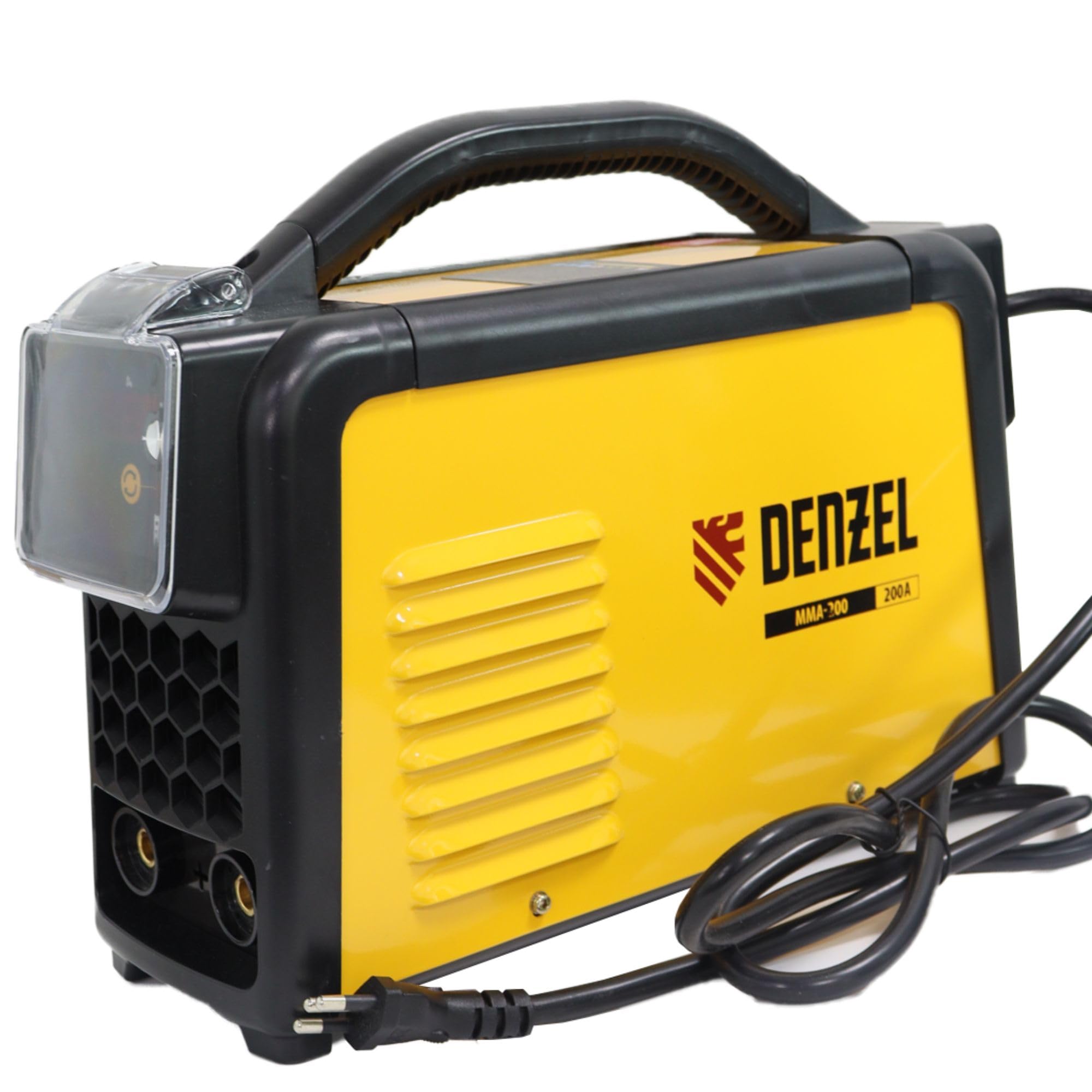
Figure 3.1: Front view of the Denzel MMA-200 Inverter Welding Machine, showing the control panel and output terminals.
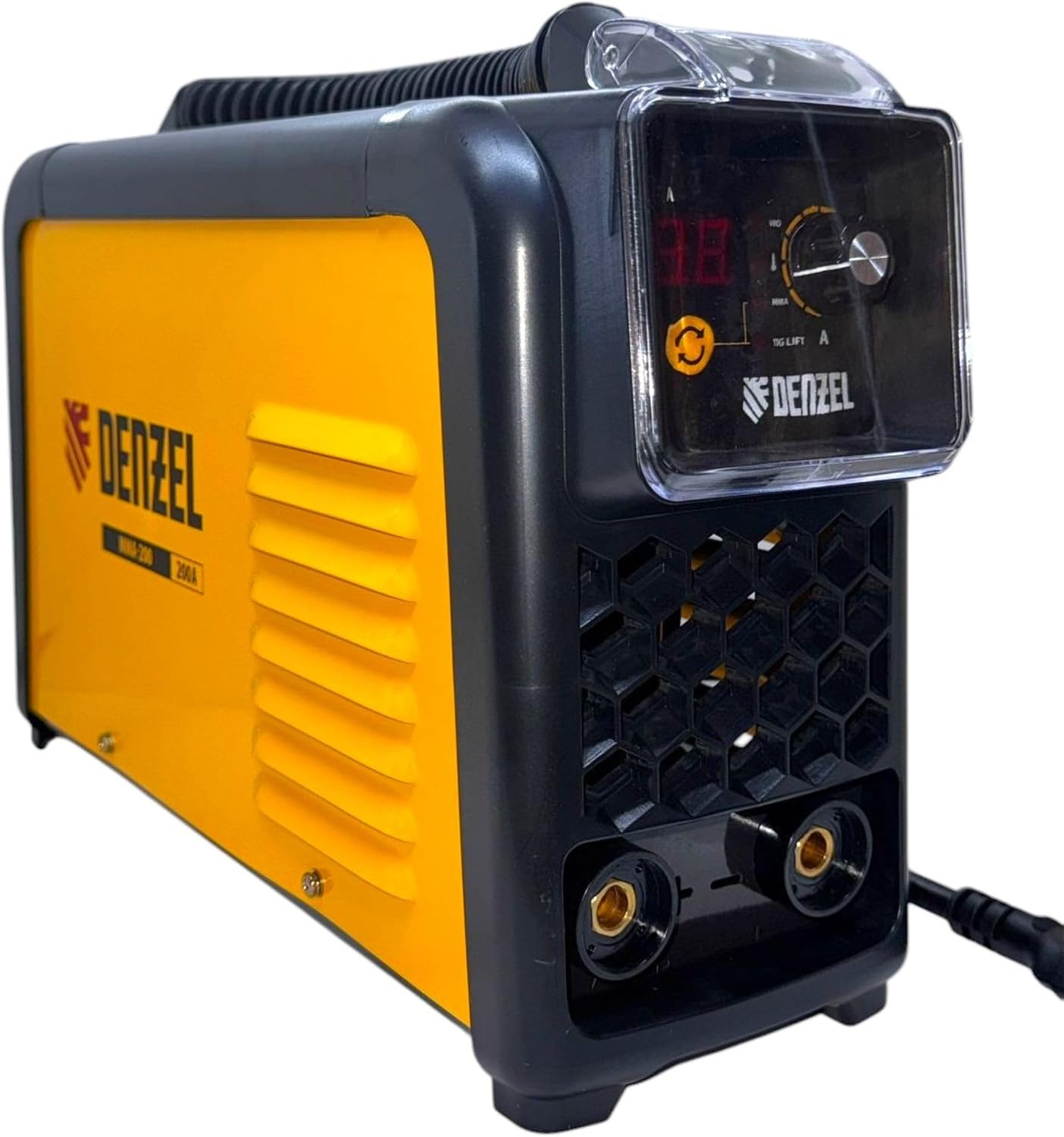
Figure 3.2: Denzel MMA-200 Inverter Welding Machine with welding cables attached, illustrating the complete setup.

Figure 3.3: Electrode holder cable, used to secure and conduct current to the welding electrode.

Figure 3.4: Ground clamp cable, used to establish an electrical connection between the workpiece and the welding machine.
4. Setup Instructions
- Unpacking: Carefully remove the welding machine and all accessories from the packaging. Inspect for any damage during transit.
- Placement: Place the machine on a stable, level surface in a well-ventilated area. Ensure there is adequate space around the machine for airflow and to prevent overheating.
- Power Connection: Ensure the machine's power switch is in the OFF position. Connect the power cord to a grounded 220V, 60Hz power outlet. Verify the power supply matches the machine's requirements.
- Connect Welding Cables:
- Connect the electrode holder cable to the positive (+) terminal on the front panel.
- Connect the ground clamp cable to the negative (-) terminal on the front panel.
- Ensure all connections are secure and tight.
- Attach Ground Clamp: Securely attach the ground clamp to the workpiece or a sturdy metal workbench that is in direct contact with the workpiece. Ensure good electrical contact.
- Insert Electrode: Insert the appropriate welding electrode (up to 4mm) into the electrode holder. Ensure it is firmly gripped.
5. Operating Instructions
- Power On: Turn the main power switch to the ON position. The LED display on the control panel will illuminate.
- Set Welding Current: Use the control knob on the front panel to adjust the welding current (Amperage) according to the electrode type and thickness of the material being welded. The digital display will show the selected current.
- Prepare for Welding: Put on all necessary personal protective equipment (welding helmet, gloves, protective clothing).
- Start Welding: Bring the electrode into contact with the workpiece to strike an arc. Maintain a consistent arc length and travel speed for optimal weld quality.
- Monitor Performance: Observe the weld pool and adjust your technique as needed. The machine's efficient ventilation system helps maintain continuous operation.
- Finish Welding: When finished, lift the electrode from the workpiece to break the arc. Allow the workpiece to cool before handling.
- Power Off: Turn the main power switch to the OFF position. Disconnect the machine from the power supply when not in use.
Note: Refer to electrode manufacturer guidelines for recommended current settings for specific applications.
6. Maintenance
Regular maintenance ensures the longevity and optimal performance of your Denzel MMA-200 welding machine.
- Cleaning: Periodically clean the machine's exterior with a dry, soft cloth. Use compressed air to blow out dust and debris from the ventilation openings. Ensure the machine is disconnected from power before cleaning.
- Cable Inspection: Regularly inspect welding cables, electrode holder, and ground clamp for signs of wear, cuts, or damage. Replace damaged components immediately to prevent electrical hazards and ensure good conductivity.
- Terminal Connections: Check that all cable connections to the machine's terminals are tight and free from corrosion.
- Storage: Store the welding machine in a dry, clean environment, away from moisture and extreme temperatures, when not in use.
- Professional Service: For internal cleaning or repairs, always consult a qualified service technician. Do not attempt to open the machine casing yourself, as this may void the warranty and expose you to dangerous electrical components.
7. Troubleshooting
This section provides solutions to common issues you might encounter.
| Problem | Possible Cause | Solution |
|---|---|---|
| Machine does not power on. | No power supply; power switch off; faulty power cord. | Check power outlet and circuit breaker. Ensure power switch is ON. Inspect power cord for damage. |
| No welding arc. | Poor ground connection; incorrect current setting; faulty electrode; loose cable connections. | Ensure ground clamp is securely attached to clean metal. Adjust current. Use a new electrode. Check all cable connections. |
| Weak or unstable arc. | Low current setting; poor ground; incorrect electrode size; voltage fluctuation. | Increase current. Improve ground connection. Use appropriate electrode. Check power supply stability. |
| Overheating indicator active. | Exceeded duty cycle; blocked ventilation; high ambient temperature. | Allow machine to cool down. Ensure ventilation openings are clear. Operate in a cooler environment. |
If the problem persists after attempting these solutions, please contact customer support or a qualified service technician.
8. Specifications
| Feature | Detail |
|---|---|
| Model | MMA-200 |
| Brand | DENZEL |
| Welding Type | MMA (Shielded Metal Arc Welding) |
| Input Voltage | 220V |
| Frequency | 60Hz |
| Welding Current Capacity | 200A |
| Compatible Electrode Diameter | Up to 4mm |
| Display | Digital LED |
| Protection Features | Overheating protection, voltage fluctuation protection |
| Package Dimensions | 40 x 30 x 15 cm |
| Weight | 3.5 kg |
| Manufacturer | China |
| ASIN | B0F45MV1QX |
| GTIN/EAN | 7899612750464 |
9. Warranty and Support
For information regarding the standard product warranty, please refer to the documentation provided at the time of purchase or contact your retailer.
Extended warranty options may be available for this product. Please check with your seller or Denzel's official channels for details on extended warranty plans.
For technical support, service, or spare parts, please contact Denzel customer service or an authorized service center.