
1. Introduction
This manual provides essential instructions for the safe and efficient operation of your BLUETTI Apex 300 Portable Power Station. Please read this manual thoroughly before using the device and retain it for future reference.
The BLUETTI Apex 300 is a high-capacity portable power station designed to provide reliable electricity for various applications, including home backup, RV use, and off-grid power needs. It features a 2764.8Wh LiFePO4 battery, 3840W AC output (7680W surge), and supports simultaneous 120V/240V output.
2. Safety Instructions
Observe the following safety guidelines to prevent injury or damage to the device:
- Do not disassemble, repair, or modify the unit.
- Avoid exposure to rain, moisture, or direct sunlight for extended periods.
- Keep the unit away from heat sources, open flames, and flammable materials.
- Ensure proper ventilation during use and charging.
- Use only BLUETTI-approved accessories and charging cables.
- Keep out of reach of children and pets.
- Do not operate the unit if it is damaged or appears to be malfunctioning.
3. Package Contents
Verify that all items are present upon unboxing:
- BLUETTI Apex 300 Power Station (x1)
- AC Charging Cable (x1)
- Car Charging Cable (x1)
- Grounding Screw (x1)
- User Manual (x1)
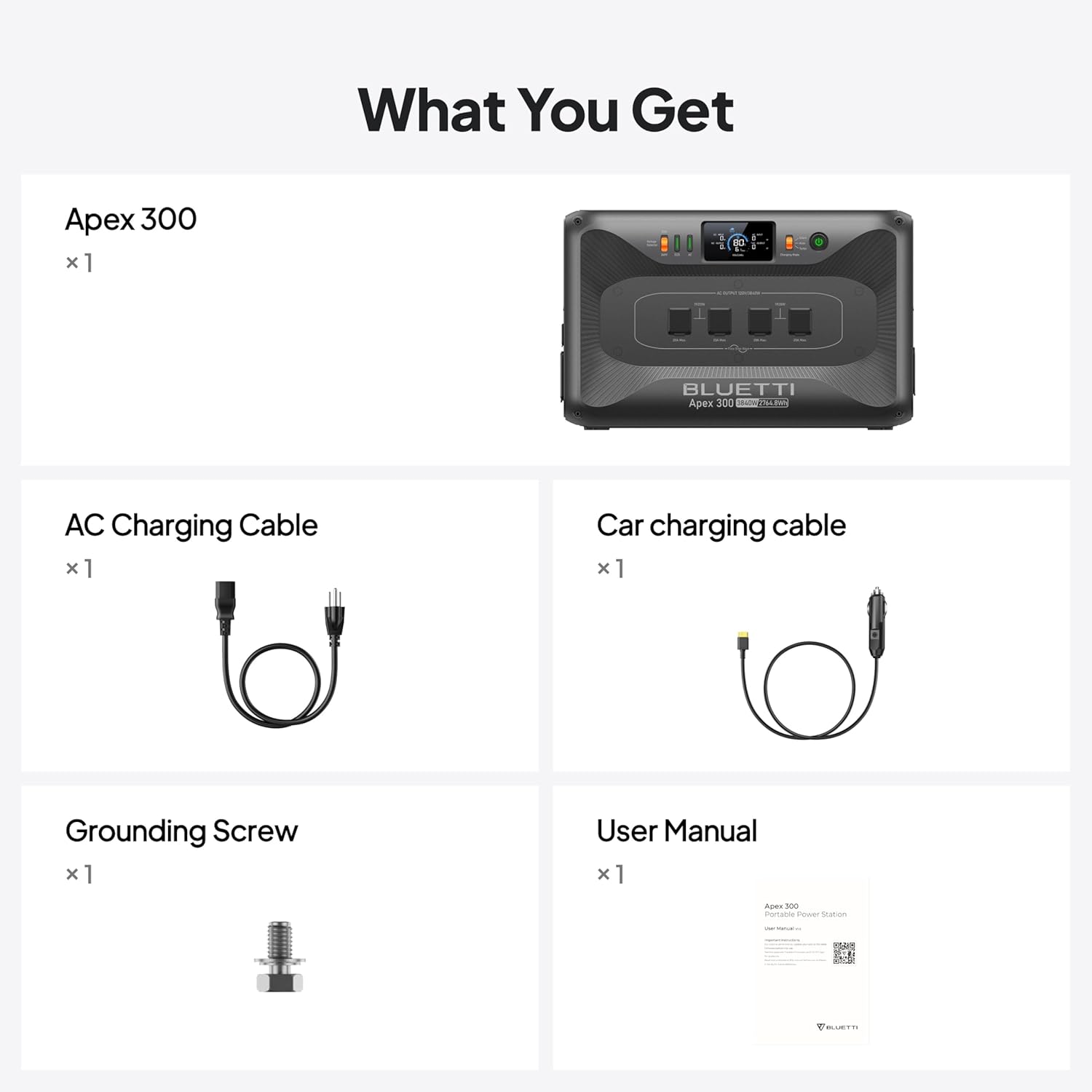
Image: Included components of the BLUETTI Apex 300 Portable Power Station.
4. Setup
4.1 Initial Inspection and Placement
Upon receiving your Apex 300, inspect the packaging and unit for any signs of damage. Place the power station on a flat, stable surface in a well-ventilated area, away from direct sunlight and moisture. Ensure adequate space around the unit for heat dissipation.
4.2 Initial Charging
It is recommended to fully charge the Apex 300 before its first use. Connect the provided AC charging cable to the unit's AC input port and then to a standard wall outlet. The LCD display will indicate the charging status. The unit can reach 80% charge in approximately 45 minutes via AC charging.
5. Operating Instructions
5.1 Powering On/Off
To power on the Apex 300, press and hold the main power button until the LCD display illuminates. To power off, press and hold the main power button again until the display turns off.
5.2 Connecting Devices
The Apex 300 offers multiple output ports:
- AC Outlets: The unit features 6 AC outlets (3840W total, 7680W surge) for standard appliances. It supports simultaneous 120V/240V output.
- NEMA TT-30R (120V/30A) & NEMA 14-50R (120V/240V, 50A): These ports are designed for higher power draw devices, such as RV ovens or air conditioning units.
- USB Ports: Various USB-A and USB-C ports are available for charging smaller electronic devices.
Simply plug your devices into the appropriate output ports. Activate the specific output group (AC, DC, USB) using the corresponding buttons on the control panel.

Image: BLUETTI Apex 300 providing power to household appliances.
5.3 Charging the Apex 300
The Apex 300 can be charged using several methods:
- AC Charging: Connect the AC charging cable to a wall outlet. The unit supports rapid charging, reaching 80% in approximately 45 minutes.
- Solar Charging: Connect compatible solar panels to the solar input ports. The Apex 300 has a 2400W built-in solar input and can expand to 6400W with additional accessories. It features dual MPPT tracking for up to 98% efficiency.
- Car Charging: Use the provided car charging cable to charge the unit from your vehicle's 12V/24V cigarette lighter port.
- Generator Charging: The unit is compatible with 95% of generators, supporting up to 11.52kW input (240V/50A Pure Sine Wave).

Image: Multiple charging options for the Apex 300, including solar, AC, and generator.
5.4 LCD Display
The LCD display provides real-time information on battery level, input/output wattage, charging status, and error indicators. Refer to the on-screen prompts for detailed information.
5.5 Expansion and Parallel Operation
The Apex 300 can be expanded with B300K external batteries to increase total capacity up to 58kWh. Multiple Apex 300 units can also be operated in parallel for increased power output. Refer to the specific expansion module's manual for detailed connection instructions.
6. Maintenance
6.1 Battery Care
The Apex 300 utilizes a LiFePO4 battery, known for its longevity. It is rated for 6,000+ cycles to 80% of its original capacity, providing an estimated 17-year lifespan with typical use. To maximize battery life:
- Avoid fully discharging the battery frequently.
- Store the unit with a charge level between 50% and 80% if not used for extended periods.
- Recharge the unit every 3-6 months during storage to prevent deep discharge.
6.2 Cleaning
Clean the exterior of the unit with a dry, soft cloth. Do not use abrasive cleaners or solvents. Ensure all ports are free of dust and debris.
6.3 Storage
Store the Apex 300 in a cool, dry place, away from direct sunlight and extreme temperatures. Ensure the unit is powered off during storage.
7. Troubleshooting
If you encounter issues with your Apex 300, refer to the following common problems and solutions:
- Unit does not power on: Ensure the battery is charged. If not, connect to an AC outlet for charging.
- No AC output: Check if the AC output button is activated. Ensure the connected device's power draw does not exceed the unit's rated output (3840W continuous, 7680W surge).
- No charging input: Verify that the charging cable is securely connected and the power source is active. For solar charging, ensure panels are correctly oriented and receiving sufficient sunlight.
- Overload warning: Disconnect some devices to reduce the total power draw. The unit will automatically resume output once the load is within limits.
For persistent issues or technical support, please contact BLUETTI customer service.
8. Specifications
| Feature | Specification |
|---|---|
| Brand | BLUETTI |
| Model | Apex 300 |
| Wattage | 2764.8 Watt-hours |
| Fuel Type | Electric |
| Power Source | Solar Powered |
| Item Weight | 66.14 Pounds |
| Voltage | 120 Volts (AC) |
| Output Wattage | 3840 Watts (7680W Surge) |
| Battery Type | LiFePO4 |
| Battery Cycles | 6,000+ cycles to 80% capacity |
| Product Dimensions | 20.67"L x 12.87"W x 12.6"H |
| Included Components | AC charging cable, BLUETTI Apex 300 Power Station, car charging cable, grounding screw |
9. Warranty and Support
9.1 Warranty Information
The BLUETTI Apex 300 Portable Power Station typically comes with a manufacturer's warranty. Please refer to the warranty card included in your package or visit the official BLUETTI website for detailed warranty terms and conditions. Retain your proof of purchase for warranty claims.
9.2 Customer Support
For technical assistance, troubleshooting, or any questions regarding your BLUETTI Apex 300, please contact BLUETTI customer support. Contact information can usually be found on the official BLUETTI website or in the documentation provided with your product.


