
BLUETTI Elite 30 V2
BLUETTI Elite 30 V2 Portable Power Station User Manual
Brand: BLUETTI | Model: Elite 30 V2
Introduction
The BLUETTI Elite 30 V2 is a compact and versatile portable power station designed to provide reliable power for various applications, from outdoor adventures to emergency home backup. Featuring a durable LiFePO4 battery and multiple output ports, it offers efficient and safe energy solutions.

Image: The BLUETTI Elite 30 V2 Portable Power Station, showcasing its compact design and various ports.
Safety Information
For safe operation and to maximize the lifespan of your BLUETTI Elite 30 V2, please adhere to the following safety guidelines:
- Do not disassemble, repair, or modify the unit. Unauthorized modifications may cause fire, explosion, or other hazards.
- Keep the device dry and away from heat sources. Avoid exposure to direct sunlight, high temperatures, or humid environments.
- Ensure proper ventilation during use and charging to prevent overheating. Do not block the ventilation openings.
- Use only original or certified charging cables and accessories.
- Keep out of reach of children and pets.
- In case of fire, use a dry powder fire extinguisher.
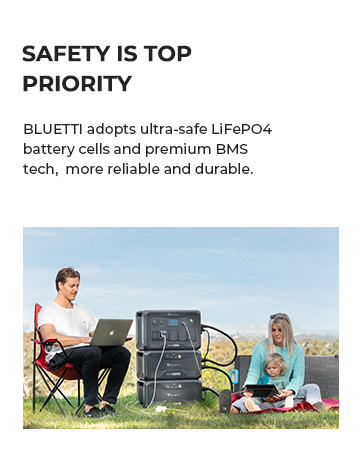
Image: Illustration emphasizing safety as a top priority, highlighting the use of ultra-safe LiFePO4 battery cells and premium BMS technology for reliability and durability.
Product Overview
Key Features:
- Light and Portable: Weighing only 9.4 lbs, it's an excellent companion for outdoor activities and travel.
- Rapid AC Charging: Achieves 0-100% charge in just 70 minutes via AC input.
- Power Lifting Capability: Delivers up to 1500W of power, enabling it to run small electric heating appliances.
- Reliable UPS Functionality: Features a seamless 10ms switchover time for uninterrupted power during outages.
- Smart App Control: Monitor and manage the power station via Bluetooth and Wi-Fi.
- Quiet Operation: Designed for minimal noise disruption, operating at 30dB.
- Durable LiFePO4 Battery: Offers a 10-year lifespan with over 3000 charge cycles.

Image: A visual summary of the BLUETTI Elite 30 V2's key features, including standby usage, UPS, output, fast charging, app control, portability, quiet operation, and battery cycles.
Ports and Outputs:
The Elite 30 V2 is equipped with a variety of ports to meet diverse power needs:
- AC Output: 2 x 120V/600W AC outlets (Pure Sine Wave).
- USB-C Output: 1 x 140W USB-C, 1 x 100W USB-C.
- USB-A Output: 2 x 15W USB-A ports.
- DC Output: 2 x 12V/10A DC5521 ports.
- Car Port: 1 x 12V/10A Cigarette Lighter Port.
- DC/PV Input: 12V-28V/10A/200W for charging.
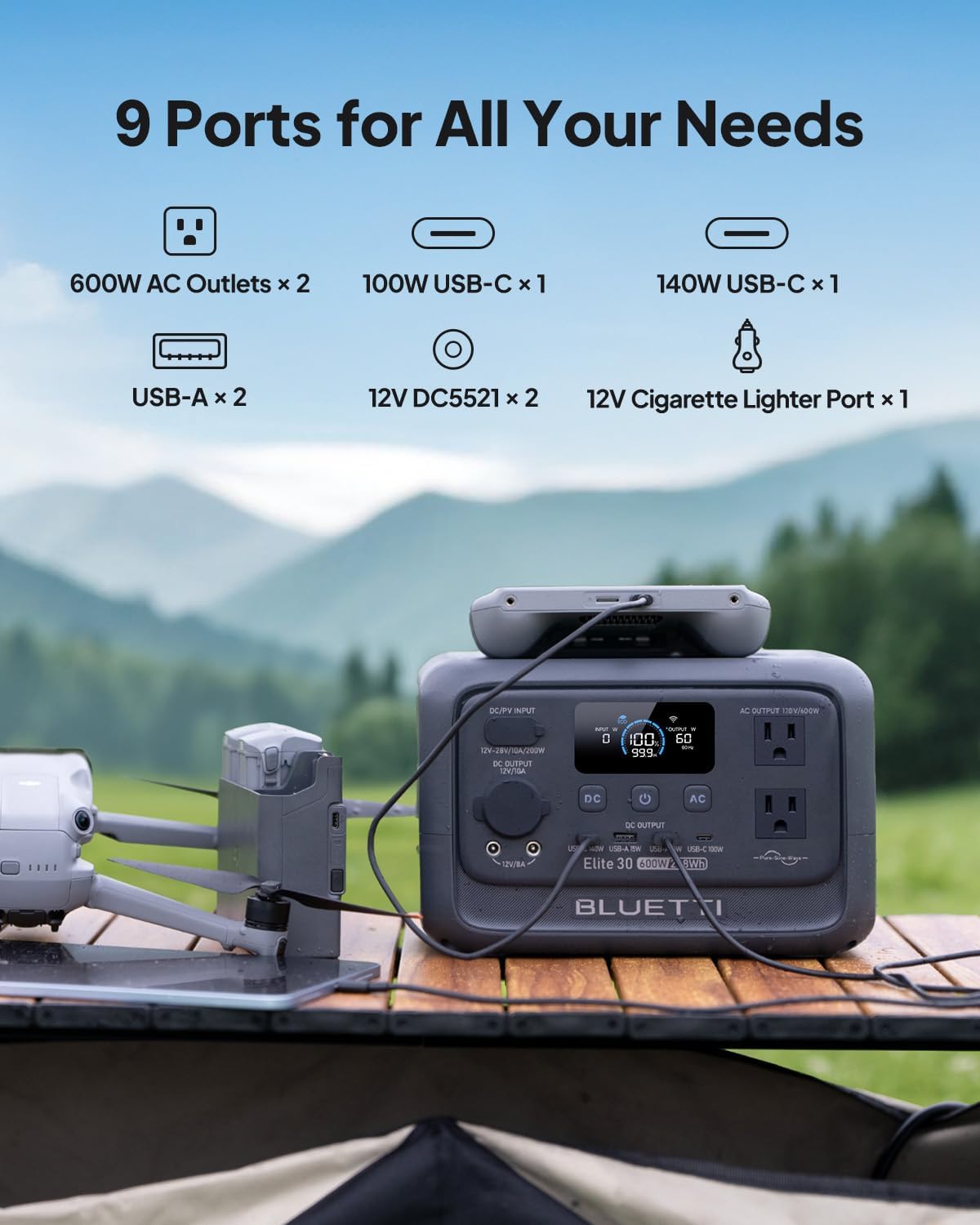
Image: The BLUETTI Elite 30 V2 displaying its nine output ports, including AC, USB-C, USB-A, DC5521, and cigarette lighter port.
Setup
Upon receiving your BLUETTI Elite 30 V2, it is recommended to fully charge the unit before its first use to optimize battery performance and calibration.
- Unboxing: Carefully remove the power station and all accessories from the packaging.
- Initial Charge: Connect the provided AC charging cable to the AC input port on the unit and plug it into a standard wall outlet. The display will show charging status.
- Full Charge: Allow the unit to charge until the battery indicator shows 100%. This may take approximately 70 minutes from 0% charge.
- Accessory Check: Verify that all included components (AC charging cable, car charging cable, user manual) are present. Note that a solar charging cable is sold separately.

Image: The BLUETTI Elite 30 V2 being charged via a wall outlet, illustrating its fast charging capability. Also shows car and solar charging options.
Operating Instructions
Turning On/Off:
- To turn on the unit, press and hold the main power button until the display illuminates.
- To turn off the unit, press and hold the main power button until the display turns off.
Using Outputs:
Activate the desired output section (DC or AC) by pressing the corresponding button. The display will show active outputs and power consumption.
- AC Output: Press the "AC" button to enable the AC outlets. Plug in your devices (e.g., laptops, small appliances). The 1500W Power Lifting feature allows for temporary higher wattage for resistive loads like kettles.
- DC Output: Press the "DC" button to enable the DC5521 and car ports. Connect 12V devices.
- USB Output: USB-A and USB-C ports are typically active when the unit is on. Connect your smartphones, tablets, or other USB-powered devices.

Image: The BLUETTI Elite 30 V2 powering a hairdryer, demonstrating its 1500W Power Lifting capability for various household appliances.
UPS Functionality:
For uninterrupted power supply, connect the BLUETTI Elite 30 V2 to a wall outlet and then plug your critical devices into the power station's AC outlets. In case of a power outage, the unit will automatically switch to battery power within 10 milliseconds, ensuring continuous operation for connected devices.

Image: The BLUETTI Elite 30 V2 providing instant UPS functionality to a desktop computer setup during a simulated power interruption.
Charging the BLUETTI Elite 30 V2
The BLUETTI Elite 30 V2 supports multiple charging methods:
- AC Wall Outlet: Use the included AC charging cable for the fastest charge, reaching 0-100% in approximately 70 minutes.
- Solar Panels: The unit can be charged using compatible solar panels (100W or 200W recommended). A solar charging cable is required and sold separately.
- Car Charging: Use the included car charging cable to charge the unit from your vehicle's 12V cigarette lighter port.
Maintenance
Proper maintenance ensures the longevity and optimal performance of your power station:
- Battery Longevity: For best battery health, try to keep the charge level between 20% and 80% during regular use. Avoid consistently draining to 0% or charging to 100% unless necessary.
- Storage: When storing the unit for extended periods, ensure it is charged to about 50-60% and store it in a cool, dry place away from direct sunlight and extreme temperatures. Recharge every 3-6 months to prevent deep discharge.
- Cleaning: Use a soft, dry cloth to clean the exterior of the unit. Do not use liquid cleaners or immerse the unit in water.
- Ventilation: Ensure the ventilation openings are clear of dust and debris to maintain proper airflow and prevent overheating.

Image: The BLUETTI Elite 30 V2 operating quietly next to a sleeping person, illustrating its low noise level suitable for various environments.
Troubleshooting
| Problem | Possible Cause | Solution |
|---|---|---|
| Unit does not turn on. | Battery is completely drained; power button not pressed long enough. | Charge the unit via AC wall outlet. Press and hold the power button for 2-3 seconds. |
| No output from AC/DC/USB ports. | Output ports not activated; overload protection triggered; device not compatible. | Ensure corresponding AC/DC buttons are pressed. Check device wattage. Disconnect and reconnect device. |
| Slow charging. | Using a low-power charging method (e.g., car charger vs. AC wall outlet); environmental factors. | Use AC wall charging for fastest speed. Ensure solar panels are in direct sunlight and correctly angled. |
| Unit overheats. | Blocked ventilation; excessive load. | Ensure ventilation openings are clear. Reduce connected load. Allow unit to cool down. |
For more detailed troubleshooting or advanced settings, refer to the BLUETTI mobile application.

Image: A smartphone screen showing the BLUETTI app interface, which allows for real-time monitoring and custom settings for the power station.
Specifications
| Attribute | Value |
|---|---|
| Brand | BLUETTI |
| Model | Elite 30 V2 |
| Battery Capacity | 288 Watt-hours (Wh) |
| Battery Type | LiFePO4 |
| AC Output Power | 600W (Pure Sine Wave) |
| Power Lifting (Max) | 1500W |
| Voltage | 120 Volts (AC) |
| Weight | 9.4 Pounds |
| Dimensions (L x W x H) | 9.8" x 7" x 6.6" |
| AC Charging Time (0-100%) | Approx. 70 minutes |
| UPS Switchover Time | <10ms |
Warranty and Support
BLUETTI is committed to providing reliable products and excellent customer service. For any questions, technical assistance, or warranty claims, please contact BLUETTI customer support through their official website or the contact information provided in your product packaging.
BLUETTI maintains widespread sales and after-service networks to assist you with any inquiries.

Image: Illustration representing BLUETTI's commitment to perfect after-sale service, with customer support available to assist users.
Related documentsElite 30 V2


Ask a question about this manual
Ask about setup, troubleshooting, compatibility, parts, safety, or missing instructions. Manuals+ will review the question and use this page’s manual context to help answer it.