
KLEIN TOOLS 656QS
Klein Tools 656QS KNECT Quad Socket Instruction Manual
Model: 656QS
1. Product Overview
The Klein Tools 656QS KNECT Quad Socket set is designed for efficiency and durability, combining 24 SAE and Metric hex sizes into 6 color-coded, deep-well impact sockets. This innovative design allows for quick size changes and provides superior reach for various fastening tasks.
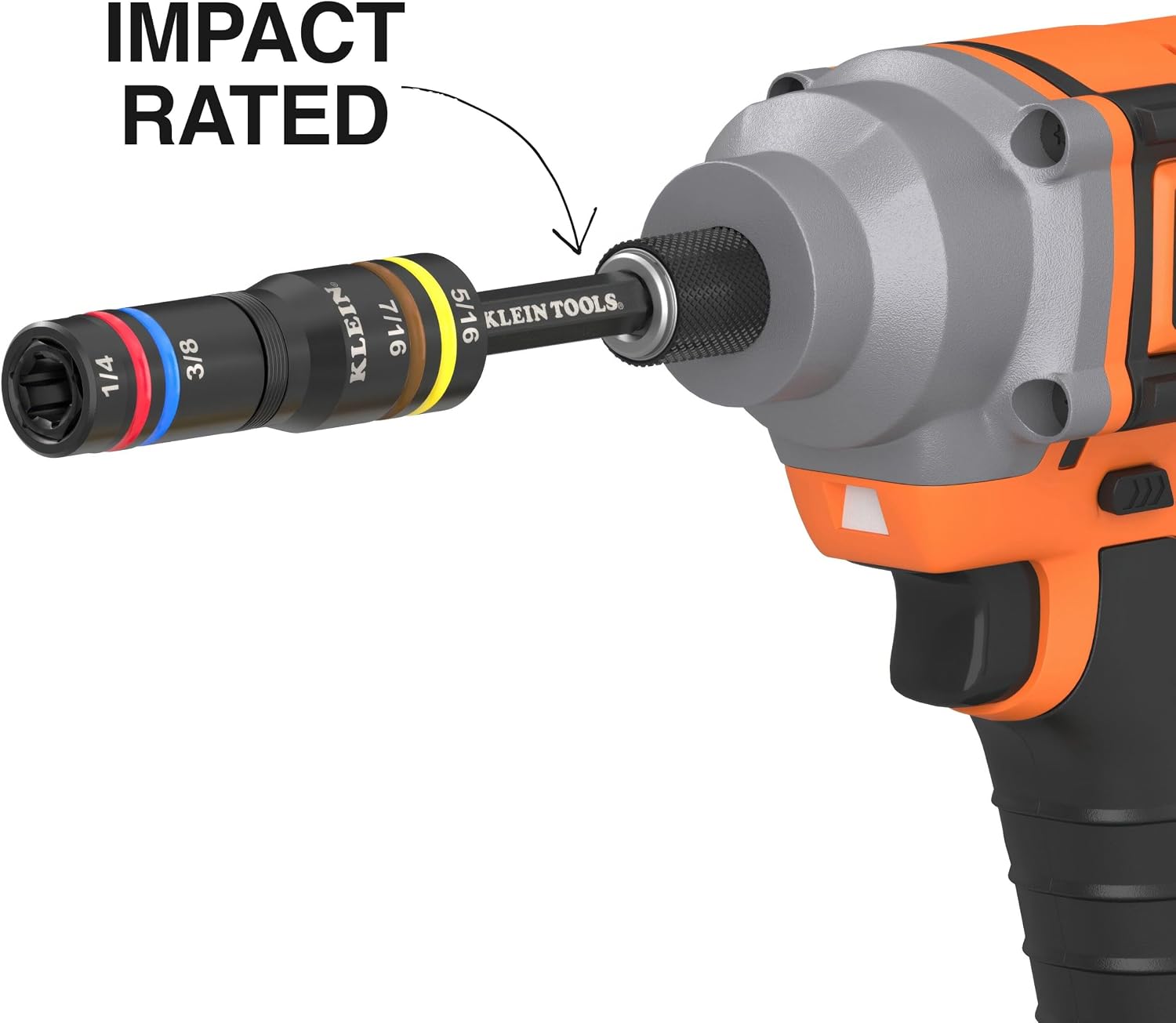
- 4 Sizes in 1 Socket: Each quad socket integrates two SAE and two Metric sizes, providing versatility in a compact form.
- Spring-Loaded Action: Facilitates hands-free size changes. Simply apply pressure to the smaller socket to compress it, revealing the larger size.
- Impact Rated: Constructed from cold-forged steel, these sockets are engineered to withstand high torque applications and offer long-lasting performance.
- Color-Coded: Painted rings on each socket allow for quick and easy identification of hex sizes, streamlining tool selection.
- Deep-Well Heavy-Duty Design: Provides extended reach for accessing recessed bolts, nuts, and fasteners with long threads.


2. Setup
The Klein Tools KNECT Quad Sockets are designed for use with compatible impact drivers and socket wrenches. Ensure your driver is appropriate for the task and securely attach the socket before operation.
- Select the Correct Socket: Identify the required hex size (SAE or Metric) for your fastener. The color-coded rings assist in quick selection.
- Attach to Driver: Insert the hex end of the quad socket into your 1/4-inch or 3/8-inch drive impact driver or socket wrench. Ensure it is fully seated and locked into place.
- Verify Connection: Gently tug on the socket to confirm it is securely attached to the driver before beginning work.
3. Operating Instructions
The KNECT Quad Sockets offer a unique spring-loaded mechanism for accessing different sizes. This feature enhances efficiency, especially in tight spaces.
- Using the Smaller Socket: Position the socket directly over the fastener. The smaller hex size will engage first.
- Accessing the Larger Socket: If the fastener requires the larger hex size, apply pressure to the socket against the fastener. The spring-loaded inner socket will compress, allowing the larger outer socket to engage the fastener. This action is hands-free once pressure is applied.
- Fastening/Loosening: Once the correct size is engaged, operate your impact driver or socket wrench as usual to tighten or loosen the fastener.
- Deep-Well Access: The deep-well design allows you to reach fasteners with extended threads or those located in recessed areas.

4. Maintenance
Proper maintenance ensures the longevity and optimal performance of your Klein Tools KNECT Quad Sockets.
- Cleaning: After each use, wipe down the sockets with a clean, dry cloth to remove dirt, grease, and debris. For stubborn grime, a mild solvent or degreaser can be used, followed by thorough drying.
- Lubrication: Periodically apply a light coat of tool oil to the spring mechanism and exterior surfaces to prevent rust and ensure smooth operation of the spring-loaded feature.
- Storage: Store the sockets in a dry environment to prevent corrosion. The included shaft allows for convenient stacking and organization of the sockets.
- Inspection: Regularly inspect sockets for any signs of wear, cracks, or damage. Discontinue use of any damaged socket to prevent injury or further tool damage.

5. Troubleshooting
If you encounter issues while using your KNECT Quad Sockets, consider the following common solutions:
- Socket Not Engaging Fastener:
- Ensure you have selected the correct SAE or Metric size for the fastener.
- Verify the socket is fully seated on the driver.
- For the larger size, ensure sufficient pressure is applied to compress the inner socket.
- Difficulty Switching Between Sizes:
- Check for debris or buildup within the spring mechanism. Clean and lubricate as described in the Maintenance section.
- Ensure the socket is not damaged or bent, which could impede movement.
- Socket Slipping on Fastener:
- Confirm the correct size is engaged and the socket is fully seated on the fastener.
- Inspect the socket's hex opening for wear or rounding. A worn socket should be replaced.
- Ensure the fastener itself is not stripped or rounded.
6. Specifications
| Feature | Detail |
|---|---|
| Brand | KLEIN TOOLS |
| Model Number | 656QS |
| Item Length | 9.15 inches |
| Material | Stainless Steel |
| Finish Type | Painted |
| Number of Pieces | 1 (set contains 6 quad sockets) |
| Unit Count | 1 Count |
| Item Weight | 2.8 pounds |
| Drive System | External Hex |
| Drive Bit Shank Style | Flip/Push-Pull |
| Bit Compatibilities | Impact driver, socket wrench |
| UPC | 092644380204 |
7. Warranty and Support
For warranty information regarding your Klein Tools 656QS KNECT Quad Socket, please contact the vendor directly. Klein Tools is committed to providing high-quality products and customer satisfaction.
For additional support, product information, or to view other Klein Tools products, please visit the official Klein Tools website:
You can also visit the Klein Tools store on Amazon for more products and information: Klein Tools Amazon Store.
Related documents656QS


Ask a question about this manual
Ask about setup, troubleshooting, compatibility, parts, safety, or missing instructions. Manuals+ will review the question and use this page’s manual context to help answer it.