
Kircuit AC/DC Adapter
Kircuit AC/DC Adapter User Manual
Compatible with Seauto SAT20 SAT-20 Robotic Pool Cleaners
Introduction
This user manual provides essential information for the safe and effective use of your Kircuit AC/DC Adapter. This adapter is specifically designed to meet the power requirements of compatible devices, such as the Seauto SAT20 SAT-20 18.5V 7800mAh Li-ion Battery Cordless Robotic Swimming Vacuum Wall-Climbing Automatic Pool Spa Cleaner. It converts standard AC power from electrical outlets into the DC power necessary to operate your device or charge its battery.
Please read this manual thoroughly before using the adapter to ensure proper operation and to prevent damage to the adapter or your connected device.
Safety Information
Always observe the following safety precautions to reduce the risk of fire, electric shock, or injury:
- Compatibility: Ensure the adapter's voltage and current specifications match your device's requirements. This adapter is designed for devices requiring 18.5V DC input. Note: 18.5V refers to the pool cleaner's battery voltage, not the charger's output voltage.
- Indoor Use Only: This adapter is intended for indoor use in dry locations. Do not expose it to rain, moisture, or extreme temperatures.
- Ventilation: Do not cover the adapter during use. Ensure adequate ventilation to prevent overheating.
- Power Source: Connect the adapter only to a properly grounded electrical outlet within the specified input voltage range (100-240VAC, 50/60Hz).
- Cord Care: Do not pull on the cord to disconnect the adapter from the outlet. Always grasp the plug. Avoid placing heavy objects on the cord or kinking it.
- Damage: Do not use the adapter if the cord or plug is damaged. Do not attempt to open or repair the adapter. Refer all servicing to qualified personnel.
- Protection Features: This adapter includes OVP (Over Voltage output Protection), OCP (Over Current output Protection), and SCP (Short Circuit output Protection) for enhanced safety.
- Battery Life: Be aware that rechargeable batteries have a limited lifespan (typically 1 to 3 years). If your device's battery is old or faulty, it may not accept a charge, which is not an indication of a faulty charger.
Product Overview
The Kircuit AC/DC Adapter is a compact and robust power supply designed for reliability and portability. It features a standard 2-prong AC input plug and a DC output connector tailored for compatible devices.
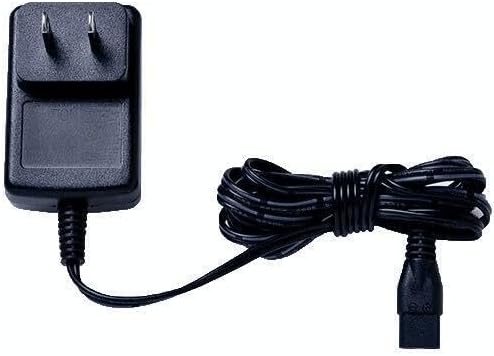
Figure 1: Kircuit 2-Prong AC/DC Adapter. This image shows the black adapter block with two prongs for wall outlet connection on the left, and an attached black power cord coiled neatly, leading to a black DC output connector on the right.
Components:
- Adapter Block: Contains the power conversion circuitry.
- AC Input Prongs: For connecting to a standard wall outlet.
- DC Output Cable: Permanently attached cable that delivers power to your device.
- DC Output Connector: The plug that connects to your device's power input port.
Setup
Follow these steps for initial setup:
- Verify Compatibility: Before connecting, confirm that your device (e.g., Seauto SAT20 SAT-20) requires an 18.5V DC power input and that the adapter's output connector matches your device's input port.
- Connect to Device: Insert the DC output connector of the Kircuit adapter firmly into the power input port of your device.
- Connect to Power Outlet: Plug the 2-prong AC input of the adapter into a standard, accessible electrical wall outlet (100-240VAC, 50/60Hz).
- Power On: Once connected, your device should begin to operate or charge, depending on its design.
Important: Always connect the adapter to the device first, then to the wall outlet.
Operating Instructions
The Kircuit AC/DC Adapter operates automatically once connected to a power source and a compatible device. It provides a stable power supply for continuous operation or efficient battery charging.
- Charging: If your device has a rechargeable battery, the adapter will supply power for charging. Monitor your device's charging indicator (if available) to determine charging status.
- Direct Power: For devices that can operate directly from AC power, the adapter will provide the necessary DC current for continuous use.
- Disconnection: To disconnect, first unplug the adapter from the wall outlet, then disconnect the DC connector from your device.
Maintenance
The Kircuit AC/DC Adapter requires minimal maintenance to ensure long-term performance:
- Cleaning: Disconnect the adapter from all power sources and devices before cleaning. Use a soft, dry cloth to wipe the exterior. Do not use liquid cleaners or solvents.
- Storage: When not in use, store the adapter in a cool, dry place, away from direct sunlight and extreme temperatures. Coil the cable loosely; do not wrap it tightly around the adapter.
- Inspection: Periodically inspect the adapter, cable, and connectors for any signs of damage, such as cuts, fraying, or bent prongs. If damage is found, discontinue use and replace the adapter.
Troubleshooting
If you encounter issues with your Kircuit AC/DC Adapter, refer to the following common solutions:
| Problem | Possible Cause | Solution |
|---|---|---|
| Device not powering on/charging. |
|
|
| Adapter feels hot. |
|
|
If the problem persists after trying these solutions, please contact customer support.
Specifications
| Feature | Detail |
|---|---|
| Brand | Kircuit |
| Model | AC/DC Adapter (Compatible with Seauto SAT20 SAT-20) |
| Input Voltage | 100-240VAC, 50/60Hz (World Wide Input) |
| Output Voltage | Designed for 18.5V DC devices (e.g., Seauto SAT20 SAT-20 18.5V 7800mAh Li-ion Battery) |
| Power Output | 180W (for compatible devices) |
| Connector Type | 2-Prong AC input, specific DC output connector |
| Color | Black |
| Protection Features | OVP (Over Voltage output Protection), OCP (Over Current output Protection), SCP (Short Circuit output Protection) |
| Manufacturer | Shenzhen Waweis Technology Co., Ltd |
| ASIN | B0F3XCX54F |
Warranty and Support
This Kircuit AC/DC Adapter comes with a standard manufacturer's warranty. Please refer to the product packaging or the manufacturer's official website for specific warranty terms and conditions.
For technical support, troubleshooting assistance beyond this manual, or warranty claims, please contact Kircuit customer service through their official channels. Keep your purchase receipt as proof of purchase.
For more information, you may visit the Kircuit brand page on Amazon.
Ask a question about this manual
Ask about setup, troubleshooting, compatibility, parts, safety, or missing instructions. Manuals+ will review the question and use this page’s manual context to help answer it.