
1. Introduction
Thank you for choosing the VEILZOR PC418 2.4G Rechargeable Wireless Keyboard and Mouse Combo. This manual provides essential information for setting up, operating, and maintaining your new wireless peripheral set. Please read it thoroughly to ensure optimal performance and longevity of your product.
This combo features a full-size keyboard with an ergonomic wrist rest and a comfortable, contoured mouse, both designed for quiet operation and enhanced productivity. Enjoy customizable RGB backlighting effects on both devices and a reliable 2.4G wireless connection.
2. Package Contents
Upon unboxing your VEILZOR PC418 Wireless Keyboard and Mouse Combo, you should find the following items:
- 1 x Wireless Keyboard
- 1 x Wireless Mouse
- 1 x USB-C Charging Cable
- 1 x 2-in-1 USB-A/C Receiver
- 1 x User Manual (this document)
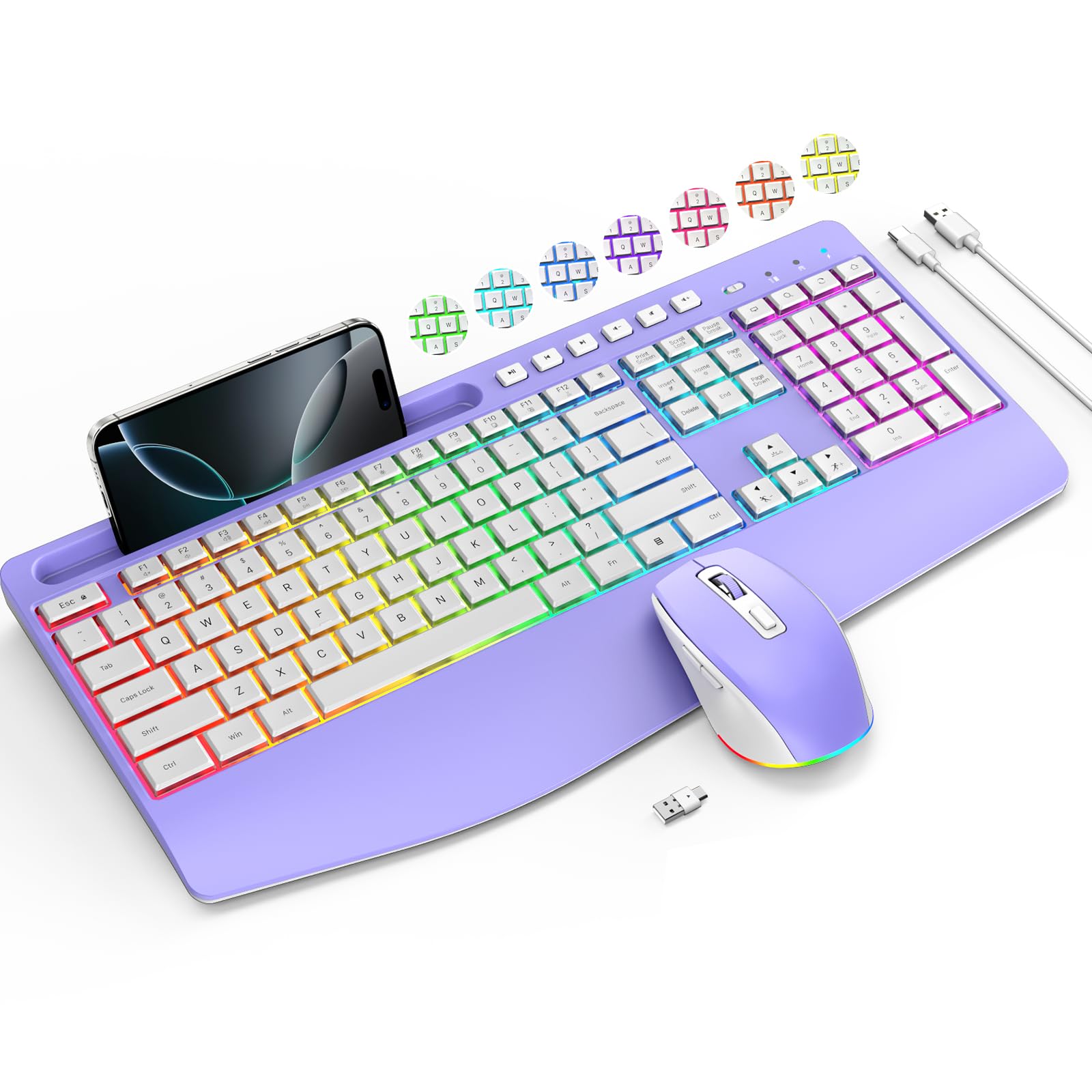
Image: The VEILZOR PC418 Wireless Keyboard and Mouse Combo in purple.
3. Setup Instructions
3.1 Initial Charging
Before first use, it is recommended to fully charge both the keyboard and mouse using the provided USB-C charging cable. Connect the cable to a USB power source (e.g., computer USB port, wall adapter) and the respective charging ports on the devices. The charging indicator lights will show the charging status.

Image: USB-C charging ports on the keyboard and mouse, indicating quick charge capability.
3.2 Connecting the Wireless Receiver
- Locate the 2-in-1 USB-A/C receiver. It is typically stored in a compartment on the back of the keyboard.
- Plug the USB receiver into an available USB-A or USB-C port on your computer, laptop, or tablet.
- Turn on the keyboard and mouse using their respective ON/OFF switches. The devices should automatically connect to the receiver.

Image: The 2.4G USB receiver, showing both USB-A and USB-C compatibility, and its storage location on the keyboard.
3.3 Video Guide: Unboxing and Setup
Video: An unboxing and initial setup guide for the VEILZOR Wireless Keyboard and Mouse, demonstrating how to connect the devices.
4. Operating Instructions
4.1 Keyboard Features
- RGB Backlighting: Personalize your workspace with 3 lighting modes, 7+1 backlight colors, and 3-level brightness. Use the dedicated function keys (e.g., FN + Home) to cycle through modes and adjust brightness.
- Ergonomic Design: The full-size keyboard includes a comfortable wrist rest and sturdy tilt legs with adjustable height to reduce strain during long typing sessions.
- Quiet Typing: Increased key stability reduces noise, providing a quiet typing experience.
- Integrated Phone Holder: A convenient slot is built into the keyboard to hold your smartphone or tablet, keeping it within view.

Image: The keyboard showcasing its three distinct backlit modes: RGB Rainbow, 7 Solid Backlit colors, and Cycle Ripple Backlit.

Image: A user typing on the ergonomic keyboard, highlighting the integrated wrist rest and foldable stand for adjustable tilt.
4.2 Mouse Features
- Ergonomic Design: The mouse features a comfortable, contoured shape that follows the natural curve of your hand, including a thumb rest for improved grip and control.
- Adjustable DPI: Switch between 3 DPI settings (800/1200/1600) for quicker click and responsiveness, adapting to your work or gaming needs.
- Quiet Clicking: The mouse reduces noise by 99.99%, ensuring a silent operation.
- Switchable RGB Light: The mouse also features customizable RGB lighting with 7 solid color effects, 7 colorful light effects, and 7 breathing light effects.

Image: The wireless mouse displaying its various switchable RGB light effects, including solid colors, colorful cycles, and breathing patterns.

Image: Depiction of the quiet operation of both the keyboard and mouse, emphasizing a silent working environment.
4.3 Video Guide: Features Overview
Video: A detailed overview of the VEILZOR Wireless Keyboard and Mouse, highlighting its features and quiet operation.
5. Charging and Power Management
The VEILZOR PC418 combo is USB-C rechargeable, eliminating the need for disposable batteries. Both devices feature smart power-saving systems:
- Keyboard: Enters sleep mode after 15 minutes of inactivity. Backlight turns off after 90 seconds.
- Mouse: Enters sleep mode after 10 minutes of inactivity. Backlight turns off after 20 seconds.
To wake the devices, simply press any key on the keyboard or move the mouse.
6. Maintenance
- Cleaning: Use a soft, dry cloth to clean the surfaces of the keyboard and mouse. For stubborn dirt, a slightly damp cloth can be used, ensuring no liquid enters the device.
- Storage: Store the devices in a cool, dry place away from direct sunlight and extreme temperatures when not in use for extended periods.
- Battery Care: Avoid fully discharging the batteries frequently. Charge them regularly to maintain optimal battery life.
7. Troubleshooting
- No Connection: Ensure the USB receiver is securely plugged into a working USB port. Turn both the keyboard and mouse off and then on again. Try plugging the receiver into a different USB port.
- Lag or Intermittent Connection: Ensure the devices are within the 10m (33ft) wireless range of the receiver. Avoid placing the receiver near strong interference sources (e.g., other wireless devices, large metal objects).
- Backlight Not Working: Ensure the keyboard and mouse are sufficiently charged. Use the designated function keys (FN + Insert for keyboard) to activate or cycle through backlight modes.
- Mouse Cursor Jumps/Erratic: Clean the mouse sensor with a soft cloth. Ensure you are using the mouse on a suitable surface (not highly reflective or transparent).
- Charging Issues: Verify the USB-C cable is properly connected to both the device and the power source. Try a different USB-C cable or power source.
8. Specifications
| Feature | Detail |
|---|---|
| Brand | VEILZOR |
| Model Number | PC418 |
| Connectivity Technology | 2.4G USB-A/C Wireless |
| Keyboard Special Features | RGB Backlit, Silent, Rechargeable, Ergonomic Design, Wrist Rest, Phone Holder |
| Mouse Special Features | Ergonomic, 3 DPI settings (800/1200/1600), Quiet Click, RGB Light |
| Compatible Devices | Laptop, Personal Computer, Tablet |
| Package Dimensions | 17.4 x 10.83 x 1.61 inches |
| Item Weight | 1.99 pounds |
9. Warranty and Support
VEILZOR is committed to providing high-quality products and excellent customer service. We value your feedback and continuously strive for improvement.
- Warranty: This product comes with a one-year unconditional return and exchange policy.
- After-Sales Service: You will receive lifetime after-sales service. For any inquiries or support, please contact VEILZOR customer service.


