
Introduction
This manual provides detailed instructions for the assembly, operation, and maintenance of your HOOBRO YL156UBZ01 Small Round Side Table with Charging Station. Please read this manual carefully before assembly and use to ensure proper function and safety. Keep this manual for future reference.
Safety Instructions
- Ensure all parts are securely fastened before placing any items on the table or using the charging station.
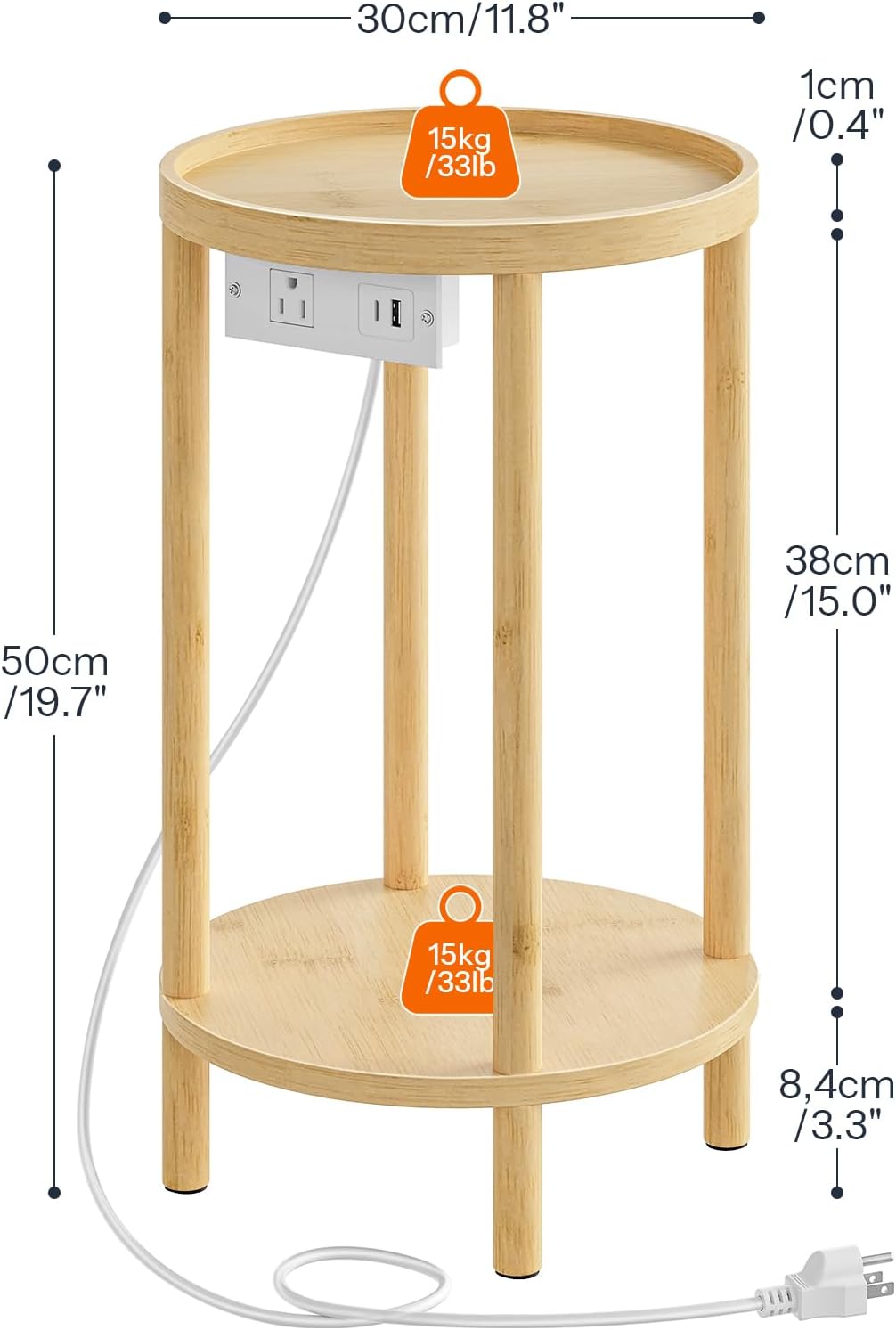
- Do not exceed the maximum static load capacity of 33 lb (15 kg) for each shelf. Overloading can cause instability and damage.
- Keep the charging station and power cord away from water, liquids, or damp environments to prevent electrical hazards.
- Do not attempt to disassemble, modify, or repair the charging station. Contact qualified personnel for any electrical issues.
- Use only as intended for indoor residential use. Avoid outdoor exposure or commercial use.
- Place the table on a flat, stable surface to prevent tipping.
- Keep small children and pets away from the charging station to prevent accidental contact with electrical components.
Package Contents
Please check the package to ensure all components are present and undamaged:
- 1 x Side Table (unassembled components)
- 1 x Charging Station (pre-assembled with power cord)
- 1 x Accessory Kit (screws, anti-scratch pads, etc.)
- 1 x Instructions Manual
Setup and Assembly
The HOOBRO YL156UBZ01 side table is designed for easy assembly with a unique twist-and-lock structure. No additional tools are required for the main table assembly, though a screwdriver might be needed for securing the charging station.
- Unpack Components: Carefully remove all parts from the packaging. Verify against the package contents list.
- Assemble Legs: Identify the table leg sections. Twist the leg sections together to form the vertical supports. Ensure each section is securely locked into place.
- Attach Shelves: Connect the top and bottom round shelves to the assembled leg structure. Ensure they fit snugly and are stable.
- Install Charging Station: Position the charging station in the designated slot on the table. Use the screws from the accessory kit to secure it firmly.
- Apply Anti-Scratch Pads: Attach the provided anti-scratch pads to the bottom of the table legs to protect your floors.


Operating Instructions (Charging Station)
The integrated charging station provides convenient power access for your electronic devices.
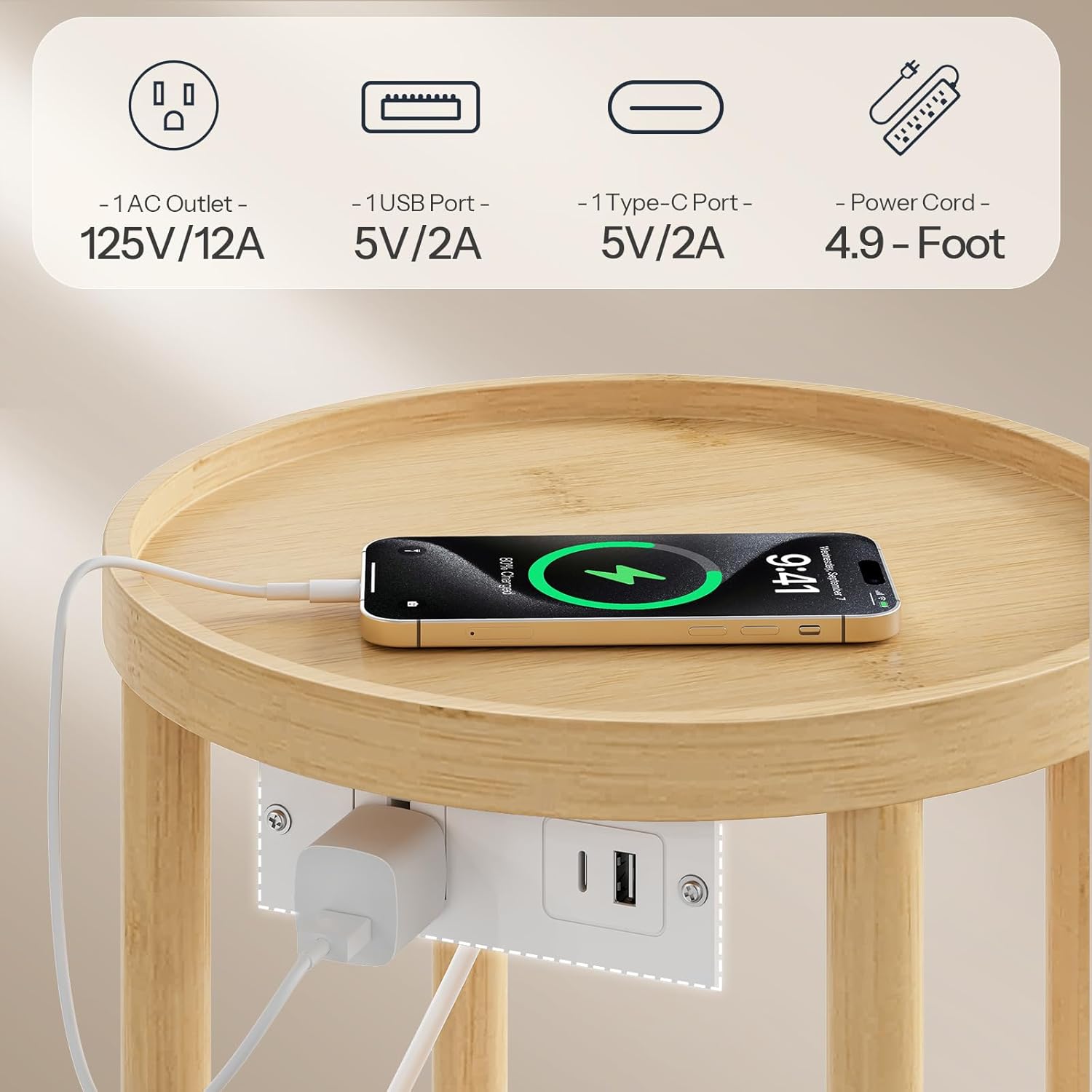
- Connect Power: Plug the 4.9-foot power cord from the charging station into a standard, grounded wall outlet.
- Charge Devices: The charging station includes:
- 1 x AC Outlet (125V/12A)
- 1 x USB-A Port (5V/2A)
- 1 x Type-C Port (5V/2A)
- Plug your devices, such as phones, headphones, or lamps, into the appropriate ports for charging or power.

This video demonstrates the HOOBRO Small Round Side Table with Charging Station, highlighting its features and use in various settings. (Duration: 0:13)
This video showcases the HOOBRO Small Round Side Table with Charging Station, focusing on its compact design and functionality. (Duration: 0:15)
Maintenance
Proper maintenance will extend the life and appearance of your side table.
- Cleaning: Wipe the table surfaces with a dry cloth to remove dust and light dirt.
- Avoid Chemicals: Do not use abrasive cleaners, harsh chemicals, or excessive moisture, as these can damage the bamboo finish.
- Regular Checks: Periodically check all screws and connections to ensure they remain tight and secure. Retighten if necessary.
- Spills: In case of liquid spills, wipe immediately with a dry cloth to prevent water damage.

Troubleshooting
| Problem | Possible Cause | Solution |
|---|---|---|
| Table is wobbly or unstable. | Loose connections; uneven surface. | Ensure all leg sections are securely twisted and locked. Verify shelves are properly attached. Place the table on a flat, even surface. Check if anti-slip pads are correctly placed. |
| Charging station not working. | Power cord not connected; wall outlet issue; overloaded. | Check if the power cord is securely plugged into both the table's charging station and a functional wall outlet. Test the wall outlet with another device. Do not overload the charging station with devices exceeding its specified capacity. |
| Items sliding off the tabletop. | Items placed too close to the edge. | The table features an anti-tip edge. Ensure items are placed within this guarded area to prevent accidental falls. |
Specifications
| Feature | Detail |
|---|---|
| Brand | HOOBRO |
| Model Number | YL156UBZ01 |
| Product Dimensions | 11.8"D x 11.8"W x 19.7"H (30cm D x 30cm W x 50cm H) |
| Item Weight | 5.5 pounds (2.5 kg) |
| Maximum Weight Recommendation | 33 pounds (15 kg) per shelf |
| Frame Material | Bamboo |
| Top Material Type | Bamboo |
| Color | Natural |
| Charging Station | 1 x AC Outlet (125V/12A), 1 x USB-A Port (5V/2A), 1 x Type-C Port (5V/2A) |
| Power Cord Length | 4.9 feet |
| Assembly Required | Yes (Easy Assembly) |
| Special Features | 2-Tier, Charging Station, Anti-Tip Edges, Anti-Slip Pads |
| Indoor/Outdoor Usage | Indoor |
Warranty and Support
For any questions, missing parts, or support needs regarding your HOOBRO YL156UBZ01 Small Round Side Table with Charging Station, please contact HOOBRO customer service through your retailer's platform or the official HOOBRO website. Please have your model number (YL156UBZ01) and purchase information ready when contacting support.


