
1. Introduction
This manual provides detailed instructions for the assembly, operation, and maintenance of your DEVAISE 55 Inch Electric Standing Desk. Designed for home and office use, this ergonomic desk features adjustable height, an LED touchscreen controller with memory presets, and a headphone hook for convenience. Please read this manual thoroughly before assembly and use to ensure proper function and safety.

Figure 1.1: The DEVAISE 55 Inch Electric Standing Desk, showcasing its spacious white desktop and sturdy frame, equipped with dual monitors, a laptop, and various office accessories.
2. Safety Information
To prevent injury or damage to your desk, please observe the following safety precautions:
- Ensure all connections are secure before operating the desk.
- Keep hands, feet, and objects clear of the moving parts (legs, crossbars) during height adjustments.
- Do not overload the desk. The maximum weight capacity is 180 lbs (81.6 kg).
- Do not allow children to operate the desk unsupervised.
- Use the desk only on a flat, stable surface.
- Disconnect power before cleaning or performing any maintenance.
- This product meets CA Prop 65 & federal safety requirements for toxin-free air quality.
3. Package Contents
Please verify that all components are present before beginning assembly:
- Desktop (55"W x 28"D)
- Desk Legs (2)
- Feet (2)
- Control Box
- LED Touchscreen Controller
- Headphone Hook
- All necessary hardware (screws, bolts, tools)
- Instruction Manual
4. Assembly Instructions
The DEVAISE Electric Standing Desk is designed for hassle-free installation with pre-drilled screw holes and labeled parts. Assembly typically takes less than 30 minutes. A Phillips head screwdriver (not included) is required.
- Unpack Components: Carefully remove all parts from the packaging and lay them out on a clean, soft surface to prevent scratches.
- Assemble Desk Frame: Attach the desk legs to the crossbar and feet using the provided hardware. Ensure all connections are tightened securely.
- Attach Desktop: Place the desktop upside down on the soft surface. Align the pre-drilled holes on the desktop with the frame. Secure the desktop to the frame using the provided screws. Note: The desktop may consist of two pieces joined by wooden dowel rods. For added stability, consider applying wood glue to these joints during assembly.
- Install Control Box and Controller: Mount the control box and LED touchscreen controller to the underside of the desktop in the designated areas. Connect all cables according to the wiring diagram in the detailed instructions.
- Attach Headphone Hook: Secure the headphone hook to the desired location on the side of the desk.
- Cable Management: Use the included cable ties or clips to manage and secure all power and control cables, preventing tangles and ensuring safe operation.
- Flip Desk Upright: With assistance, carefully flip the assembled desk upright and place it in its desired location.

Figure 4.1: Simplified components for quick and easy assembly.
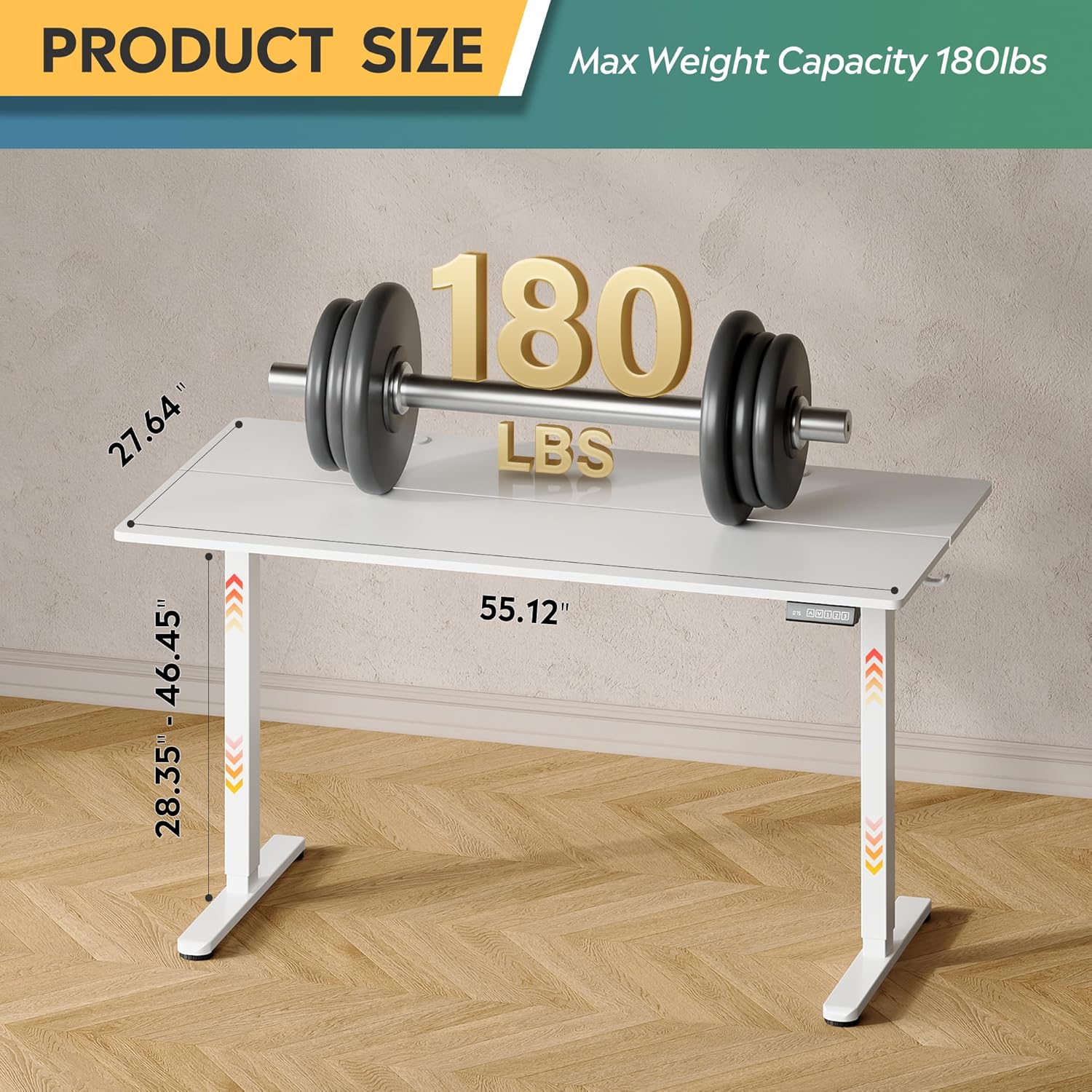
Figure 4.2: Desk dimensions and maximum weight capacity of 180 lbs.
5. Operating Instructions
Your DEVAISE Electric Standing Desk features a tri-motor system for quiet and smooth height adjustments and an intuitive LED touchscreen controller.
5.1. Height Adjustment
The desk's height can be adjusted from 28.35 inches (sitting height) to 46.45 inches (standing height).
- Raise Desk: Press and hold the UP arrow button on the controller. The desk will move upwards. Release the button at your desired height.
- Lower Desk: Press and hold the DOWN arrow button on the controller. The desk will move downwards. Release the button at your desired height.

Figure 5.1: Adjustable height range from 28.35" to 46.45".
5.2. Memory Presets
The LED touchscreen controller allows you to store and recall up to three personalized height settings.
- Set a Memory Preset:
- Adjust the desk to your desired height using the UP/DOWN buttons.
- Press the S button (Set). The LED display will flash.
- Press one of the memory buttons (1, 2, or 3) within 5 seconds. The height is now saved to that button.
- Recall a Memory Preset: Simply press the corresponding memory button (1, 2, or 3). The desk will automatically move to the saved height.

Figure 5.2: Multi-function LED touchscreen control panel.
5.3. Quiet Operation
The desk's tri-motor system operates at a whisper-quiet level of less than 50dB, ensuring minimal disruption in your workspace.

Figure 5.3: The desk operates quietly, below 50dB.
6. Maintenance
Regular maintenance will help prolong the life of your DEVAISE Electric Standing Desk:
- Cleaning: Wipe the desktop and frame with a soft, damp cloth. Avoid harsh chemicals or abrasive cleaners.
- Check Connections: Periodically inspect all screws and connections to ensure they remain tight. Retighten if necessary.
- Cable Management: Ensure cables are neatly organized and not pinched or stressed.
7. Troubleshooting
If you encounter issues with your desk, refer to the following common problems and solutions:
| Problem | Possible Cause | Solution |
|---|---|---|
| Desk does not move. | No power; loose connection; motor error. | Check power cord connection. Ensure all cables are securely plugged into the control box and motor. Unplug and replug the power cord to reset. |
| Desk moves unevenly or makes unusual noise. | Overload; obstruction; loose components. | Reduce weight on the desk. Check for any obstructions under or around the desk. Ensure all assembly screws are tightened. |
| LED display shows an error code. | Specific system error. | Refer to the detailed error code list in the full product manual (if available) or contact customer support. Often, a power cycle (unplugging for 30 seconds and replugging) can resolve temporary errors. |
8. Specifications
| Feature | Detail |
|---|---|
| Model Number | ASJZ023-new |
| Product Dimensions (D x W x H) | 23.62"D x 55"W x 28.34"H |
| Adjustable Height Range | 28.35" to 46.45" |
| Number of Height Positions | 3 (Memory Presets) |
| Maximum Weight Capacity | 180 lbs |
| Item Weight | 37 Pounds |
| Desktop Material | Engineered Wood |
| Base Material | Iron / Steel |
| Color | White |
| Motor Noise Level | <50dB |
| Special Features | Adjustable Height, Electric, Ergonomic, LED Touchscreen, Headphone Hook |
9. Warranty and Support
Your DEVAISE Electric Standing Desk comes with a limited warranty. For specific warranty terms and conditions, please refer to the documentation included with your purchase or contact DEVAISE customer support.
9.1. Returns
This product is eligible for 30-day easy returns. Please refer to your retailer's return policy for details.
9.2. Protection Plans
Optional 2-Year and 3-Year Protection Plans may be available for purchase separately to extend coverage beyond the standard limited warranty.
9.3. Customer Support
If you have any questions regarding assembly, operation, troubleshooting, or product selection, please contact our U.S.-based product support team. Contact information can typically be found on the DEVAISE official website or on your purchase receipt.
