
1. Introduction
This manual provides comprehensive instructions for the safe and effective operation, setup, and maintenance of your bitmoji Professional 15.6-inch Skin Analysis Machine. Please read this manual thoroughly before use and retain it for future reference. This device is designed for professional use by estheticians and spa professionals to conduct detailed skin assessments.
2. Safety Information
While specific safety information was not provided, it is crucial to adhere to general safety practices when operating any professional equipment. Always ensure the device is used in a clean, dry, and well-ventilated environment. Avoid exposing the machine to liquids or extreme temperatures. Disconnect the power supply before cleaning or performing any maintenance. Only trained professionals should operate this equipment. Consult a qualified professional for specific safety guidelines related to operating advanced skin analysis equipment.
3. Product Overview
3.1 Key Features
- Facial Scanning & Microscopic Imaging: Features a 15.6-inch HD touchscreen (1920x1080) and a handheld microimager for precise skin assessment and care planning.
- 15 Skin Health Indicators: Provides comprehensive analysis of various skin conditions including blackheads, redness, fluorescent agents, sebum, wrinkles, and more, enabling personalized skincare recommendations.
- Advanced 8-Spectral Imaging: Utilizes multiple light spectrums such as UV, Wood’s light, and polarized light to accurately detect acne, pigmentation, pores, hydration levels, and skin sensitivity.
- Customizable Reports: Generates professional client reports with product recommendations. Supports multiple languages, including English, Spanish, Chinese, French, and German.
- Cloud Storage & Data Management: Equipped with secure 32GB cloud storage, dual-band Wi-Fi (2.4G/5G), USB/HDMI ports, and one-click client file access for efficient workflow management.
3.2 Components
The bitmoji Skin Analysis Machine comprises a main unit with an integrated 15.6-inch HD touchscreen, a handheld microimager, and necessary power and data cables. Familiarize yourself with each component before operation.

Image: The main unit of the bitmoji Skin Analysis Machine, featuring a 15.6-inch touchscreen display and a separate handheld microimager. This image illustrates the primary components of the system.

Image: A diagram showing the approximate dimensions of the bitmoji Skin Analysis Machine. The main unit measures approximately 25 inches in width, 20.5 inches in depth, and 19.3 inches in height.
4. Setup
- Unpacking: Carefully remove all components from the packaging. Verify that all parts listed in the packing list are present and undamaged.
- Placement: Position the main unit on a stable, level surface in a well-ventilated area. Ensure adequate space around the device for operation and air circulation. Avoid placing it near heat sources or in direct sunlight.
- Power Connection: Connect the provided power adapter to the machine's power input port. Then, plug the power adapter into a grounded electrical outlet.
- Microimager Connection: Connect the handheld microimager cable to its designated port on the main unit. Ensure a secure connection.
- Initial Power On: Press the power button, typically located on the main unit, to turn on the device. Follow the on-screen prompts for initial setup, which may include language selection, time zone, and network configuration.
- Network Configuration: Connect the device to a dual-band Wi-Fi network (2.4G/5G) to enable cloud storage, data management, and software updates. Navigate to the settings menu to configure Wi-Fi.
5. Operating Instructions
5.1 User Interface Navigation
The device is operated via its 15.6-inch HD touchscreen. Navigate through menus, select options, and input data by tapping the screen. The interface is designed for intuitive use.
5.2 Client Management
- Create New Client Profile: From the main menu, select the option to "Create New Client" or similar. Enter the required client information, such as name, age, and contact details.
- Access Existing Client Profile: Select "Client List" or "Client Database" from the main menu. Choose the desired client from the displayed list to view their history and conduct new analyses.
- Cloud Storage: Client data is securely stored in the integrated 32GB cloud storage. This allows for easy access to client files with one-click retrieval from any connected device.
5.3 Performing a Skin Analysis
- Client Preparation: Ensure the client's face is clean and free of makeup, sunscreen, or other topical products. Position the client comfortably in front of the main unit, ensuring their face is centered within the scanning area.
- Facial Scanning: Guide the client to place their face inside the scanning area of the main unit. The device will automatically initiate the capture process, utilizing its 8-spectral imaging technology to collect comprehensive data.
- Microscopic Imaging: For a more detailed examination of specific skin areas or concerns, use the handheld microimager. Gently place the microimager on the skin surface to capture high-resolution images.
- Analysis Results: Once images are captured, the device will process the data and display comprehensive results for 15 key skin health indicators. These indicators include hydration, pore size, blackheads, acne, lipid levels, sensitivity, red blood vessels, superficial pigment, deep pigment, brown pigment, fluorescent agents, pimples, porphyry, texture, and roughness.
- Report Generation: Generate customizable professional client reports directly from the device. These reports can include a case presentation, symptom description, product recommendations, and an effect display to show treatment progress. The reports are multi-language supported.
- Comparison Modes: Utilize the three available comparison modes—Horizontal, Vertical, and Multinomial—to effectively track and visualize client progress over time. This feature helps in demonstrating the efficacy of skincare treatments.
- Multi-Language Support: The device supports 15 languages, including English, Spanish, Chinese, French, and German. Select your preferred language in the system settings for ease of use.

Image: The main unit of the skin analysis machine demonstrating the 8-spectral imaging process. The image shows a client's face being scanned, with various light spectrums (White, Positive polarized, Negative polarized, Wood's, UV, Brown, Red, Mixed light) used for detailed skin insights into skin conditions.

Image: An esthetician using the handheld microimager on a client's face, demonstrating its application for detailed skin analysis. The main unit with its touchscreen is visible in the background, indicating a professional spa setting.

Image: A visual representation of the 15 skin health indicators analyzed by the machine, including hydration, pore size, blackheads, acne, lipid levels, sensitivity, and various pigmentations. Examples of skin conditions under different light sources are also shown for clarity.

Image: Screenshots illustrating the customizable report generation feature and multi-language support. The reports can include case presentations, symptom descriptions, product recommendations, and visual effect displays. The interface shows options for annotating images and customizing test results according to specific requirements.
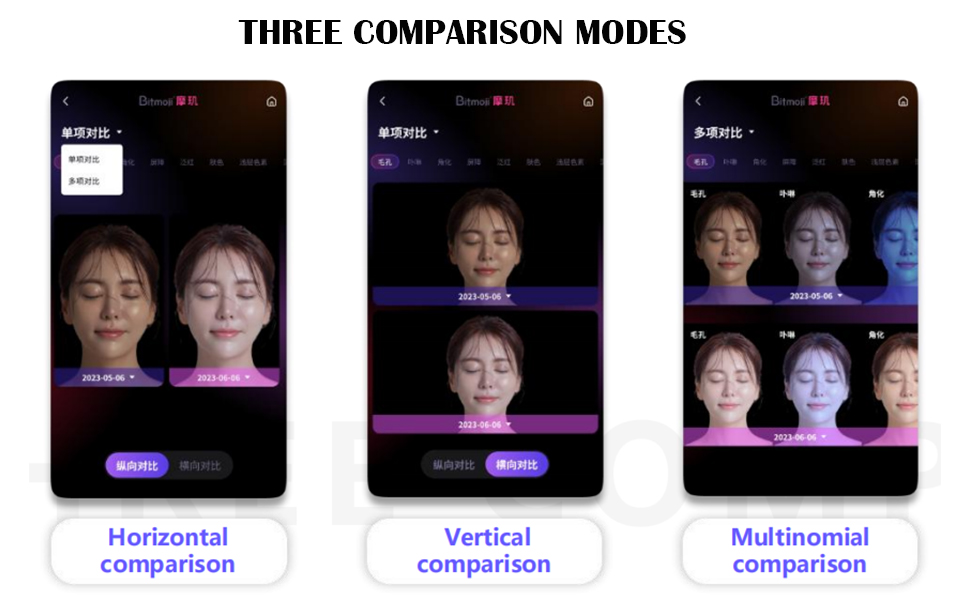
Image: A visual demonstration of the three comparison modes available on the device: Horizontal comparison, Vertical comparison, and Multinomial comparison. These modes allow for tracking changes in skin conditions over time by comparing images from different dates or different aspects of the skin.
6. Maintenance
Regular maintenance ensures the longevity and optimal performance of your skin analysis machine.
- Cleaning:
- Always turn off and unplug the device before cleaning.
- Wipe the touchscreen and exterior surfaces with a soft, slightly damp cloth. Avoid using abrasive cleaners, solvents, or harsh chemicals, as these can damage the finish.
- Gently clean the microimager lens and the main unit's scanning area with a specialized lens cleaning cloth or a soft, lint-free cloth to ensure clear image capture.
- Software Updates: Periodically check for and install available software updates. These updates often include performance enhancements, bug fixes, and new features. Ensure the device is connected to Wi-Fi for updates.
- Data Backup: While the device offers secure cloud storage, it is recommended to periodically back up critical client data to an external storage device via the USB port as an additional precaution.
- Storage: When the device is not in use for extended periods, store it in a clean, dry environment, away from direct sunlight, excessive dust, and extreme temperatures.
7. Troubleshooting
This section addresses common issues you might encounter. If a problem persists after attempting these solutions, please contact customer support.
7.1 Common Issues and Solutions
- Device not powering on:
- Ensure the power cable is securely connected to both the device and a functional power outlet.
- Verify that the power outlet is supplying electricity.
- If the issue persists, contact customer support.
- Touchscreen unresponsive:
- Attempt to restart the device by holding down the power button.
- Ensure the screen is clean and dry, free from any debris or moisture.
- If the issue continues, contact customer support for assistance.
- Poor image quality or blurry scans:
- Ensure the client's face is properly positioned and remains still during the scanning process.
- Clean the lenses of both the main unit's scanning area and the handheld microimager.
- Check the ambient lighting conditions in the room; excessive or insufficient light can affect image quality.
- Wi-Fi connection issues:
- Verify that your Wi-Fi network is active and that you are entering the correct password.
- Restart both the skin analysis device and your Wi-Fi router.
- Ensure the device is within effective range of the Wi-Fi signal.
- Reports not generating or displaying correctly:
- Ensure all necessary skin analysis data has been successfully captured and processed.
- Check for any error messages displayed on the screen that might indicate a problem.
- Try restarting the application or the entire device.
8. Specifications
| Feature | Detail |
|---|---|
| Display | 15.6-inch HD Touchscreen (1920x1080) |
| Imaging Technology | 8-Spectral Imaging (UV, Wood’s light, Polarized light, etc.) |
| Storage | 32GB Cloud Storage |
| Connectivity | Dual-band Wi-Fi (2.4G/5G), USB, HDMI |
| Languages Supported | 15 (including English, Spanish, Chinese, French, German) |
| Product Dimensions | 25 x 20.5 x 19.3 inches |
| Product Weight | 20.9 Pounds |
| Model Number | B0F3VQFWY9 |
| UPC | 763423660793 |
| Manufacturer | Shenzhen Zhimei Lihe Industrial Development Co.,Ltd |
9. Warranty and Support
For detailed warranty information, terms, and conditions, please refer to the warranty card or documentation included with your purchase. Keep your proof of purchase, such as the receipt or invoice, as it will be required for any warranty claims.
For technical support, troubleshooting assistance beyond what is covered in this manual, or service inquiries, please contact the manufacturer directly:
- Manufacturer: Shenzhen Zhimei Lihe Industrial Development Co.,Ltd
- Please visit the bitmoji official website or refer to your product packaging for the most current contact information.