
1. Introduction
Thank you for choosing the DOWN4SOUND JP23 V1.5 Elite Gray Monoblock Amplifier. This amplifier is engineered to deliver exceptional power and sound quality for your car audio system, specifically designed for high-performance bass applications. To ensure optimal performance and longevity of your amplifier, please read this manual thoroughly before installation and operation. Keep this manual for future reference.
1.1 Product Overview
The JP23 V1.5 Monoblock Amplifier is a powerful audio component capable of delivering 2300W RMS, making it suitable for demanding subwoofer setups. It offers versatile impedance compatibility, providing 1300W RMS at 2 Ohms and 700W RMS at 4 Ohms. Key features include advanced tuning options such as adjustable Low Pass Filter (LPF), Subsonic Filter, and Bass Boost, along with a premium bass knob remote featuring a voltage display for real-time monitoring and precise control.
1.2 Safety Information
Always disconnect the vehicle's battery before installing or servicing any electrical components. Ensure all wiring is correctly sized and fused to prevent damage to the amplifier, vehicle, or personal injury. Avoid mounting the amplifier in locations exposed to excessive heat, moisture, or vibration. Professional installation is recommended for optimal safety and performance.
2. Package Contents
- DOWN4SOUND JP23 V1.5 Elite Gray Monoblock Amplifier
- Premium Bass Knob Remote with Voltage Display
- Mounting Hardware (screws)
- User Manual (this document)
3. Product Features
The JP23 V1.5 amplifier is designed with several features to enhance your car audio experience:
- High Power Output: Delivers 2300W RMS, ideal for driving high-power subwoofers.
- Versatile Impedance: Stable at 1-Ohm, with outputs of 1300W RMS at 2 Ohms and 700W RMS at 4 Ohms.
- Linkable Functionality: Allows for strapping two amplifiers together for increased power output.
- Advanced Tuning: Features adjustable Low Pass Filter (35Hz - 250Hz), Subsonic Filter (10Hz - 50Hz), and Bass Boost (0 - 9 dB).
- Remote Bass Knob: Includes a premium bass knob with a voltage display for convenient real-time monitoring and adjustment of bass levels from the driver's seat.

Figure 3.1: The DOWN4SOUND JP23 V1.5 Elite Gray Monoblock Amplifier shown with its accompanying bass knob remote.
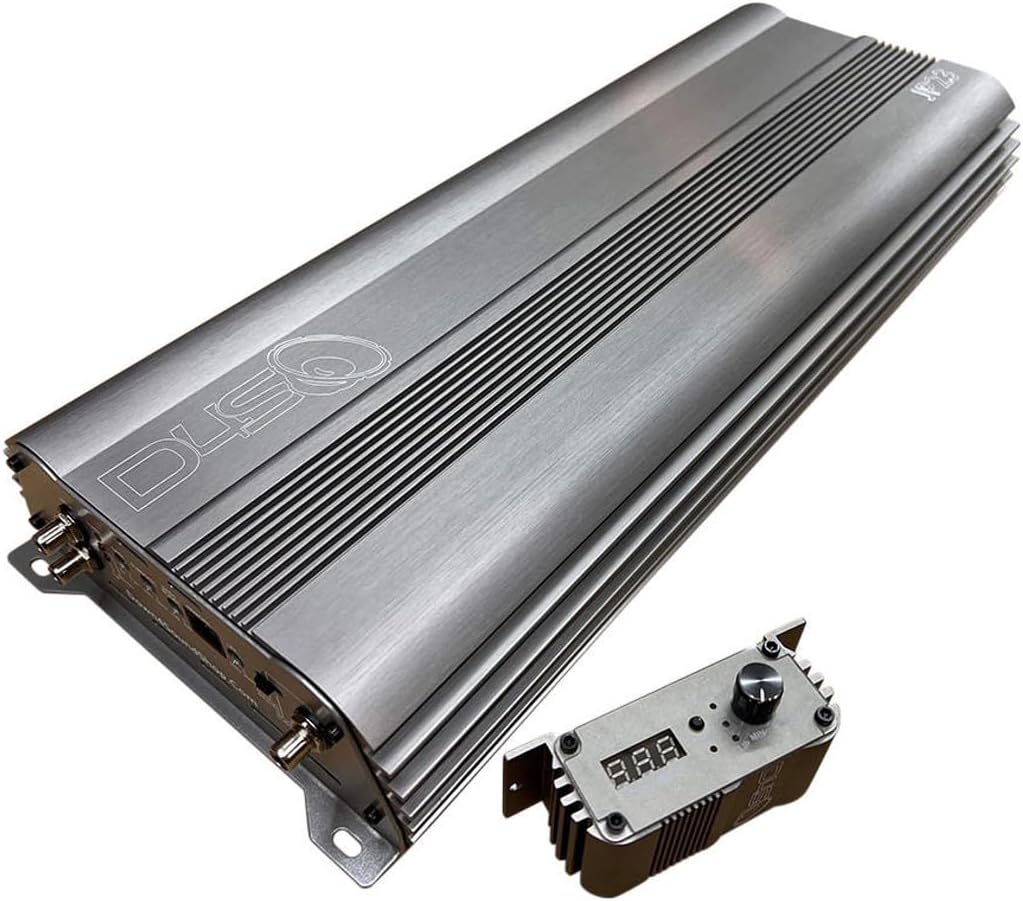
Figure 3.2: An angled perspective of the amplifier and bass knob, highlighting the sleek gray finish.
4. Setup and Installation
Proper installation is crucial for the performance and safety of your amplifier. If you are unsure about any steps, consult a professional car audio installer.
4.1 Mounting Location
Choose a mounting location that is dry, well-ventilated, and away from direct sunlight or heat sources. Ensure there is sufficient space around the amplifier for proper airflow. Common locations include under seats, in the trunk, or behind rear seats. Secure the amplifier firmly using the provided mounting hardware to prevent movement during vehicle operation.
4.2 Wiring Connections
All wiring should be of appropriate gauge for the power requirements. Refer to the specifications section for fuse ratings.
- Power (B+): Connect a heavy-gauge power cable directly from the positive terminal of the vehicle's battery to the amplifier's B+ terminal. Install an in-line fuse holder (200A for single unit, 400A for strapped units) within 18 inches of the battery.
- Ground (GND): Connect a heavy-gauge ground cable from the amplifier's GND terminal to a clean, unpainted metal surface of the vehicle's chassis. Ensure a solid, low-resistance connection.
- Remote (REM): Connect a remote turn-on wire from your head unit's remote output to the amplifier's REM terminal. This wire signals the amplifier to turn on when the head unit is active.
- RCA Input: Connect RCA cables from your head unit's pre-out (subwoofer output recommended) to the amplifier's INPUT terminals.
- Speaker Output: Connect your subwoofer(s) to the amplifier's speaker output terminals. Pay close attention to polarity (+/-).

Figure 4.1: Rear panel of the JP23 V1.5 amplifier, illustrating the power, ground, remote, RCA input, and speaker output terminals, along with control knobs.
5. Operating Instructions
Once installed, the amplifier requires proper configuration for optimal sound performance.
5.1 Initial Power-Up
After all connections are made, reconnect the vehicle's battery. Turn on your head unit. The amplifier's power indicator light should illuminate. If it does not, refer to the Troubleshooting section.
5.2 Adjusting Settings
- GAIN: This control matches the amplifier's input sensitivity to the output voltage of your head unit. Start with the gain at minimum, play a familiar track, and slowly increase the gain until you hear distortion, then back off slightly.
- SUBSONIC: (10Hz - 50Hz) This filter removes extremely low frequencies that are inaudible but can waste amplifier power and potentially damage subwoofers. Set it slightly below your subwoofer's resonant frequency or port tuning frequency.
- BASS BOOST: (0 - 9 dB) This control provides a boost at a specific frequency, typically around 45Hz. Use sparingly to avoid distortion and potential damage.
- LPF (Low Pass Filter): (35Hz - 250Hz) This filter allows only frequencies below the set point to pass through to the subwoofer. Set it to blend smoothly with your main speakers, typically between 60Hz and 100Hz.
5.3 Using the Bass Knob Remote
The included bass knob remote allows for convenient adjustment of the bass volume from your listening position. It also features a voltage display, enabling you to monitor your system's voltage in real-time and identify potential signal distortion.
6. Maintenance
Regular maintenance helps ensure the longevity and performance of your amplifier.
- Cleaning: Periodically wipe the amplifier's exterior with a soft, dry cloth to remove dust and debris. Do not use liquid cleaners or solvents.
- Connections: Occasionally check all power, ground, remote, and speaker connections to ensure they are secure and free from corrosion. Loose connections can lead to poor performance or damage.
- Ventilation: Ensure that the amplifier's cooling fins are not obstructed by dirt or other objects to maintain proper heat dissipation.
7. Troubleshooting
If you experience issues with your amplifier, consult the following common problems and solutions before seeking professional assistance.
| Problem | Possible Cause | Solution |
|---|---|---|
| Amplifier does not turn on | No power, poor ground, no remote signal, blown fuse | Check power and ground connections. Verify remote wire has 12V. Check in-line fuse and amplifier fuses. |
| No sound output | No input signal, incorrect gain setting, speaker wiring issue, amplifier in protect mode | Check RCA connections. Adjust gain. Verify speaker wiring polarity and connection. Check if protect light is on. |
| Distorted sound | Gain set too high, improper tuning, poor ground connection, damaged speaker | Reduce gain. Adjust LPF, Subsonic, and Bass Boost settings. Ensure solid ground. Inspect speaker for damage. |
| Amplifier goes into protect mode | Overheating, short circuit in speaker wiring, impedance too low, low voltage | Allow amplifier to cool. Check speaker wiring for shorts. Verify speaker impedance matches amplifier's capabilities. Check vehicle's charging system. |
8. Specifications
| Feature | Specification |
|---|---|
| Model | JP23 V1.5 Elite Gray |
| RMS Power Output (1 Ohm) | 2300W |
| RMS Power Output (2 Ohms) | 1300W |
| RMS Power Output (4 Ohms) | 700W |
| Low Pass Filter (LPF) | 35Hz - 250Hz |
| Subsonic Filter | 10Hz - 50Hz |
| Bass Boost | 0 - 9 dB |
| Fuse Rating (Single Unit) | 200A |
| Fuse Rating (Strapped Units) | 400A |
| Item Weight | 4.99 pounds |
| Package Dimensions | 25 x 7.48 x 2.24 inches |
| Manufacturer | Down4Sound |
9. Warranty and Support
9.1 Warranty Information
The DOWN4SOUND JP23 V1.5 Monoblock Amplifier comes with a 1-year warranty. An optional extended warranty is available, particularly recommended for 0.5-ohm usage, to provide additional coverage and peace of mind.
9.2 Customer Support
For technical assistance, warranty claims, or further inquiries, please contact DOWN4SOUND customer support. Refer to the product packaging or the official DOWN4SOUND website for the most current contact information.