
1. Introduction
This manual provides comprehensive instructions for the installation, operation, and maintenance of your SASKATE HY368 Digital Programmable Heating Thermostat. This device is designed to offer precise temperature control for your home, featuring remote control, app control, voice control, and energy-saving functionalities. Please read this manual carefully before installation and use to ensure optimal performance and safety.
2. Package Contents
Upon opening the package, please verify that all the following components are present:
- 1 x HY368 Thermostat Valve
- 5 x Accessory Connectors (various sizes for compatibility)
- 1 x Screw
- 1 x Nut
- 1 x User Manual (this document)

Image: All components included in the SASKATE HY368 package, showing the thermostat valve, various accessory connectors, screw, and nut.
3. Specifications
| Feature | Specification |
|---|---|
| Model | HY368 |
| Material | ABS |
| Temperature Range | 5-35℃ |
| Temperature Measurement Error | 0.5℃ |
| Installation Type | Rotating valve installation |
| Power Supply | 2 x AA battery (not included) |
| Voice Control | Yes |

Image: Dimensions of the SASKATE HY368 thermostat, showing a height of 90mm (3.54in), top diameter of 52mm (2.05in), and base diameter of 38mm (1.5in).
4. Setup and Installation
The SASKATE HY368 thermostat is designed for rotating valve installation. Ensure you have the correct valve connector for your heating system.
4.1 Battery Installation
- Gently twist and remove the top cover of the thermostat.
- Insert 2 AA batteries into the battery compartment, observing the correct polarity (+/-). Batteries are not included.
- Replace the top cover, ensuring it clicks securely into place.
4.2 Valve Installation
- Identify the existing thermostatic radiator valve (TRV) on your radiator.
- Remove the old TRV head.
- Select the appropriate accessory connector from the package that matches your radiator valve.
- Attach the selected connector to the radiator valve.
- Screw the SASKATE HY368 thermostat onto the connector until it is firmly secured. Ensure the thermostat is oriented correctly for display visibility.
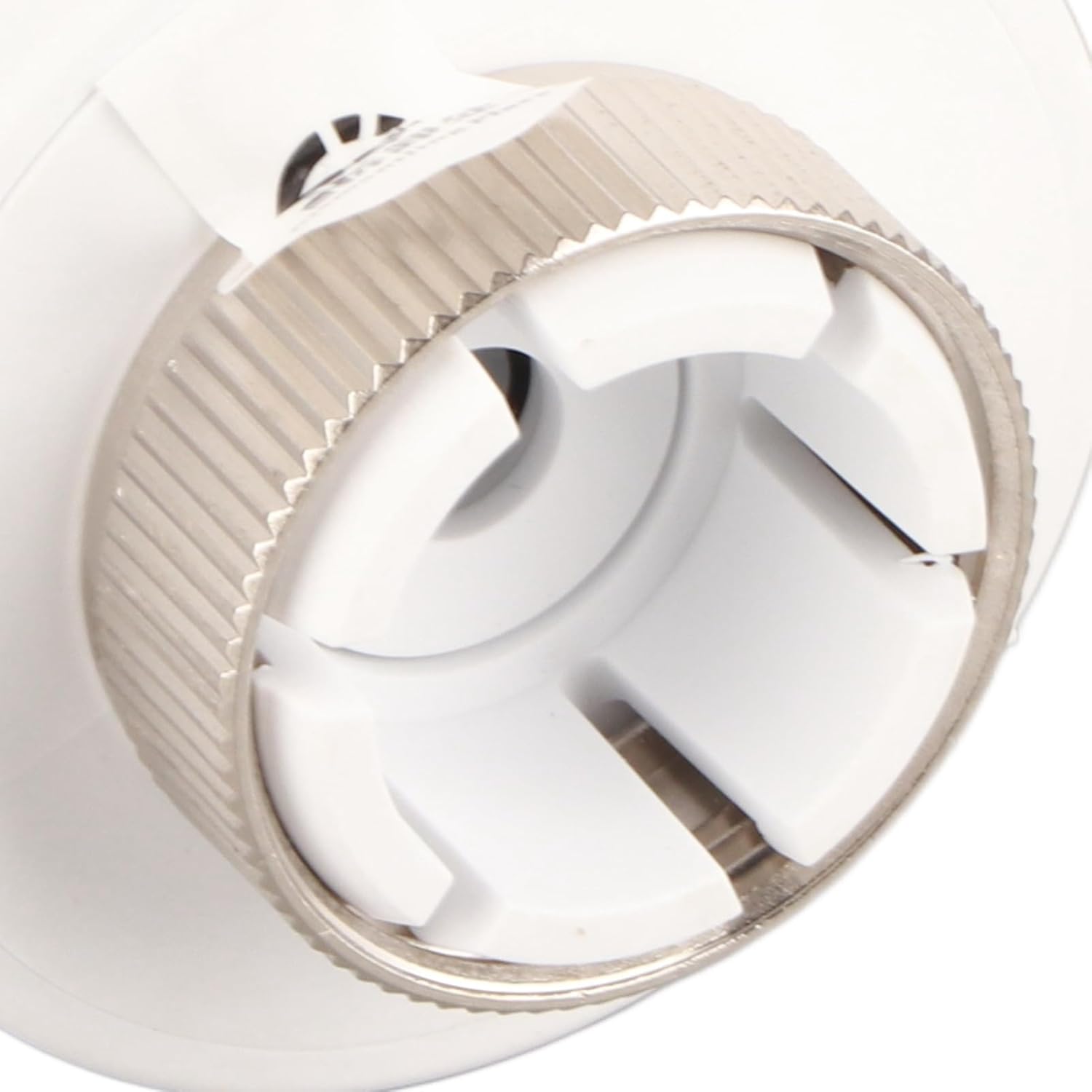
Image: A close-up view of the rotating valve connector on the SASKATE HY368 thermostat, illustrating the mechanism for attachment to a radiator valve.
5. Operating Instructions
The HY368 thermostat offers both manual and automatic control modes, with a temperature control range of 5-35℃ and an accuracy of 0.5℃.
5.1 Manual Temperature Adjustment
Rotate the thermostat body to manually adjust the desired temperature. The current temperature setting will be displayed on the screen.
5.2 App Control
The thermostat supports remote control via a mobile application. Download the designated app (refer to the quick start guide or packaging for app name) and follow the in-app instructions to pair your device. Once paired, you can conveniently set and monitor room temperature from your smartphone.
5.3 Voice Control
The HY368 is compatible with various voice control devices. After setting up app control, link your thermostat to your preferred voice assistant (e.g., Amazon Alexa, Google Assistant) through their respective applications. You can then use voice commands to adjust the temperature.
6. Working Modes and Programming
The thermostat allows for flexible scheduling to meet your heating needs throughout the week.
6.1 Programming Periods
You can set the temperature for up to 5 distinct periods within a day. This allows for customized heating schedules based on your daily routine.
6.2 Weekly Modes
Choose from three available programming modes for the week:
- 5+2 Mode: Separate programming for weekdays (Monday-Friday) and weekends (Saturday-Sunday).
- 6+1 Mode: Separate programming for working days (Monday-Saturday) and Sunday.
- 7-Day Mode: Individual programming for each day of the week (Monday-Sunday).
Refer to the app or device interface for detailed instructions on setting up these programming modes.
7. Energy Saving Features
The SASKATE HY368 thermostat incorporates features designed to help reduce energy consumption.
- Low Power Consumption: The device is powered by batteries and designed for minimal power usage.
- Open Window/Door Detection: If the thermostat detects an open window or door (via connected sensors or significant temperature drop), the associated mobile application will send you a message, prompting you to turn off the heating to prevent energy waste.
- Anti-Freezing Function: The thermostat includes an anti-freezing function to protect your pipes during cold periods by maintaining a minimum temperature.
8. Maintenance
To ensure the longevity and optimal performance of your SASKATE HY368 thermostat, follow these maintenance guidelines:
- Cleaning: Wipe the thermostat's exterior with a soft, dry cloth. Do not use abrasive cleaners or solvents.
- Battery Replacement: When the battery indicator appears on the display, replace both AA batteries promptly to avoid interruption of service.
- Avoid Obstruction: Ensure that the thermostat is not covered by curtains or furniture, as this can affect its temperature readings.
9. Troubleshooting
If you encounter issues with your SASKATE HY368 thermostat, please refer to the following common solutions:
- Thermostat not responding: Check if the batteries are correctly installed and have sufficient charge. Replace batteries if necessary.
- Incorrect temperature reading: Ensure the thermostat is not exposed to direct sunlight, drafts, or heat sources that could affect its sensor.
- App connectivity issues: Verify your home Wi-Fi network is active and the thermostat is within range. Restart your router and the thermostat if needed. Ensure the app is updated to the latest version.
- Voice control not working: Confirm that the thermostat is correctly linked to your voice assistant account and that your voice commands are clear and precise.
- Heating not turning on/off: Check the valve installation to ensure it is securely attached and not obstructed. Verify the set temperature is above/below the current room temperature as required.
If problems persist, please contact SASKATE customer support for further assistance.
10. Warranty and Support
For warranty information and customer support, please refer to the warranty card included with your product or visit the official SASKATE website. Keep your purchase receipt as proof of purchase for any warranty claims.