1. Introduction
This manual provides essential information for the safe and efficient operation of your TCL 98P8K 4K Ultra HD Smart QLED Google TV. Please read this manual thoroughly before using the television and retain it for future reference. This television features a 98-inch 4K QLED display, Google TV operating system, and advanced audio and video processing capabilities.

Figure 1.1: Front view of the TCL 98P8K 4K Ultra HD Smart QLED Google TV, showcasing its large display and slim bezels.
2. What's in the Box
Carefully unpack the television and check that all items listed below are included and undamaged. If any items are missing or damaged, contact your retailer immediately.
- 1N LED TV (TCL 98P8K)
- 1N Stand (for table-top mounting)
- 1N Wall Mount (for wall installation)
- 1N Remote Control
- 2N AAA Batteries (for remote control)

Figure 2.1: Illustration of the components included in the product packaging.
3. Setup
3.1 Physical Installation
Your TCL 98P8K TV can be installed using either the included table-top stand or a wall mount. Ensure the installation surface is stable and can support the television's weight (approximately 50.8 kg without stand, 51.8 kg with stand).

Figure 3.1: Product dimensions for installation planning. Height with stand: 128.5 cm (50.59 inches), Width with stand: 42 cm (16.5 inches), Length: 217.8 cm (85.4 inches).
3.1.1 Table-Top Stand Installation
- Place the TV screen face down on a soft, flat surface to prevent scratches.
- Attach the stand components to the designated slots on the bottom of the TV using the provided screws. Ensure they are securely fastened.
- Carefully lift the TV to its upright position on a stable, level surface.
3.1.2 Wall Mount Installation
Refer to the wall mount kit's instructions for detailed installation steps. Professional installation is recommended for large televisions.
3.2 Connecting Devices
The TCL 98P8K TV offers various connectivity options. Ensure the TV is powered off before making any connections.

Figure 3.2: Side view illustrating the TV's input and output ports.
- HDMI Ports (4 total): Connect Blu-ray players, gaming consoles, set-top boxes, etc. HDMI 1 supports eARC for enhanced audio return.
- USB Port (1 total): Connect USB storage devices for media playback.
- LAN Port (1 total): For wired internet connection.
- Audio Out (Optical): For connecting to external audio systems.
- Cable/ANT Input: For connecting an antenna or cable TV.
3.3 Initial Power-On and Setup
- Connect the power cord to the TV and then to a power outlet.
- Press the power button on the TV or remote control to turn it on.
- Follow the on-screen instructions to complete the initial setup, including language selection, network connection (Wi-Fi or LAN), and Google account sign-in.
4. Operating Instructions
4.1 Remote Control Functions
The included smart remote control provides easy access to all TV functions. It uses both IR and Bluetooth technology.

Figure 4.1: The smart remote control for the TCL 98P8K TV, featuring dedicated buttons for popular streaming services and Google Assistant.
- Power Button: Turns the TV on or off.
- Number Buttons: Direct channel selection.
- Navigation Pad: For menu navigation.
- OK Button: Confirms selections.
- Back Button: Returns to the previous screen.
- Home Button: Accesses the Google TV home screen.
- Google Assistant Button: Activates voice control.
- Volume Up/Down: Adjusts audio volume.
- Channel Up/Down: Changes TV channels.
- Dedicated Hotkeys: Quick access to Prime Video, Netflix, YouTube, and other services.
4.2 Smart TV Features (Google TV)
Your TCL 98P8K TV runs on the Google TV operating system, providing a personalized entertainment experience.

Figure 4.2: The Google TV home screen, displaying various streaming applications and content recommendations.
- Content Aggregation: Google TV organizes movies, shows, and live TV from your apps and subscriptions into one central interface.
- Google Assistant: Use voice commands via the remote to search for content, control smart home devices, get answers, and more.
- Built-in Apps: Access popular streaming services like Prime Video, Netflix, Hotstar, Zee5, YouTube, and many others directly from the TV.
- Screen Mirroring: Cast content from your compatible smartphone or tablet to the TV.
- Web Browser: Browse the internet directly on your TV.
- Kids Profile: Create profiles for children with curated content and parental controls.
5. Display and Audio Features
5.1 Display Technology
The TCL 98P8K features advanced display technologies for a superior viewing experience.
- 4K QLED Display: Quantum Dot technology delivers over a billion shades of color, providing vibrant and lifelike images with 100% Color Volume Plus.
- HDR 10: High Dynamic Range support enhances contrast and color accuracy, revealing more detail in both bright and dark scenes.
- 144Hz Refresh Rate: A high refresh rate ensures smooth motion, especially beneficial for fast-paced action and gaming. Supports VRR up to 288Hz and DLG up to 288Hz.
- AiPQ Pro Processor: This intelligent processor optimizes picture quality in real-time, enhancing contrast, color, clarity, and motion through AI algorithms.
- HVA Panel: Provides higher contrast and wider viewing angles (178 degrees) compared to conventional panels, ensuring consistent picture quality from various positions.
- Micro Dimming: Analyzes the TV content in hundreds of separate zones to adjust brightness and darkness independently, improving contrast.
- Metallic Bezel-Less Design: Offers an immersive viewing experience with minimal distractions.

Figure 5.1: Visual representation of QLED technology, highlighting its ability to produce vibrant and accurate colors.

Figure 5.2: Illustration of the AiPQ Pro Processor, which intelligently optimizes various aspects of the image for enhanced viewing.
5.2 Audio System
Experience rich and immersive sound with the integrated audio system.
- 40 Watts Output: Powerful audio output for clear and dynamic sound.
- Dolby Atmos: Delivers multi-dimensional sound that moves around you, creating an immersive audio experience.
- ONKYO 2.1ch Hi-Fi System: Integrated ONKYO speakers provide high-fidelity audio, including a dedicated subwoofer for enhanced bass.

Figure 5.3: Visual depicting the ONKYO 2.1ch Hi-Fi System, designed to deliver a rich and immersive sound experience.
6. Specifications
Detailed technical specifications for the TCL 98P8K TV.
| Feature | Specification |
|---|---|
| Brand | TCL |
| Model | 98P8K |
| Model Year | 2025 |
| Screen Size | 98 Inches (248 cm) |
| Display Technology | QLED |
| Resolution | 4K UHD (3840 x 2160 Pixels) |
| Refresh Rate | 144 Hz (VRR 288Hz/DLG 288Hz) |
| Operating System | Google TV |
| RAM Memory | 3 GB |
| Storage Capacity | 64 GB |
| Processor | 64-bit Quad Core Processor, AiPQ Pro Processor |
| Connectivity | 4 HDMI Ports (HDMI 2.1), 1 USB Port, 1 LAN Port, Wi-Fi 5, Bluetooth |
| Audio Output | 40 Watts, Dolby Atmos, ONKYO 2.1ch Hi-Fi System |
| Viewing Angle | 178 Degrees |
| Power Consumption (On-mode) | 280 Watts |
| Annual Energy Consumption | 350 kWh/Year (5 Star Energy Rating) |
| Product Dimensions (with stand) | 217.8 x 42 x 128.5 cm |
| Item Weight (with stand) | 51.8 kg |
| Batteries Required | 2 AAA (included for remote) |
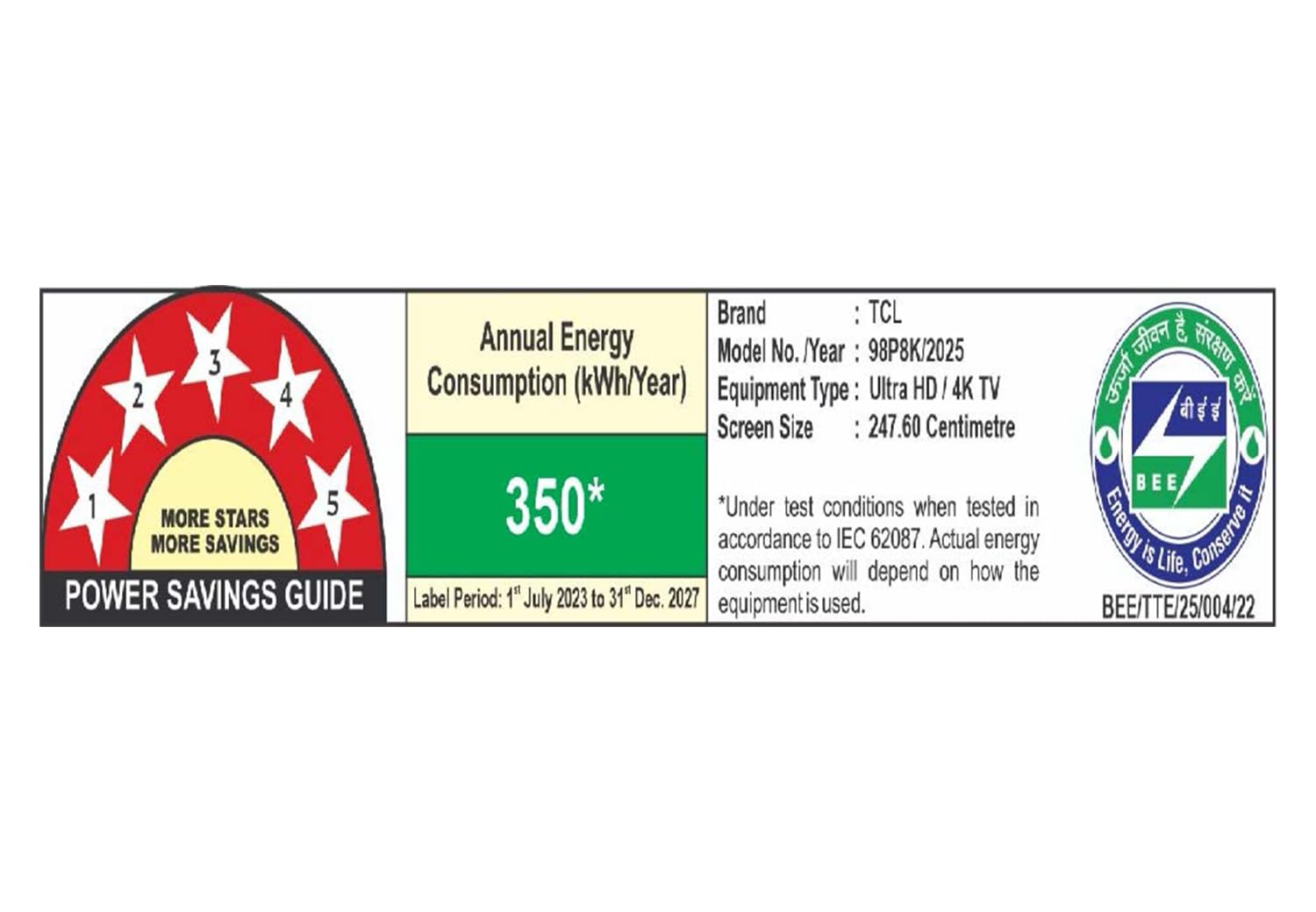
Figure 6.1: Energy efficiency label for the TCL 98P8K TV, indicating a 5-star rating and annual energy consumption.
7. Maintenance
Proper maintenance ensures the longevity and optimal performance of your television.
- Screen Cleaning: Gently wipe the screen with a soft, lint-free cloth. For stubborn marks, use a screen-specific cleaning solution applied to the cloth, not directly to the screen. Avoid harsh chemicals or abrasive materials.
- Cabinet Cleaning: Wipe the TV cabinet with a soft, dry cloth.
- Ventilation: Ensure adequate airflow around the TV. Do not block ventilation openings.
- Power Cord: Regularly check the power cord for any damage. Do not use a damaged cord.
- Dusting: Periodically dust the TV and its ports to prevent dust buildup.
8. Troubleshooting
This section addresses common issues you might encounter. If the problem persists after trying these solutions, contact customer support.
| Problem | Possible Cause / Solution |
|---|---|
| No Power | Ensure the power cord is securely plugged into the TV and the power outlet. Check if the power outlet is working. |
| No Picture, But Sound is Present | Check the input source. Ensure the connected device is powered on and functioning correctly. Try a different HDMI cable. |
| No Sound, But Picture is Present | Check the volume level. Ensure the TV is not muted. Verify audio output settings if using external speakers. |
| Remote Control Not Working | Replace the batteries. Ensure there are no obstructions between the remote and the TV's IR sensor. For Bluetooth remote, ensure it is paired. |
| Poor Picture Quality | Check the signal source quality. Adjust picture settings (brightness, contrast, sharpness). Ensure the resolution of the input source matches the TV's capabilities. |
| Cannot Connect to Wi-Fi | Ensure Wi-Fi is enabled on the TV. Check your router and internet connection. Re-enter the Wi-Fi password. Try restarting the TV and router. |
| Smart TV Apps Not Loading/Crashing | Check internet connection. Clear app cache or data. Update the app or TV firmware. Restart the TV. |
9. Warranty and Support
Your TCL 98P8K television comes with a manufacturer's warranty.
- TV Warranty: 2-year warranty provided by the manufacturer from the date of purchase.
- Remote Control Warranty: 6-months warranty for the remote control.
- Warranty Claims: Warranty claims can be processed using the Amazon e-invoice.
For further assistance, technical support, or warranty inquiries, please refer to the official TCL India website or contact their customer service directly. The user manual can also be accessed from the brand website under the 'About this item' or 'Product details' section.


