
1. Product Overview
The Joying Single Din Touchscreen Car Stereo (Model JY-UTS10N4-B) is an advanced Android 13 head unit designed to enhance your in-car entertainment and navigation experience. Featuring a 10.1-inch 1280x800P display, 4GB RAM, and 64GB storage, it offers seamless integration with Apple CarPlay and Android Auto, a convenient volume knob, and AM/FM radio functionality. This manual provides detailed instructions for installation, operation, and maintenance to ensure optimal performance and user satisfaction.

Figure 1: Joying Single Din Touchscreen Car Stereo with Android 13, 10.1 inch display, Qualcomm Snapdragon 6125, Octa Core 2.0GHz, IPS Screen 1280x800P.
2. Safety Information
Please read and understand all safety instructions before installing or operating this device. Failure to follow these instructions may result in injury or damage to the product or vehicle.
- Professional Installation Recommended: Installation of car audio equipment can be complex and may require specialized tools and knowledge. It is highly recommended to have the unit installed by a qualified professional.
- Vehicle Compatibility: Ensure the product is compatible with your vehicle's electrical system and dashboard configuration.
- Power Disconnection: Always disconnect the vehicle's battery before beginning any installation or wiring work to prevent electrical shorts and damage.
- Wiring: Use appropriate gauge wiring and ensure all connections are secure and properly insulated to prevent short circuits and fire hazards.
- Driving Safety: Do not operate the device in a manner that distracts you from driving. Always prioritize road safety.
- Temperature Extremes: Avoid exposing the unit to extreme temperatures, direct sunlight for prolonged periods, or excessive moisture.
- Ventilation: Ensure adequate ventilation around the unit to prevent overheating.
3. What's in the Box
The package includes the following components:
- 10.1" Radio x 1
- Single Din Cage x 1
- Mounting Sleeve x 1
- Left & Right Bracket x 1
- Plastic Trim Out x 1
- Extraction Keys x 1
- Installation Manual x 1
- WiFi Antenna x 1
- GPS Antenna x 1
- 4G Antenna x 2
- External Mic x 1
- USB Cable x 2
- AR Cable x 1
- Screen Ribbon Cable x 1
- ISO Cable x 1
- User Manual x 1

Figure 2: All components included in the Joying Single Din Car Stereo package.
4. Setup and Installation
Proper installation is crucial for the optimal performance of your Joying head unit. Refer to the included Installation Manual for detailed, step-by-step instructions specific to your vehicle.
4.1 General Installation Notes
- Additional accessories such as an installation frame kit, special ISO harness, amplifier adapter, or CANBUS decoder may be required depending on your car's specific situation.
- This unit does not support factory car GPS antenna, factory backup rear camera, factory Bluetooth, factory USB, and factory microphone.
- Only JOYING accessories are supported for additional functionalities (e.g., DAB+ digital radio adapter, DVR, OBDII scanner, reverse camera, TPMS, steering wheel controller). These are not included and must be ordered separately.
4.2 Installation Structure
The fixing position of the left and right brackets can be extended or telescoped to achieve the best fixing position according to your car's center console, adapting to a wider range of vehicles.

Figure 3: Adjustable installation structure for flexible mounting.
4.3 Cooling System
The unit features a dual heat sink design for superior heat dissipation, improved temperature control, and enhanced performance stability. You can set a warning value for CPU temperature or radio volume; if exceeded, the fan will automatically activate for cooling.

Figure 4: Dual heat sink design and intelligent cooling system.
4.4 WiFi Signal
An independent WiFi antenna ensures stable signal quality and provides fast and smooth internet access. Supports 802.11a/b/g/n/AC standards across 2.4GHz/5GHz spectral bands.

Figure 5: Independent WiFi antenna for enhanced connectivity.
4.5 Optional Accessories
Enhance your driving experience with optional accessories (not included in the package):
- OBD2 (ASIN: B076CD78HT): Connects via Bluetooth to retrieve real-time data and trouble codes from your vehicle computer.
- AR Front Camera (ASIN: B0CBX4N6V8): Records the front road in the background automatically while driving.
- AR Rear Camera (ASIN: B0CBX39S8M): Switches to the reverse display automatically when reversing the car.

Figure 6: Optional accessories for enhanced functionality.
5. Operating Instructions
5.1 Fast Boot Feature
Once the car key is inserted, the unit will start up immediately and enter the user interface within 2 seconds. The first boot-up may take approximately 30-40 seconds.
5.2 Audio Output
The unit features Optical Fiber and Coaxial Digital Output. If your external amplifier has Optical Fiber or Coaxial Digital Input, you can achieve ultimate sound quality directly.

Figure 7: High-quality sound features and output options.
5.3 Built-in 4G Module
Insert a SIM card for internet access. Note that it does not support making phone calls or sending SMS. Supported FDD-LTE types include B2/B4/B5/B7/B12/B13/B14/B17/B25/B26/B38/B66/B71, and TDD-LTE type B41.
5.4 GPS Navigation
Precise GPS engines and included GPS antennas ensure more accurate and faster real-time navigation. You can download Google offline map data for offline use in supported areas. Mobile phone map data can also be synchronized to the head unit via CarPlay/Android Auto.
5.5 CarPlay & Android Auto
Connect your mobile phone via USB cable or Bluetooth to share your phone's apps on the larger screen. This provides an easier way to access navigation, make phone calls, and listen to music.

Figure 8: Built-in Apple CarPlay and Android Auto functionality.
5.6 Split-screen Multitasking
The unit supports split-screen multitasking, allowing you to run two applications simultaneously, such as navigation and music playback.

Figure 9: Split-screen multitasking in action.
5.7 HDMI Output
HDMI is a full digital image and sound-sending interface that can send uncompressed audio and video signals. Audio and video can be output synchronously without manual adjustment. This allows for projection screen display for passengers in the headrest and on-screen display with 1080P clear picture without stuttering. Note: The HDMI cable is not included.

Figure 10: HDMI output for external displays.
5.8 Personalized Settings
Customize your head unit with changeable button colors, customizable wallpapers, and adjustable screen brightness to match your preferences and vehicle interior.
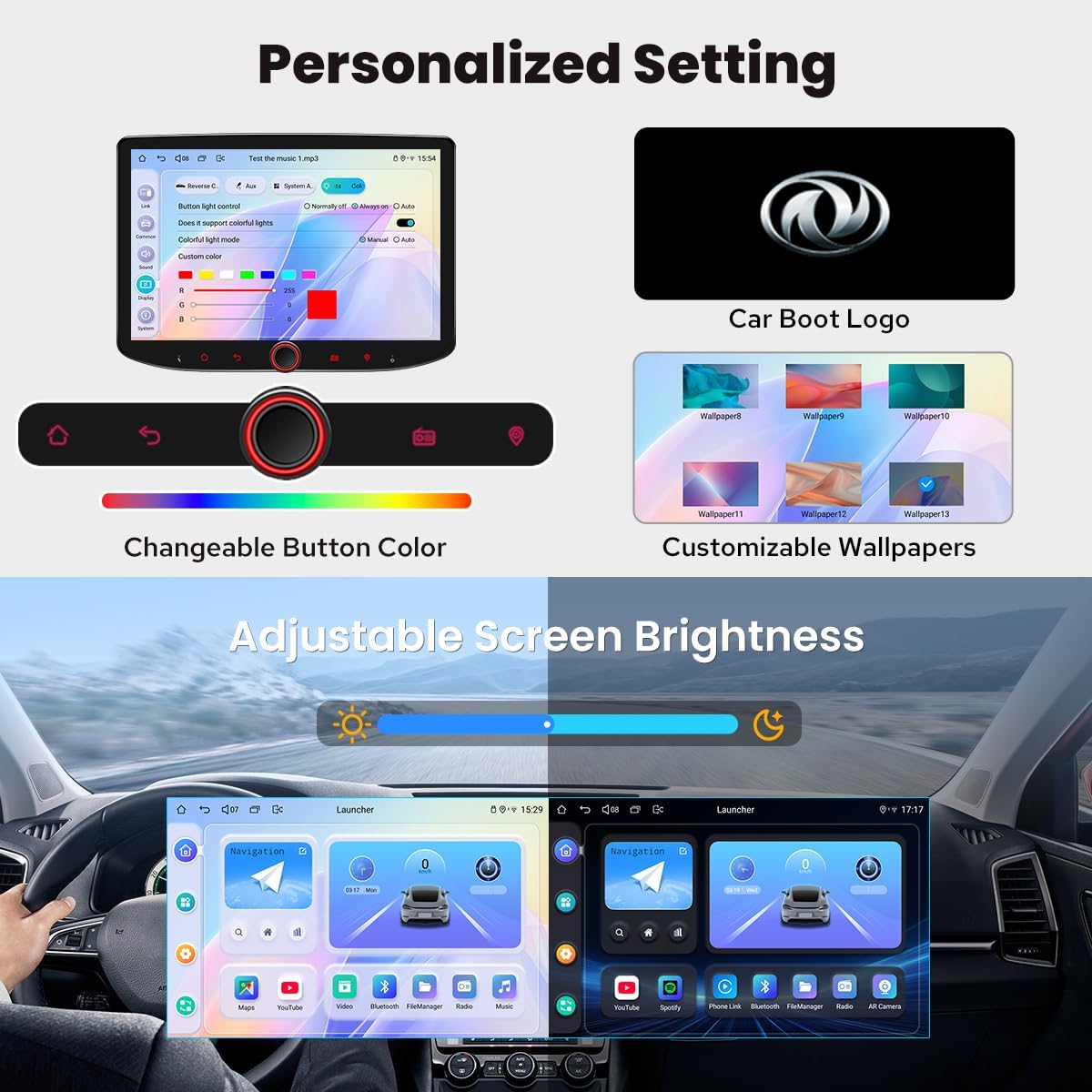
Figure 11: Customization options for the user interface.
5.9 Steering Wheel Control
The unit supports steering wheel control, allowing you to easily switch songs, radio channels, and adjust volume for a safer and more enjoyable journey. Note: Cars with a CAN system may need an extra CANBUS cable to enable this feature.

Figure 12: Steering wheel control integration.
5.10 Other Features
Additional functionalities include:
- Picture-in-Picture
- 3 USB ports
- Micro SD Card Slot
- AM/FM Radio
- Hands-free Call

Figure 13: Overview of additional features.
6. Maintenance
To ensure the longevity and optimal performance of your Joying head unit, follow these maintenance guidelines:
- Cleaning the Screen: Use a soft, lint-free cloth to gently wipe the touchscreen. For stubborn smudges, slightly dampen the cloth with water or a screen-safe cleaner. Avoid harsh chemicals or abrasive materials.
- General Cleaning: Keep the unit free from dust and debris. Use a soft brush or compressed air to clean vents and ports.
- Software Updates: Periodically check the official JOYING website or contact support for available software updates to ensure you have the latest features and bug fixes.
- Avoid Liquid Contact: Prevent any liquids from entering the unit, as this can cause severe damage.
- Temperature Control: While the unit has an advanced cooling system, avoid leaving your vehicle in extreme heat or cold for extended periods, especially with the unit exposed to direct sunlight.
7. Troubleshooting
If you encounter issues with your Joying head unit, refer to the following common troubleshooting steps:
- Unit Not Powering On:
- Check all power connections and ensure they are securely fastened.
- Verify the vehicle's fuse box for any blown fuses related to the stereo.
- Ensure the car battery has sufficient charge.
- No Sound:
- Check speaker connections and ensure they are correctly wired.
- Verify the volume level on the unit and any connected amplifiers.
- Ensure the audio source is correctly selected.
- Touchscreen Unresponsive:
- Perform a soft reset by pressing the reset button (if available) or by turning off the vehicle and restarting.
- Ensure the screen is clean and free from obstructions.
- GPS Signal Issues:
- Ensure the GPS antenna is properly installed and has a clear view of the sky.
- Check for any obstructions that might be blocking the signal.
- CarPlay/Android Auto Not Connecting:
- Ensure your phone's operating system is up to date.
- Try a different USB cable (if wired connection).
- Restart both the head unit and your mobile phone.
- Verify Bluetooth is enabled and paired correctly (if wireless connection).
If these steps do not resolve the issue, please contact JOYING customer support for further assistance.
8. Specifications
| Feature | Detail |
|---|---|
| Model Name | JY-UTS10N4-B |
| Display Size | 10.1 Inches |
| Resolution | 1280x800P |
| Operating System | Android 13 |
| RAM + Storage | 4GB + 64GB |
| Connectivity Technology | Bluetooth, Ethernet, HDMI, USB, Wi-Fi, 4G Module |
| Special Features | Android Auto, Apple CarPlay, Built-In Bluetooth, Built-In Wi-Fi, Equalizer, Optical Fiber & Coaxial Digital Output, Fast Boot |
| Audio Output Mode | Stereo |
| Map Type | North America (Offline map support) |
| Mounting Type | Panel Mount (Single Din) |
| Item Weight | 2.65 pounds |
| Package Dimensions | 14.88 x 8.03 x 5.98 inches |

Figure 14: Product dimensions and rear panel connections.
9. Warranty and Support
The Joying Single Din Touchscreen Car Stereo (JY-UTS10N4-B) comes with a 2-Year Warranty as per the product specifications.
For technical support, warranty claims, or additional product information, please visit the official JOYING Store on Amazon or contact their customer service directly.
Return Policy: This product is eligible for a 30-day refund/replacement return policy from the date of purchase, subject to Amazon's terms and conditions.
10. Product Videos
10.1 Product Overview
Video 1: A comprehensive overview of the Joying Single Din Touchscreen Car Stereo, highlighting its key features and design. This video is provided by the seller, Amazon Product Imaging.
10.2 Front and Rear Camera View Demonstration
Video 2: Demonstration of the front and rear camera views on the 10.1-inch car stereo, showcasing how it aids in safe driving and parking. This video is provided by the seller, PLZ STORE.
10.3 Large Screen Car Stereo Upgraded Hardware
Video 3: A detailed look at the upgraded hardware of the 10.1-inch large screen car stereo, emphasizing its robust design and components. This video is provided by the seller, PLZ STORE.

