
Important Safety Instructions
Please read all instructions carefully before using your BOSSCARE GR8602 massage chair. Retain this manual for future reference.
- Always unplug the chair from the power outlet after use and before cleaning.
- Do not use the chair in a wet or damp environment.
- Keep children and pets away from the chair during operation.
- Consult a physician before using if you have medical conditions, are pregnant, or have a pacemaker.
- Do not use the chair for more than 30 minutes at a time.
- Avoid placing heavy objects on the chair or standing on it.
Product Overview
The BOSSCARE GR8602 is a sophisticated full-body massage chair designed to provide comprehensive relaxation and therapeutic benefits. It features advanced 3D robotic precision along an SL-track, covering massage from the neck to the upper thighs. The chair includes a triple zero-gravity reclining function, back heating, full-body air compression with 36 airbags, and dual foot roller massage nodes. Control is intuitive via a smart APP, AI voice commands, or a touchpad remote. With 6 massage techniques and 12 auto-programs, it offers versatile massage experiences for various needs.
Package Contents
The BOSSCARE GR8602 massage chair is designed for minimal assembly. The main unit is largely pre-assembled. Please ensure all components are present before beginning assembly.
- Main Massage Chair Unit (Base with leg rest and seat cushion)
- Backrest Assembly
- Left Armrest
- Right Armrest
- Power Cord
- Touchpad Remote Control
- Instruction Manual
- Accessory Kit (screws, washers, Allen wrench)
Setup & Assembly
The BOSSCARE GR8602 massage chair is designed for easy setup. Most components are pre-assembled. Follow these steps to prepare your chair for use.
1. Unboxing and Placement
The chair arrives in two main boxes. Carefully remove all packaging materials. The main unit is equipped with wheels for easier movement. Ensure your doorway is at least 29.5 inches wide to accommodate the chair.
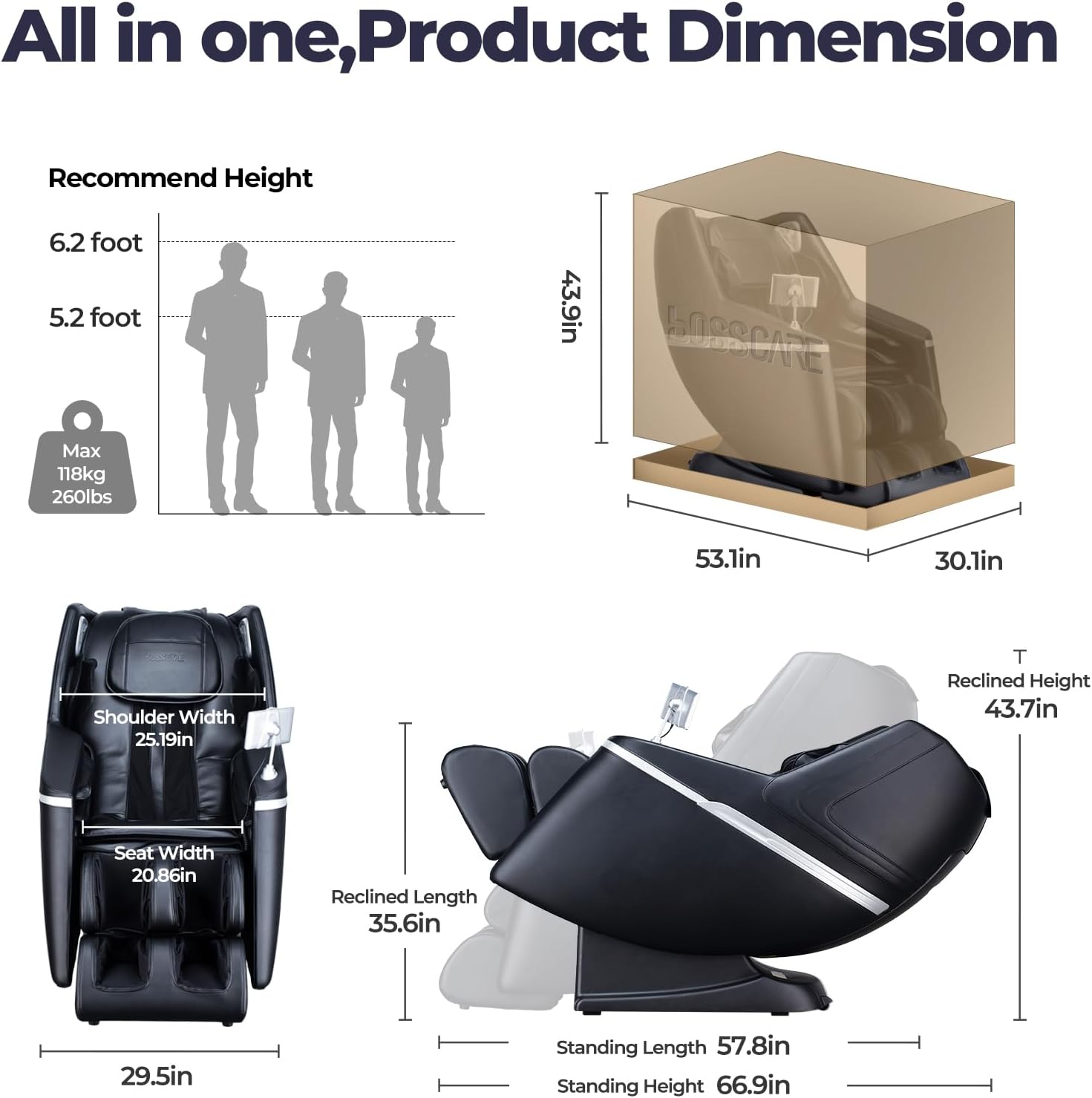
Image: BOSSCARE GR8602 Massage Chair Product Dimensions. This image illustrates the overall dimensions of the massage chair, including recommended user height and weight capacity, as well as the packaged dimensions for delivery.

Image: BOSSCARE GR8602 Massage Chair All-in-one Design, No Installation Required. This image highlights the minimal assembly required for the chair, showing its compact design and the minimum doorway size needed for entry.
2. Attaching the Backrest and Armrests
Carefully align the backrest with the main unit's slots and secure it. Connect any visible air tubes and electrical wires from the backrest to the main unit. Repeat this process for the left and right armrests, ensuring all connections are firm and secure. Use the provided screws and Allen wrench from the accessory kit to fasten the armrests.
3. Connecting Power
Once all components are securely attached, connect the power cord to the chair's power inlet and then to a grounded electrical outlet.
Video: BOSSCARE GR8527 Legrest Installation. This video demonstrates the process of installing the legrest component of a BOSSCARE massage chair, which involves connecting air tubes and electrical ports.
Operating Instructions
Your BOSSCARE GR8602 massage chair offers multiple ways to control your massage experience. Familiarize yourself with the touchpad remote, smart APP, and AI voice control features.
1. Power On and Auto Body Scan
Press the power button on the remote or control panel. The chair will automatically initiate a body scan to detect your unique pressure points and adjust the SL-track rollers for a personalized massage.

Image: BOSSCARE GR8602 Massage Chair 12 Auto Massage Modes with Body Scanning. This image displays the various auto massage modes available and highlights the body scanning feature that customizes the massage to the user's physique.
2. Control Options
- Touchpad Remote: Use the integrated touchpad remote to select massage programs, adjust intensity, recline positions, and control other features.
- Smart APP Control: Download the BOSSCARE app to customize massage styles, sync music via Bluetooth, and manage all chair functions from your smartphone.
- AI Voice Control: Use simple voice commands to activate and adjust various massage functions, such as turning on heating or changing modes.

Image: BOSSCARE GR8602 Massage Chair Smart APP Control, AI Voice Control, and Touch Screen Panel. This image showcases the multiple control interfaces for the massage chair, including a smartphone app, voice commands, and a physical touch screen panel.
3. Zero Gravity Recline
The chair features 3 adjustable zero-gravity angles. Select your preferred angle to distribute body weight evenly, reducing spinal pressure and enhancing the massage experience.

Image: BOSSCARE GR8602 Massage Chair Zero Gravity Design with 3 Recline Steps. This image illustrates the three stages of zero gravity recline, showing how the chair positions the user to minimize spinal pressure.
4. Massage Techniques and Programs
Choose from 6 massage techniques (kneading, tapping, shiatsu, etc.) and 12 auto-programs (e.g., "Relax," "Sport Recovery"). Adjust intensity levels to suit your preference.

Image: BOSSCARE GR8602 Massage Chair Full Body Airbag Massage with 6 Massage Types. This image details the various massage types available, including Shiatsu, Knocking, Tapping, Rolling, Kneading, and Sync, alongside the full-body airbag system.
5. Air Compression and Foot Rollers
Activate the 36 airbags for full-body compression massage on shoulders, arms, legs, and feet. The dual foot roller massage nodes provide targeted relief to the soles of your feet. The leg rest extends up to 16 inches to accommodate users up to 6'5".

Image: BOSSCARE GR8602 Massage Chair Full-Body Air Compression & Foot Roller Massage. This image highlights the chair's features for full-body air compression and foot roller massage, including the extendable leg rest.
6. Back Heating
Engage the back heating function to warm your lower back (40°C-45°C), helping to melt away muscle stiffness and enhance relaxation.
Video: Mazzup Full Body Massage Chair. This video demonstrates various features of a full body massage chair, including the zero gravity recline, foot roller massage, lumbar and calf heating, full body air compression, Bluetooth speakers, and control options.
Maintenance
Proper maintenance ensures the longevity and optimal performance of your BOSSCARE GR8602 massage chair.
- Cleaning: Wipe the faux leather surfaces with a soft, damp cloth. Avoid harsh chemicals or abrasive cleaners.
- Storage: When not in use, keep the chair in a dry, cool place away from direct sunlight.
- Power Cord: Regularly inspect the power cord for any damage. If damaged, contact customer support for assistance.
- General Care: Avoid spilling liquids on the chair. Do not attempt to repair the chair yourself.
Troubleshooting
If you encounter any issues with your massage chair, refer to the following common solutions:
- Chair not powering on: Ensure the power cord is securely plugged into both the chair and a working electrical outlet. Check the power switch on the chair's base.
- Massage rollers not moving: Verify that the auto body scan has completed. If using manual mode, ensure a massage area and technique are selected.
- Airbags not inflating: Check the air pressure settings on your remote or app. Ensure no air tubes are kinked or disconnected.
- Abnormal noise: Discontinue use and check for any obstructions. If the noise persists, contact customer support.
Specifications
| Feature | Detail |
|---|---|
| Brand | BOSSCARE |
| Model Name | GR8602 |
| Color | Black |
| Material | Faux Leather |
| Product Dimensions | 53.2"D x 43.9"W x 30.2"H |
| Item Weight | 178.6 pounds |
| Reclining Position Count | 3 (Zero Gravity) |
| Included Components | Touch Panel |
Warranty & Support
Your BOSSCARE GR8602 massage chair comes with a 3-year after-sales support. For any inquiries or assistance, please contact BOSSCARE-US customer service through Amazon's messaging system.

Image: BOSSCARE Customer Support. This image highlights the availability of 12-hour online customer service and 3 years of after-sales support for the product.