
1. Product Overview
The NUTOMO SP300 Palm Vein Smart Lock offers advanced keyless entry solutions for your home. It integrates multiple unlocking methods including palm vein recognition, keypad codes, IC cards, smartphone app control, physical keys, and Alexa voice commands. Designed for high security and user convenience, this smart lock ensures reliable access while prioritizing privacy and ease of use.
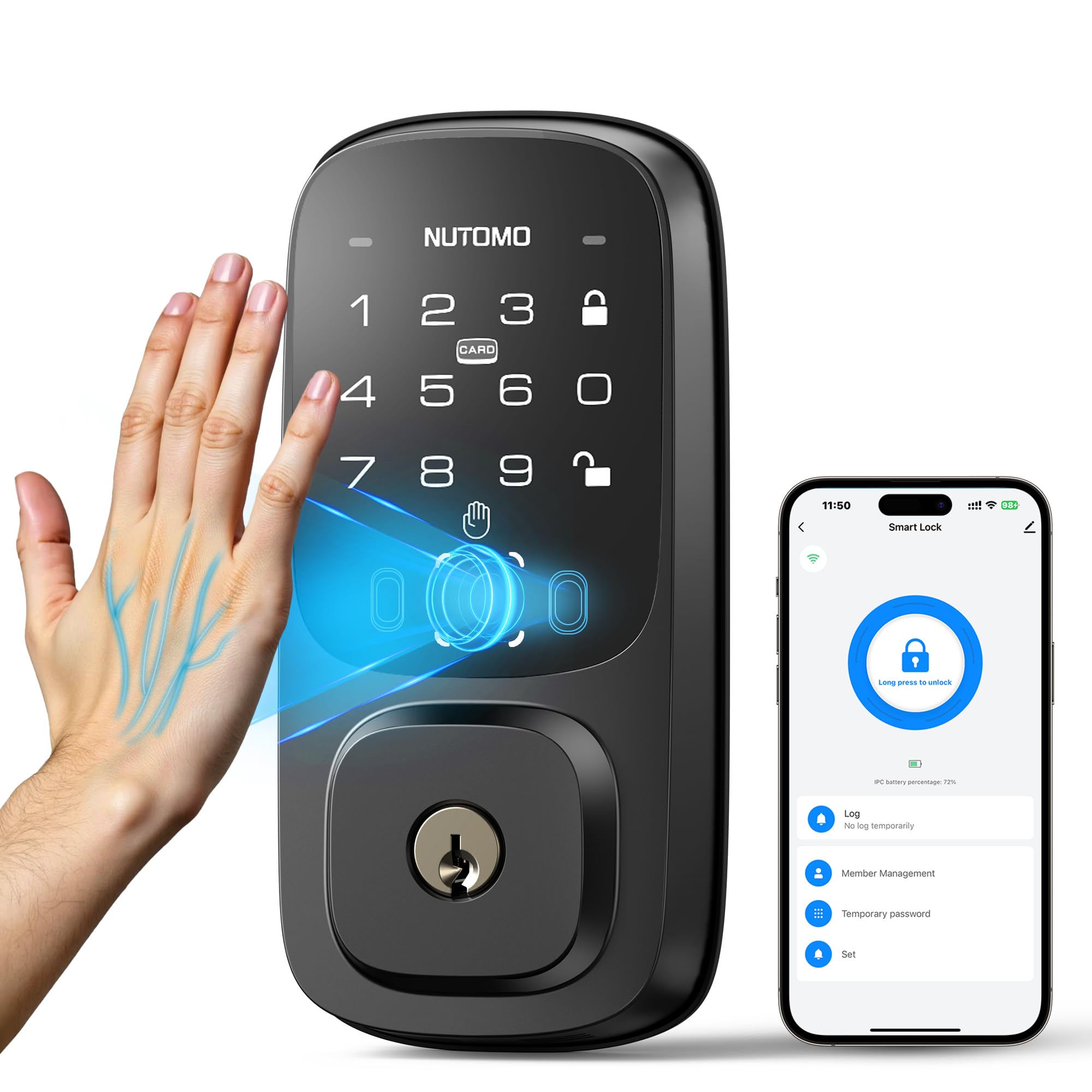
Figure 1: NUTOMO SP300 Palm Vein Smart Lock exterior view.
2. What's Included
The NUTOMO SP300 package includes all necessary components for installation and operation:
- Exterior lock assembly
- Interior deadbolt assembly
- Latch mechanism
- Mounting plate
- Rechargeable battery (7800mAh)
- Installation instructions
- Screws for installation
- 2 IC Cards for access
- 3 Physical keys for manual override

Figure 2: Contents of the NUTOMO SP300 package.
3. Setup and Installation
Before beginning installation, ensure your door meets the compatibility requirements: door thickness between 1.38" to 2.17" (35-55mm), door hole diameter 1-1/2" or 2-1/8" (38mm or 54mm), and backset of 2-3/8" or 2-3/4" (60mm or 70mm).

Figure 3: Door compatibility check.
3.1 Initial Steps
- Remove the rear cover of the interior lock assembly.
- Install the rechargeable battery properly into the compartment.
- Press the setting button to initiate setup.
- Follow voice prompts to enter the admin password and confirm.

Figure 4: Initial setup and battery installation.
3.2 Deadbolt Installation
Ensure the deadbolt is in the retracted (unlocked) status. Insert it into the door frame with the word "Up" facing upwards. Adjust the deadbolt length if necessary. Secure the deadbolt and install the strike box.
Video 1: Detailed guide on how to install the NUTOMO Palm Vein Lock, including deadbolt adjustment and installation.
3.3 Exterior Lock and Mounting Plate Installation
Install the exterior lock, ensuring the lock spindle remains vertical. Pass the lock spindle through the central hole of the mounting plate and route the cable through the right-side hole. Secure the mounting plate with screws, ensuring proper alignment and flush installation. Connect the cable to its respective port on the interior lock assembly, align the lock spindle with the knob groove, and insert it. Tuck excess wire into the mounting plate hole for neatness. Secure the interior lock in place with screws and put on the protective cover.
4. Operating Instructions
The NUTOMO SP300 offers multiple convenient ways to unlock your door:
4.1 Palm Vein Recognition
Simply wave your palm near the sensor for quick, contactless unlocking. The palm vein recognition system offers high accuracy (99.9999%) and works effectively even with worn fingerprints, damp hands, or for children and the elderly. It supports 360-degree recognition, allowing access from any angle.

Figure 5: Contactless palm vein unlocking.

Figure 6: Palm vein recognition works for various hand conditions.
Video 2: Overview of NUTOMO Palm Vein Smart Lock features, including a demonstration of palm vein recognition.
4.2 Keypad Code Entry
Enter your personalized code on the anti-peep keypad. You can add random digits before or after your actual code to prevent others from guessing it.

Figure 7: Anti-peeping keypad feature.
4.3 IC Card Access
Tap the provided IC card to the designated area on the lock to unlock. This is a convenient option for family members or trusted guests.
4.4 Smartphone App Control
With built-in 2.4G Wi-Fi, you can manage your lock remotely via the dedicated app. This includes locking/unlocking, granting temporary access, monitoring entry logs, and receiving real-time notifications.

Figure 8: App remote control features.

Figure 9: View lock activity log history.
4.5 Physical Key Override
For traditional access or in case of battery depletion, use the provided physical keys to unlock the deadbolt.
4.6 Alexa Voice Control
Integrate your NUTOMO SP300 with Alexa for convenient voice-activated locking and unlocking.

Figure 10: Alexa voice control integration.
5. Features and Benefits
- Ultra-Secure & Touch-Free: Palm vein authentication offers 99.9999% accuracy, surpassing traditional biometrics by reading internal vein patterns, ensuring hygienic and secure access. All biometric data is stored locally on the device for enhanced privacy.
- Universal Usability: The palm vein recognition adapts to various hand conditions, including worn fingerprints, damp hands, or aging skin, making it suitable for all family members.
- Remote Control & Alerts: Manage your lock from anywhere using the app, receive real-time notifications, and view entry logs.
- Sustainable Battery: Equipped with a 7800mAh rechargeable battery, providing up to 240 days of use per charge (based on 10 uses/day). Features USB-C for emergency charging.
- DIY-Friendly Design: Compatible with most standard US & CA deadbolts, auto-adjusts for left/right doors (1.38" to 2.17" thick), and allows for a 15-minute installation without drilling.
- Auto Lock & Anti-Peeping: Configure the lock to automatically secure after 5-15 seconds, or manually lock with a single touch. The anti-peeping keypad allows you to input random digits before or after your actual code to protect your entry.
- Durable & Weather-Resistant: IP54 waterproof rating and operational in temperatures from -4°F to 158°F, ensuring reliable performance in various climates. BHMA Grade 3 certified for durability, including 100,000 usage tests, 72-hour salt spray tests, 2000 N pull force tests, and 144-hour humidity tests.

Figure 11: Rechargeable 7800mAh battery.

Figure 12: BHMA Grade 3 durability standards.
6. Maintenance
6.1 Battery Charging
The 7800mAh rechargeable battery provides long-lasting power. When the battery level is low, the app will send a notification. Remove the battery pack from the interior lock assembly and charge it using a USB-C cable (not provided). Charging typically takes 5-6 hours. The lock can be temporarily powered via USB-C for emergency access if the battery is fully depleted.
6.2 General Care
Clean the exterior of the lock with a soft, dry cloth. Avoid using abrasive cleaners or solvents that could damage the finish or electronic components. Ensure the palm vein sensor area is kept clear of obstructions for optimal performance.
7. Troubleshooting
- Palm Vein Recognition Failure: Ensure your palm is within 2.0-5.9 inches of the sensor. Re-register your palm if issues persist, especially if hand conditions have changed significantly.
- Keypad Unresponsive: Check battery level. If low, charge the battery or use the physical key.
- App Connectivity Issues: Ensure your home Wi-Fi (2.4G) is stable and the lock is within range. Restart the app and the lock if necessary.
- Lock Not Responding: If the lock is completely unresponsive, use the physical key for access. Check the battery and charge if needed.
8. Specifications
| Feature | Detail |
|---|---|
| Brand | NUTOMO |
| Model Name | SP300 |
| Material | Aluminum |
| Item Dimensions (L x W x H) | 0.71 x 5.4 x 2.79 inches |
| Item Weight | 2.98 pounds |
| Lock Type | APP Lock, Keyfobs & Key Lock, Keypad, Palm Vein Lock |
| Connectivity Protocol | Wi-Fi (2.4G) |
| Battery | 1 Lithium Ion (7800mAh, rechargeable) |
| Smart Home Compatibility | Amazon Alexa, Google Assistant |
| Special Features | Custom timed codes, APP control, auto lock, No extra drill, Anti-peep keypad, One-touch lock, Palm vein unlock, Contactless unlock |
| Durability Rating | BHMA Grade 3, IP54 Waterproof |
9. Warranty and Support
NUTOMO provides a 30-Day money-back guarantee, a 1-year warranty, and lifetime technical support for the SP300 Palm Vein Smart Lock. For any inquiries or assistance, please contact NUTOMO customer service.